FCM_User Reference Manual.pdf.pdf - 第199页
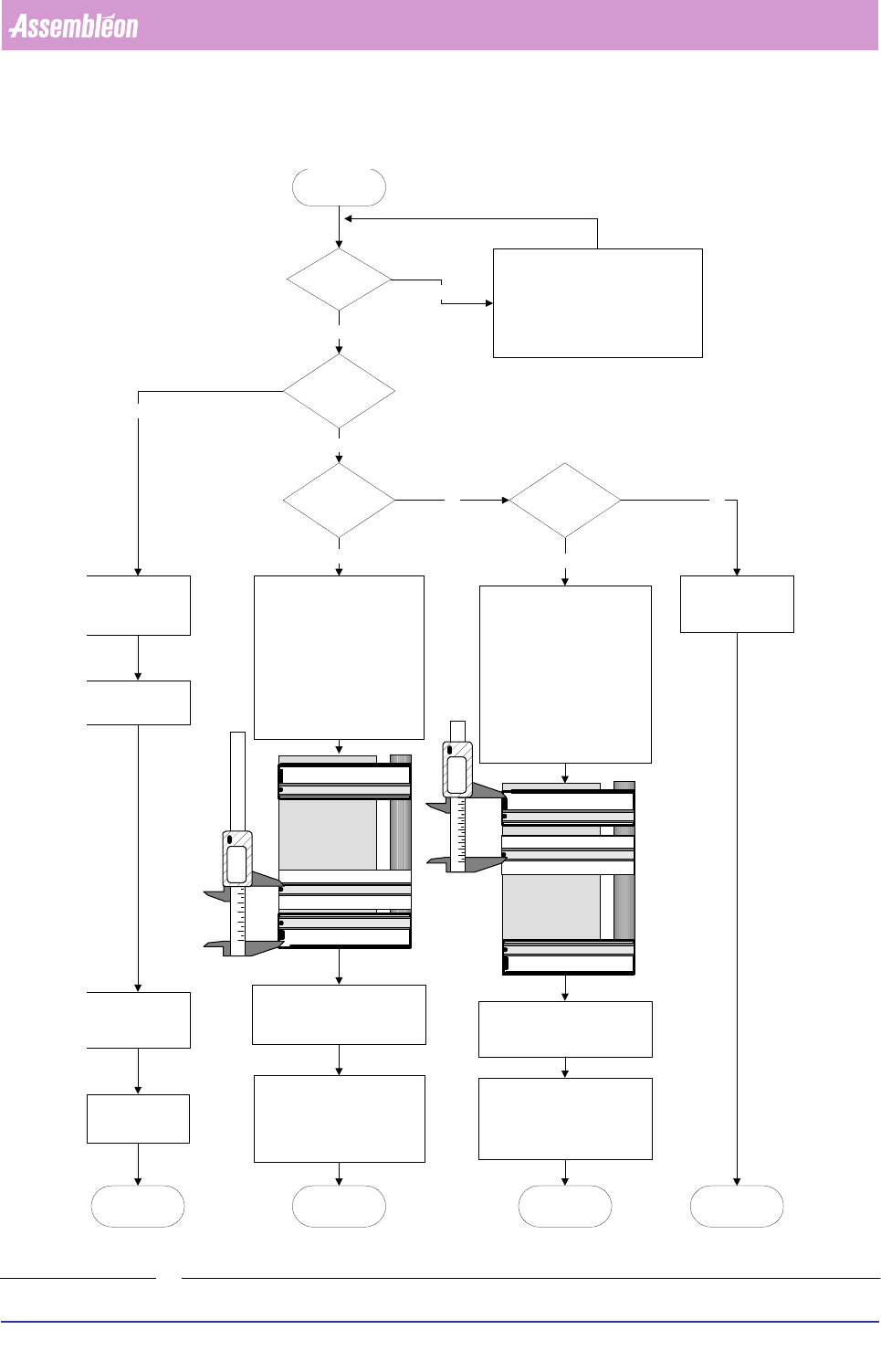
4022 591 960 82 Us er Reference Man ual 02.02 FC M Multif lex 6-7 Pr oduc t Ch ang e Ov er 6.2.4 Adjusting the T ool for the Dual S trip and Small B oar ds in Combination with the Carrier Kit. Th e dual str ip is a str i…
Product Change Over
User Reference Manual 4022 591 96082
6-6 FCM Multiflex 02.02
FIGURE 6-4
New strip
mount postions
are known?
Adjusting the
mounting tool
Determine strip positions, consider
interference with:
reference pins (temperature pins)
support pins
positioning pins
shape of the board
front strip on
alternative
postion?
rear strip on
alternative
postion?
both strips on
alternative
postions?
Yes
Yes
No No
Yes
Yes
No
End
adjusting the
mounting tool
Follow standard strip
mount procedure
described in the
operator manual
No
1. Determine strip position. (rear
edge to centre of strip, positions
between 23 and 55 mm are not
possible)
2. Put support slide between
adjustable slide and fixed slide
3. Position the adjustable slide on
the determined strip position,
measure from the inside edge of
the support slide to centre of the
strip on the support slide
4. Lock the adjustable slide and the
support slide
Continue with standard strip
mounting procedure, only push the
board against the adjustable slide
instead of using both the fixed and
the adjustable slide and put the rear
strip on the support slide
1. Determine strip position. (front
edge to centre of strip, positions
between 23 and 55 mm are not
possible)
2. Put support slide between
adjustable slide and fixed slide
3. Position the support slide on the
determined strip position,
measure from the inside edge of
the fixed slide to centre of the
strip on the support slide
4. Lock the support slide
Continue with the standard strip
mounting procedure, only push the
board against the fixed slide
instead of using both the fixed and
the adjustable slide and put the
front strip on the support slide
first follow the
instruction for front
strip mounting on
alternative position
End
adjusting the
mounting tool
End
adjusting the
mounting tool
Mount the front strip
on all the calibration
boards
Mount the rear strip
on all the calibration
boards
Follow the
instruction for rear
strip mounting on
alternative position
End
adjusting the
mounting tool
Fixed slide
Adjustable slide
Support slide
Fixed slide
Adjustable slide
Support slide
Check the distance between the
middle of the rear strip and and the
rear side of the board, write this
distance down, this is S
R
Check the distance between the
middle of the front strip and and the
front side of the board, write this
distance down, this is S
F
·
·
·
·
Always keep the distance between front
and rear strip as large as possible
42.13 mm
44.51 mm
ON/
OFF
ON/
OFF
4022 591 96082 User Reference Manual
02.02 FCM Multiflex 6-7
Product Change Over
6.2.4 Adjusting the Tool for the Dual Strip and Small Boards in
Combination with the Carrier Kit.
The dual strip is a strip for small boards. To mount it on a board only the fixed slide
is used to put the dual strip on. Follow the standard procedure and instead of two
strips only the dual strip is used.
The combination Carrier kit and small production boards (87.0mm to 101.5mm in Y)
can cause interference of the calibration strips with the reference pin. Therefor the
rear (north) strip should be placed lower then 23mm from the rear edge. A default
value can be 52.5mm from the edge (checkbox “fixed alternatives” checked gives
automatically the right value).
The offline preparation tool has this value also:
Use the adjustable slide and the support slide as one slide: push the support slide
against the adjustable slide and move it as one slide to fit in the production board.
Put the calibration strip on the support slide instead of on the adjustable slide. The
strip is mounted 52.5 mm from the rear edge.
6.2.5 Calibrating with Alternative Strip Positions
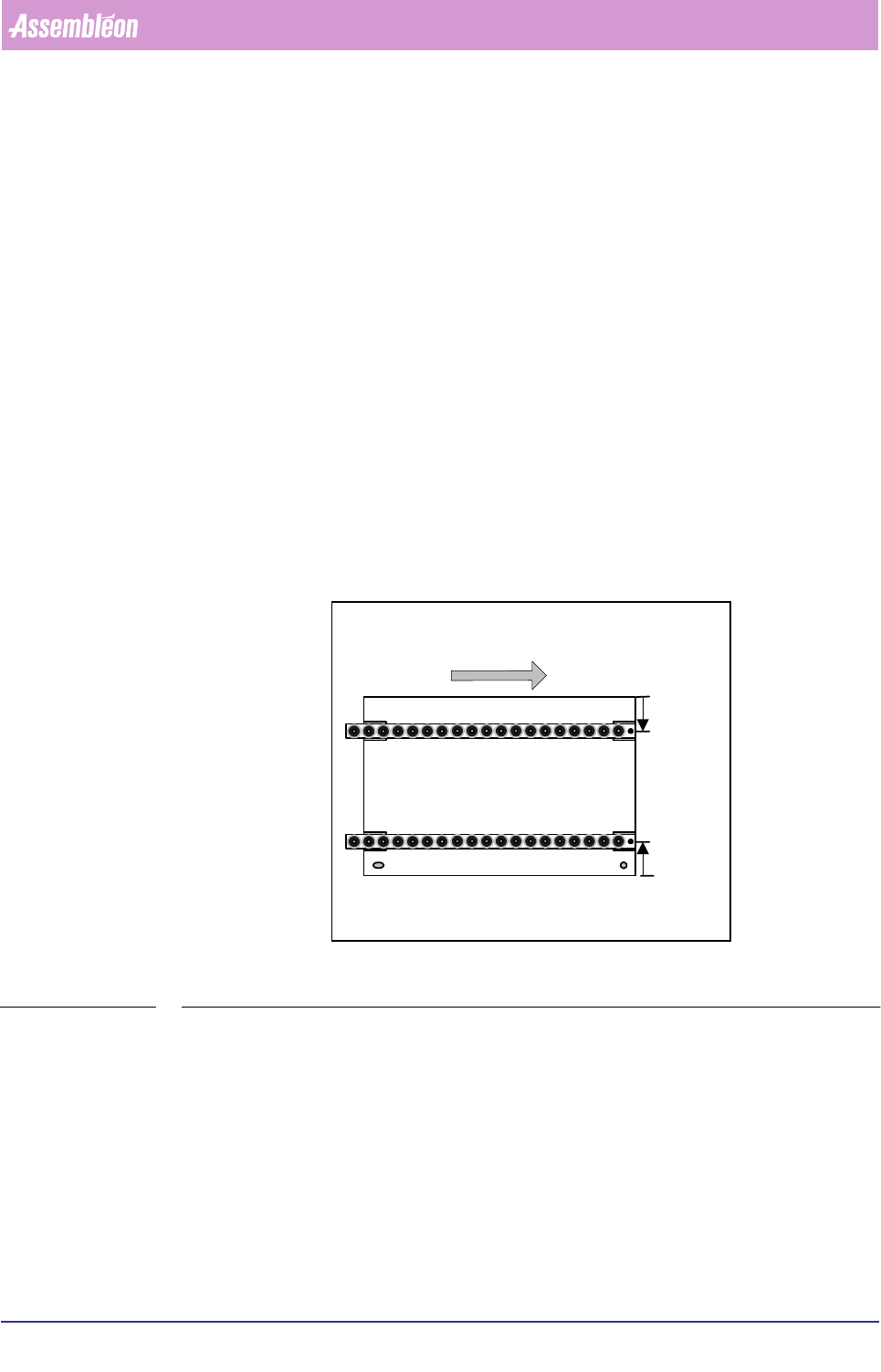
FIGURE 6-5
The FCM assumes that during Multiflex calibration the calibration strips are on
23mm from the edge of the board. If the strips are mounted on other positions
these positions must be mentioned to the FCM. This can be done in the “Cali-
bration” dialog.
Feeding direction into FCM
Top side
S
R
mm
S
F
mm
Front strip
Rear strip
South east
corner
Product Change Over
User Reference Manual 4022 591 96082
6-8 FCM Multiflex 02.02
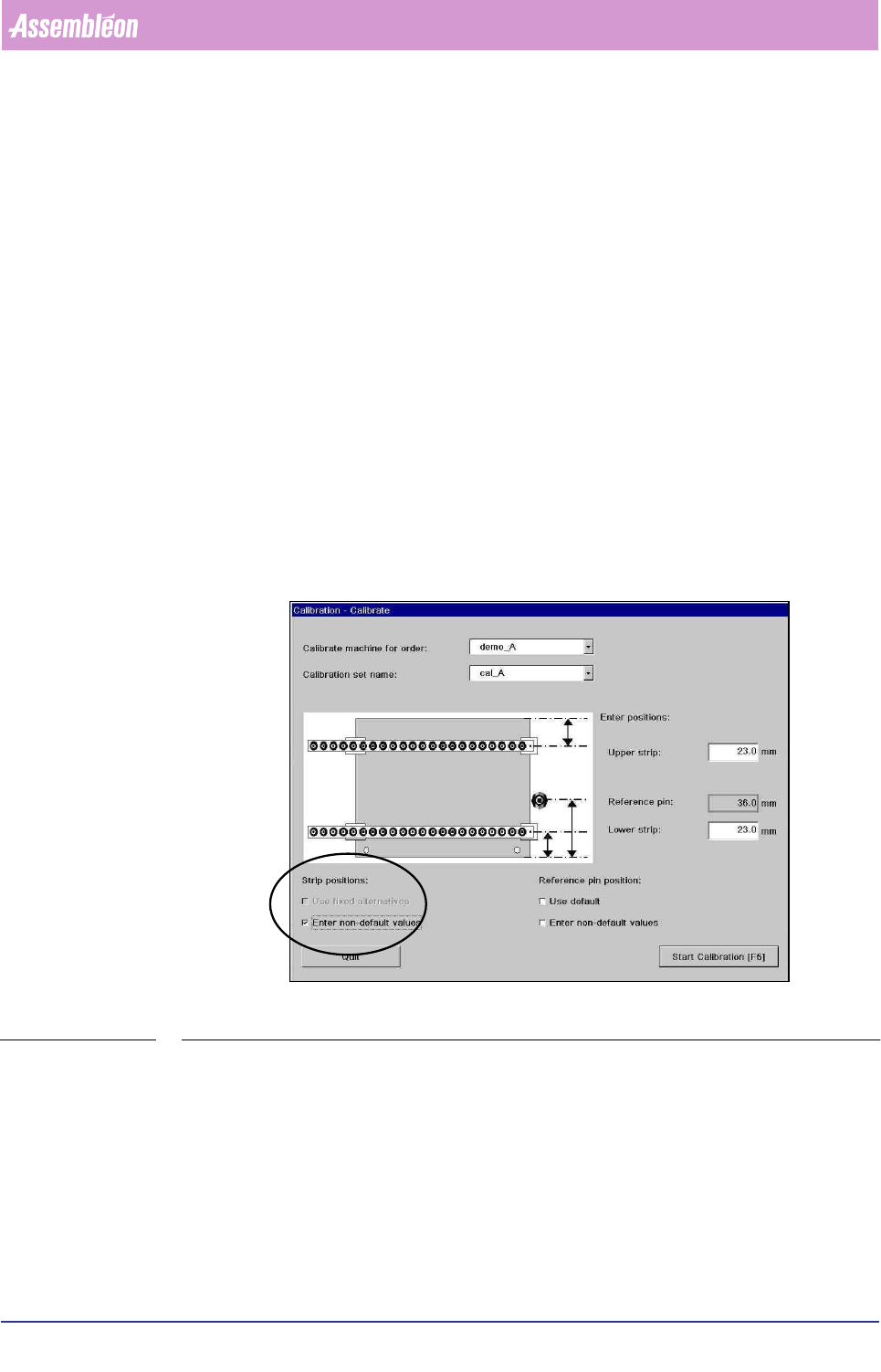
Calibration dialog:
Upper strip: … mm (S
R
)
The position of the upper strip with respect to the north edge of the board in mm is
displayed. These values can be edited by checking the checkboxes under ‘strip
position’. Default value: 23 mm
Lower strip: … mm (S
F
)
The position of the lower strip with respect to the south edge of the board in mm is
displayed. These values can be edited by checking the checkboxes under ‘strip
position’. Default value: 23 mm
Reference pin xx mm
For information about reference pin positions refer to 6.2.6
Strip positions checkboxes:
■ Use fixed alternatives. To use other defaults for the positions of the strips.
These values can be edited, refer to 6.2.7 for more details. If no suitable values
are found the default value is displayed: 23 mm
SCREEN 6-2
■ Enter non-default values. To enter strip positions (S
F
en S
R
). The text “Enter
strip positions” is displayed and entry fields with initial value 23mm are
displayed. In the entry fields new values can be entered. The strip position must
be measured from the edge of the board to the middle of the calibration strip in
millimeters.
Reference pin position checkboxes:
Refer to 6.2.6