FCM_User Reference Manual.pdf.pdf - 第96页
MIS User Re ference Manual 4022 5 91 96082 5-4 FCM Multiflex 02.02 data coll ection command sh oul d be giv en firs t. Durin g p rod ucti on, an automati c M I S d ata collection com mands ar e given b y the FCM M ultifl…
4022 591 96082 User Reference Manual
02.02 FCM Multiflex 5-3
MIS
5.2 MIS Periods and Data Collection
5.2.1 MIS Period Creation
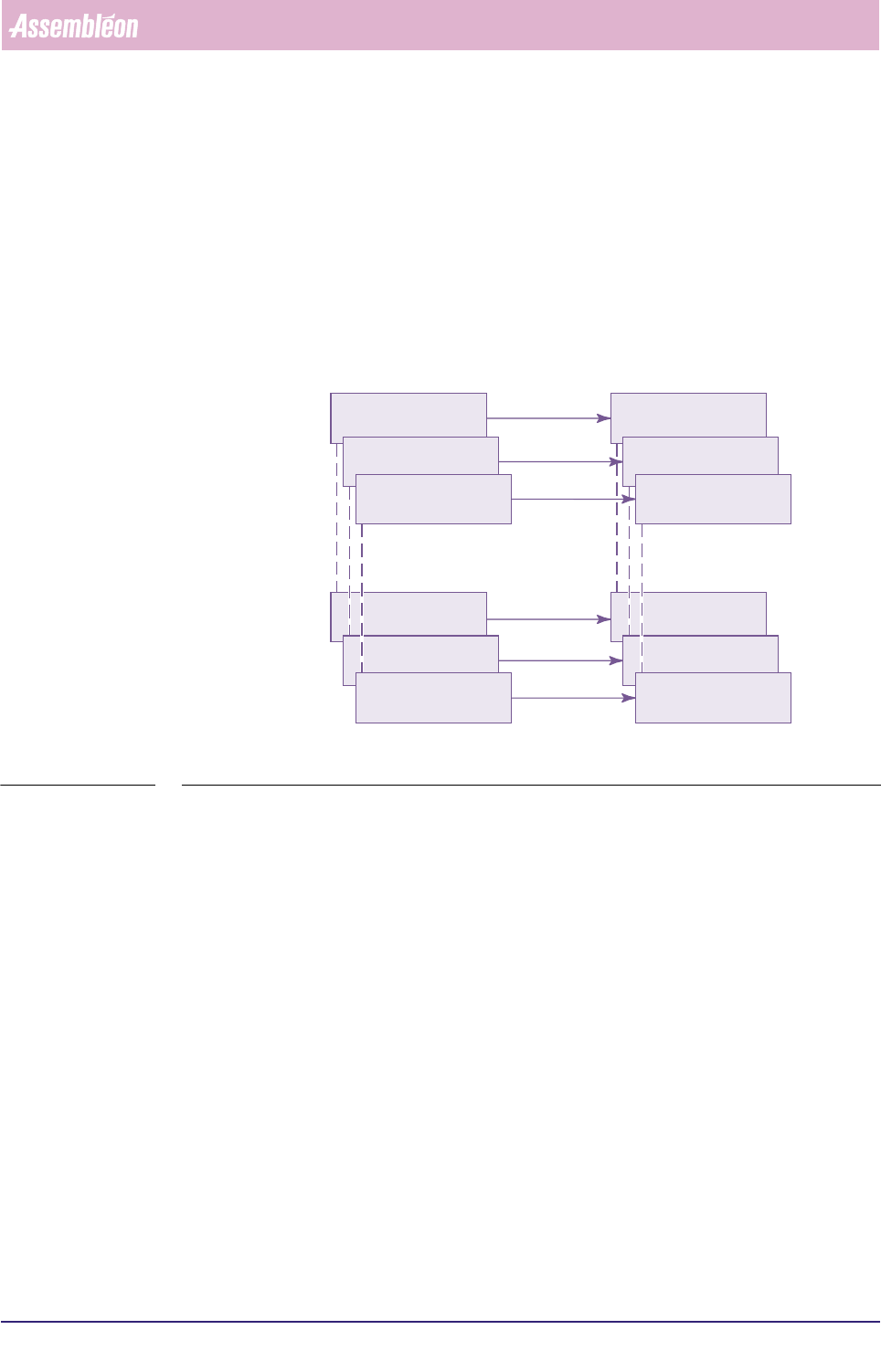
During production, MIS data are collected from the various FCM Multiflex system
parts to be monitored on request later. These MIS data are gathered in so-called
MIS periods. A MIS period is started/ended in one of two ways:
■ When a production order is entered/deleted;
■ On command from the supervisor.
fcm0502a.eps
FIGURE 5-2 Relation between order entry/deletion and MIS period existence
5.2.2 MIS Period Naming
When viewing old MIS periods, the MIS period’s name is important in order to be
able to select the right one. A MIS period name is automatically created on entering
a production order, and it consists of Date + Order name (given in the order
entry).
If two orders are started on the same day with the same name, the character “a” is
automatically appended to the MIS period name to distinguish between these two.
5.2.3 MIS Data Collection and Writing Actions
5.2.3.1 Data Collection
MIS data is collected from different parts of the FCM Multiflex. Some of these FCM
Multiflex parts write data immediately into the MIS database, whereas some other
parts do only on a MIS data collection command. As a consequence of this, the
MIS database of a running order may be inconsistent at sometime. So, when you
want to create a report that is surely based upon consistent data at any moment, a
(manual) MIS
new order A entered new MIS period A starts
order A deleted MIS period A ends
new order B entered new MIS period B starts
order B deleted MIS period B ends
new order C entered new MIS period C starts
order C deleted MIS period C ends
MIS
User Reference Manual 4022 591 96082
5-4 FCM Multiflex 02.02
data collection command should be given first. During production, an automatic
MIS data collection commands are given by the FCM Multiflex system periodically.
This is noticeable as the FCM Multiflex will pause for approximately 10 seconds 1 at
that time.
For FCM Multiflex systems without SECS-II option installed, automatic MIS data
collection commands are given every hour (on the hour).
For FCM Multiflex systems with SECS-II option installed, automatic MIS data
collection commands are given after a set period has been expired. Default
period setting is 1 hour; a value can be set between 1 hour and 10 seconds.
5.2.3.2 Writing Actions
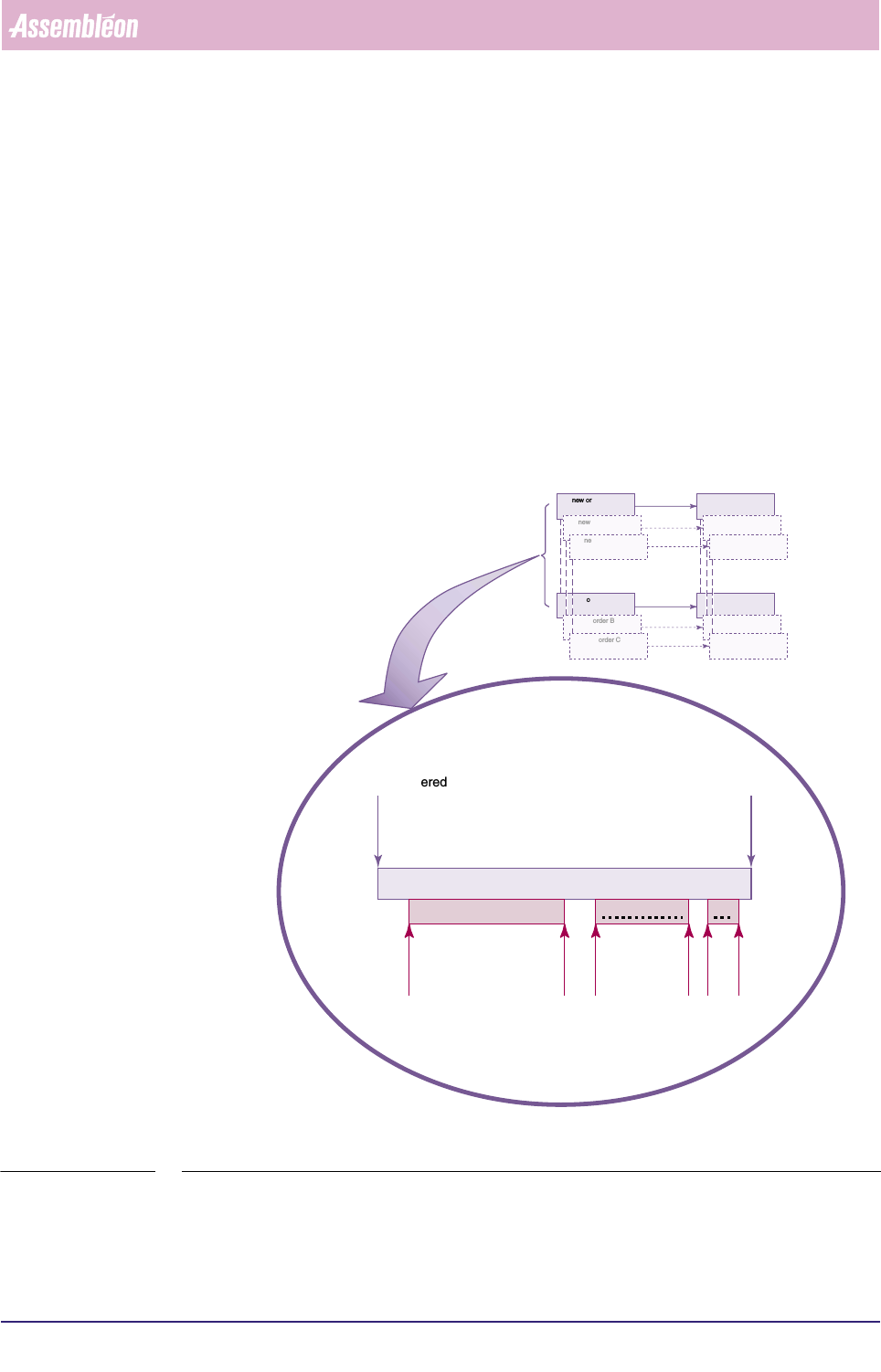
As long as an order has not been deleted, the MIS period of that order will be
updated any time this order is started. See FIGURE 5-3
fcm0503a.eps
FIGURE 5-3 MIS data being written in the same MIS period during different production runs
1. Depends on the number of installed placement
modules.
new order A entered order A deleted
MIS period A
started
started
started
stopped
stopped
stopped
MIS data being written MIS data being written
MIS d..
running order A running order A running
order A
new order A entered new MIS period A starts
order A deleted MIS period A ends
new order B entered new MIS period B starts
order B deleted MIS period B ends
new order C entered new MIS period C starts
order C deleted MIS period C ends
4022 591 96082 User Reference Manual
02.02 FCM Multiflex 5-5
MIS
5.2.3.3 Backup MIS Data
Up to 100 MIS periods are stored on the system disk. When period 101 is created,
the oldest MIS period will be deleted from the system disk automatically. However,
a backup mechanism is available (copy to archive, see index) within MIS.
5.2.4 Automatic MIS Period Creation
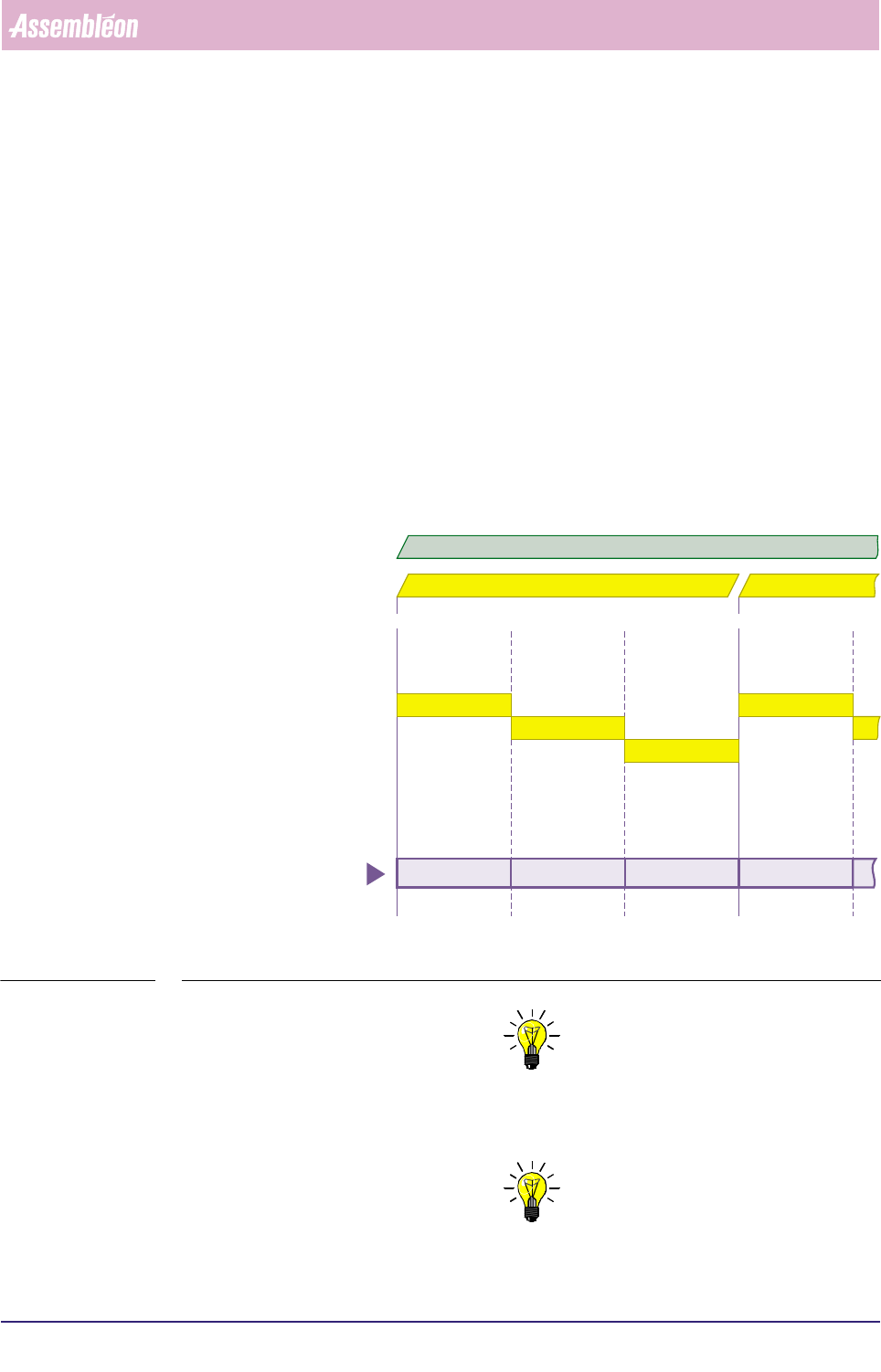
When you plan to run the same order over a long period, you can let the system
create MIS periods automatically. In that case, the MIS period creation is based on
a shift schedule to be filled in via the MIS menu
[Parameters] > [Auto start
period...]
, see section 5.5.9.4 Each time a new shift starts, a new MIS period is
created (as long as the concerned order is active).
MIS periods created this way get the name Date + Order name + “shift x”, where
x is the actual shift number (shift number 1 is the first on the day).
See FIGURE 5-4 .
fcm0505a.eps
FIGURE 5-4 Automatic MIS periods creation, controlled by the MIS shift schedule
NOTE: 1) Deleting the current order will end the MIS period of
that order respectively the automatic generation of new MIS periods for
that order.
NOTE: 2) Entering a new order will still create a new MIS period.
shift 1
shift 2
shift 3
shift 1
07:00 u 15:00 u 07:00 u 15:00 u23:00 u
date = 98 10 02 date = 98 10 03
98 10 02 order A shift 1 98 10 02 order A shift 2 98 10 02 order A shift 3 98 10 03 order A shift 1
automatically created
MIS periods
active order = A