FCM_User Reference Manual.pdf.pdf - 第98页
MIS User Re ference Manual 4022 5 91 96082 5-6 FCM Multiflex 02.02 5.2.5 Star t of a T e mpor ary MIS P eriod In some c ases , i t may be us efu l to in sert a tempor ary MI S peri od. F or insta nc e , after havin g r e…
4022 591 96082 User Reference Manual
02.02 FCM Multiflex 5-5
MIS
5.2.3.3 Backup MIS Data
Up to 100 MIS periods are stored on the system disk. When period 101 is created,
the oldest MIS period will be deleted from the system disk automatically. However,
a backup mechanism is available (copy to archive, see index) within MIS.
5.2.4 Automatic MIS Period Creation
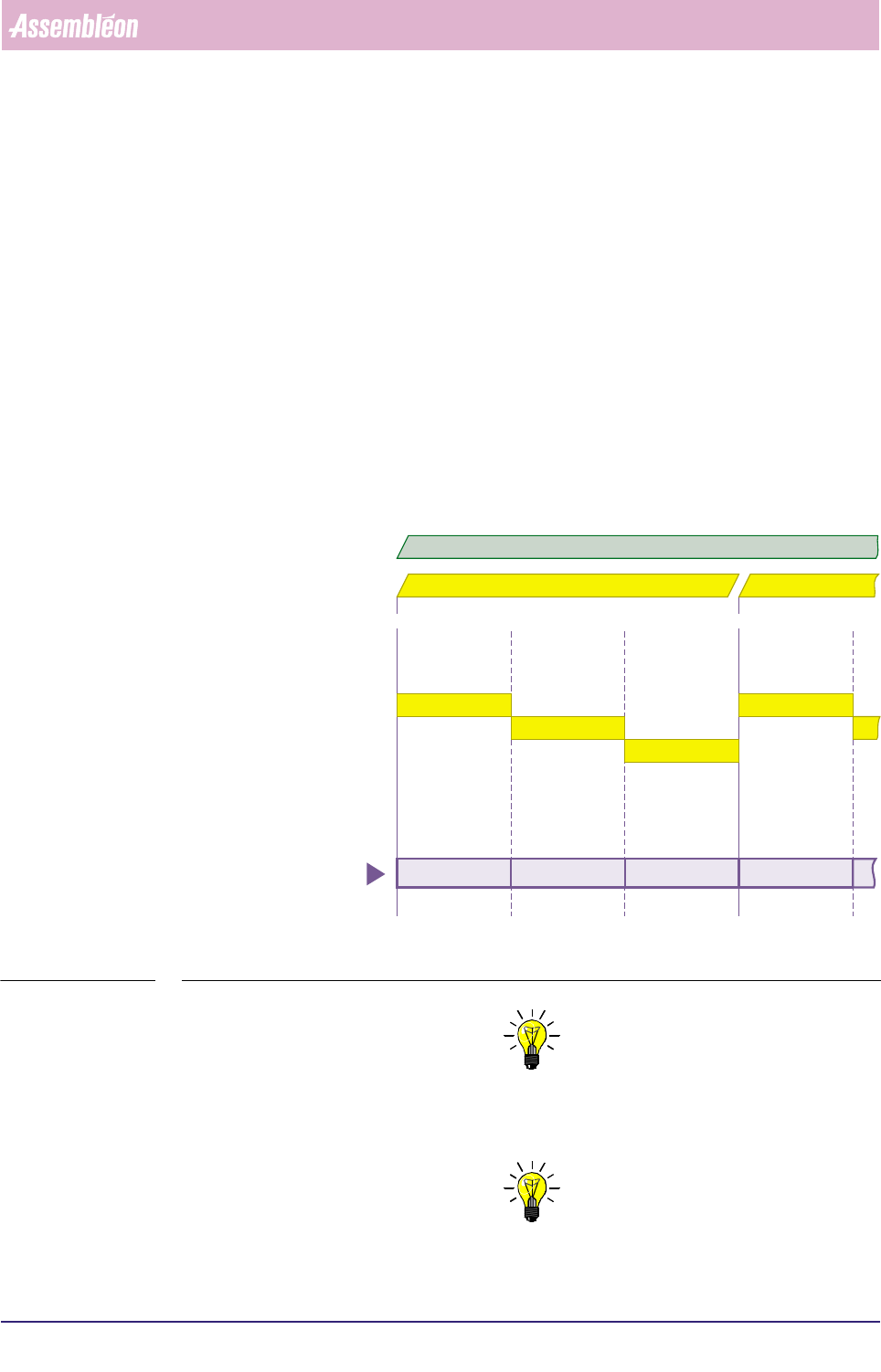
When you plan to run the same order over a long period, you can let the system
create MIS periods automatically. In that case, the MIS period creation is based on
a shift schedule to be filled in via the MIS menu
[Parameters] > [Auto start
period...]
, see section 5.5.9.4 Each time a new shift starts, a new MIS period is
created (as long as the concerned order is active).
MIS periods created this way get the name Date + Order name + “shift x”, where
x is the actual shift number (shift number 1 is the first on the day).
See FIGURE 5-4 .
fcm0505a.eps
FIGURE 5-4 Automatic MIS periods creation, controlled by the MIS shift schedule
NOTE: 1) Deleting the current order will end the MIS period of
that order respectively the automatic generation of new MIS periods for
that order.
NOTE: 2) Entering a new order will still create a new MIS period.
shift 1
shift 2
shift 3
shift 1
07:00 u 15:00 u 07:00 u 15:00 u23:00 u
date = 98 10 02 date = 98 10 03
98 10 02 order A shift 1 98 10 02 order A shift 2 98 10 02 order A shift 3 98 10 03 order A shift 1
automatically created
MIS periods
active order = A
MIS
User Reference Manual 4022 591 96082
5-6 FCM Multiflex 02.02
5.2.5 Start of a Temporary MIS Period
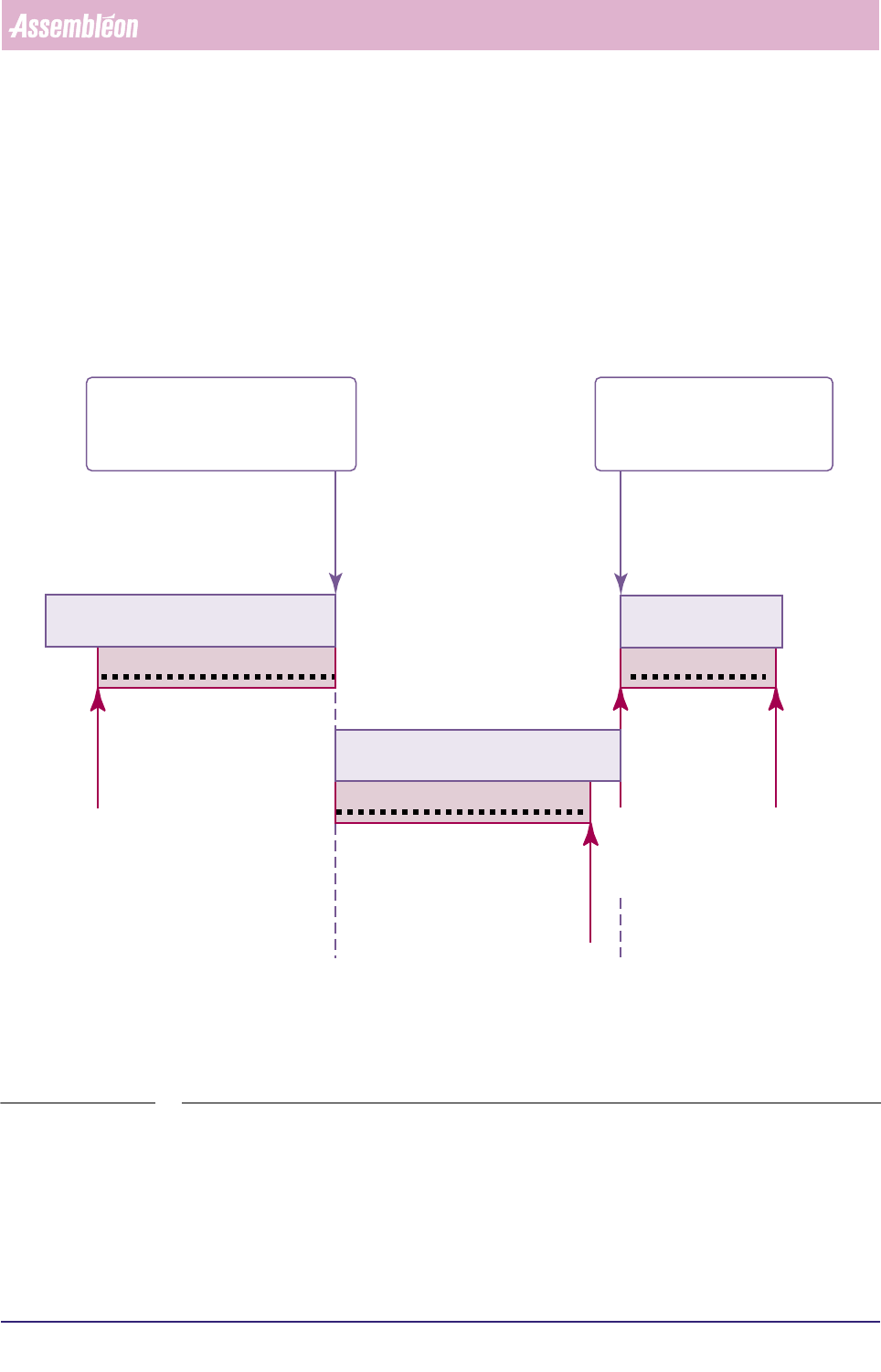
In some cases, it may be useful to insert a temporary MIS period. For instance, after
having replaced some suspicious machine parts, such a temporary MIS period can
tell you how the system behaves now without being charged with all “old data”, as
you start with a “clean sheet”. Start of a temporary MIS period is only possible
when an order is running. The current MIS period will be ended. On start of another
order, the temporary MIS period on its turn will be ended.
See FIGURE 5-5.
fcm0504a.eps
FIGURE 5-5 Starting a temporary MIS period
5.3 MIS Functions Description
5.3.1 Introduction
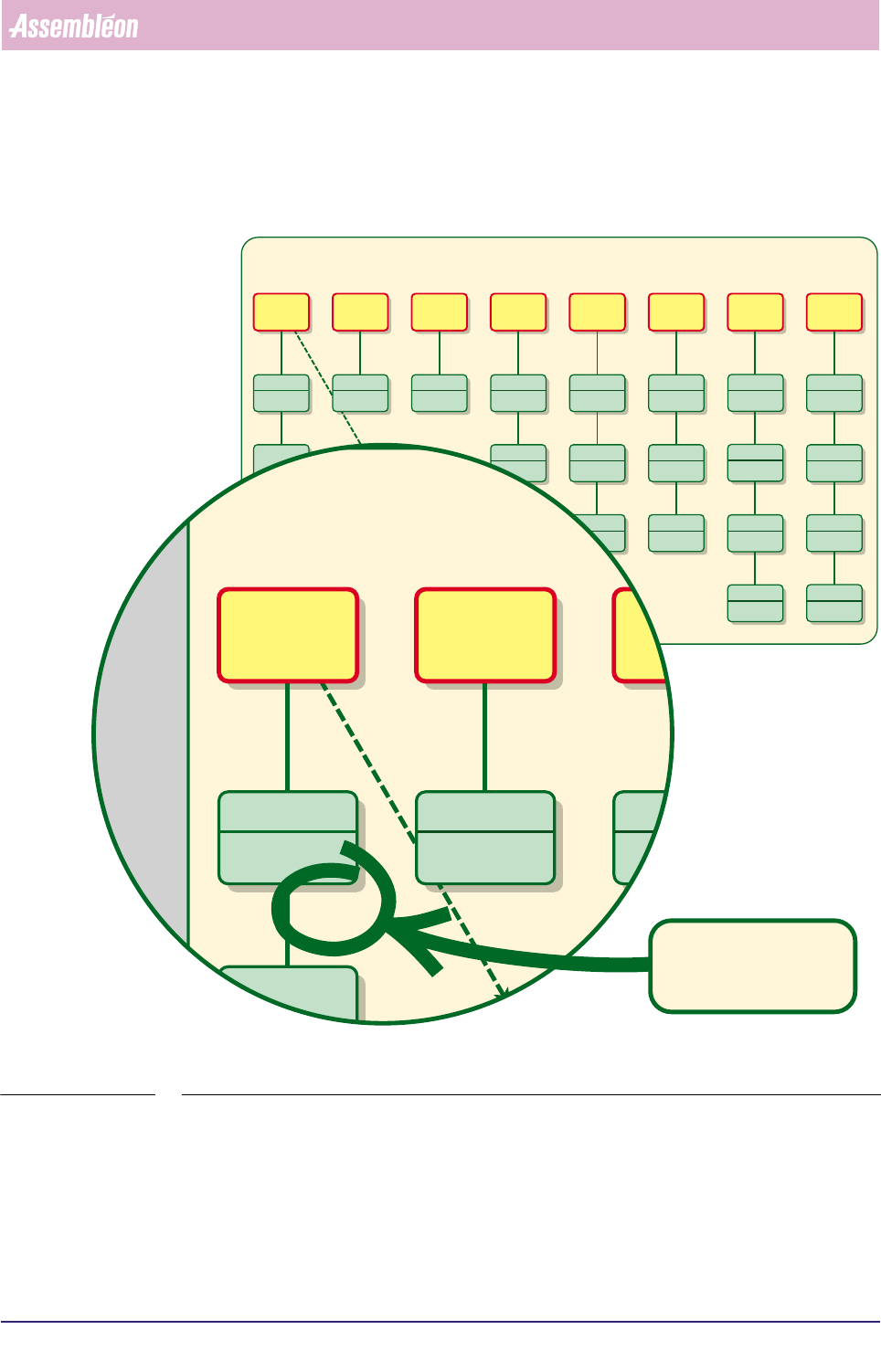
By means of a MIS Functions Selection Tree chart (see FIGURE 5-6), this chapter
gives you a schematic survey of all possible types of information you can extract
stopped
MIS data being written
running order A
order B started
= temporary MIS period
automatically closed
temporary MIS period started
= current MIS period
automatically closed
started
MIS data being written
running order A
MIS period A
started
stopped
MIS data being written
running order B
MIS period B
temporary MIS period
4022 591 96082 User Reference Manual
02.02 FCM Multiflex 5-7
MIS
from MIS first. Starting from here, you can quickly decide which MIS information
type you need, and then select the proper information section. Every information
section is split up into a Quick Reference part and a Detailed Information part.
fcm0508a.eps
FIGURE 5-6 MIS Functions Selection Tree references
Process
Performance
* order identification
* action spec name
* part number per feeder
Process
Output
* total running time
* total pause time
* total setup time
* etc.
Trouble-
shooting
* PIP no. involved
* feeder no. involved
* SMD part number
Machine
Performance
all machine errors with
* error name
* no. of occurrences
* operator response time
* total down time
graphical info of tracking
warnings or servo drift
for all servo systems
chronological log of all
machine and process
errors
display of the actual MIS
software version
MIS Data
Control
select one of the earlier
periods, and all reports
you create will now be
based on this period
start a new MIS period,
current period will be
ended; only possible if
there is a running order
will force an update of
the MIS database for
the current MIS period
Print Options
to print the last
displayed report
to print all reports
defined by parameter
setting [Print set]
* to control print jobs
* printer setup
* to install printers
File Handling
Parameter
Settings
to input text that will be
displayed in the header
of all text reports
to define the set of
reports that will be printed
when selecting the [All
reports] command
to define the error cause
descriptions that are
used during production
error recovery
to enable automatic MIS
period creation for each
shift that starts
S
S
SSS
SS
S
S
S
S
S
S
S
SO
SO
SO
SO
SO
▼ 5.3.2.2
▼ 5.3.3.1
▼ 5.3.4.1 ▼ 5.3.5.1 ▼ 5.3.6.1 ▼ 5.3.7.1
▼ 5.3.7.2
▼ 5.3.9.1
▼ 5.3.9.2
▼ 5.3.9.3
▼ 5.3.9.4
▼ 5.3.7.3
▼ 5.3.6.2
▼ 5.3.6.3
▼ 5.3.5.2
▼ 5.3.5.3
▼ 5.3.5.4
S = Supervisor access
O = Operator access
▼ = see relevant information section
▼ 5.3.2.3
▼ 5.3.2.4
[Reports]
[General data...]
* SMD handling errors
* nos. of SMDs handled
* nos. of PCBs handled
[Reports]
[Production events...]
* picked nos. of SMDs
* nos. of auto retries
* nos. of process errors
* misalign details
[Reports]
[Process report...]
SO
▼ 5.3.2.5
* picked nos. of SMDs
* nos. of auto retries
* nos. of process errors
* misalign details
[Reports]
[Process graph...]
[Reports]
[Production times...]
[Troubleshooting]
[Trace component...]
[Reports]
[Machine performance...]
[Reports]
[Servo diagnostic...]
[Reports]
[Error history...]
[Reports]
[Show version...]
[Administration]
[View past period...]
[Control]
[Start temporary period...]
[Control]
[Collect data...]
[Print]
[Last report]
[Print]
[All reports]
[Print]
[Printer control...]
to copy MIS data from
an archive to the FCM
controller
S
▼ 5.3.8.1
[Administration]
[Copy from archive...]
to copy MIS data to an
archive from the FCM
controller
S
▼ 5.3.8.2
[Administration]
[Copy to archive...]
to export all data for one
MIS period in text form
onto a floppy disk
to delete all data
belonging to one MIS
period
S
S
▼ 5.3.8.3
▼ 5.3.8.4
[Administration]
[Export...]
[Administration]
[Delete...]
[Parameters]
[Machine identification...]
[Parameters]
[Print set...]
[Parameters]
[Error causes...]
[Parameters]
[Auto start period...]
MIS Functions Selection Tree
MIS Functions Selection Tree
SO
to immediately access
the [Process Graph...]
function of the current
MIS period
[Summary... F2]
▼ 5.3.2.1
▼ 5.3.2
▼ 5.3.3 ▼ 5.3.4 ▼ 5.3.5 ▼ 5.3.6 ▼ 5.3.7 ▼ 5.3.8
▼ 5.3.9
O
Process
Performance
* order identification
* action spec name
* part number per feeder
Process
Output
* total running time
* total pause time
* total setup time
* etc.
Tro
sho
* PIP no. in
* feeder no
* SMD par
S
S
S
▼ 5.3.2.2
▼ 5.3.3.1
[Reports]
[General data...]
* SMD handling errors
[Reports]
[Production events...]
[Reports]
[Production times...]
[Trouble
[Trace co
MIS Fun
MIS Fun
▼ 5.3.2
▼ 5.3.3 ▼ 5.3.4
references to the
relevant information
sections