FCM_User Reference Manual.pdf.pdf - 第136页
MIS User Re ference Manual 4022 5 91 96082 5-44 F CM Mult ifl ex 02.02 fcm05 43a.tif SCREE N 5-3 5 [Produ cti on times. ..] screen e x a mple ✱✱ Detailed Infor mation ▼ Display ed Info rmatio n T ABLE 5- 19 Report t ext …
4022 591 96082 User Reference Manual
02.02 FCM Multiflex 5-43
MIS
5.3.3 Process Output
5.3.3.1 [Reports] > [Production times...]
TABLE 5-18 Quick Reference
Actions ■ select [Functions...] in the MIS pull-down menu
■ select [Reports]
■ select [Production times...]
Conditions ■ supervisor access level
■ order active
Information ■ FCM Multiflex machine identification and serial no.
■ MIS period name + start/stop date/time
■ action spec name
■ order name
■ report date/time
■ total time for which production
• has been running
• has been paused (stopped by the operator)
• was waiting for a board to enter/leave the run-in/
run-out section
■ total setup time
■ total uptime
■ waiting-for-operator time
■ downtime (machine related + not machine related)
■ power down time
■ data lost due to power down
■ total downtime
■ total elapsed time (= total uptime + total downtime)
■ number of processed boards
■ number of empty production cycles (empty
transport carriers)
■ average cycle time during production =
production running time
number of processed boards + number of empty production cycles
■ number of SMDs mounted
Display Options -
MIS
User Reference Manual 4022 591 96082
5-44 FCM Multiflex 02.02
fcm0543a.tif
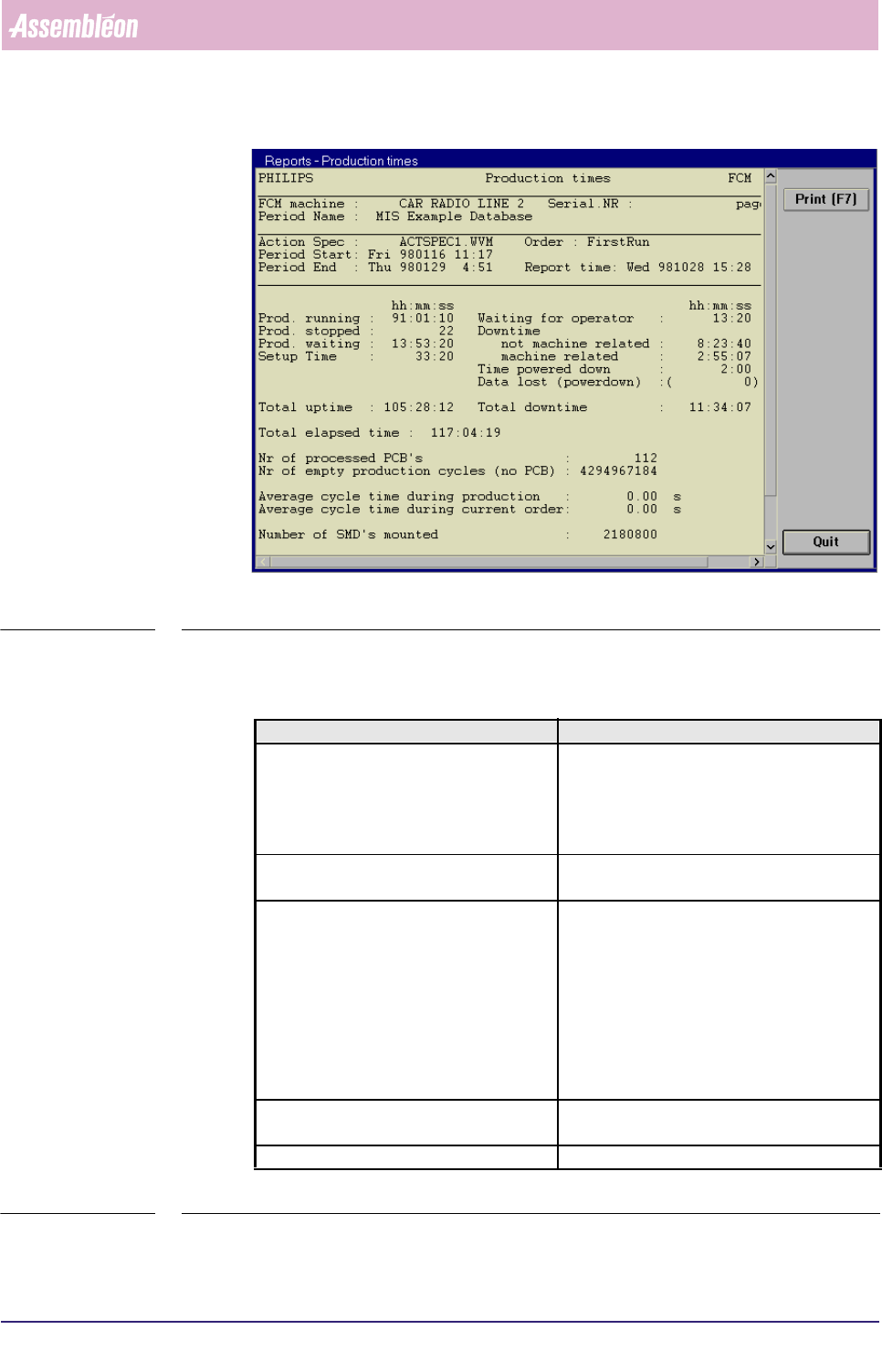
SCREEN 5-35 [Production times...] screen example
✱✱Detailed Information
▼Displayed Information
TABLE 5-19
Report text Explanation
Prod. running
■ the total time for which production has
been running
■ please note that this time is defined as the
sum of the [Running] and [Waiting (board
in runin/runout)] times
Prod. stopped the total time for which the production has
been paused (stopped by the operator)
Prod. waiting the total time the FCM Multiflex was
■ waiting for a board to enter the run-in
section while all carriers were empty
■ waiting for a board to leave the run-out
section while all carriers were occupied +
all SMDs have been placed (for instance,
no boards allowed to leave the run-out
section as a SMEMA-busy signal was given
by the upstream unit)
Setup Time the time between order entry and production
start + the time after the order was completed
Total uptime the sum of the previous 4 items
4022 591 96082 User Reference Manual
02.02 FCM Multiflex 5-45
MIS
TABLE 5-20
fcm0544a.eps
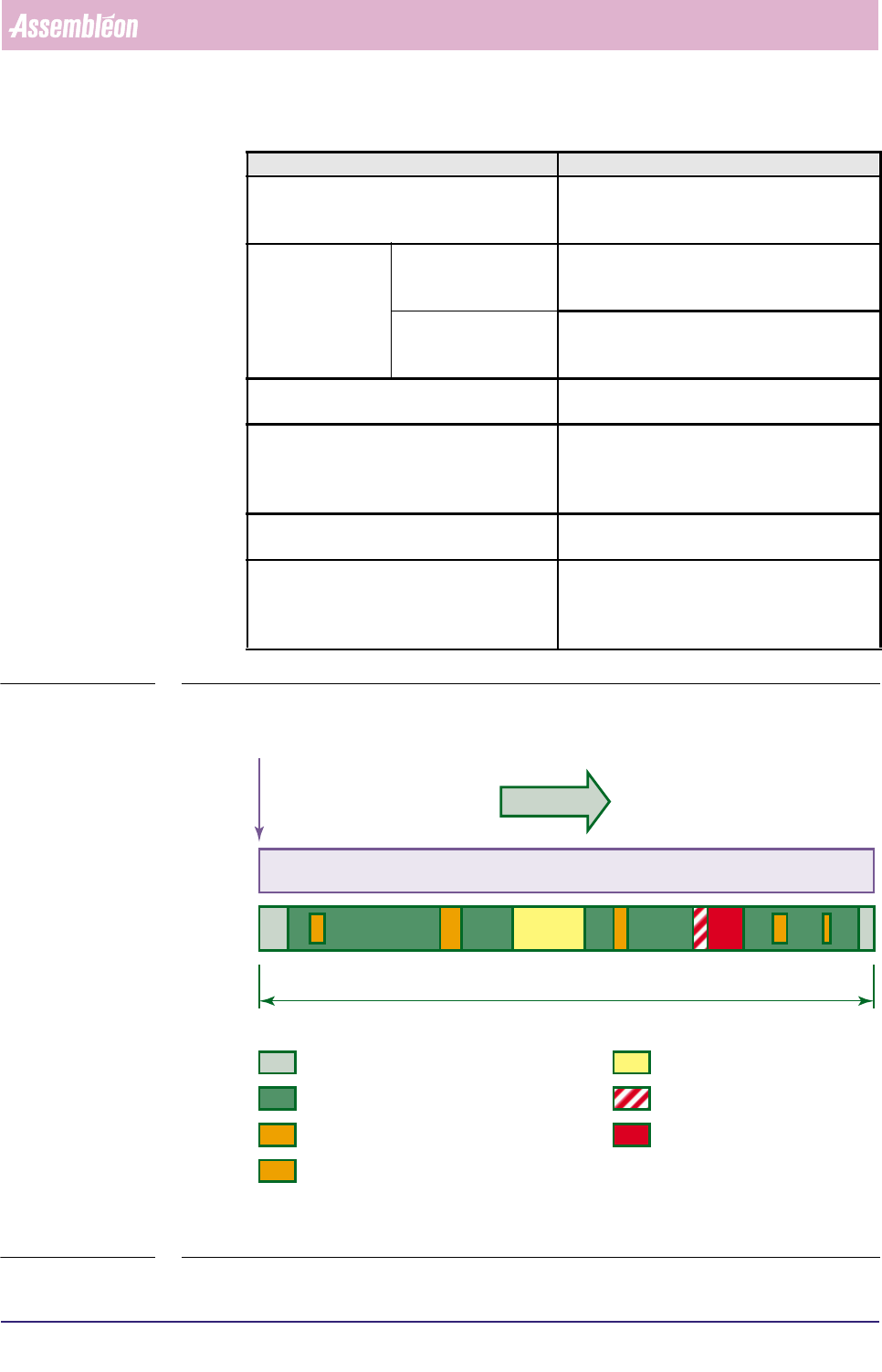
FIGURE 5-8 Example of time elements from the [Production times...] report
Report text Explanation
Waiting for operator the total Waiting-for-operator time during error
(time between occurrence of the error and the
moment the operator starts with recovery)
Downtime not machine related the total time the FCM Multiflex has stopped
due to not-machine related errors; for
instance an empty tape
machine related the total time the FCM Multiflex has stopped
due to machine-related errors; for instance a
servo error
Time powered down the total time for which the FCM Multiflex has
been pow-ered down
Data lost (power down) the total time for which MIS data was lost due
to power down; for instance the MIS data had
not yet been stored when the power went
down
Total downtime the sum of the previous 4 items excluding
“Data lost due (power down)”
Total elapsed time the total elapsed time for this MIS period so
far, counted from the first production started
situation up till the last production stopped sit-
uation (see also section 5.2.3.2)
new order A entered
MIS period A
Total elapsed time
Setup Time Prod. stopped
Waiting for operator
Downtime
Prod. running
Waiting (PCB to enter/leave system)
Prod. waiting (All carriers empty while waiting for a PCB to enter, or
all carriers occupied + all SMDs placed while waiting for a PCB to leave)
!
!!