QP-242E 工程师培训手册 (6.0).pdf.pdf - 第100页
FK-9F98-07 QP242E T raining Text for Service Engineers 6th edition 12. Placing Pressure Control Function Adjustment [ 2 / 4 ] Fuji Machine Mfg. Co., Ltd. Okazaki SMT Equipment Quality Assurance Dept. Technical Support Di…
FK-9F98-07 QP242E Training Text for Service Engineers
6th edition 12. Placing Pressure Control Function Adjustment [1/4]
Fuji Machine Mfg. Co., Ltd. Okazaki
SMT Equipment Quality Assurance Dept.
Technical Support Div. Section No.2
12-1
[CHAPTER 12] Placing Pressure Control Function
Adjustment
12-1] Prior to Adjusting the Placing Pressure Control Function
- Certain parts require additional pressure compared to normal placement. In order to make it
possible to place this type of part the machine is equipped with a placing pressure control
function in order to control the pressure exerted on parts during placement.
- In the normal part placement operation on the QP242, parts are lowered in one motion from a
height of 9 mm (bottom of the part to the board surface) to a position pushed 0.3 mm into the
board. The pressure at which the nozzle presses the part into the board at this time is
determined by adding various frictional resistances to the pressure of the spring. In general
this can be considered as a primary linear addition that depends on the amount of pushing force
(flexibility of the spring). This linear angle and intercept are obtained beforehand (Proper data
measurement) and the pushing force is calculated from the specified placing pressure when a
part is actually placed. The placing pressure control function, by using this pushing force as an
offset when a part is placed, can be used to control the pressure at which a part is pushed into the
board.
- Additional pressure range : 120 ~ 1200 g
Additional pressure deviation : 3 sigma 10 g
[12-2] Proper Data Settings and Transmission
1) Set the following Proper data item and program nozzle data in F4G for each module and then
transmit the data to the machine.
Proper data : PLM? PPC_Port
2 : Set the port number of the SCU port to which connection is made
from the PPC.
Nozzle data : Nozzle_Type
64 : Set the nozzles that use placing pressure control. (Add to the
original value.) (Set all nozzles during adjustment if there is no
setting from the user. Nozzle names must also be specified.)
2) After transmission of the Proper data to the machine is completed, cut the power to the
machine and reboot.
3) After zero set is completed then begin adjustment
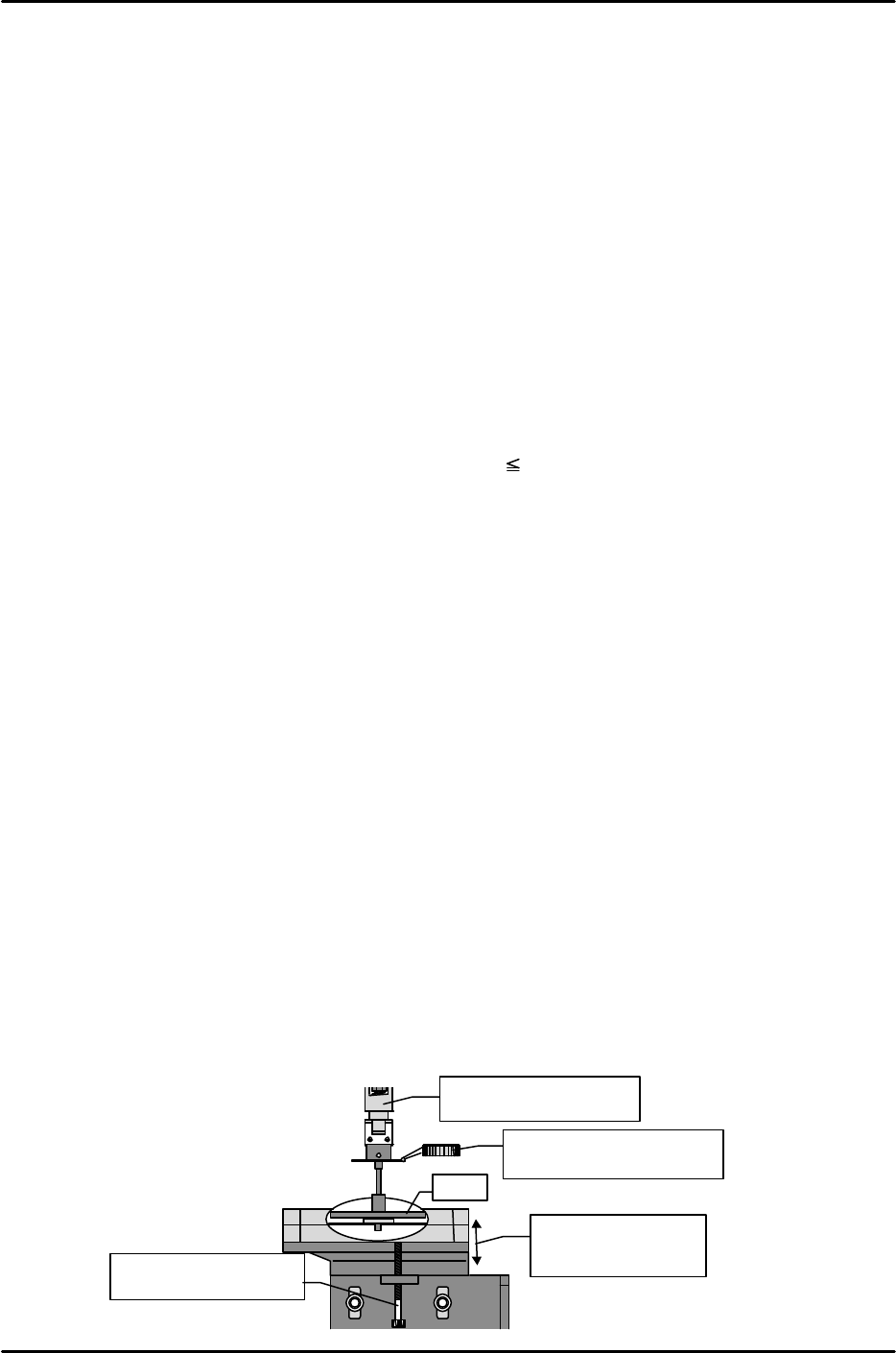
[12-3] Placing Pressure Control Device Height Adjustment
1) Loosen the bolt for adjusting the height of the control device and lower the device as far as
possible.
2) From the previously measured PPC_Cali_Pos_X & Y position, lower the Z-axis to the Proper
data Placment_Height_Z0 position, and set a dial gauge on the top of the nozzle light emitting
surface.
3) Slowly raise the control device using the bolt on the bottom of the control device to find the
position at which the dial gauge begins moving.
4) From the position at which the dial gauge begins moving, secure the device in place at a height
within ± 0.1 mm.
X,Y-axis = PPC_Cali_Pos.
Z-axis = Z0
Move the unit up and
down until the dial
reads zero.
Adjust the height
using the set screw.
Plate
Set the dial gauge on the
light-emitting surface.
FK-9F98-07 QP242E Training Text for Service Engineers
6th edition 12. Placing Pressure Control Function Adjustment [2/4]
Fuji Machine Mfg. Co., Ltd. Okazaki
SMT Equipment Quality Assurance Dept.
Technical Support Div. Section No.2
12-2
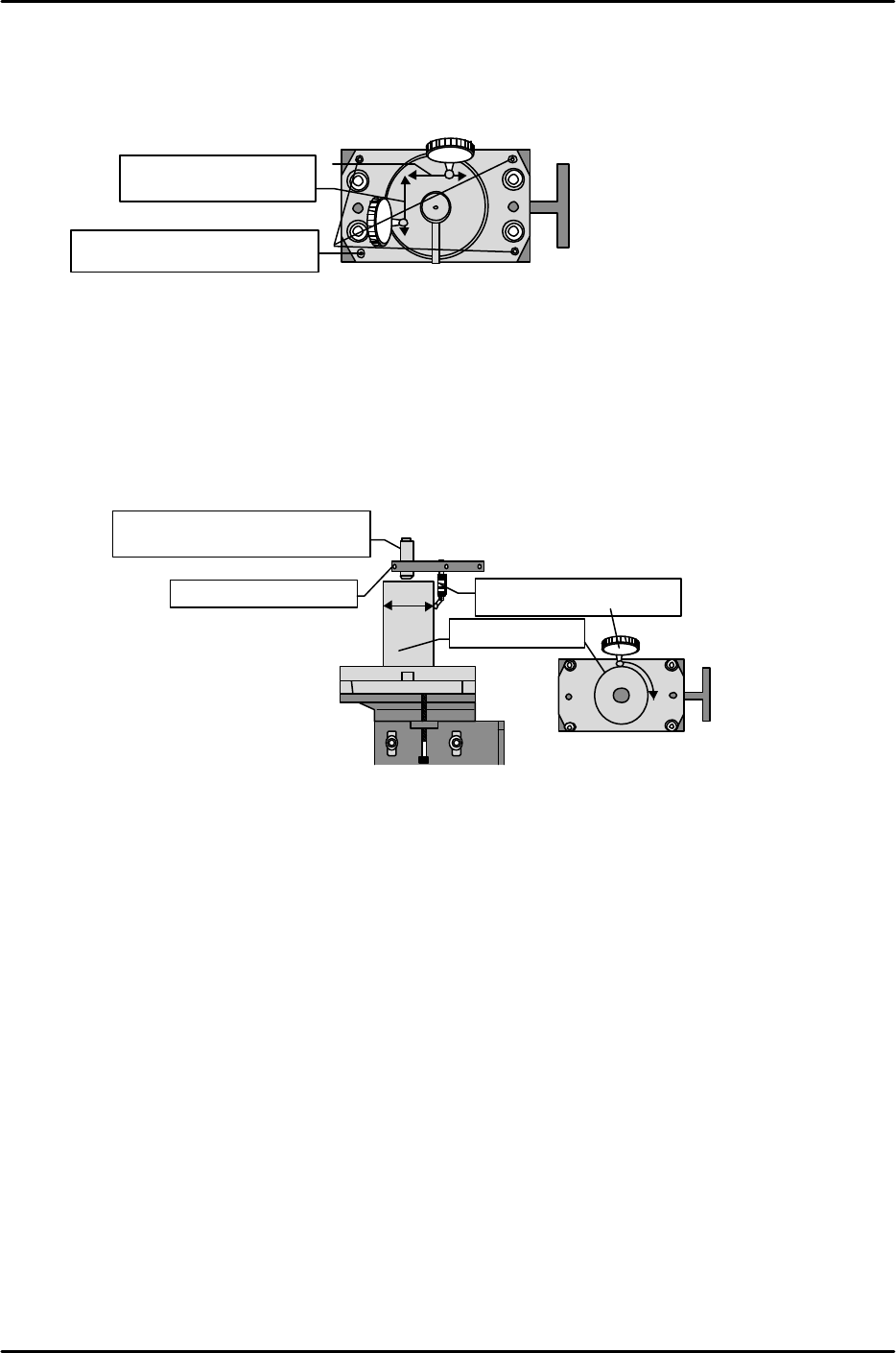
[12-4] Placing Pressure Control Device Leveling
1) Loosen the two bolts on the top cover of the control device and remove the cover.
2) Measure the front to back levelness and left to right levelness of the top surface of the bottom
plate with the dial gauge and use the hollow bolts at the four corners to level the plate.
Tolerance: Within 0 ± 0.01 mm
[12-5] PPC_Calibration_Position_X,Y
1) Attach the cylinder jig for measurement on the top of the bottom plate.
2) Use the plate jig to attach the dial gauge to the single holder.
3) Swing the dial gauge to measure the orbit of the cylinder jig and move the placement head via
jogging so that the amount of fluctuation in the dial gauge is within 0.01 mm.
4) In the position where the dial reads zero, perform the following command operation to
automatically enter the Proper data; [PROPER], [ETC], [ETC], [PLCING PRESS], [POSITION,
and [SET].
[12-6] Digital Indicator Settings
Operate the digital indicator to carry out selection of the sensor rated value and hold mode.
1) Cancel calibration prohibit (LOCK) and registration prohibit (LOCK).
After verifying that I/O OUT (Y04B: PRES CNTL LOCK) is in the “X” status carry out the next
operation and then cancel. (If the I/O is in the “0” status then disconnect rear terminal 21 and
22.)
Cancel the calibration prohibit (LOCK) status.
[*], [#], [1], [1], [#], [0], and [#]
Cancel the registration prohibit (LOCK) status.
[*], [#], [1], [2], [#], [0], and [#]
Since the prohibit (LOCK) status using the rear terminal and the prohibit (LOCK) status using
key input are both enabled (overlap is prohibited), cancel both.
2) Equivalent input calibration (By registering the sensor rated value, calibration of a load that is
not actually exerted can be carried out.)
Register the sensor rated value.
Register the rated output (mv/v/1 kgf) value of the calibrated load that is entered together with
the load cell. Take the rated output calculated in TEAC and enter it as shown below.
[1], [#], [Setting 1], [#], [Setting 2], [#]
Example: Rated output = 0.5361 mv/v 1.0 kgf
[1], [#], [0.536], [#], [1000.], [#]
Be careful of the decimal point position. (For decimal input press [*] when the lowest level digit
is blinking.)
View from the top of the placing pressure control device
Measure front to back
and left to right .
Adjust using the set screws
located at the four corners.
View from front of placing
pressure control device
View from top of the placing
pressure control device
Measure at position
where dial reads zero.
Plate swinging jig
Cylinder jig
Via jogging find the position
at which the dial reads zero.
FK-9F98-07 QP242E Training Text for Service Engineers
6th edition 12. Placing Pressure Control Function Adjustment [3/4]
Fuji Machine Mfg. Co., Ltd. Okazaki
SMT Equipment Quality Assurance Dept.
Technical Support Div. Section No.2
12-3
3) Register the zero point.
Register the zero point in the no load status (float load status, input 0).
[3], [#]
4) Select the digital filter and zero tracking.
[4], [#], [0 0], [#]
5) Select the analog filter and set the time lag.
Select the analog filter.
[*], [#], [2], [6], [#], [3], [#]
Set the analog filter time lag.
[*], [#], [2], [7], [#], [0 0 1], [#]
6) Select the hold mode.
Select the section set hold mode.
[9], [#], [3], [#]
7) Enable calibration prohibit (LOCK).
Enable the calibration prohibit (LOCK) status using key input.
[*], [#], [1], [1], [#], [1], [#]
Enable the registration prohibit (LOCK) status using key input.
[*], [#], [1], [2], [#], [1], [#]
(If rear terminal number 21 and 22 are disconnected then return to the original status.)
If zero does not display as the digital indicator value (no load status) then carry out steps 1, 3, and 7
in that order.
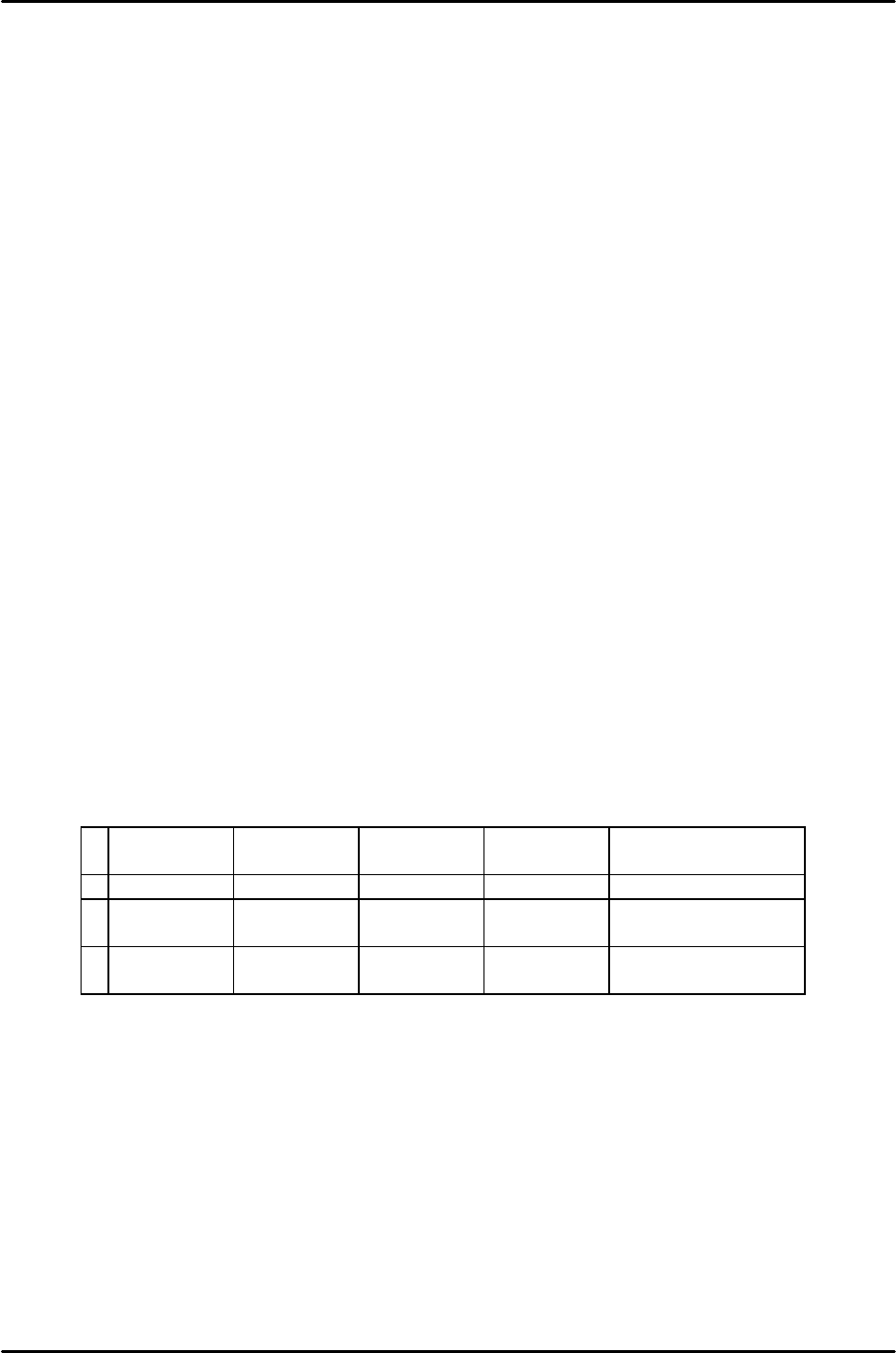
[12-7] Load Cell Calibration Check
This must be carried out after the digital indicator zero point has been adjusted.
1) Remove the device top cover and plate and set each load jig.
2) Verify that the amount of deviation of each load is within 10 g and that the difference between the
minimum and maximum amount of deviation is within 10 g. If the amount of deviation exceeds 10 g
then replace the load cell.
250g
difference
500g
difference
750g
difference
1000g
difference
Result
1 259g (+9) 504g (+4) 749g (-1) 1000g (0) Load cell OK
2 255g (+5) 504g (+4) 748g (-2) 994g (-6) Load cell NG
(Min, Max)
3 262g (+12) 511g (+11) 758g (+8) 1008g (+8) Load cell NG
(amount of deviation)