QP-242E 工程师培训手册 (6.0).pdf.pdf - 第14页
FK-9F98-07 QP242E Training Text for Service Engineers 6th edition 1. QP242E Initial Adjustment (1) [ 5 / 6 ] Fuji Machine Mfg. Co., Ltd. Okazaki SMT Equipment Quality Assurance Dept. Technical Support Div. Section No.2 1…
FK-9F98-07 QP242E Training Text for Service Engineers
6th edition 1. QP242E Initial Adjustment (1) [4/
6
]
Fuji Machine Mfg. Co., Ltd. Okazaki
SMT Equipment Quality Assurance Dept.
Technical Support Div. Section No.2
1-
4
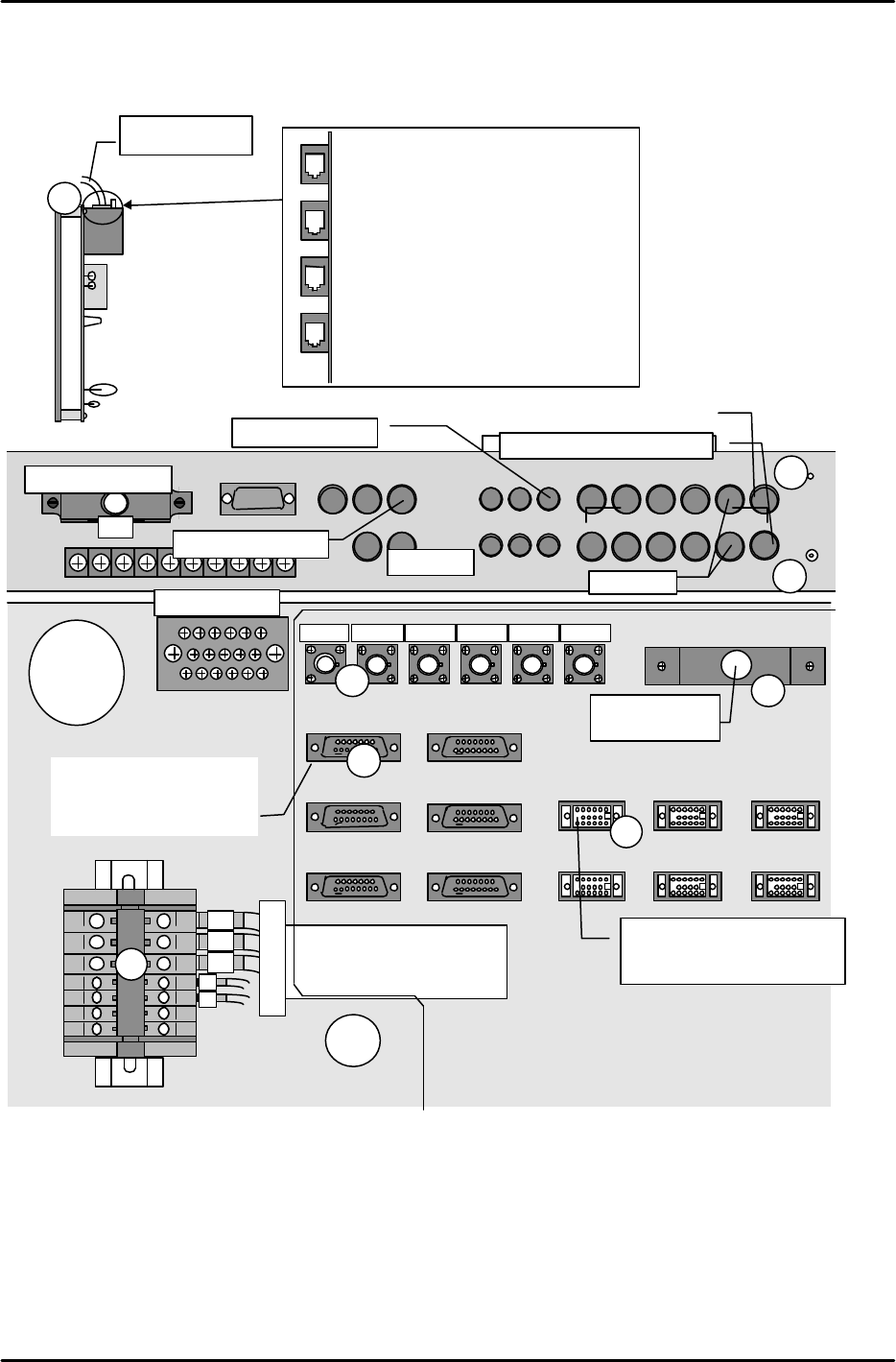
At rear parts-supply machines, connect the [CRT-1B] cable to the rear of the operation monitor. Connect
the [BCD1CN1-FB] cable to [M1PCB1B] at the right side of the vision processing monitor. Connect the
[OPCN1] cable to [OPCN1].
Part name: Active hub
2
1
4
3
6
5
8
7
10
9
12
11
CAMERA IN
MONITOR IN
2
4
1
5
3
1
MONITOR OUT
2
1
4
3
5
CAMERA OUT
RS232C
CONTR
OL
ENCODER1 ENCODER3
CAM1-I/F
CAM3-I/F
CAM5-I/F
CAM2-I/F
CAM4-I/F
CAM6-I/F
MDL-I/F
1
2
3
From module 1 mark camera
From COGNEX board
Module
2
From module 1 parts camera
3
4
5
6
6
7
8
Arc-net cable
down
1
2
3
4
Viewed from front of active hub
Active hub wiring
1. To MP board
2. To Net-1 at module 1
3. To Net-1 at module 3
4. To Net-1 at module 5
ENCODER2
ENCODER4
ENCODER5
ENCODER6
1
4
5
6
7
To module 1
1
2
3
4
5
6
7
To Module 1
(GNP-12)
From line scan encoder (Used in
sequence from CN1, beginning
from smallest module number)
To COGNEX board
CAM1-AV
CAM2
-
AV
CAM3-AV CAM4-AV CAM5-AV CAM6-AV
901
902
903
103
104
Ground terminal block
I/O
View from
machine top
Part name: Multiplexer
To monitor
From line scan parts camera AV
(Used in sequence from CN1,
beginning from smallest module
number)
FK-9F98-07 QP242E Training Text for Service Engineers
6th edition 1. QP242E Initial Adjustment (1) [5/
6
]
Fuji Machine Mfg. Co., Ltd. Okazaki
SMT Equipment Quality Assurance Dept.
Technical Support Div. Section No.2
1-
5
[1-3] Checking the Conveyor Parallelism and Linkage Chain Tension
1) Adjust the conveyor width to the width of a Fuji PCB.
2) Verify that the difference in width from the conveyor's entrance to exit (at each module) is within
0.5mm. Record the measured values on the record sheet.
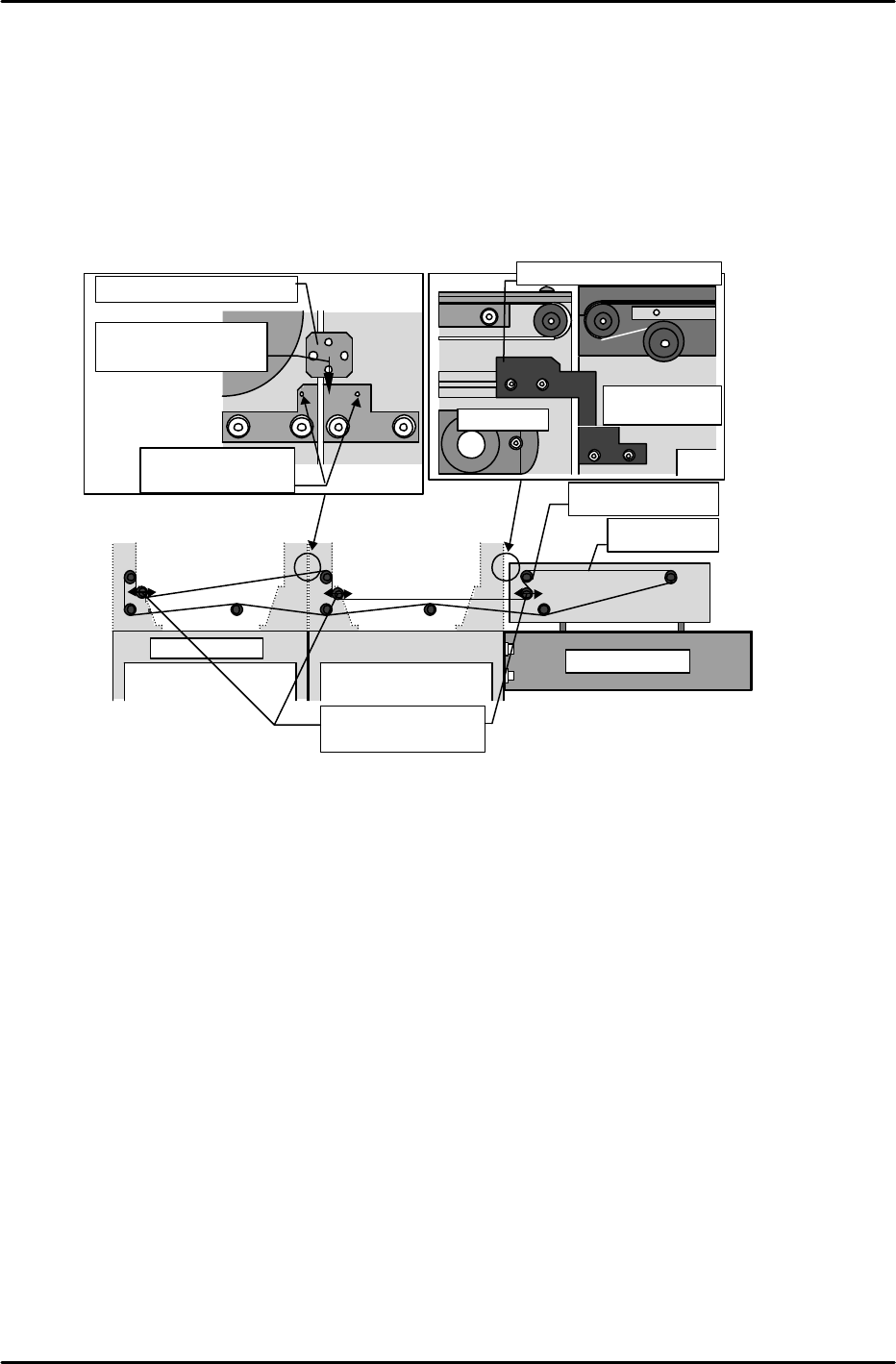
3) Verify that a linkage bracket is present (for conveyor linkage) at the secondary conveyor rails of each
module.
4) Verify that the linkage chain tension is as prescribed.
Note: If the chain is too tight, the handle will not turn easily.
[1-4] Connecting power cable and an air hose, and transmitting F4G.
*
After ensureing 200V is on in the transformer, connect power cable to power box.
*
*
*
Chain
Sprocket
Conveyor linkage bracket
Insert bracket
between these pins
Slide to back of
bracket
IN conveyor
Last module
Chain tension
adjusting sprockets
IN conveyor
Module 1 secondary
conveyor rail
Conveyor linkage bracket

FK-9F98-07 QP242E Training Text for Service Engineers
6th edition 1. QP242E Initial Adjustment (1) [6/
6
]
Fuji Machine Mfg. Co., Ltd. Okazaki
SMT Equipment Quality Assurance Dept.
Technical Support Div. Section No.2
1-
6
***** This page does not contain any contents.