QP-242E 工程师培训手册 (6.0).pdf.pdf - 第76页
FK-9F98-07 QP242E Training Text for Service Engineers 6th edition 8. MTU6 Adjustment [ 8 /16] Fuji Machine Mfg. Co., Ltd. Okazaki SMT Equipment Quality Assurance Dept. Technical Support Div. Section No.2 8- 8 [8 -1 6 ] Z…
FK-9F98-07 QP242E Training Text for Service Engineers
6th edition 8. MTU6 Adjustment [7/16]
Fuji Machine Mfg. Co., Ltd. Okazaki
SMT Equipment Quality Assurance Dept.
Technical Support Div. Section No.2
8-7
[8-13]
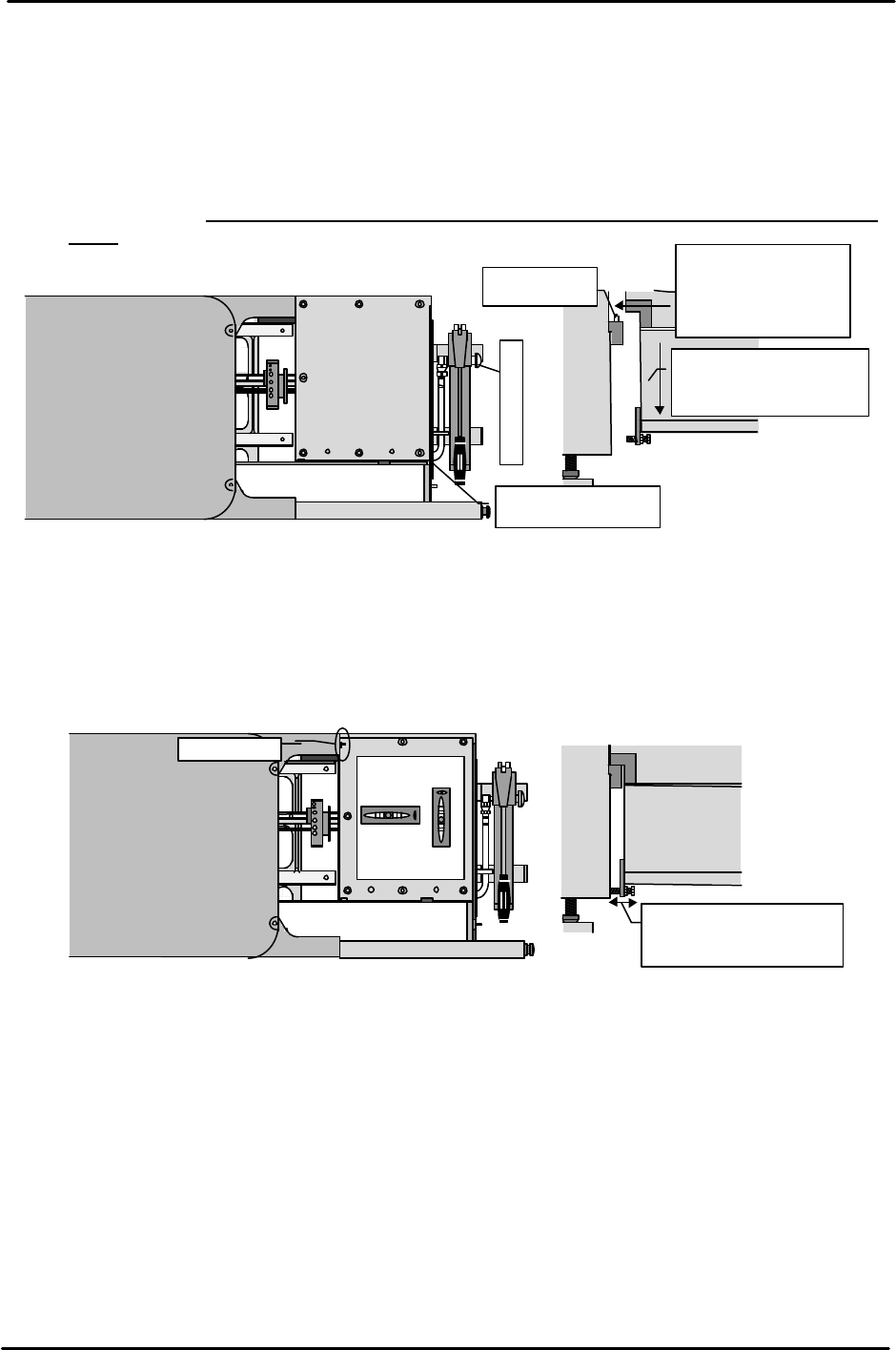
Connecting the MTU
1) Use the hydraulic jack on the MTU to lift the MTU to a height where the MTU clamping
brackets do not make contact with the machine locking pins.
2) Move the MTU to the position where the MTU clamping brackets align with the machine lock
pins. Be careful of the cables during movement.
3) Once the brackets are aligned with the pins, loosen the hydraulic jack valve and slowly lower the
MTU until it connects with the machine.
4) Verify that the contact surface of both brackets is actually making contact and then proceed to
the next item. (Use a clearance gauge to verify that there is a gap of less than 0.03
mm.)
[8-14]
Leveling
Remove the magazine rack, place a leveling device on the up/down plate, and check the level
in the front to back direction. (However, the leveling device is only used as a target. This is because
the up/down plate is not flat. Note also that it is not possible to adjust the level in the left to right
direction.) Use the angle adjustment bolt located on the bottom of the MTU to adjust the front to
back angle. After this is adjusted use the set screws on the top of the MTU to support the MTU so
that it is not tilted from front to back. After adjustment using the set screws, check the level again.
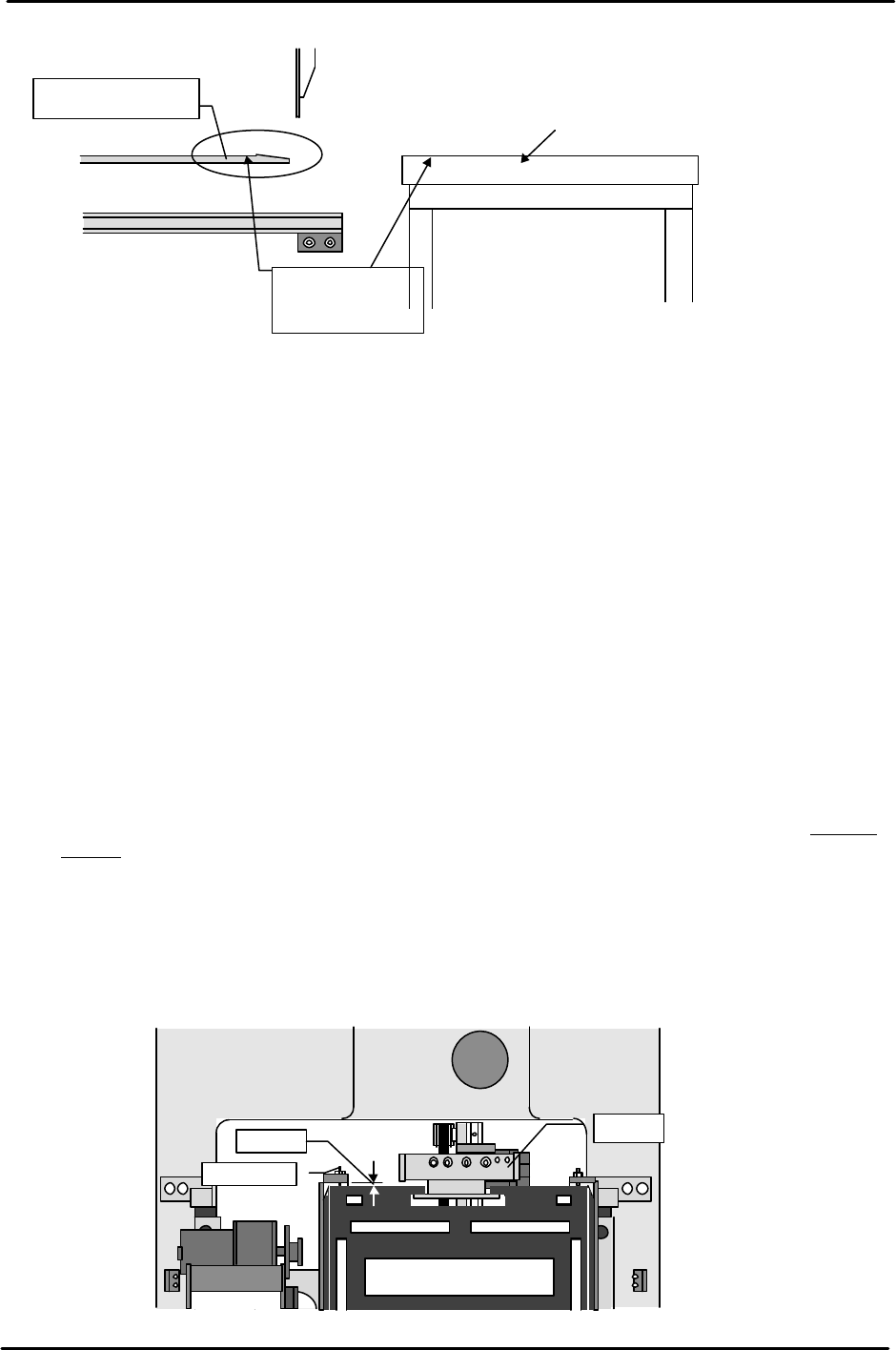
[8-15] Original_Position_TZ Provisional Measurement
Instead of the magazine set the jig that is the same height as the height from the bottom of the
magazine (magazine set surface, stationary side) to the highest level. While measuring the height
using a dial gauge, adjust the TZ-axis position via inching so that the jig is the same height as the
shuttle unit tray holder rail surface. Measure the rails on both ends of the shuttle unit and using
the lower side as a reference, set the provisional Original_Position_TZ at a position 0.5 mm (50
pulses) below the lowest side.
Top of the
Adjust the front to back
angle using the angle
adjustment bolt.
Set screw
MTU
Top of up/down
Y-direction
X-direction
Top of the
Move the lever up
and down to raise.
Loosen the air jack to
lower the MTU and
connect it to the machine.
Positioning
pin
Raise the MTU to a
height where there
is no contact with
the pins.
MTU
FK-9F98-07 QP242E Training Text for Service Engineers
6th edition 8. MTU6 Adjustment [8/16]
Fuji Machine Mfg. Co., Ltd. Okazaki
SMT Equipment Quality Assurance Dept.
Technical Support Div. Section No.2
8-8
[8-16] Zero_Offset_TZ & Original_Position_TZ Input
1) Zero_Offset_TZ
The servo count value corresponding to the position 1,000 pulses below the value for
Original_Position_TZ that was provisionally measured in the previous section becomes the
Zero_Offset_TZ value. Use the following command operation to input the Zero_Offset_TZ value
on the machine; [PROPER], [ETC], [ETC], [Zero Offset],
[ETC], [TZ], [SET], input the value using the numeric key pad and then hit return.
2) Original_Position_TZ
Move the TZ-axis via inching to a servo pulse count of 1,000 (view the servo count value on the
operation display while inching the axis). Use the following command operation to input
Original_Position_TZ: 1,000 at the machine; [PROPER], [DEVICE],
[ORG. POS. Z], [ORG. POS. TZ], and [SET].
[8-17] Slope Adjustment & Zero_Offset_TY Measurement
1) Loosen the set screws on both ends of the slope and then tighten the bolts so that they do not
interfere with the receiving plate.
2) Once this is completed use the following command operation to move the shuttle to the advance
limit; [POSITION], [MTU], [SHUTTLE], [ADVANCE], and press START. The tray holder will
also move forward with the shuttle.
3) Move the tray holder via inching so that the end of the tray holder comes to a position 2mm in
front of the left side (device position 101) slope frame end.
4) Once this is done push in on the set screws on both ends so that they make slight but even contact
with the tray holder. From this position of contact, turn the set screws another half turn and
secure in place in that position.
5) This is the Zero_Offset_TY position.
Input the value at the machine using the same input procedure as described in the previous
section.
Shuttle tray
Machine side
Lower to a position
0.5 mm below the
uniform level.
Original_Position_TZ
measurement jig
Tray holder
shuttle
2mm
Set screw
Device #101
Device # 102
FK-9F98-07 QP242E Training Text for Service Engineers
6th edition 8. MTU6 Adjustment [9/16]
Fuji Machine Mfg. Co., Ltd. Okazaki
SMT Equipment Quality Assurance Dept.
Technical Support Div. Section No.2
8-9
[8-18]
Perform Zero Set Again
After the Proper data items Zero_Offset_TZ and TY are input perform zero set again.
Note: Normally after zero set is completed the TZ and TY axes move by the amount of
Zero_Offset. Once this movement is finished, reset the servo count value of that position to
zero. If the Proper data is not input and zero set is not carried out again, the TZ and TY
axes Proper data items that are measured next will change.
Always input the Proper data and carry out zero set again before proceeding.
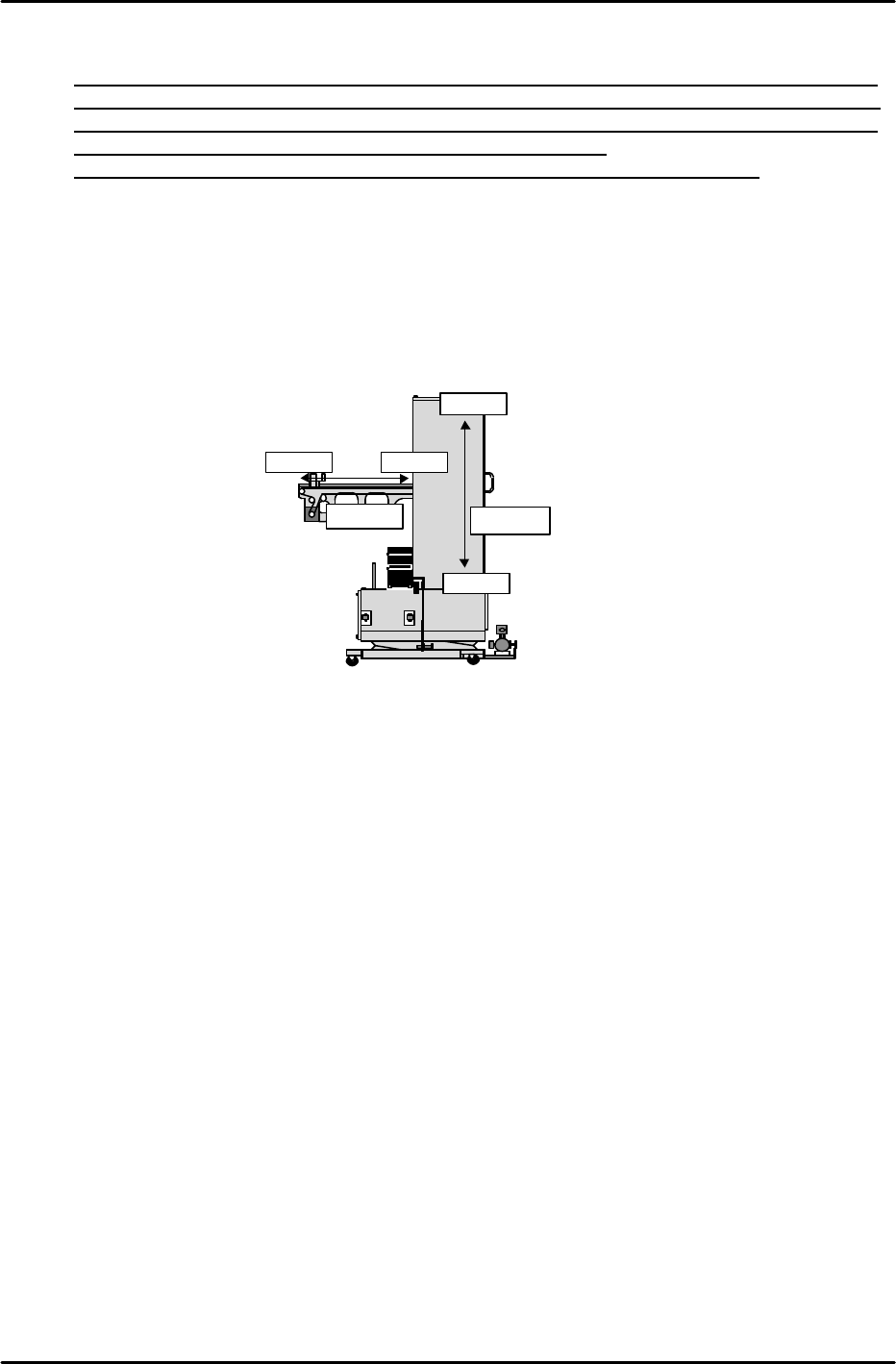
[8-19]
Max,Min Limit Position
Select [PROPER], [Max/Min], and [TY] [TZ] and then carry out [Max Limit] and
[Min Limit] measurement of each axis. For the shuttle, the camera side mechanical stopper
position is the [Min Limit] and the MTU side mechanical stopper position is the [Max Limit].
For the MTU the bottom mechanical stopper position is the [Min Limit] and the top
mechanical stopper position is the[Max Limit]. In the position where the axis is pressed up
against the stopper, press [SET] and the counter value will be automatically entered.
Max Limit
Min Limit
TY-axis
TZ-axis
Min Limit
Max Limit