QP-242E 工程师培训手册 (6.0).pdf.pdf - 第102页
FK-9F98-07 QP242E T raining Text for Service Engineers 6th edition 12. Placing Pressure Control Function Adjustment [ 4 / 4 ] Fuji Machine Mfg. Co., Ltd. Okazaki SMT Equipment Quality Assurance Dept. Technical Support Di…
FK-9F98-07 QP242E Training Text for Service Engineers
6th edition 12. Placing Pressure Control Function Adjustment [3/4]
Fuji Machine Mfg. Co., Ltd. Okazaki
SMT Equipment Quality Assurance Dept.
Technical Support Div. Section No.2
12-3
3) Register the zero point.
Register the zero point in the no load status (float load status, input 0).
[3], [#]
4) Select the digital filter and zero tracking.
[4], [#], [0 0], [#]
5) Select the analog filter and set the time lag.
Select the analog filter.
[*], [#], [2], [6], [#], [3], [#]
Set the analog filter time lag.
[*], [#], [2], [7], [#], [0 0 1], [#]
6) Select the hold mode.
Select the section set hold mode.
[9], [#], [3], [#]
7) Enable calibration prohibit (LOCK).
Enable the calibration prohibit (LOCK) status using key input.
[*], [#], [1], [1], [#], [1], [#]
Enable the registration prohibit (LOCK) status using key input.
[*], [#], [1], [2], [#], [1], [#]
(If rear terminal number 21 and 22 are disconnected then return to the original status.)
If zero does not display as the digital indicator value (no load status) then carry out steps 1, 3, and 7
in that order.
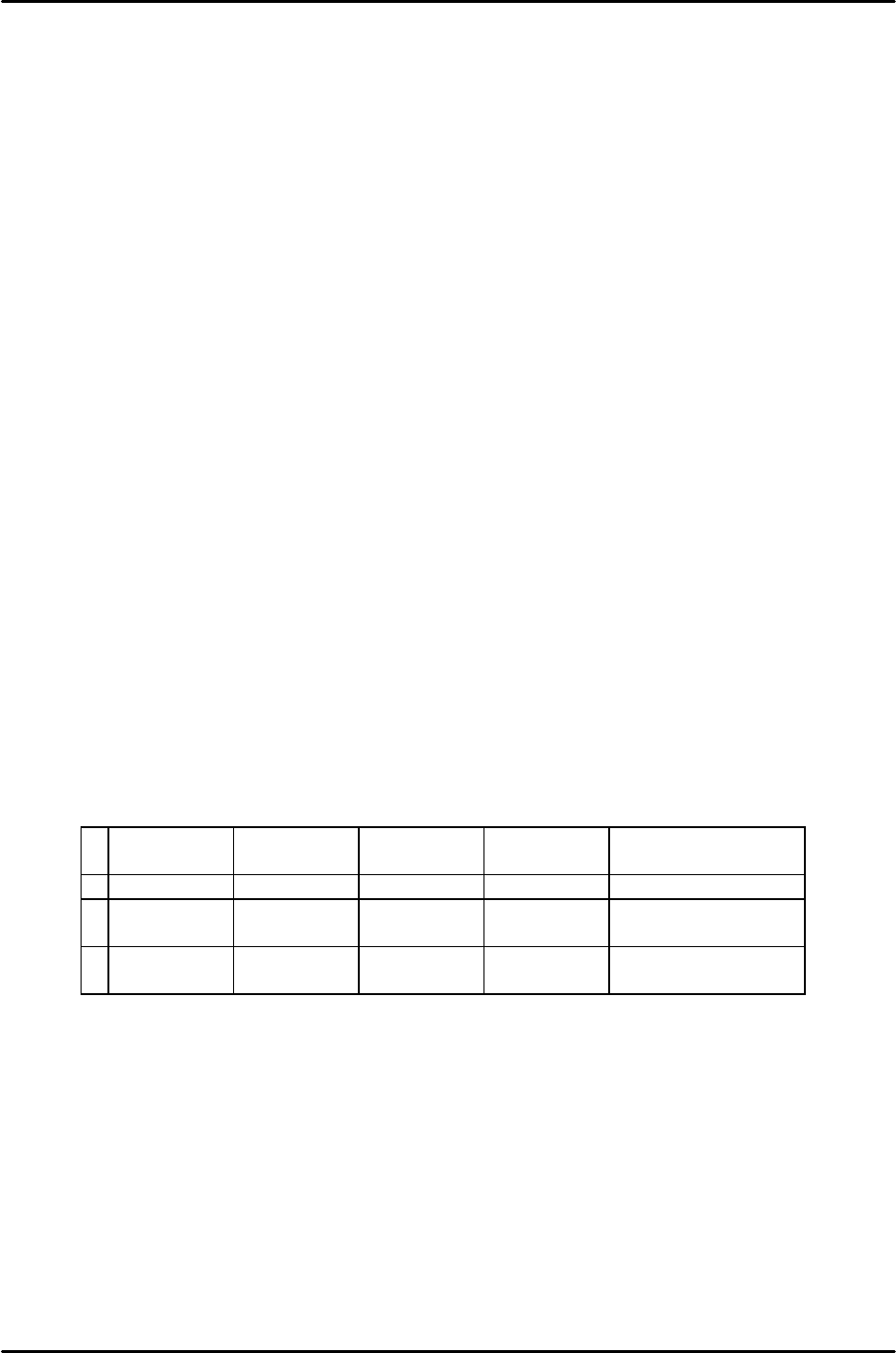
[12-7] Load Cell Calibration Check
This must be carried out after the digital indicator zero point has been adjusted.
1) Remove the device top cover and plate and set each load jig.
2) Verify that the amount of deviation of each load is within 10 g and that the difference between the
minimum and maximum amount of deviation is within 10 g. If the amount of deviation exceeds 10 g
then replace the load cell.
250g
difference
500g
difference
750g
difference
1000g
difference
Result
1 259g (+9) 504g (+4) 749g (-1) 1000g (0) Load cell OK
2 255g (+5) 504g (+4) 748g (-2) 994g (-6) Load cell NG
(Min, Max)
3 262g (+12) 511g (+11) 758g (+8) 1008g (+8) Load cell NG
(amount of deviation)

FK-9F98-07 QP242E Training Text for Service Engineers
6th edition 12. Placing Pressure Control Function Adjustment [4/4]
Fuji Machine Mfg. Co., Ltd. Okazaki
SMT Equipment Quality Assurance Dept.
Technical Support Div. Section No.2
12-4
[12-8] Placing Pressure Calibration Measurement
1) Set the nozzle installed on the module on which the pressure device is installed.
* Since specification of the nozzle name is required when placing pressure control
is
used, confirm that the nozzle name has been set. Measure in the nozzle change
status using the nozzle change command. Do not measure after detaching the
nozzle by hand.
2) All nozzles will be measured if the nozzle used for placing pressure control is not specified.
Verify that the Nozzle_Type item in the nozzle data of all nozzles is set to “64”.
3) After PPC_Calibration_Position_X and Y are measured exit the Proper data display
screen. By exiting the Proper data screen the Proper data is transmitted from the ICM to the
SCU board of each module. (The ICM extracts only the servo count from each module for
measurement. The set Proper data are held by the ICM when measurement is carried out.)
4) Enter the Proper data display screen again. Press [ETC], [ETC], [PLCING PRESS], [NZL
CHANGE], set the number of the measurement nozzle, then after the change over to the START
ready status press [MEASUREMENT] and START to begin measurement. Measurement is
carried out 30 times for the pressing force of each two points respectively.
5) Once measurement is finished if the 3D.V value displayed on the screen is within 10.0 then
measurement is complete. If it is more than 20.0 the machine will automatically erase the
measured value. However, care should be exercised since the tolerance range is within 10.0.
Press [YES] to save the measured value.
S.C.: Spring_const (spring constant obtained from measurement)
I.P: Init_Pressure (initial pressure obtained from measurement)
3D.V: Average 3sigma value after measurement (within 10.0)
Valid range Min gf, Max gf: 120 ~ 1200 g (guaranteed)
6) Return to [NZL CHANGE] and then change the measurement nozzle and measure again using
the same procedure. Carry out measurement using all nozzles.
7) Calibration result tolerance range
1: Additional pressure variation 3 sigma 10 g
2: Additional pressure range 120 ~ 1200 guaranteed
(An error will not be output even if the pressure is out of
range so check during measurement)
• Adjust the calibration result of Min to about 100 ~ 110 g.
Check the following points if the measurement result is out of range.
1: If the variation in the additional pressure is too large
(1) Check that movement is smooth when the nut is moved up and down.
à Make sure that the set status of the up/down spring is natural. The set status of the
spring will have a stiff feel once it is installed.
à Make sure there is not a stiff feel in the spline when the up/down spring is released.
If the spring is defective then replace it.
(2) Verify that the vacuum mechanism works smoothly.
à Replace it if defective.
2: If the additional pressure is out of range
(1) Verify that the add pressure sensor position is the same as the position from
adjustment.
à Verify that the sensor position is in compliance with the values used in adjustment
since the additional pressure range will be offset by sensor position adjustment.
(2) Check that the up/down spring is not excessively bent or stretched.
à In some instances the spring constant will not be exact. If so replace the spring.
After Proper data measurement is completed transmit the Proper data from the machine to F4G.
FK-9F98-07 QP242E Training Text for Service Engineers
6th edition 13. MTU 71E Adjustment [1/24]
Fuji Machine Mfg. Co., Ltd. Okazaki
SMT Equipment Quality Assurance Dept.
Technical Support Div. Section No.2
13-1
[Chapter 13] MTU71E Adjustment
Note: If the by-pass key is inserted in the mechanical switch of the MFU
specifications safety door, remove the key and put it in the MTU cover.
If the key is left inserted in the MFU specifications switch this will disable
the MTU front safety door by-pass key which can lead to damage.
[13-1] Prior to Adjusting the MTU71E
- Since layered stacking of trays is possible on the MTU71E, an additional 10 to 20 part types can be
loaded on the MTU71E compared to the MTU6 (MTU6 can handle 50 to 100 types of parts).
- There is a detachable type tray remover on the changer unit that is needed for removing empty trays.
By attaching this to the placing head, empty trays can be removed in conjunction with the layered tray
stacking specifications.
- On modules that utilize an MTU71E it is possible to change from an MTU71E to an MFU. However,
when installing an MTU71E on an MFU module, additional work related to the shuttle, remover
station and Proper data measurement are required.
- When connecting the MTU71E unit to the machine, the machine should be zero set and the 100 V
power should be on before connecting the MTU71E. If zero setting is performed after connecting the
unit to the machine there is a danger of damage being caused by a collision between the shuttle jaw and
the tray holder. For details refer to the material from what to do prior to connecting the MTU up to the
measurement of Orgn. Pos. TY.
- When the MTU71E is removed from the machine always verify that the shuttle jaw and tray holder are
separated and that the shuttle jaw has been advanced forward before carrying out the removal work.
The shuttle may be damaged if the jaw is at the retract limit.
- On modules with an MTU71E installed, the maximum part size that can be loaded is 50 mm square.
This is because the width of the reject parts conveyor is 54 mm (the 4 mm difference is to take part
pickup deviation ± 2 mm into account).
- MTU71E Specifications
Suitable machine : QP-242 600 type and 760 type
Number of part types that can be loaded : 10 types/Unit (Large parts tray), 20
types/Unit (Small parts tray)
Tray stacking height : 32 mm/level
Tray size : 335 x 250 mm (1part type/level), 130 x 250 mm
(2 part types/level)
Maximum load weight per tray pallet : 2.0 Kg
Permissible empty tray load weight : 240 g/tray
Minimum tray thickness : 4 mm
Empty tray removal speed : Within 8 seconds
Special air source required for MTU71 (for remover)
TY-axis : 0.09 mm/Pulse
TZ-axis : 0.01 mm/Pulse
Required number of magnets : New model 60, existing model 20 for total of 80
magnets/MTU
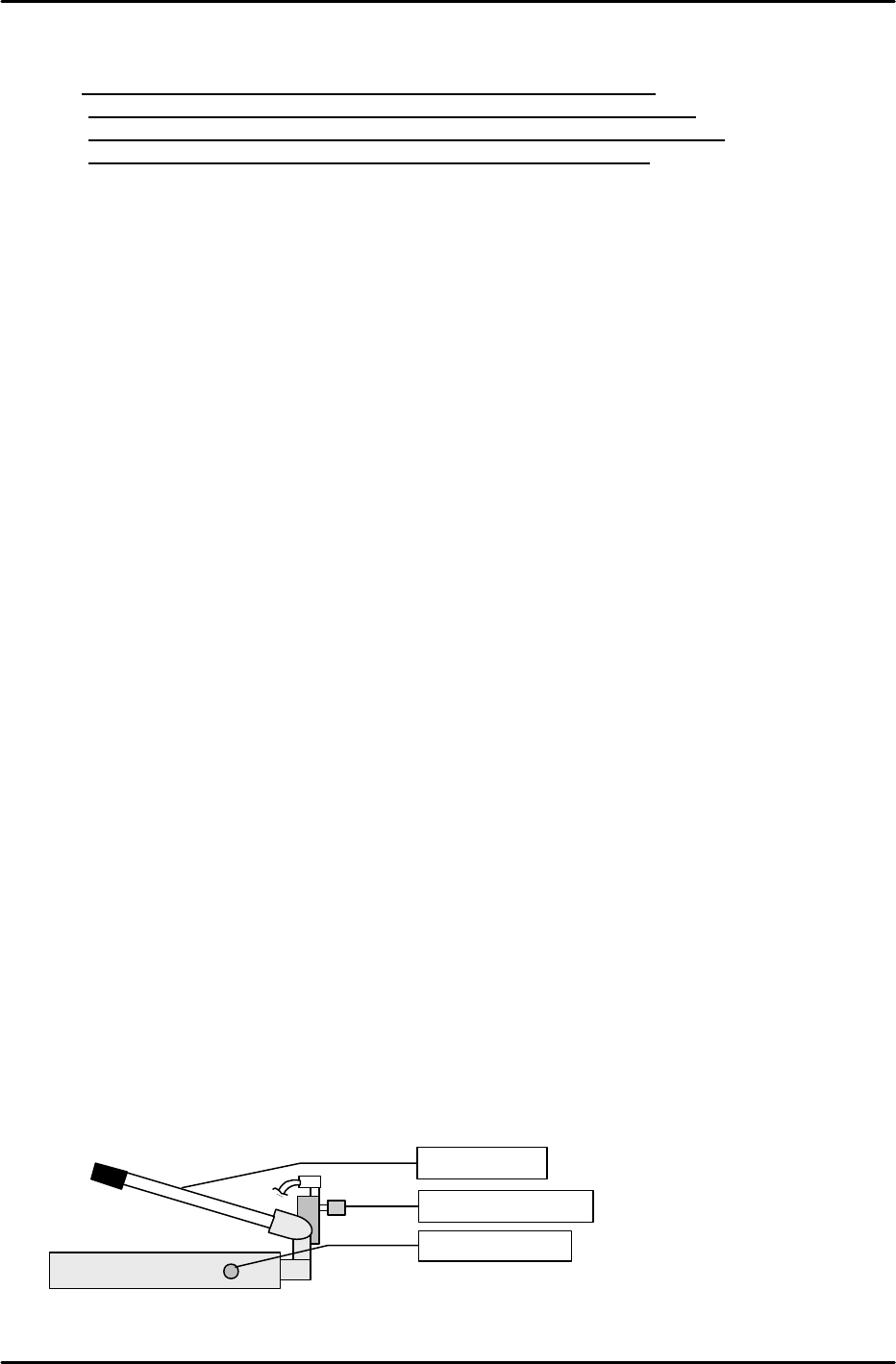
[13-2] MTU Descent Speed Adjustment
Raise the MTU by the maximum stroke using the hydraulic jack then use the speed controller
beside the jack to adjust the speed so that the operation time from the opening of the hydraulic jack
valve to the end of descent is between 6 and 10 seconds.
Speed controller
Descent valve
Ascent lever