QP-242E 工程师培训手册 (6.0).pdf.pdf - 第37页
FK-9F98-07 QP242E Training Text for Service Engineers 6th edition 5. Before Beginning the Proper Data Measurements [ 2 / 6 ] Fuji Machine Mfg. Co., Ltd. Okazaki SMT Equipment Quality Assurance Dept. Technical Support Div…
FK-9F98-07 QP242E Training Text for Service Engineers
6th edition 5. Before Beginning the Proper Data Measurements [1/6]
Fuji Machine Mfg. Co., Ltd. Okazaki
SMT Equipment Quality Assurance Dept.
Technical Support Div. Section No.2
5-1
[Chapter 5] Before Beginning the Proper Data
Measurements
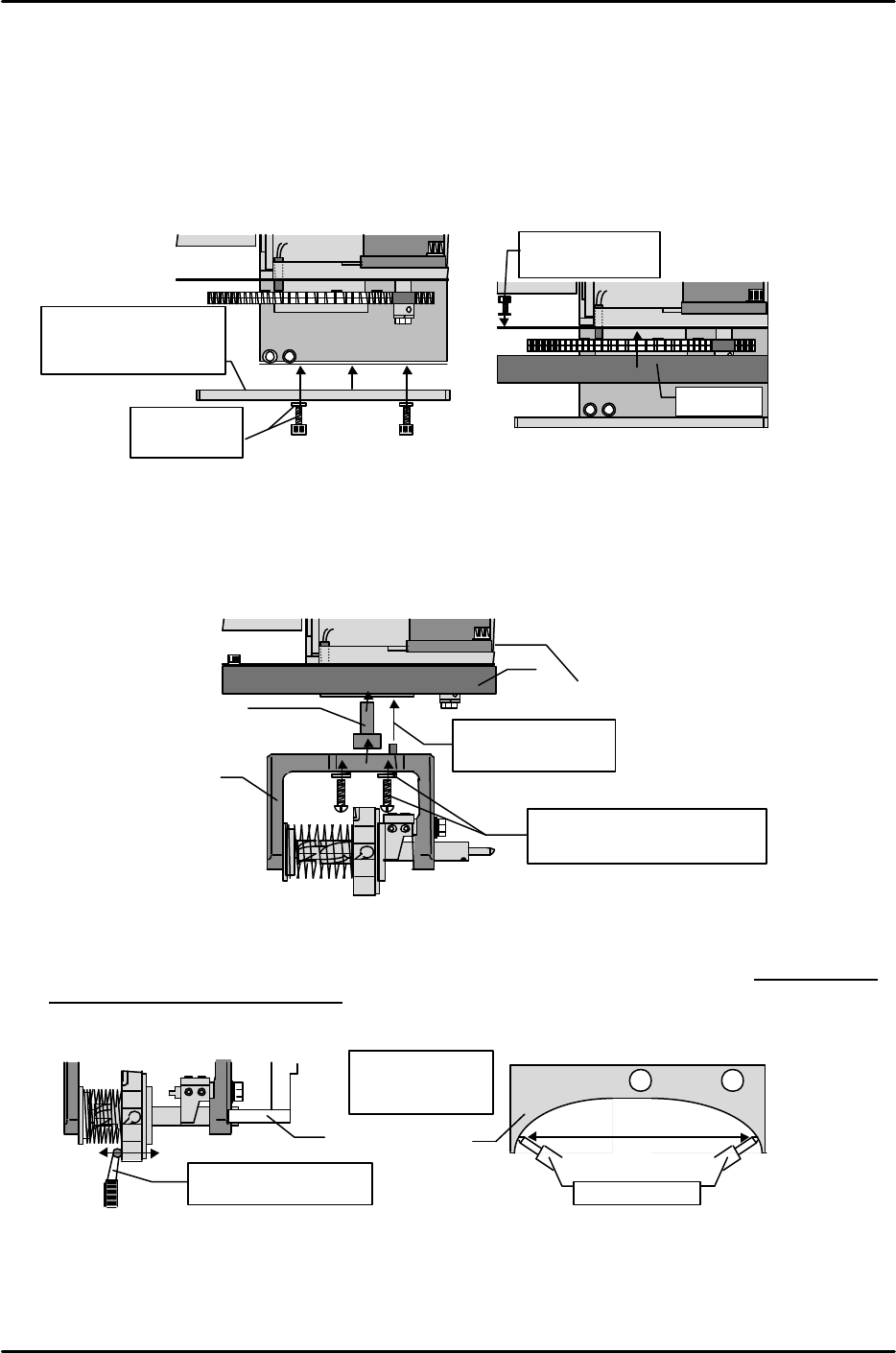
[5-1] Attaching the Nozzle Changer Holder Bracket and Q-Cover (For Index Types Only)
1) End the Z-axis zero setting operation and lock the servo.
2) Mount the holder bracket at the head from which it was removed (see section [5-4]), partially
tightening it there with the M5 x 10 bolts and disc springs.
3) Use the M3 x 5 bolts and spring washers to mount the Q-cover for the index nozzle at the bottom of
the placing head.
[5-2] Mounting the Index Holder and Adjusting the Holder Bracket
1) Mount Index type holders on the gear in the same manner as the Q-axis zero measurement jig,
using the M5 x 15mm machine screws and spring washers. When mounting the holder, note the
positioning pin on the top face. A stepped collar (28mm thick) is installed between the holder and
the gear.
2) With the holder shaft against the bracket, turn the holder to the shaft's most contracted position.
At this position, set a dial gauge in the Y-direction and adjust until the holder's inner gap is
within a "0 to 0.05mm" range, with the holder shaft ends making contact with the bracket's
left and right sides in an even manner.
Holder shaft
Even contact at
right and left
Dial gauge reading
within 0.01 to 0.05mm
Nozzle changer
holder bracket
Collar
Align pin hole and
mount on the gear
Index holder
M5 x 15mm machine screws
and spring washers for holder
Q-cover
M5 x 10 / disc
springs
Nozzle changer
holder bracket
(partially secured)
M3 x 5 /
spring washers
Q-cover
FK-9F98-07 QP242E Training Text for Service Engineers
6th edition 5. Before Beginning the Proper Data Measurements [2/6]
Fuji Machine Mfg. Co., Ltd. Okazaki
SMT Equipment Quality Assurance Dept.
Technical Support Div. Section No.2
5-2
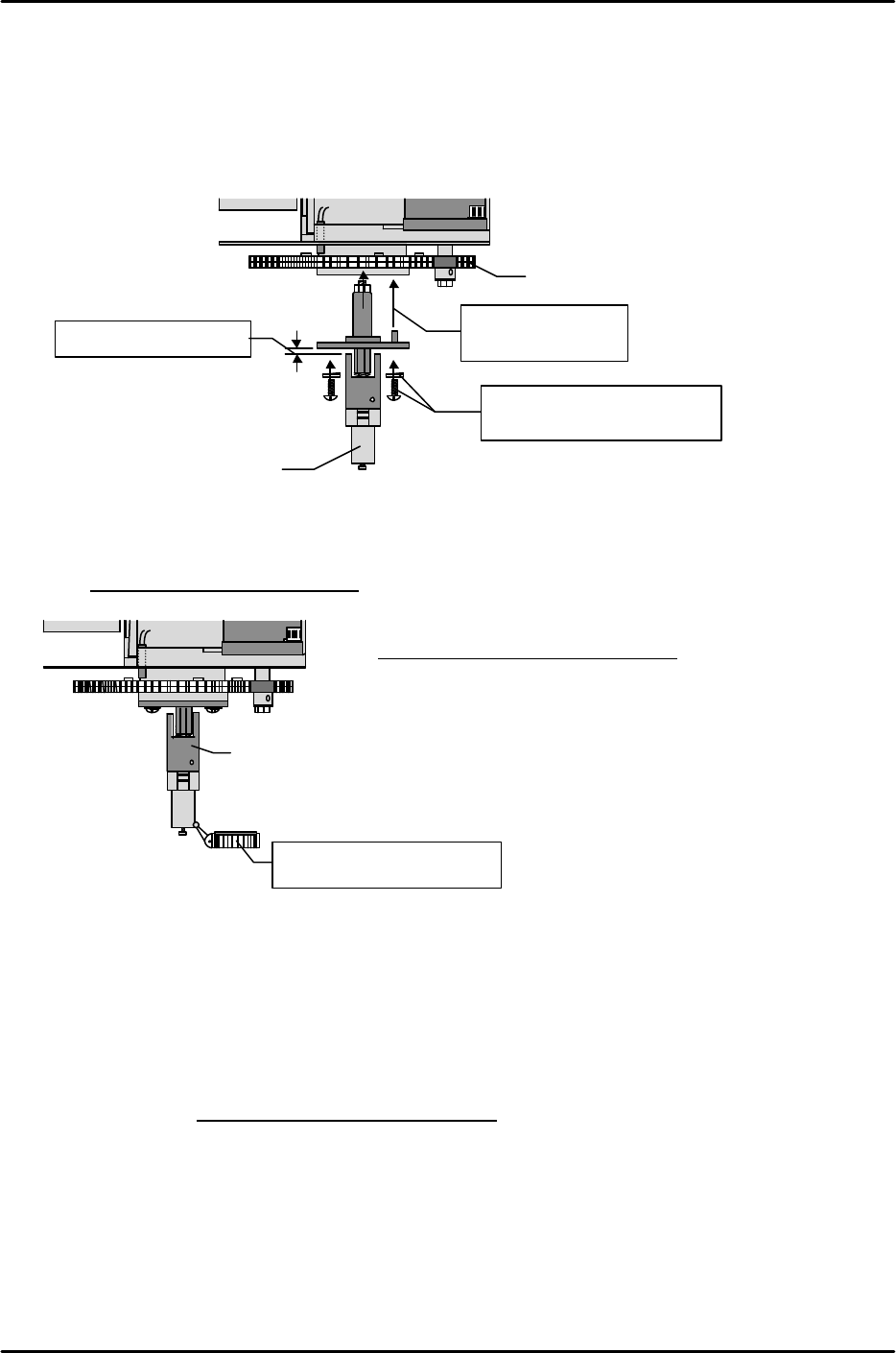
[5-3] Mounting Shafts For Single Nozzles
* Note that the inner spring used in systems with placing pressure control is different from the
standard item.
1) Verify that there is a 2mm gap between collars. If the gap is other than 2mm, request
instructions from the supervisor.
2) In the same manner as for index holders, mount the single holder in the prescribed direction (note
positioning pin) using the M5 x 12mm machine screws and spring washers.
[5-4] Measuring the Single Shaft Swing
Set a dial gauge at the bottom of the single shaft and measure the shaft swing.
(This measurement is not required for index nozzles.)
Tolerance: 0.1 / 360degrees
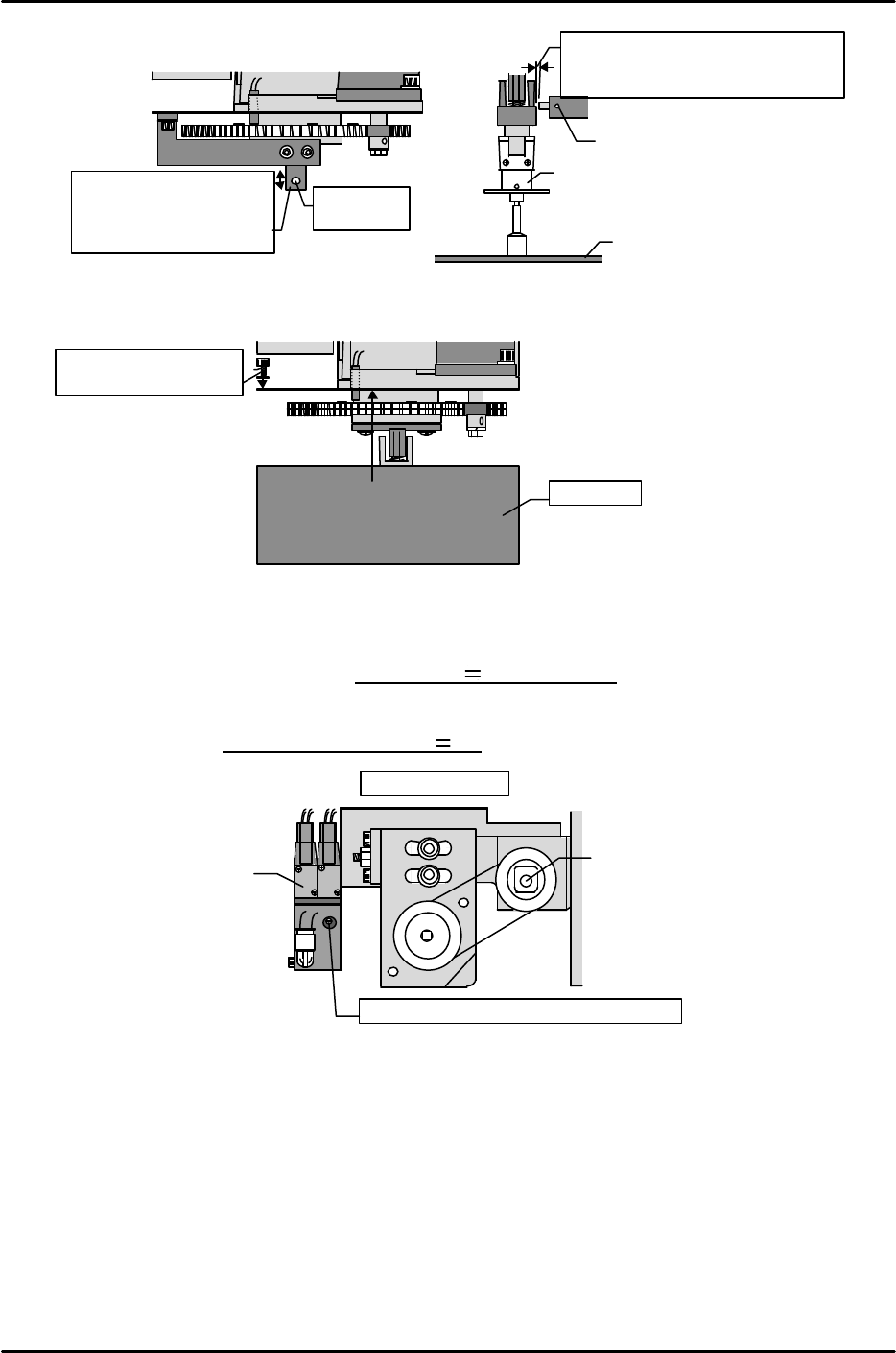
[5-5] Adjusting the Pressure Control Sensor
1) Mount a standard nozzle on the head.
2) Clamp a standard PCB on the main conveyor.
3) Move the nozzle to the PCB surface and lower the Z-axis to the position specified by the Z0 Proper
data value.
4) Loosen the hollow bolt which secures the sensor and adjust the sensor position so that there is a
0.3mm gap between the shaft collar's side face and the sensor's side face.
5) Adjust the bracket position up and down until the pressure control sensor switches on when the
Z-axis is lowered 0.15 ± 0.015mm (100 ± 10 Pls) from Z0.
Align pin hole and
mount gear
M5 x 12mm machine screws
and spring washers
Gear
Single nozzle shaft
Verify that gap is 2mm
Single nozzle shaft
Set dial gauge at bottom of
shaft and measure swing
Max. swing amount: mm
FK-9F98-07 QP242E Training Text for Service Engineers
6th edition 5. Before Beginning the Proper Data Measurements [3/6]
Fuji Machine Mfg. Co., Ltd. Okazaki
SMT Equipment Quality Assurance Dept.
Technical Support Div. Section No.2
5-3
[5-6] Attaching the Single Nozzle Q-Cover
Mount the single nozzle Q-cover on the bottom of the placing head using the M3 x 5 bolts and spring
washers.
[5-7] Measuring the Nozzle Vacuum Pressure
1) Mount a 2.5mm nozzle at the holder and shaft.
2) Attach a vacuum gauge to the end of the nozzle, then switch on the "Y002 NOZZLE VACUUM"
I/O at the relevant module and measure the vacuum pressure.
3) Verify that the vacuum pressure is – 79.8kPa ( – 600 mmHg) or less at each module.
4) Switch on the "Y003 NOZZLE BLOW" I/O to break the vacuum. Adjust the vacuum break
pressure adjusting screw on the solenoid valve (at top side of placing head) so that the measured
vacuum pressure is +6.65kPa ( +50mmHg).
Adjust this bracket up
and down until the
sensor switches on at
0.15 ~ 0.015.
Pressure
sensor
Standard nozzle
Standard PCB
Loosen hollow bolt and move
sensor until this dimension is
0.3mm
Hollow bolt
Z-axis ball screw
Solenoid valve
Vacuum break pressure adjusting screw.
Top of placing head
Q-cover
M3 x 5 / spring washers