QP-242E 工程师培训手册 (6.0).pdf.pdf - 第125页
FK-9F98-07 QP242E Training Text for Service Engineers 6th edition 13. MTU 71E Adjustment [ 23 /24] Fuji Machine Mfg. Co., Ltd. Okazaki SMT Equipment Quality Assurance Dept. Technical Support Div. Section No.2 13- 23 b. Z…
FK-9F98-07 QP242E Training Text for Service Engineers
6th edition 13. MTU 71E Adjustment [22/24]
Fuji Machine Mfg. Co., Ltd. Okazaki
SMT Equipment Quality Assurance Dept.
Technical Support Div. Section No.2
13-22
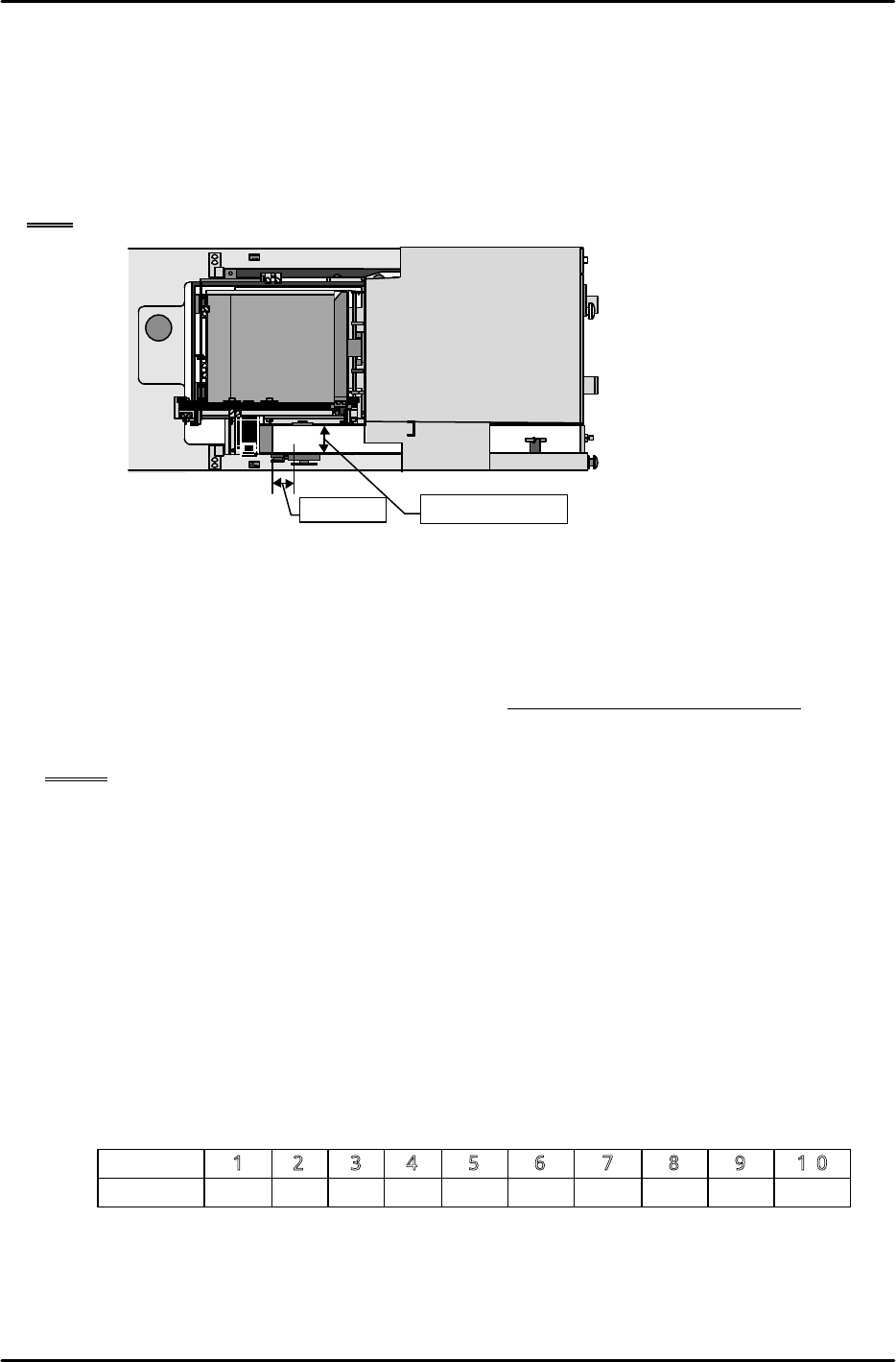
[13-57 ] MTU_Parts_Eject_Pos.CV_X,Y Measurement
1) Set the nozzle jig.
2) Move the placing head to the position where the center of the tip of the nozzle jig is 50 mm
from the width center of the reject parts conveyor in the X-direction and 50 mm from the rear
edge of the conveyor in the Y-direction.
3) This position is MTU_Parts_Eject_Pos.CV_X, Y. Use the following command operation to
automatically enter the values in Proper data: [PROPER], [ETC], [REJECT POS.],
[CONVEYOR], and [SET].
Note: The maximum width of parts that can be discarded on the reject parts conveyor is 50 mm.
[13-58 ] Empty Tray Discard Box Existence Switch Check
1) After selecting [POSITION], [MTU], SHUTTLE], and [RETRACT] then press START to move
the shuttle to the retract limit. Once this is done press [TRAYORG] to raise the Z-axis.
2) Pull the empty tray discard box away from the limit switch position and then tightly secure the
safety door.
3) If the reset button cannot be used to cancel the "Safety door opened/MTU BOX" error that
displays then the check switch is working properly. If the error can be canceled then search for
the cause.
NOTE: Carry out this check after all Proper data values have been measured.
[13-59] Tray Pickup Check Sensor Settings
1) Summary
The tray pickup check sensor is used when a tray is being discarded to monitor whether the
tray is picked by the remover. If a tray is dropped this sensor will respond and the machine
will stop immediately. This measure is to prevent damage to the machine. Be aware that
the immediate machine stop may cause the parts in the tray to become scattered. Note also
that this function is an option.
2) Settings
a. Device switch settings
1. While pressing the convex button in the lower center of the amp panel, pull the panel unit
forward. (The machine power must be cut and the panel display must be off before doing
this.)
2. Set the ten individual switches as shown in the table below.
No.
1 2 3 4 5 6 7 8 9 10
Setting OFF ON ON ON OFF OFF OFF OFF OFF OFF
3. Once the dip switch settings have been made return the panel to its original status.
50mm
Machine
★
Conveyor center

FK-9F98-07 QP242E Training Text for Service Engineers
6th edition 13. MTU 71E Adjustment [23/24]
Fuji Machine Mfg. Co., Ltd. Okazaki
SMT Equipment Quality Assurance Dept.
Technical Support Div. Section No.2
13-23
b. Zero shift value setting
Turn the machine power on and use the following procedure to make the setting.
1. Move from the measurement mode in which the measured value is displayed, to the
setting mode by pressing the arrow key. 1-H displays in the top level and the zero shift
value displays in the lower level.
2. Set the zero shift value to -1 mmHg.
(The value can be changed using the up/down key.)
3. The zero shift value is entered when the arrow key is pressed after which 1-H will display.
4. Set this value to zero. (If the value is zero to begin with this can be left as it is.)
5. Press the arrow key twice to return the mode to the measurement mode.
This completes the tray pickup check sensor settings.
NOTE: This function can be switched on and off by means of a Proper data setting. However,
when this function is switched on, the tray discard operation cycle time will be 280 to
290 ms longer than the existing cycle time.
• ON/OFF switching procedure
To set to ON add 4096 to Proper data item PLM?_Machine_Status (MQ2?_MASA) and then
transmit the Proper data to the machine. The "?" denotes the module number. Also note
that if this is not input the tray pickup check function will be OFF.
3) Operation check of the tray pickup check sensor
This operation check is used to verify that the tray pickup check sensor does not erroneously
detect a tray. It applies when the settings outlined in 2) above have been made. The tray
pickup check sensor will go off, the tray will be considered as having been dropped, and the
machine will enter the emergency stop status if the vacuum pressure differential (pressure
when the remover vacuum leaks completely versus the pressure when a tray is picked) falls
below 1 (mmHg). Although the cases in which this would actually be used are extremely
limited, the following precautions would apply if an ultra lightweight tray (less than 40 g)
were being used for which pickup is possible even in the presence of a slight vacuum pressure
differential (2 - 3 mmHg).
If the vacuum pressure differential does not stabilize and the tray pickup sensor is chattering
this may cause an unnecessary emergency stop of the machine to occur. If so use a dummy
tray, for which pickup is possible in the presence of a pressure differential of 2 to 3 (mmHg), to
carry out a tray pickup check sensor detection test.
The procedure for conducting such a test is described below.
a. First, use the unit operation command to chuck the remover to the head.
b. Set the MY02B REMOVER VACUUM I/O to ON.
c. Set the MY03F TRAY PKUP OSET to ON.
d. Verify that the MX027 TRAY PKUP CHK I/O is always OFF (no chattering) when the
remover has nothing picked.
e. Manually pick the dummy tray with the remover.
f. Verify that the MX027 TRAY PKUP CHK I/O is always ON (no chattering) when the
dummy tray is picked.
This completes the check operation.

FK-9F98-07 QP242E Training Text for Service Engineers
6th edition 13. MTU 71E Adjustment [24/24]
Fuji Machine Mfg. Co., Ltd. Okazaki
SMT Equipment Quality Assurance Dept.
Technical Support Div. Section No.2
13-24
Use a dummy tray that satisfies the following conditions.
• Vacuum pressure differential of approximately 2 to 3 (mmHg) between the all leak status
and the tray picked status
• Tray that does not drop as a result of its own weight
As an example consider using the following as a dummy tray.
• Styrofoam: Size 270 mm length x 130 mm width x 30 mm thickness approximately 15 g
Prepare two pieces each with 18 holes that have an inner diameter of 23 mm
(Total weight of about 35 g)
This styrofoam is used for the nozzles that have been shipped.
Overlap the two pieces of styrofoam and pick with the remover (pick the styrofoam so that
the hole near the center of the styrofoam is close to the center of the remover). Adjust the
two pieces of overlapping styrofoam so that the vacuum pressure differential between the
all leak status and the styrofoam picked status is about 2 to 3 (mmHg). (Use the styrofoam
holes as slits.)
Try using the styrofoam pieces adjusted in this way as a dummy tray.
[13-60] Reverse Transmission of Proper Data
1) After all of the Proper data items have been measured transmit the Proper data from F4G.
2) Recheck the transmitted Proper data and input suitable values for any Proper data items
that require revision.
After verifying the Proper data, transmit the Proper data again from F4G to the machine.