QP-242E 工程师培训手册 (6.0).pdf.pdf - 第97页
FK-9F98-07 QP242E Training Text for Service Engin eers 6th edition 11. Coplanarity Check Adjustment & Operation Check [ 3 / 4 ] Fuji Machine Mfg. Co., Ltd. Okazaki SMT Equipment Quality Assurance Dept. Technical Supp…
FK-9F98-07 QP242E Training Text for Service Engineers
6th edition 11. Coplanarity Check Adjustment & Operation Check [2/4]
Fuji Machine Mfg. Co., Ltd. Okazaki
SMT Equipment Quality Assurance Dept.
Technical Support Div. Section No.2
11-2
41mm
148mm
Module connection surface
M/C base
LLL sensor
installation surface
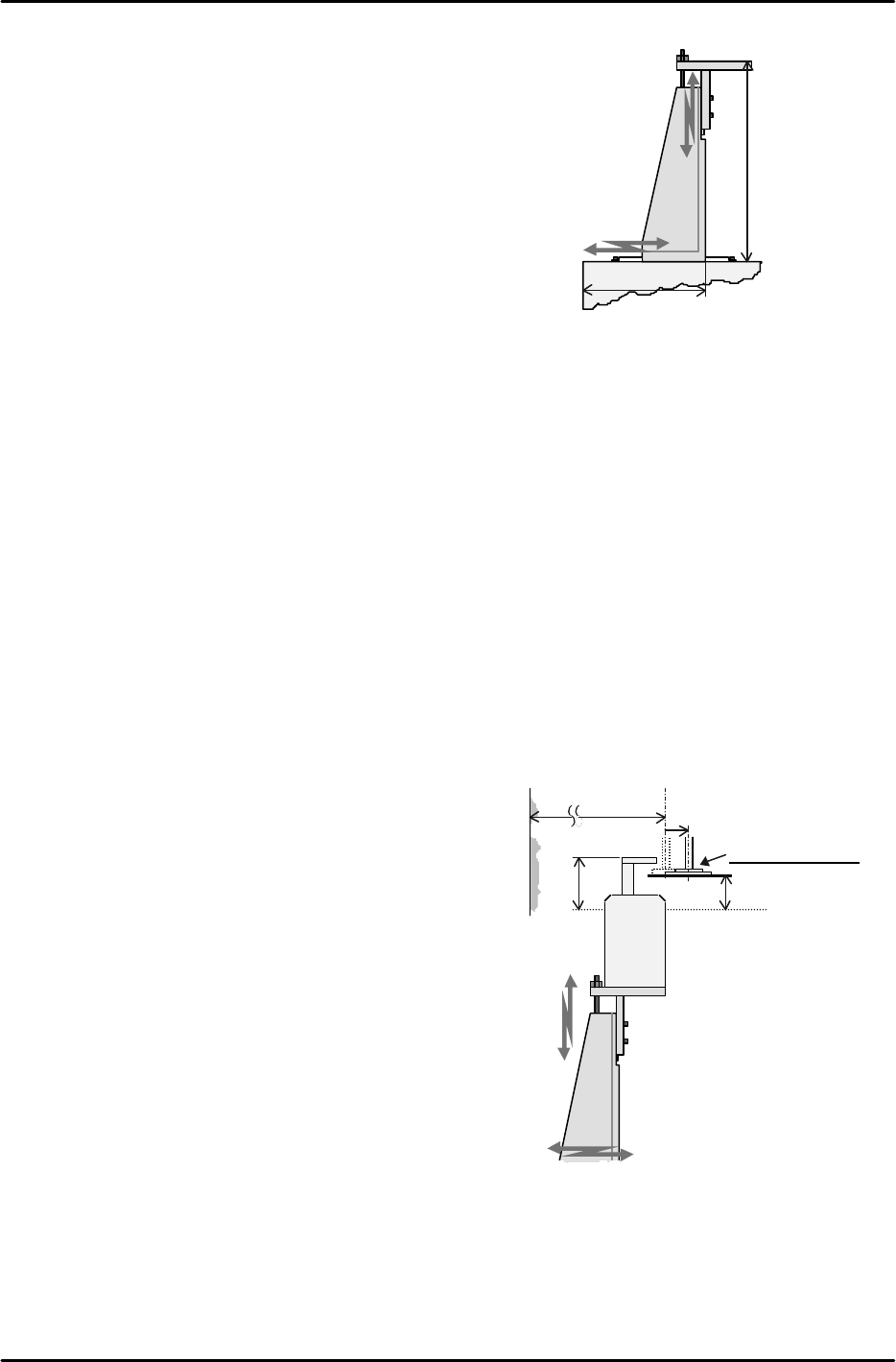
[11-5] Sensor Bracket Installation
1) Y-direction
Position using the key
2) X-direction
Align the side of the bracket so that it is 41 mm from
the side of the machine (module connection surface).
3) Z-direction
Align the sensor installation surface so that it is 148
mm from the machine base surface.
[11-6] Sensor Installation Surface Level Check
Attach the dial gauge on the placement head and check the levelness of the sensor installation
surface.
1) X-direction Levelness of the bracket must be within 0.05 mm.
2) Y-direction Levelness of the bracket must be within 0.05 mm.
(If the tolerance is exceeded the bracket needs to be replaced.)
[11-7] LLL Sensor Installation
Attach the dial gauge to the placement head and secure the sensor in position such that the
side of the sensor is parallel to the Y-axis within 0.05 mm.
[11-8] LLL Sensor Height Adjustment
Adjust the sensor height so that the top of the sensor head is 16,000 pulses (24 mm) above the
top surface of the board (Z0).
[11-9] LLL Sensor X-direction Positioning
1) Install the Proper data measurement nozzle
for coplanarity check on the nozzle holder; use
the I/O command to turn on the vacuum and
pickup the jig plate.
2) Use the dial gauge to align the jig plate
parallel to the Y-axis.
The parallelism to the Y-axis must be within
0.01 mm.
3) Move the placement head to a position where
there is nothing to cause interference around
the sensor and then raise the Z-axis height to a
position 11,167 pulses (16.75 mm) above the
top surface of the board (Z0).
4) Be particularly careful that nothing is
interfering with the sensor and then move the
X-axis position toward the inside by only 4,000
pulses (10 mm) from the Limit Position on the
side on which the coplanarity sensor is
installed.
5) Move the placement head in the Y-direction to
the position where the sensor head aligns with the center of the nozzle.
6) In this status then fine adjust sensor bracket installation in the X-direction so the sensor is
in a position where the red LED on the top of the sensor changes from being on (untripped)
to off (tripped).
7) Lastly, check again that all of the bolts have been tightened, that the alignment marks exist,
and that the wiring connectors are secured.
Return 10mm, 4000 pulse.
(67.5mm)
Top surface of
board (Z0)
24mm
Measurement pos.
LLL sensor
Limit Position X
16.75mm
Move the bracket
to the position
where the red LED
goes ON/OFF.
Fine adjust the
sensor head
height
Module connection surface

FK-9F98-07 QP242E Training Text for Service Engineers
6th edition 11. Coplanarity Check Adjustment & Operation Check [3/4]
Fuji Machine Mfg. Co., Ltd. Okazaki
SMT Equipment Quality Assurance Dept.
Technical Support Div. Section No.2
11-3
[11-10 ] Proper Data Measurement
1) Transmit the program created for measuring Proper data to the foreground of the machine.
The program can also be transmitted to the background but it must then be changed to the
foreground prior to the start of measurement. If a suitable program is not used the jig
cannot be positioned via vision processing.
(1) Part data
Enter the jig plate X and Y dimensions (X & Y = 28mm) as the Body size X and Y values.
Enter the jig plate thickness (h = 0.7 mm) as the Component height. Select the Lighting
and Vision type to match the camera type.
Lighting CCD=0, LS=3
Vision type CCD=10, LS=250
Enter Copla_PROP_I or S as the nozzle name.
(2) Nozzle data
Set so that nozzle check is not performed.
(3) Production program
Set the part data specified in (1) above for the first device used in the first sequence.
2) If work is continued from section 13.9 and the jig plate has already been picked, then install
the nozzle to be used if necessary and execute the following work.
Carry out the following command operation to turn on the vacuum and enable the START
ready status; [SET] (F5), [PROPER] (F3), input the ID code?, select the Mod No.?, [ETC] (F5),
[COPLA] (F3). Note that the [COPLA] (F3) command will only display if Coplanarity
Check is set to “1” (Yes).
Next, pickup the jig plate if necessary. The tip of the nozzle should be directly above the
cavity in the plate at this time. Furthermore, the plate should be picked in a status subject
to as little rotation deviation as possible.
3) Move the placement head to the position that satisfies the conditions given below in order to
set a position that is suitable for Proper data measurement. Directly input the provisional
Proper data value using [SET] (F1). Be careful that the sensor head does not make contact
with the jig during the course of this work.
(1) Y-direction Near the center of the sensor head (visual check)
(2) Z-direction Near the middle between the sensor head beam emitting mechanism
and the beam reflector (visual check)
(3) X-direction Within 400 pulses toward the rear from the red LED ON/OFF position
4) Press START to begin automatic measurement.
Repeat measurement twice in the order given below to complete measurement.
Vision process jig plate à Measure in X-direction à Measure in Y-direction
5) Once measurement is completed remove the jig plate from the nozzle holder and remove the
nozzle used for measurement and then cut the vacuum off using either the I/O command or
the part reject command to complete the work.

FK-9F98-07 QP242E Training Text for Service Engineers
6th edition 11. Coplanarity Check Adjustment & Operation Check [4/4]
Fuji Machine Mfg. Co., Ltd. Okazaki
SMT Equipment Quality Assurance Dept.
Technical Support Div. Section No.2
11-4
***** This page does not contain any contents.