QP-242E 工程师培训手册 (6.0).pdf.pdf - 第55页
FK-9F98-07 QP242E Training Text for Service Engineers 6th edition 6. Proper Data Measurement [ 14 /20] Fuji Machine Mfg. Co., Ltd. Okazaki SMT Equipment Quality Assurance Dept. Technical Support Div. Section No.2 6- 14 […
FK-9F98-07 QP242E Training Text for Service Engineers
6th edition 6. Proper Data Measurement [13/20]
Fuji Machine Mfg. Co., Ltd. Okazaki
SMT Equipment Quality Assurance Dept.
Technical Support Div. Section No.2
6-13
[6-16] Camera Center XC, YC, Nozzle Holder Center X, Y Measurement
* Camera Center XC,YC and Nozzle Holder Center X,Y are measured at the
same time.
1) For camera types 1, 2, and 3, mount a 10mm back light nozzle in the holder
(3.7mm nozzle for camera type 1), then execute the following command
sequence to begin the automatic measurement: [CAMERA] à [CAMERA
POS]à [PARTS CAMERA]à [START].
2) For camera types 4, 6, and 7, mount a nozzle jig in the holder. (Camera
types 6 and 7 require a special jig, although the jig for camera type 4 can be
used if its end is painted white.) Execute the same command sequence as
that shown in step 1 above to begin the automatic measurement.
* When measurement is prevented by an error:
Because the real image cannot be displayed at the monitor when a line scan cameras is used,
align the monitor center with the jig center by eye.Use the inching operation to move head
until this alignment is achieved.Return to the “Temporary Camera Center XC,YC
Measurement” section ([7-13]), then execute the [XC/YC] --> [SET] commands and enter the
Proper data value. After entering the Proper data, return to the [CAMERA POS] command
and press [START] to perform the automatic measurement again.
3) After calibration, in case of a CCD camera, tighten the lens lock by hand and further apply a
small amount of LOCTITE 222. Do NOT retighten by using a tool.
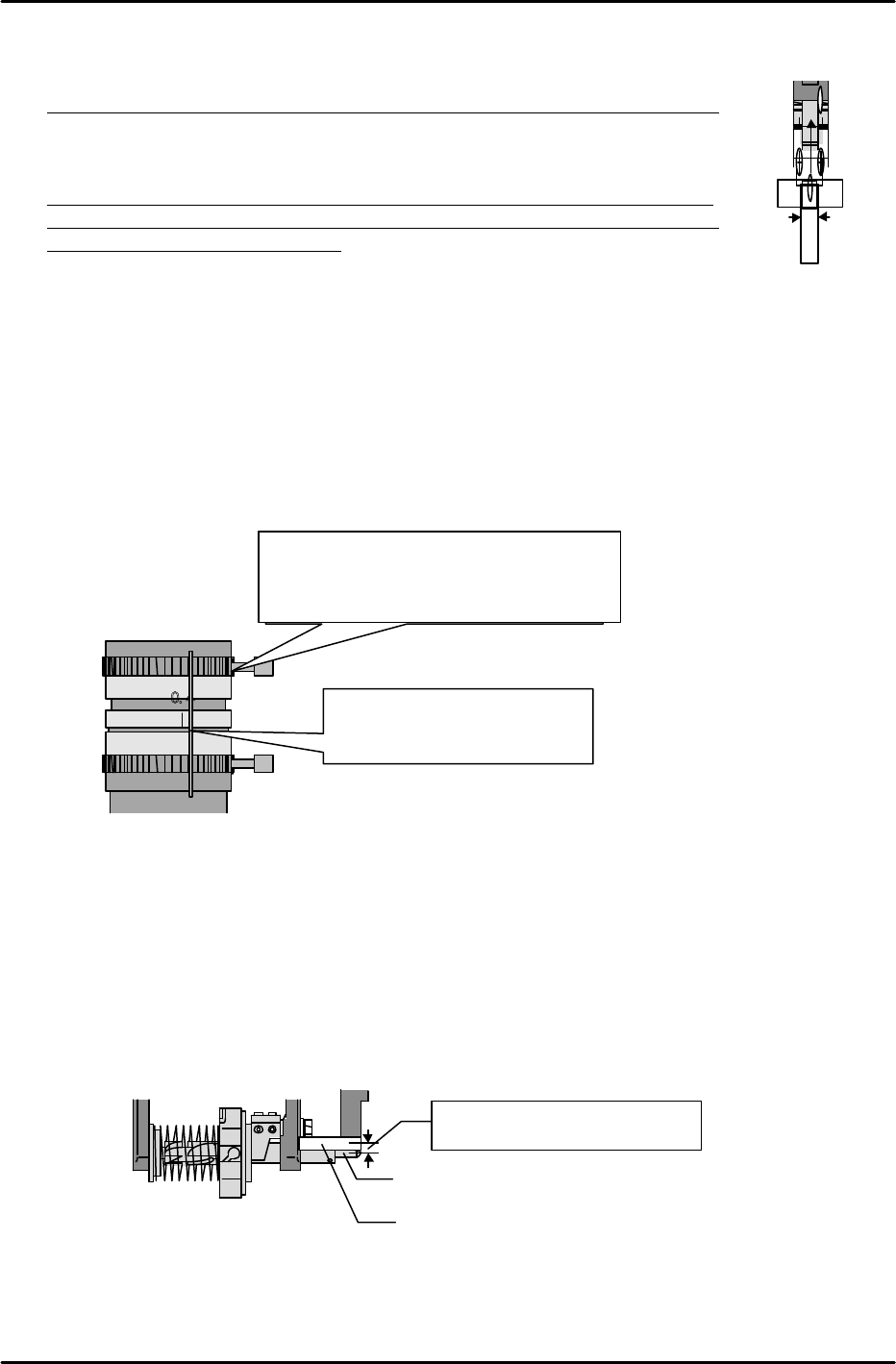
[6-17] Nozzle_Select_Pos.Z Measurement (For Index Types Only)
1) Turn off the 200V power supply, then turn the Z-axis pulley by hand to raise the Z-axis until
the shaft holder makes light contact with the bottom face of the bracket.
2) Add 2333 pulses (2mm shaft radius + 1.5mm below bottom of bracket) to the Z-axis counter
reading at the point of contact to obtain the Nozzle_Select_Pos.Z value. After rotating the
holder so that there is no interference between the end of the shaft and the bracket, raise the
Z-axis to the Nozzle_Select_Pos.Z position and lock the servo.
3) Execute the following command sequence to perform an automatic data input: [NZZLE
SELECT] à [Zn] à [SET].
Add 2333 pulses to the contact-
point counter reading
Nozzle change holder bracket
Shaft holder
10mm
Jig for single type
48
C16
2 1, 4
0. 4
J APAN
The amount of adhesive may exceed if applied
directly from the container. Therefore, use
something as a
screwdriver
to apply adhesive.
Place a yellow mark from the
front.
FK-9F98-07 QP242E Training Text for Service Engineers
6th edition 6. Proper Data Measurement [14/20]
Fuji Machine Mfg. Co., Ltd. Okazaki
SMT Equipment Quality Assurance Dept.
Technical Support Div. Section No.2
6-14
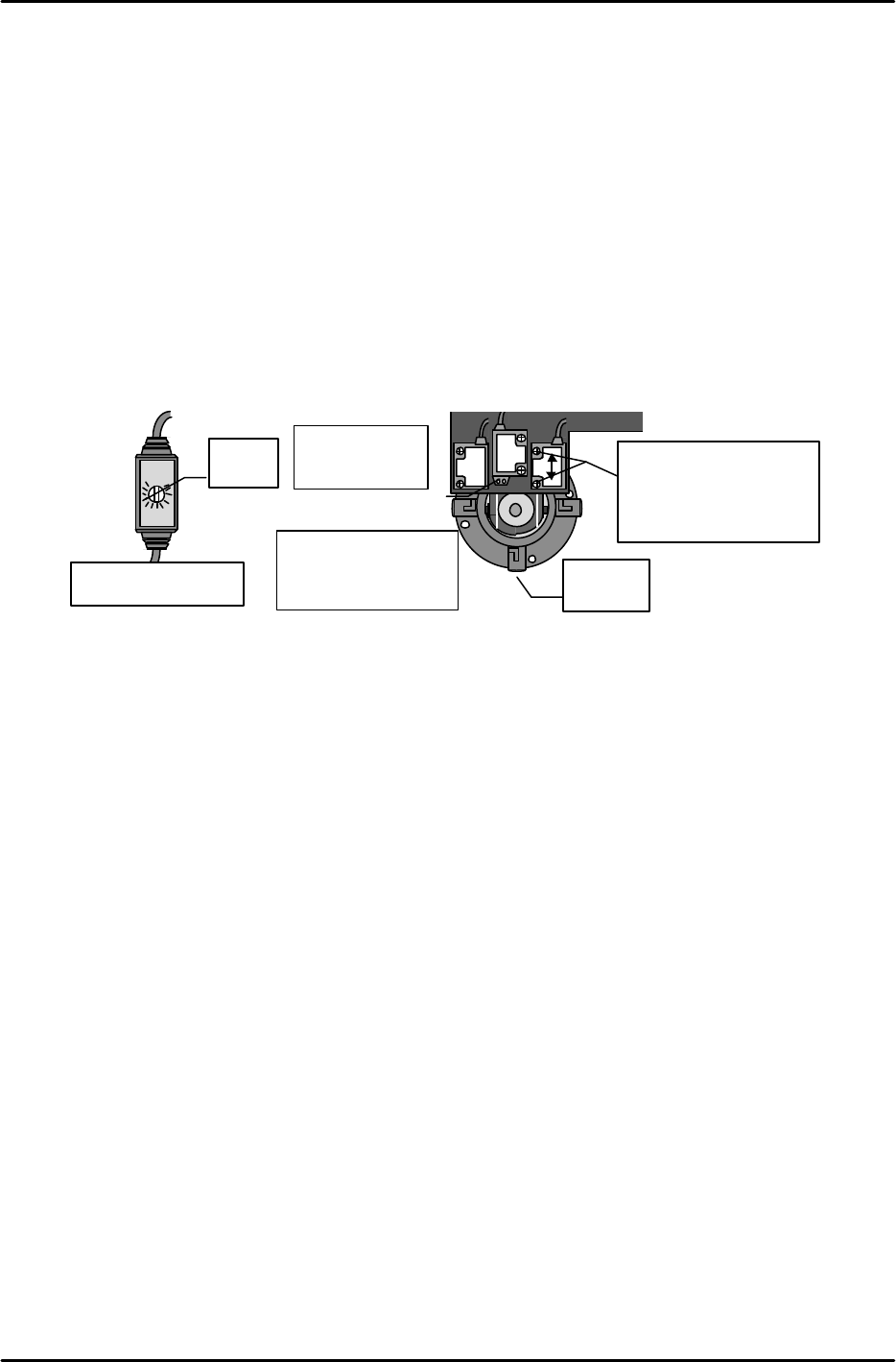
[6-18] Adjusting the Nozzle Check Sensor (For Index Types Only)
1) Move the Z-axis to the Nozzle_Select_Pos.Z position, and the Q-axis to the position where the
counter reads “0”.
2) Temporarily turn the sensor volume to its center position.
3) Select nozzle 3.
4) Gradually cover the index hole from up, down, left, and right, then adjust the sensor beam
emitter up, down, left, and right, until the sensor beam passes through the center of the hole.
5) Lower the volume setting to the point just prior to the point where the sensor receptor’s red
LED goes off.
6) Verify that the green LED lights (stable status) regardless of whether or not the sensor beam
is blocked.
7) Lower the Z-axis 500 pulses below the Nozzle_Select_Pos.Z position and verify that the sensor
beam is not blocked.
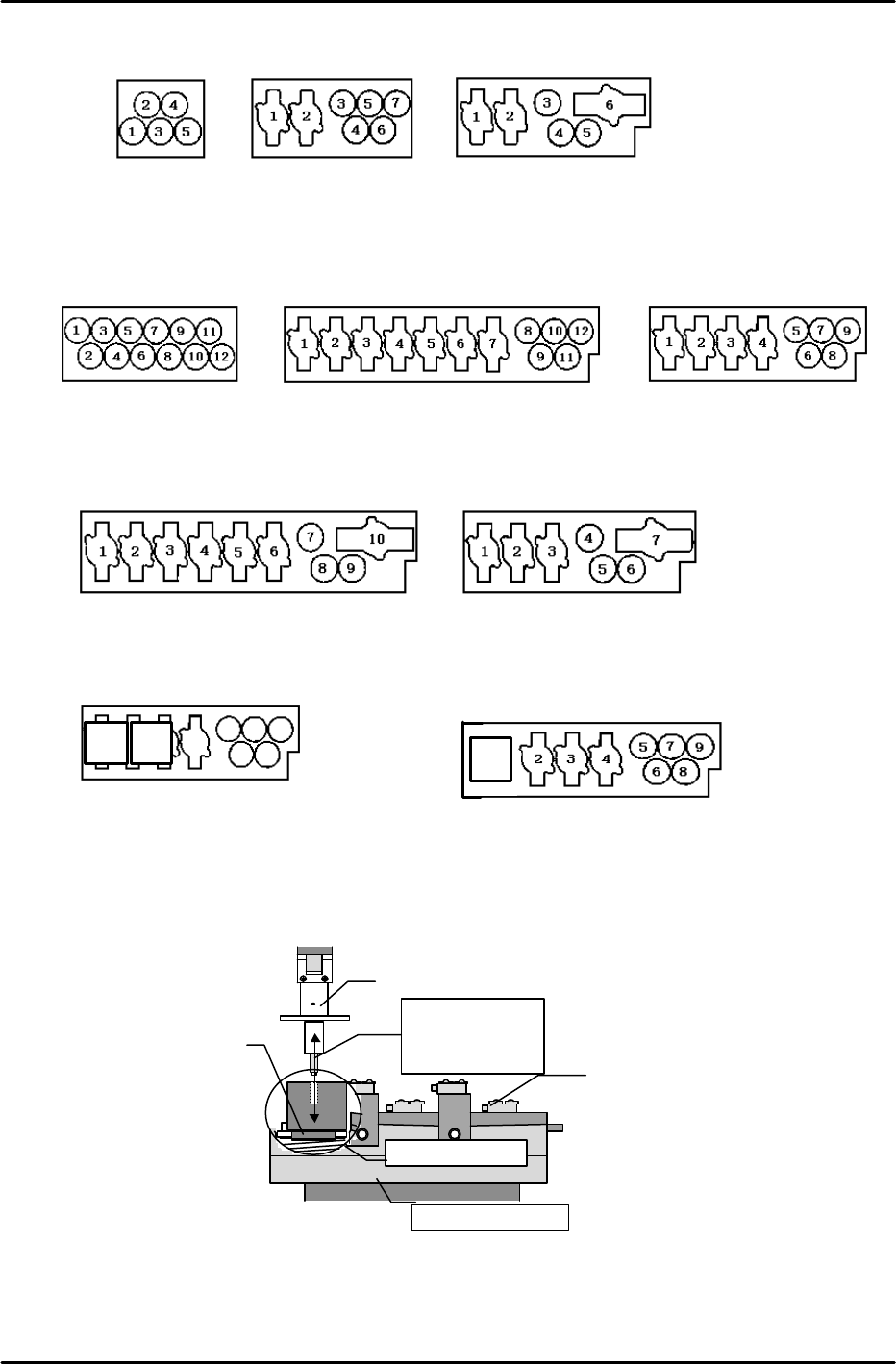
[6-19] Nozzle_Select_Pos.X,Y,Z Measurement (Single Types Only)
1) Nozzle_Select_Pos.X,Y Measurement
1. Execute the following command sequence to raise the unit:
[POSITION] à [Module #] à [NOZZLE] à [STATION] à [UP].
2. Mount the nozzle jig which was used for X0/Y0 at the nozzle shaft.
3. Place a receiving jig at nozzle changer 1.
4. Turn off the 200V power supply and turn the X,Y,Z axis pulleys to find the position where
the nozzle jig can be inserted smoothly into the number 1 jig hole.
5. After positioning the X and Y axes, execute the following command sequence to
automatically enter the Nozzle_1_Select_Pos.X,Y data:
[NOZZLE SELECT] à [Xn/Yn] à [Xn1/Yn1] à [SET].
6. Measure all the Nozzle_Select_Pos.X,Y positions in the same manner.
* The above jig cannot be used at stations with mechanical chucks. Use a jig for mechanical
chucks at these stations.
* For 600 Module
3
2
Select
nozzle, 3.
SEEKA
SEAS
Sensor
volume
Adjust up and down. (The
adjustment range is the
distance equivalent to the
sensor mounting screw’s
unloaded hole amount.)
LED
Inner side: Green
Outer side: Red
Beam emitter
: no LED at sensor
Beam receptor
: LED at sensor
Wiring joint at both
sides of head
FK-9F98-07 QP242E Training Text for Service Engineers
6th edition 6. Proper Data Measurement [15/20]
Fuji Machine Mfg. Co., Ltd. Okazaki
SMT Equipment Quality Assurance Dept.
Technical Support Div. Section No.2
6-15
Move to position
where jig can be
inserted smoothly
Set a receiver jig
to No. 1.
Nozzle jig
Changer spring
Nozzle changer unit
Nozzle detection sensor
Type A (for 1-camera
and 2-camera systems)
Type B (For 1-camera
systems only)
Type C (for 1-camera
systems only)
5 single nozzles loaded
•5 single nozzles loaded
•2 mechanical chucks
•3 single nozzles loaded
•3 mechanical chucks loaded
*
For 800 Module
Type A12 (for 1-camera and
2-camera systems)
12 single nozzles loaded
Type B1 (For 1-camera systems only)
Type B12 (for 1-camera
and 2-camera systems)
•5 single nozzles loaded
•7 mechanical chucks loaded
•5 single nozzles loaded
•4 mechanical chucks loaded
Type C12 (for 1-camera and
2-camera systems)
Type C1 (For 1-camera systems only)
•3 single nozzles loaded
•4 mechanical chucks loaded
•3 single nozzles loaded
•7 mechanical chucks loaded
Type E12 (for 1-camera and
2-camera systems)
•6 single nozzles loaded (1 of which is for 56mm)
•3 mechanical chucks loaded
1
•7 single nozzles loaded (2 of which are
for 56mm)
Type D12 (for 1-camera
21
3
4
5
6
7
8