QP-242E 工程师培训手册 (6.0).pdf.pdf - 第80页
FK-9F98-07 QP242E Training Text for Service Engineers 6th edition 8. MTU6 Adjustment [ 12 /16] Fuji Machine Mfg. Co., Ltd. Okazaki SMT Equipment Quality Assurance Dept. Technical Support Div. Section No.2 8- 12 0.5mm Sto…
FK-9F98-07 QP242E Training Text for Service Engineers
6th edition 8. MTU6 Adjustment [11/16]
Fuji Machine Mfg. Co., Ltd. Okazaki
SMT Equipment Quality Assurance Dept.
Technical Support Div. Section No.2
8-11
Original_Position_TY pre-adjustment
Flush
Tray holder
MTU tray holder stopper
Retract 2.2
to 2.3 mm
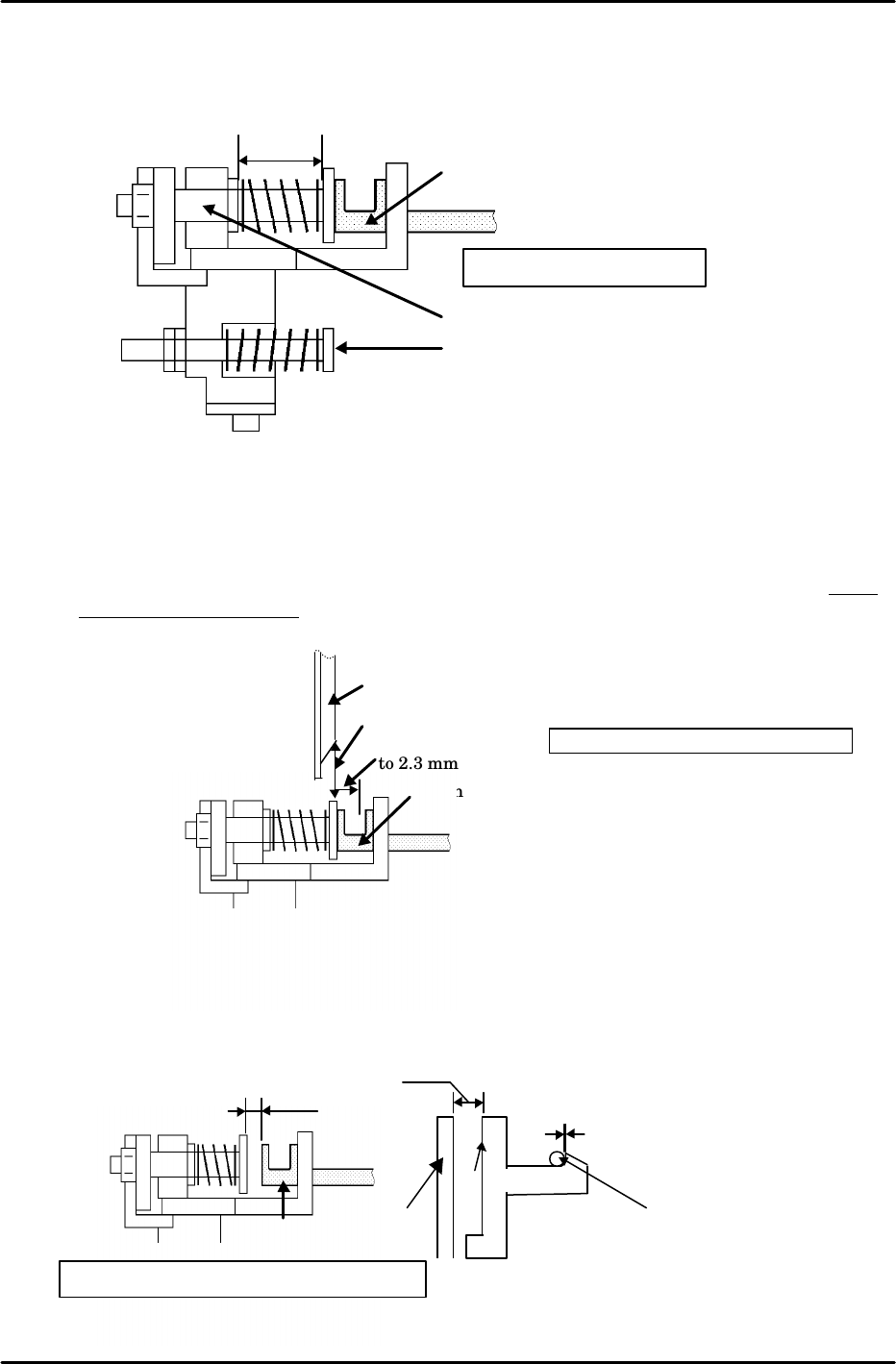
d) Likewise, with the shuttle at the advance limit or some position other than the retract
limit and the tray holder in the set status, adjust shaft clamper dimension B so that it is
18 mm as shown in the figure.
e) Move the shuttle to the advance limit using the following command operation;
[POSITION], [MTU], [SHUTTLE], [ADVANCE] and press START.
f) Set the tray holder and then retract the shuttle via inching.
g) As shown in the figure, from the position where the front of the MTU tray holder stopper
and the rear of the tray holder are on the same plane, retract the shuttle a further 2.2 to
2.3 mm (about 27 pulses) and record the servo count value of that position.
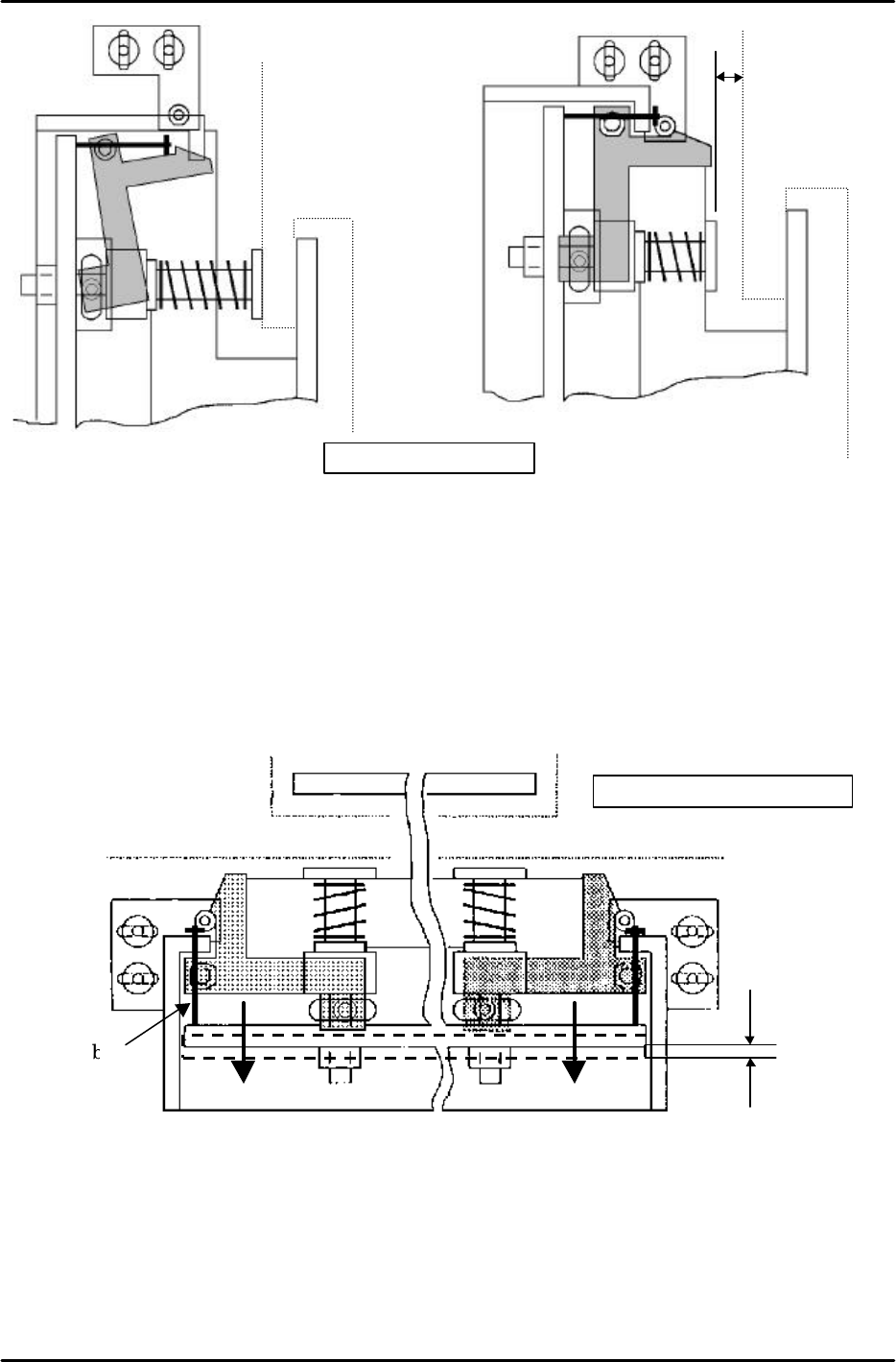
h) Install the cam follower bracket as shown in figure B. (Secure in place temporarily)
i) Adjust the cam follower position using the cam follower bracket such that side C of the
cam and the shuttle plate are approximately parallel and so that there is a gap of about 4
mm between the tray holder and the shaft clamper as shown in figure A.
B:18mm
Shaft clamper
Retract limit cushion
Tray holder
Shaft clamper adjustment
Tray holder
4mm
parallel
Cam
No clearance
Side C
Shuttle
plate
Top view
Cam
follower
Fig.
A Cam follower position adjustment
FK-9F98-07 QP242E Training Text for Service Engineers
6th edition 8. MTU6 Adjustment [12/16]
Fuji Machine Mfg. Co., Ltd. Okazaki
SMT Equipment Quality Assurance Dept.
Technical Support Div. Section No.2
8-12
0.5mm
Stopper bolt
Stopper bolt adjustment
j) From the position that satisfies these conditions retract the TY-axis another 1 mm (12
pulses). This position becomes Original_Position_TY.
k) In this position use the following command operation to automatically enter the Proper
data; [PROPER}, [ETC], [DEVICE], [ORG. POS], [TY], and [SET].
2) Stopper bolt adjustment
a) Attach the stopper bolt. (Secure in place temporarily.)
b) As shown in the figure below adjust the stopper bolt so that the shuttle plate is pushed in
on the advance limit side by 0.5 mm.
c) Move the shuttle to the advance limit and tighten the stopper bolt lock nut.
4mm
Fig.B Cam installation
After cam
installation
Prior to cam
installation
Top view
Top view
FK-9F98-07 QP242E Training Text for Service Engineers
6th edition 8. MTU6 Adjustment [13/16]
Fuji Machine Mfg. Co., Ltd. Okazaki
SMT Equipment Quality Assurance Dept.
Technical Support Div. Section No.2
8-13
Tray holder
Cam follower contact adjustment
4mm
parallel
Cam
Side C
Shuttle
plate
Top view
Cam
follower
Cam follower
contact
adjustment
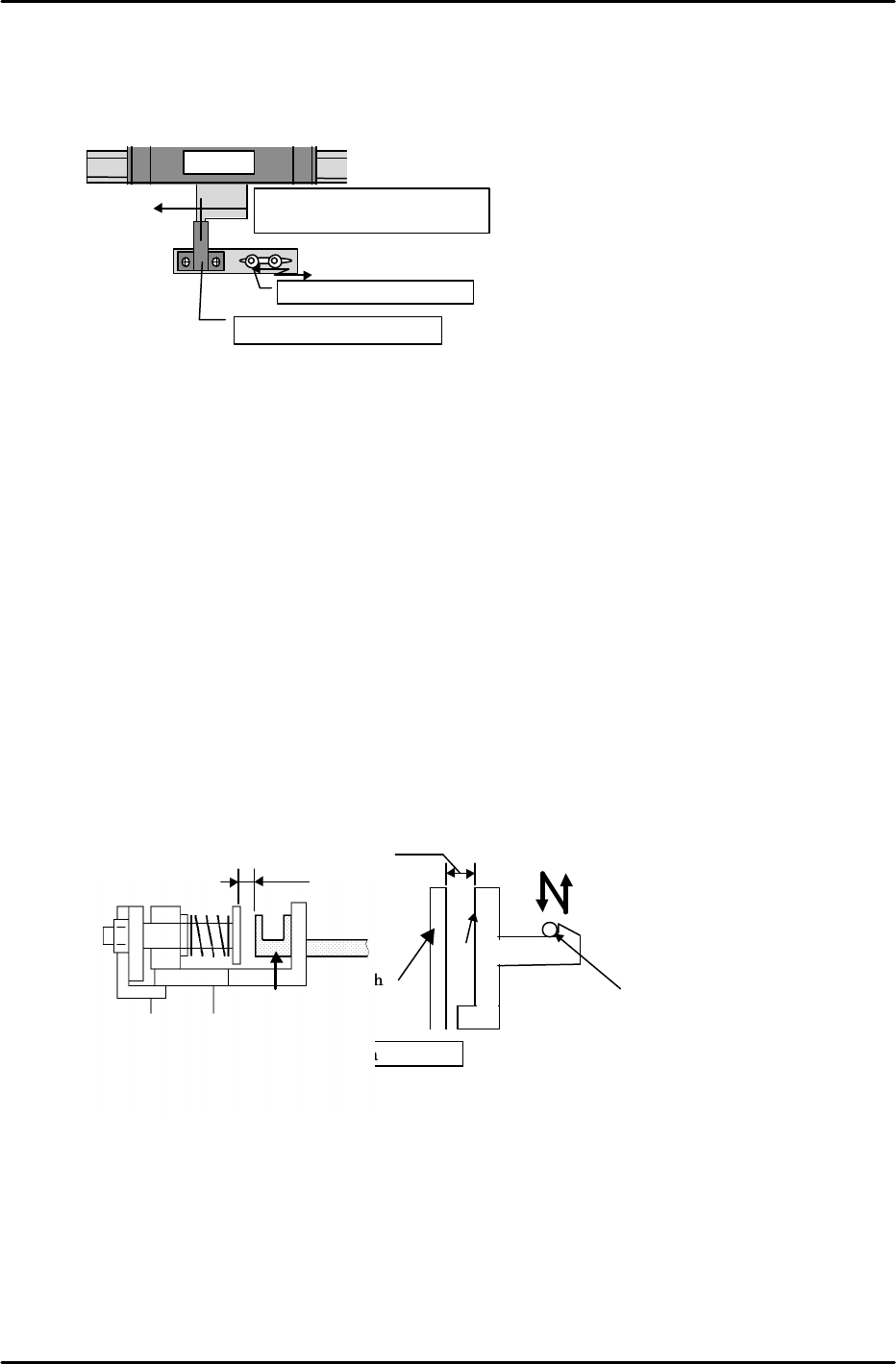
3) Retract limit check sensor adjustment
Adjust the retract limit check sensor from the Original_Position_TY position. Move the
bracket on the sensor side to adjust so that the dog is in the center of the sensor.
4) Shuttle retract limit stop position check
Move the shuttle from the advance limit to the retract limit. When this is done make
sure that the shuttle jaw does not come into contact with the tray holder guide. If it does
make contact then adjust the retract limit cushion and the stopper bolt. Advance and
retract the shuttle several times to verify.
5) Cam follower position check
a) Verify that the dog does not separate from the retract limit sensor as a result of the spring
force of the shuttle jaw even when the emergency stop status is enabled at the
Original_Position_TY position.
b) Advance and retract the shuttle repeatedly to verify that no unusual noise is being
produced between the cam follower and the cam. If the cam follower strikes the cam too
hard this will produce a clicking sound.
Note: If the TY-axis separates from the retract limit sensor as a result of an emergency stop
it is possible that the cam follower is not striking the cam with enough force.
However, care should be exercised since if the striking force is too strong this will lead
to increased impact when a tray is stored as well as tray vibration.
In terms of cam follower contact, in general the cam should be adjusted so that side C
of the cam is parallel with the shaft plate (previously described).
However, if the conditions in step (1)and (2) above are not satisfied, use the cam
follower bracket as shown in the figure below to adjust the cam follower position.
Shuttle
Move the sensor bracket
Original_Position_TY pos.
Retract limit check sensor
Align the center of the dog
with the center of the sensor.