QP-242E 工程师培训手册 (6.0).pdf.pdf - 第111页
FK-9F98-07 QP242E Training Text for Service Engineers 6th edition 13. MTU 71E Adjustment [ 9 /24] Fuji Machine Mfg. Co., Ltd. Okazaki SMT Equipment Quality Assurance Dept. Technical Support Div. Section No.2 13- 9 [1 3- …
FK-9F98-07 QP242E Training Text for Service Engineers
6th edition 13. MTU 71E Adjustment [8/24]
Fuji Machine Mfg. Co., Ltd. Okazaki
SMT Equipment Quality Assurance Dept.
Technical Support Div. Section No.2
13-8
[13-21] Prior to Zero Set Adjustment
Note: Even if zero set has not been completed the inching button will work in relation to the
TZ-axis but only if the TY-axis advance or retract limit sensor is on. If the inching button
is used when the advance limit sensor is on, the TZ-axis interlock sensor will not work.
Exercise caution when using the inching button with the tray holder in the forward status.
If the tray holder or LM guide makes even the slightest contact with the cover or guide
bar the tray will have to be readjusted.
[13-22] Preliminary Zero Setting
1) Remove the TZ-axis zero set dog (also serves as TZ-axis interlock) and TY-axis interlock dog
(long top to bottom dog) from inside the MTU71E unit.
2) Check that the remover has been returned and then with the TY-axis retract limit sensor
and TY-axis interlock sensor in the tripped status, press START on the machine to begin
zero setting.
3) After zero setting of the X, Y, Z, and Q axes on the machine has been completed, zero setting
of the TY-axis and TZ-axis commences in that order. Check that the motor has definitely
begun working, then reset the tripped status of the TY-axis retract limit sensor, and trip the
TY-axis zero set sensor two times (now at the retract limit) to complete zero setting of the
TY-axis. Once zero setting is completed the TY-axis will begin moving to the
Original_Position_TY position so if the Proper data value is to be entered, trip the TY-axis
retract limit sensor again at this time.
4) TZ-axis zero setting will then commence. Check that the TZ-axis motor is working, then trip
the TZ-axis zero set sensor two times and complete TZ-axis zero setting. If the initial display
screen appears on the machine monitor this indicates that zero setting is completed. Since
the next adjustment is initiated from this status, maintain the servo lock status as it is.
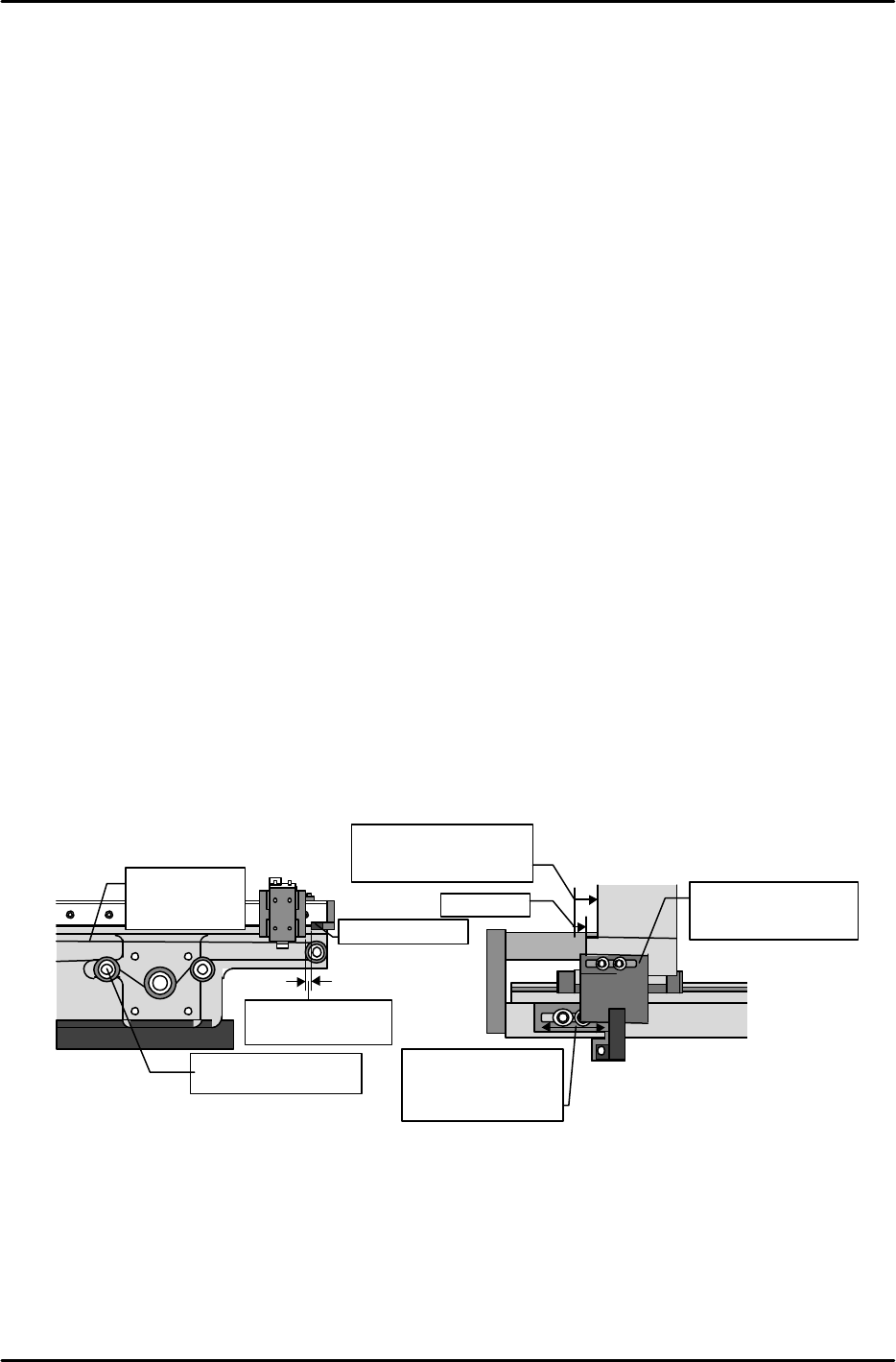
[13-23] TY-axis Zero Set Position Adjustment
Secure the zero set dog in place in the center of the oblong hole. Stretch the timing belt so
that the shuttle is 2 mm from one of the mechanical stoppers. (Belt tension: 52.60HZ ~ 62.60
Hz) Next, move the TY-axis so that it is +167 pulses (15 mm) from the mechanical stopper
(check the servo count while doing this). Move the sensor bracket side to adjust the sensor so
that it comes on in this position. Once adjustment is finished use the servo counter to verify
that the position at which the sensor comes on is within a range from +164 to +170 pulses
(14.76 ~ 15.3 mm) from the mechanical stopper.
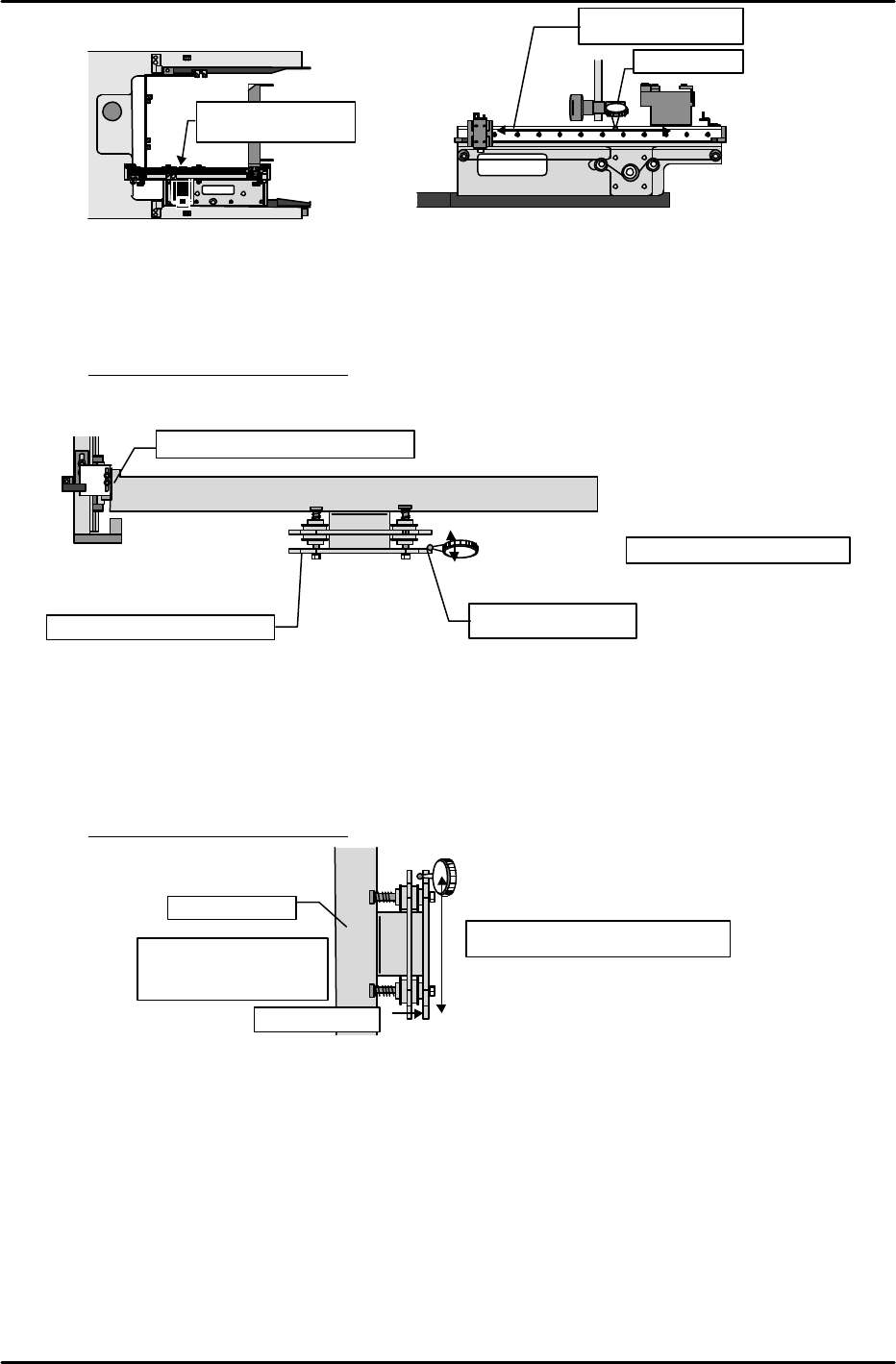
[13-24] Shuttle Assembly Y-direction Angle of Orientation Adjustment
Attach the dial gauge to the placement head, set the dial gauge needle on the side of the shuttle
assembly linear guide rail and measure the angle of orientation in the Y-direction. Adjust the
angle so that the difference from the advance limit to the retract limit is within 0.1 mm.
Mecha-stopper
Adjust the tension
using this pulley.
Pull the belt back
2 mm.
sensor
Adjust so that the
sensor comes on in
a position between
+164 and 170
LM
guide
゙
Mecha-stopper
Secure the dog in
place in the center
of the oblong hole.
Adjust to a position
167 pulses from the
mechanical stopper.
Belt tension
measurement
location
Outside view from the side of the shuttle
Inside view from the side of the shuttle
15mm
FK-9F98-07 QP242E Training Text for Service Engineers
6th edition 13. MTU 71E Adjustment [9/24]
Fuji Machine Mfg. Co., Ltd. Okazaki
SMT Equipment Quality Assurance Dept.
Technical Support Div. Section No.2
13-9
[13-25] Shuttle Jaw Front to Back Angle of Orientation Adjustment
Set the dial gauge needle on the inside surface of the stationary claw and move it up and down
in the Z-direction. Then twist the shuttle bar mount to adjust the jaw so that the angle of
orientation from the top of the claw to the bottom is within the allowable tolerance.
Tolerance: Within +/- 0.1 mm
[13-26] Shuttle Jaw Parallel Adjustment
Use the dial gauge set on the inside of the stationary side claw in the previous item. This time
move the dial gauge in the X-direction to measure the parallelism of the jaw. If the difference at
each end exceeds the allowable tolerance then the shuttle bar must be replaced. When the
shuttle bar is replaced not only must parallel adjustment be performed but the angle of
orientation in the previous item must be adjusted again as well.
Tolerance: Within +/- 0.2 mm
Tolerance : within +/-0.2mm
Advance limit position
from the top of the
shuttle assembly
Shuttle bar
Stationary side
2
1
Measure the side of
the linear guide.
Angle of orientation
within 0.1 mm
Dial gauge
①
②
Inside view from the side of the shuttle
Shuttle bar
Shuttle stationary claw side
Top (
)
Bottom ( )
Measure the side in
the Z-direction
Tolerance : within +/-0.1mm
Fine adjust by the torsion status.
Top (
)
Bottom( 0 )
1
2
FK-9F98-07 QP242E Training Text for Service Engineers
6th edition 13. MTU 71E Adjustment [10/24]
Fuji Machine Mfg. Co., Ltd. Okazaki
SMT Equipment Quality Assurance Dept.
Technical Support Div. Section No.2
13-10
[
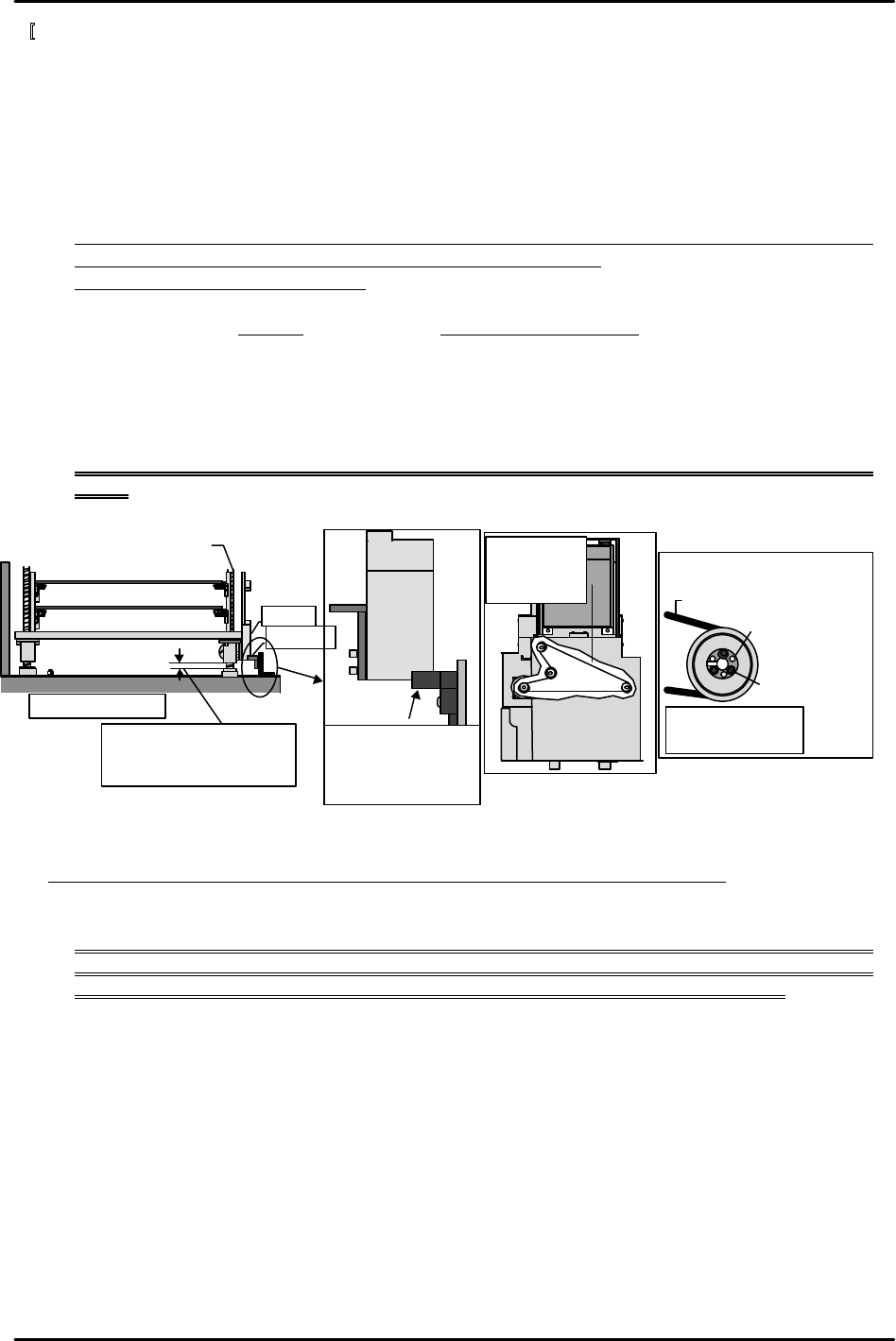
13-27] TZ-axis Zero Set Position Adjustment
1) Rotate the ball screw by hand and move the two spline shaft nuts to the mechanical stopper
positions.
2) Loosen the span ring on the belt pulley mechanism located on the underside of the ball
screw. If the spann ring is difficult to loosen, move the bolt to the adjacent loosening hole as
shown in the figure and fasten the bolt in the hole.
3) Use the inching button to move the TZ-axis –1,000 pulses (–10 mm). In this position wrap
the belt around the pulley, tighten the spann ring and use the belt tension pulley to adjust
the tension.
Note: In some instances the pulley may drop down as the ring is tightened. Push the pulley
up to the highest point and then tighten the spann ring bolt.
Belt tension: 52.10 Hz ~ 62.10 Hz
4) Install the zero set dog (also serves as TZ-axis interlock) that was removed in an earlier
process. Move the TZ-axis via inching to a servo count of + 400 (position 14 mm from the
mechanical stopper). Move the zero set sensor to adjust it so that it comes on at this position.
5) Next, move the TZ-axis to turn the sensor off and then back on to verify the servo count value.
6) Lastly install the TY-axis interlock (also serves as set pitch) dog. Raise the TZ-axis via
inching and adjust the bracket position so that none of the interlock sensors and dogs
interfere with each other.
Note: If the TZ-axis interlock dog is moved the TZ-axis zero set sensor must be adjusted
again.
[13-28] Zero_Offset_TZ Measurement and Re-calibrating Zero Setting
Move the TZ-axis up 1 mm (100 pulses) from the bottom mechanical stopper. The servo count
value at this time becomes the Zero_Offset_TZ value. After the value is entered at the machine or
transmitted from F4G, cut the power to the machine, reboot and then carry out zero set again.
Note: After zero set is completed the machine moves not to the zero set complete position but to
the position specified by Zero_Offset_TZ and the servo count value is reset to zero. Before
proceeding to the next item be sure to cut the power and carry out zero set again.
Adjust so that the
zero set sensor comes
on when the TZ-axis
count is + 400 pulses.
Timing belt
Ring lock
bolt
Bolt loosening
hole
View from bottom of the ring
Belt tension
measureme
nt location
Bolt tightening
torque is 2 kgf.cm
TZ-axis ball screw
MTU bottom front
10mm
Counter value is 0 (zero
set complete position)
Dog
゙
Sensor