QP-242E 工程师培训手册 (6.0).pdf.pdf - 第25页
FK-9F98-07 QP242E Training Text for Service Engineers 6th edition 3. QP242E Initial Adjustment (2) [ 8 /12] Fuji Machine Mfg. Co., Ltd. Okazaki SMT Equipment Quality Assurance Dept. Technical Support Div. Section No.2 3-…
FK-9F98-07 QP242E Training Text for Service Engineers
6th edition 3. QP242E Initial Adjustment (2) [7/12]
Fuji Machine Mfg. Co., Ltd. Okazaki
SMT Equipment Quality Assurance Dept.
Technical Support Div. Section No.2
3-7
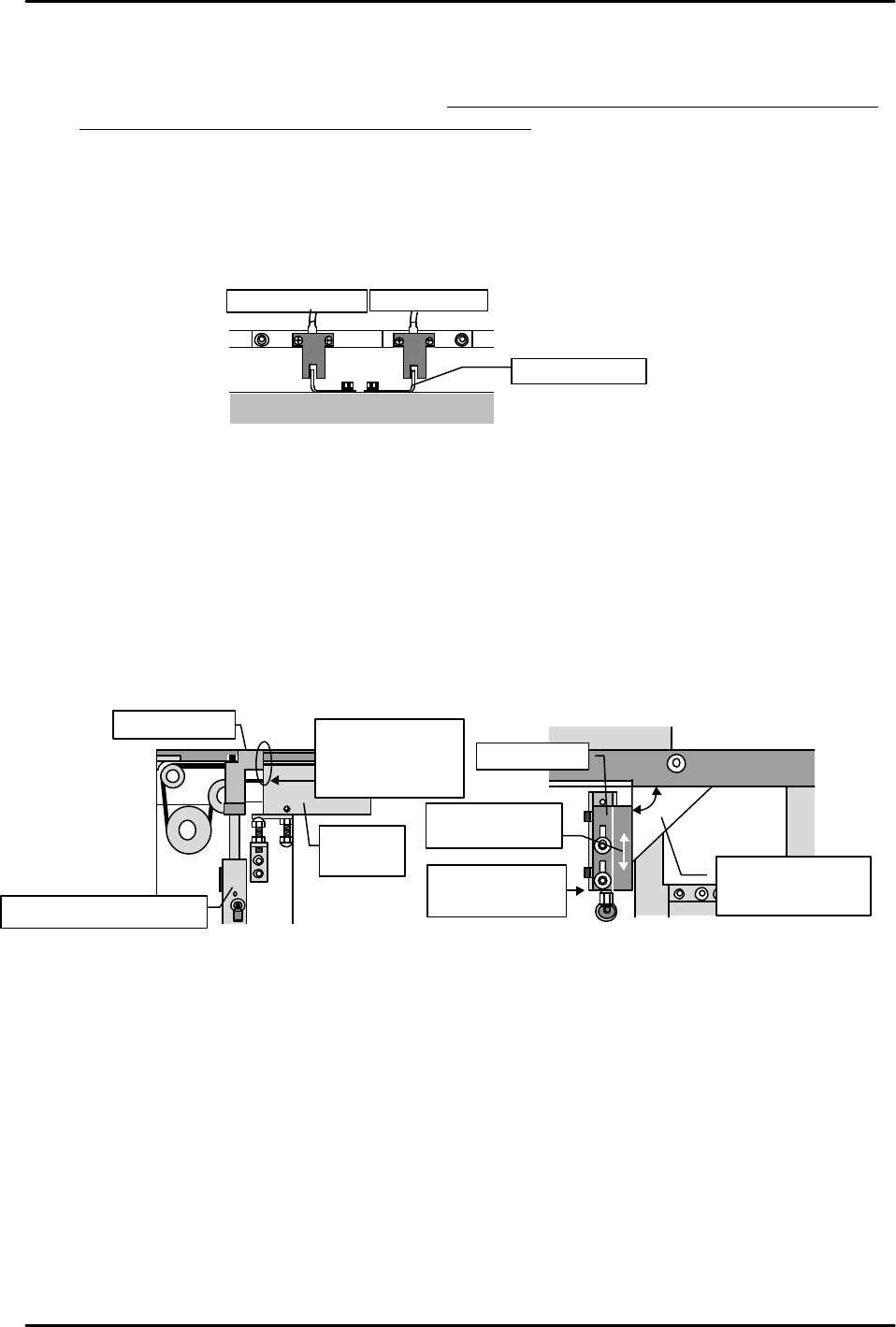
[3-8 ] Table UP Limit and DOWN Limit Sensor Adjustments
1) Turn the "Y023 CNVYR BRD CLMP" I/O command on to raise the table at the module in
question. Adjust the UP limit sensor dog so that the sensor switches on when a 4mm board
is clamped, and off when a 4.8mm board is clamped.
2) Turn the "Y024 CNVYR BRD UNCLMP" I/O command on to lower the table. Starting from
the position where the sensor is on, raise the dog until the sensor switches off. Next, lower
the dog to find the point where the sensor switches on again. Secure the dog 1mm below
that point.
3) Turn the I/O commands on and off to raise and lower the table, verifying that there is no
sensor hunting, etc.
[3-9 ] Board Stopper Sensor and Stopper Position Adjustments
1) Turn the "Y022 CVR BD STPR IN" I/O command off to lower the board stopper. Beginning
from the position where the DOWN limit sensor is on, gradually lower the sensor to find the
point where it switches off. Secure the sensor 1mm above this point.
2) Turn the "Y022 CVR BD STPR IN" I/O command on to raise the board stopper. Beginning
from the position where the UP limit sensor is on, gradually raise the sensor to find the
point where it switches off. Secure the sensor 1mm below this point.
3) Adjust the stopper position as shown below.
* Use the I/O command to raise the board stopper, and check the adjustments at the UP
limit position.
DOWN limit sensor UP limit sensor
Adjust dog
Table
Conveyor
Align cylinder
and bracket faces
Move bracket to
align faces
Use square jig to
verify 90 angle
(adjust if necessary)
Board stopper
Board stopper air cylinder
Board
clamper
Adjust the stopper
so that the stopper
and clamper faces
are evenly aligned
Board stopper
FK-9F98-07 QP242E Training Text for Service Engineers
6th edition 3. QP242E Initial Adjustment (2) [8/12]
Fuji Machine Mfg. Co., Ltd. Okazaki
SMT Equipment Quality Assurance Dept.
Technical Support Div. Section No.2
3-8
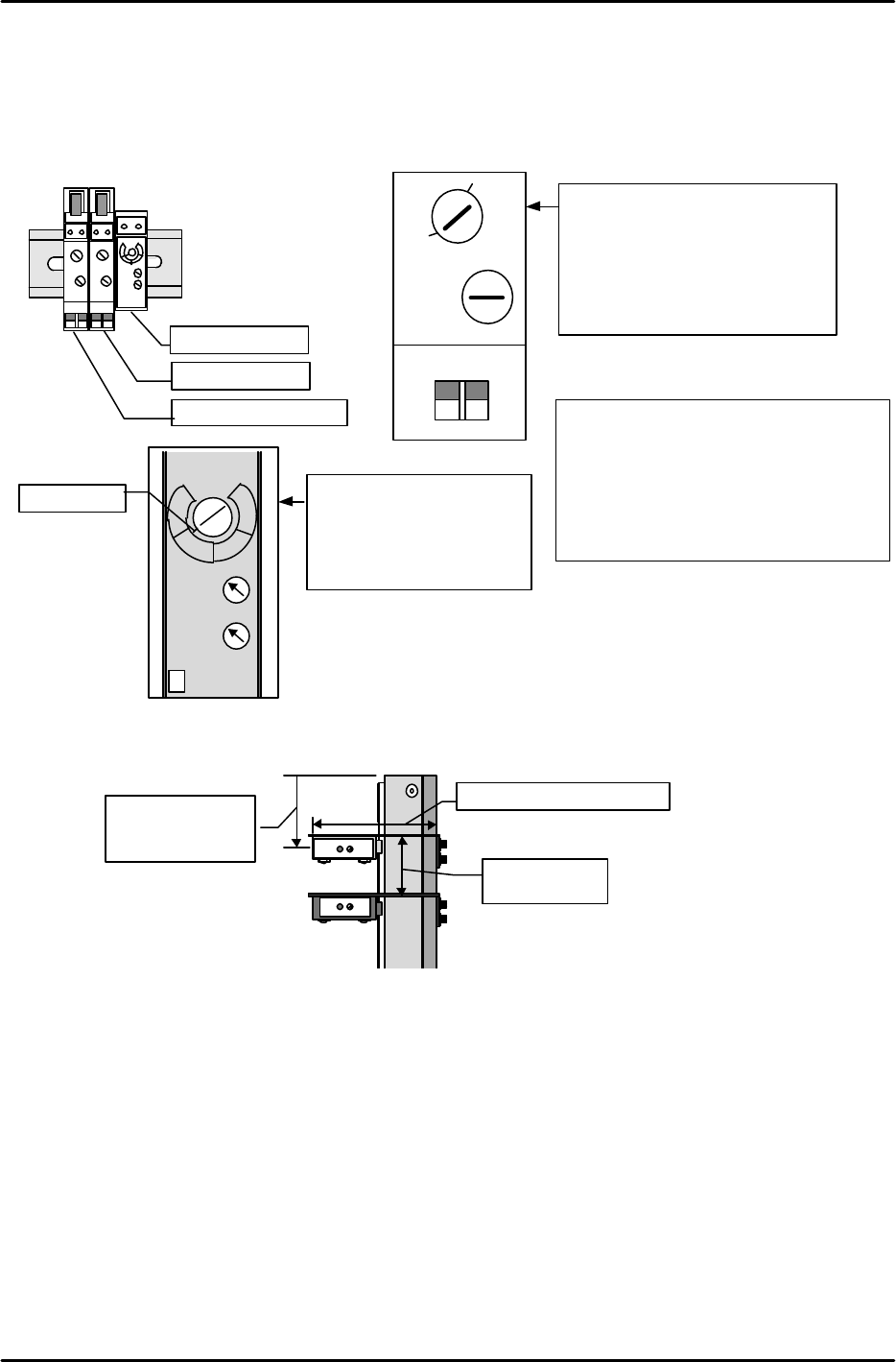
[3-10] Board Sensor Adjustment
1) Set the conveyor sensor amplifiers as shown below.
(At rear part-supply machines, the amplifiers are located on the right-side face of the MFU
mounting area. At front part-supply machines, the amplifiers are located in front of the
conveyor.)
2) Adjust the ICM deceleration and arrival sensor positions with reference to the following
illustration.
Yamatake Honeywell
DELAY
OMRON
Sensor switches
on 40mm from
conveyor end
40mm from
arrival sensor
67mm from conveyor end
Arrival sensor
Deceleration sensor
Pass sensor
Sensor amplifier
TIME
MAX
MIN D.ON
L.ON
1
2
3
4
LOW
HIGH
SENS
Red line
ON
Pass sensor
•DARAK ON
•TIME MIN
•SENS 3 Temporary
adjustment
SENS
L-ON
MODE
OFF-D
ON
OFF
D-ON
OFF-D
MIN MAX
Deceleration and arrival sensor
•LIGHT ON
•OFF-D OFF
•SENS Temporarily adjust to
activate for Fuji boards
•OFF-D volume
Set to maximum (full CW rotation)
Remarks
In cases where the board stopper pushes
boards which are being unloaded
upward, turn the arrival sensor's OFF-D
switch on and adjust the OFF-D volume.
If the OFF-D timer period is too long,
however, 2 consecutive boards will be
unloaded.
FK-9F98-07 QP242E Training Text for Service Engineers
6th edition 3. QP242E Initial Adjustment (2) [9/12]
Fuji Machine Mfg. Co., Ltd. Okazaki
SMT Equipment Quality Assurance Dept.
Technical Support Div. Section No.2
3-9
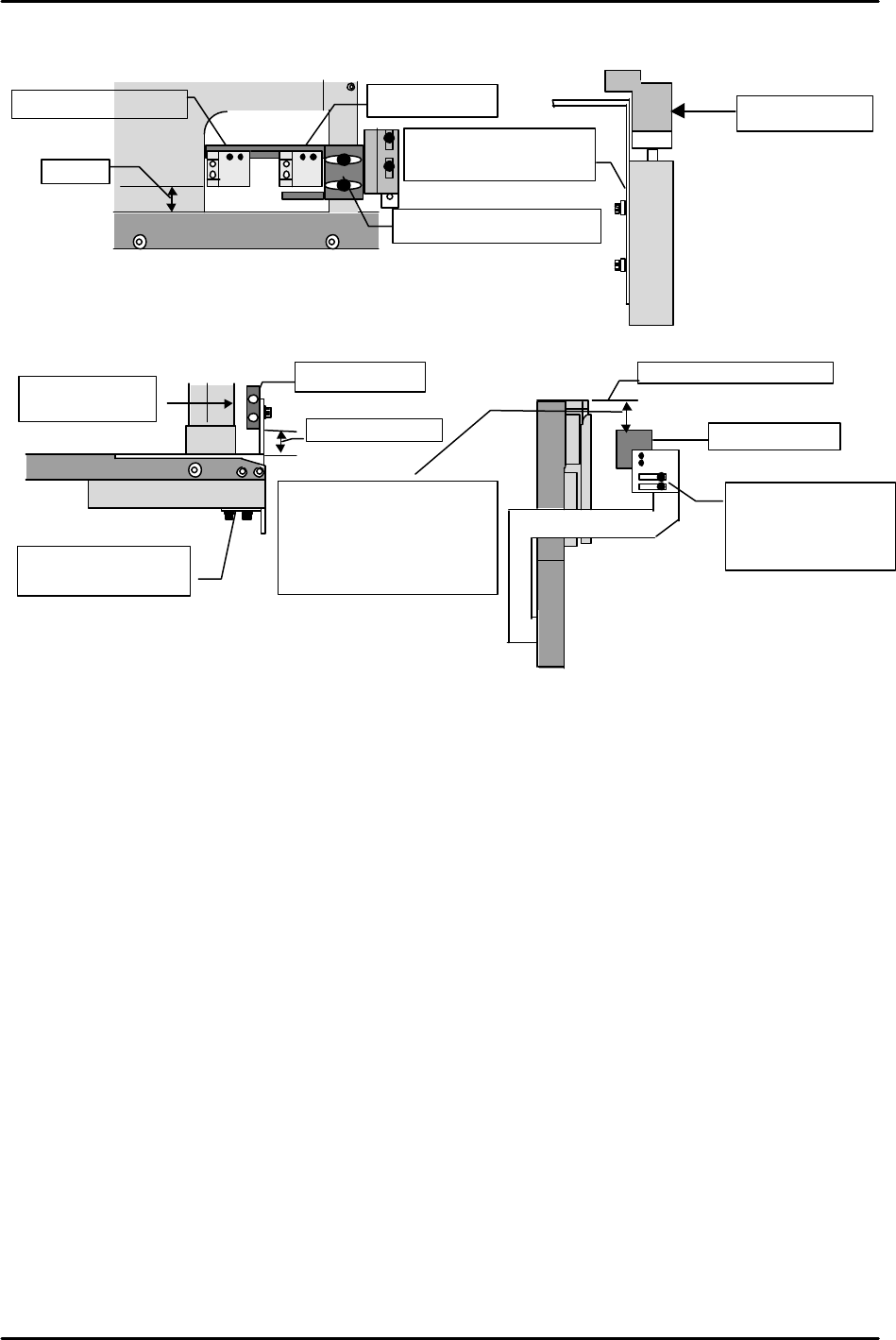
3) Adjust the machine's deceleration, arrival, and pass sensor positions with reference to the
following illustration. (This illustration shows a rear part-supply machine)
Note 1. Verify that that there is no interference between the pass sensor bracket and the
conveyor pulley (or belt) when the conveyor is adjusted to the minimum size board
width.
As old type brackets cannot be adjusted to 5mm, move these brackets to the end of the
slot.
Note 2. Because interference occurs if old type brackets are adjusted to 3mm, a change of up to
6mm is permitted.
4) Set the volume of the conveyor deceleration speed controller to 30%. Check to see if the
conveyor decelerates when the deceleration sensor beam is blocked.
5) Clamp a Fuji board (1.6mm thick, with black sensor activating face), and verify that the
deceleration, arrival, and pass sensors operate properly. If a sensor fails to activate, turn the
sensor's amplifier volume a little higher, stopping at the point where the sensor activates.
6) Set a premounted part on a Fuji board (board bottom face, height 23mm, with black sensor
activating face), and check to see if this part activates the deceleration and arrival sensors.
If a sensor fails to activate, turn the sensor's amplifier volume a little higher, stopping at the
point where the sensor activates. (For premounted parts with heights exceeding 23mm (23
to 26mm), move the sensor further back.) If the pass sensor fails to activate, adjust its
amplifier volume so that the pass sensor can detect a black color 26mm below the board's
bottom face.
7) Finally, verify that the sensors are not activated by the white board located 27mm above the
board clamper's top face. (Not activated by the mark camera's white dispersion plate.)
8) If the check results at steps 6) and 7) are NG, change the sensor height (pass sensor), then
repeat the above procedure, beginning from step 5). However, only the pass sensor height may
be changed. Only volume adjustment is permitted at the deceleration and arrival sensors.
Conveyor
Set height adjusting
bracket to approximately
50mm, and verify as
described in steps 6) and 7)
below. If NG, readjust.
Pass sensor
5mm *See note 1
Viewed from top of machine
Conveyor
Set height adjusting
bracket to 50mm
Viewed from machine's
right side
Pass sensor
From conveyor's top face
Adjust to
3 to 6mm
*See note 2
Adjust front
/back
positioning bracket
to 5mm
*See note 1
9mm
Viewed from machine rear
Conveyor
ー
Deceleration sensor
Adjust front
/back
positioning bracket to
9mm
Arrival sensor
Viewed from machine front
Main stopper
Secure at center of slot