a3369b.pdf - 第126页
Communication Interfaces VTK - TR -BA- 171e - 1 - User Manua l MDS 3080 -V 117 82 SETUP: AR EAD: <set up no .> Descript ion: This command reads the p arameters of a g iven setup. As va lue you ha ve to enter i ts n…
Communication Interfaces
116
VTK-TR-BA-171e-1 - User Manual MDS 3080-V
80 SETUP:ASAVE:<setup no.>:<RI>,<OT>,<FA>,<NL>,<NP>,<DL>
Description:
This command saves the given parameters in a setup. You always have to
provide the number of the setup and all six setup parameters.
All parameters will be checked. Not enough parameters, delay too short
with activated heater or incorrect values will lead to cancellation.
Parameters relating to time have to be specified in 1/10 ms, except for
“Falling” and “Rising”, which have to be entered in 1/100 ms. Values lower
than “1” are not admissible, only the open time can be “0”. The minimum
values for Falling and Rising depend on the Needle Lift (see paragraph 7.4
"Minimum and Maximum Parameter Limits", page 61).
Specified values must be integer and positive
Example:
Input:
SETUP:ASAVE:1: 30,10,15,90,20,8
Result:
The parameters will be saved in the given setup and
checked.
Return:
OK
81 SETUP:READ:<setup no.>
Description:
This command reads the parameters of a given setup. As value you have to
enter its number.
All values relating to time are given in 1/10 ms (i.e. 10 ≙ 1.0 ms).
The minimum values for Falling and Rising depend on the Needle Lift
(see
paragraph 7.4 "Minimum and Maximum Parameter Limits", page 61).
Example:
Input:
SETUP:READ:1
Result:
Displays the parameters of the given setup.
Rising: 30 ≙ 3.0 ms (ms = Milliseconds)
Open Time: 10 ≙ 1.0 ms
Falling: 15 ≙ 1.5 ms
Needle Lift: 90 %
Number of Pulses: 20
Delay: 8 ≙ 0.8 ms
Return:
30,10,15,90,20,8
Communication Interfaces
VTK-TR-BA-171e-1 - User Manual MDS 3080-V
117
82 SETUP:AREAD:<setup no.>
Description:
This command reads the parameters of a given setup. As value you have to
enter its number.
All values relating to time, except “Falling” and “Rising”, are given in
1/10 ms (i.e. 10 ≙ 1 ms). Falling and rising are given in 1/100 ms (i.e. 100 ≙
1.00 ms).
The minimum values for Falling and Rising depend on the Needle Lift
(see
paragraph 7.4 "Minimum and Maximum Parameter Limits", page 61).
Example:
Input:
SETUP:AREAD:1
Result:
Displays the parameters of the given setup.
Rising: 30 ≙ 0.3 ms (ms = Milliseconds)
Open Time: 10 ≙ 1.0 ms
Falling: 15 ≙ 0.15 ms
Needle Lift: 90 %
Number of Pulses: 20
Delay: 8 ≙ 0.8 ms
Return:
30,10,15,90,20,8
83 BAUDRATE:0/1/2/3/4
Description:
This command changes the baud rate of the serial interface. There are five
possible baud rates (9600, 19200, 38400, 57600 and 115200),
corresponding with the parameters in this order (0, 1, 2, 3 or 4).
Important Note!
After reading the “OK”, the sender has to switch his baud rate as well;
otherwise, the communication will break down.
Example:
Input:
BAUDRATE:1
Result:
The baud rate is switched to 19200.
Return:
OK
84 GETTD GETTD = Get time and date
Description:
This command tells you the current time (UTC) and date in the format
“hour, minute, second, year, month, day”.
Example:
Input:
GETTD
Result:
The time (UTC) is given, including the date.
Return:
10,07,00,2019,02,17
or
No Clock (if the RTC of the MDC is defect)
85 MDC:RESTART
Description:
This command tells the MDC to shut down (without shutting down the
power) and then to restart.
Example:
Input:
MDC:RESTART
Result:
The MDC is shut down and then restarts.
Return:
OK
Communication Interfaces
118
VTK-TR-BA-171e-1 - User Manual MDS 3080-V
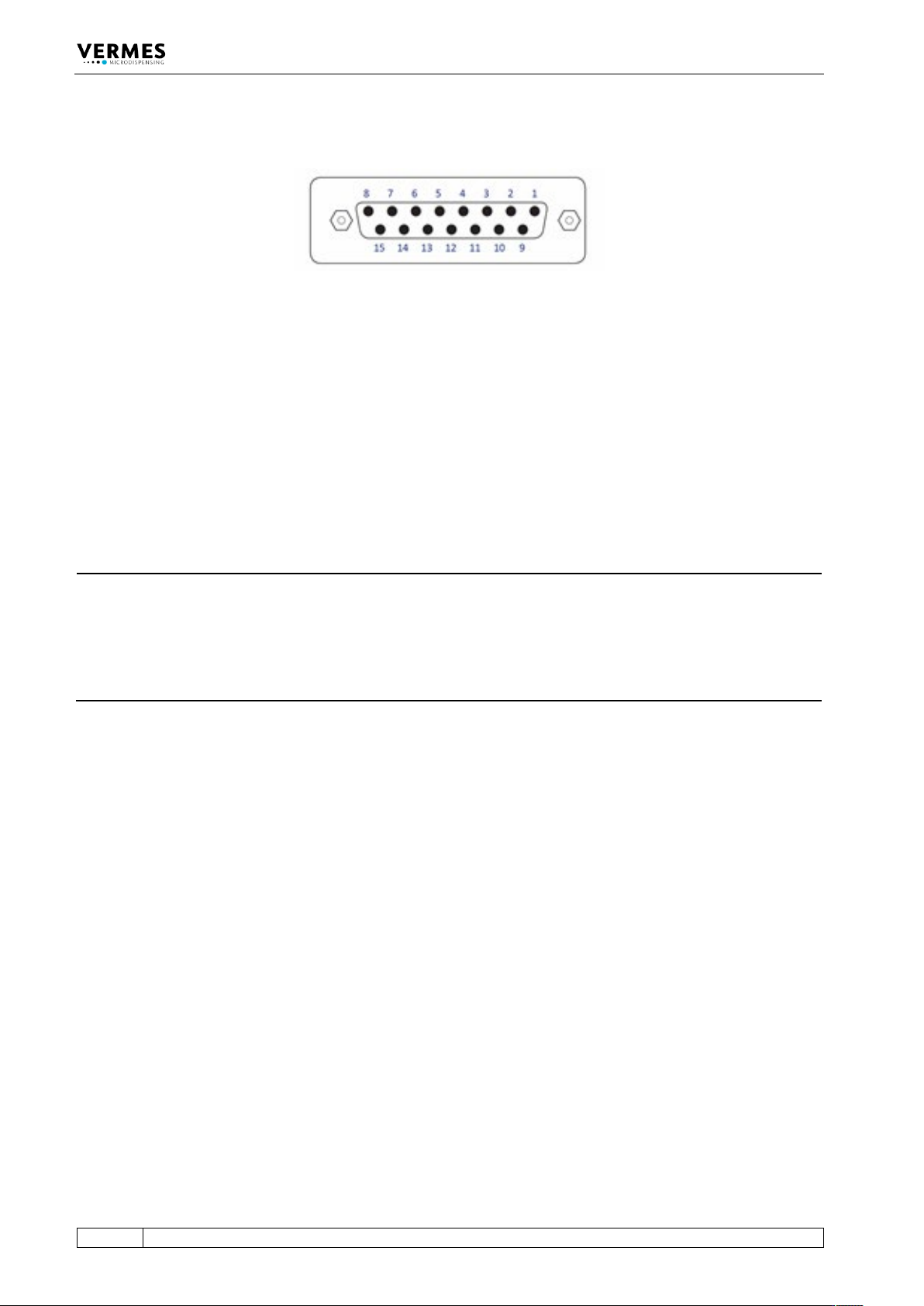
8.2 PLC-Interface: 15-pin, Sub-D
Fig. 31: PLC Interface: 15-pin, Sub-D
The PLC interface (illustrated above) works on digital basis without a particular syntax. It allows
for controlling a machine or device by means of a remote master device. Transmission of data is
possible in either direction. The trigger delay of this interface amounts to 96 μs.
Access is possible to:
• Status bits
• Values of voltage and current
• Set-Trigger signals initiating dispensing cycles (pulses) or complete packages of pulses
(bursts)
INFORMATION
Do not use keypad during PLC triggered dispensing
When a PLC-trigger is send, the keypad is locked at the same time. This lock can be lifted by
pressing the [enter]-key. But make sure not to do it during dispensing, since it also activates a
delay, which could affect your dispensing result. On the other hand, a trigger does not work, if
the MDC is not switched to the main menu. Additionally do not send a trigger, while the heater is
starting.