a3369b.pdf - 第65页
Initial Operation 56 VTK - TR -BA- 171e - 1 - User Man u al MDS 3080 -V 6.6 Init ial Liq uid Su pply – Step 1: If not using a prefi lled cartridg e, fill an empt y one with t he required flui d, till up to 80 % o f its c…
Initial Operation
VTK-TR-BA-171e-1 - User Manual MDS 3080-V
55
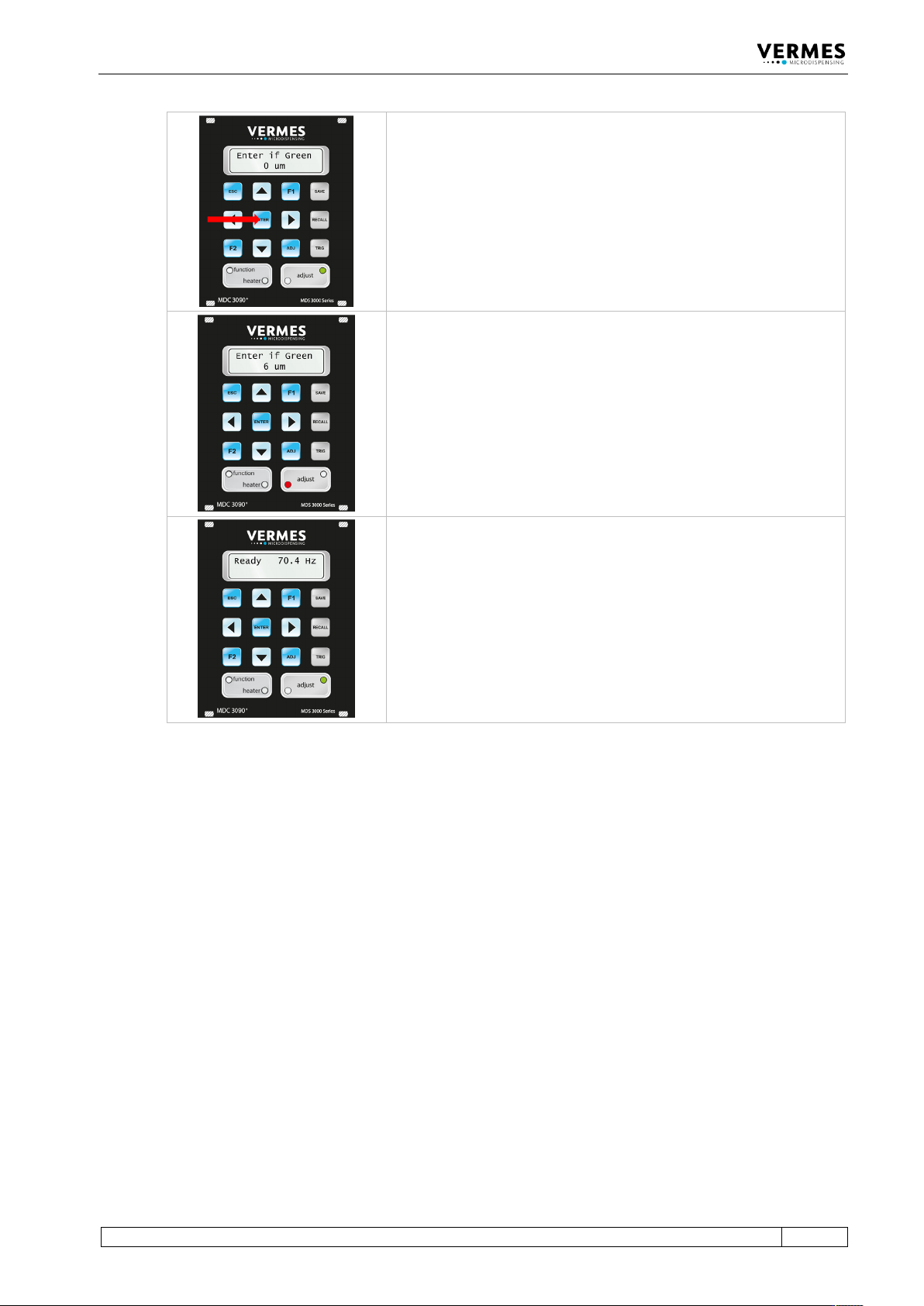
Press the [enter]-key, if the green adjust LED is ON.
If you screw in the adjust screw too far (5 µm or more shown), then
the red adjust LED will be ON. Screw back a little bit, until the green
adjust LED is ON, and further back, until both LEDs are OFF. Then
screw forward again, until the green adjust LED is ON. An adjust can
only be confirmed as successful with [enter], while the green adjust
LED is ON.
Once you have completed the adjust successfully, the display returns
to the message “3090+ xx Hz”. You are again in the main menu of the
MDC. The system is now ready to be filled with the dispensing
medium.
Tab. 18: The adjust
Initial Operation
56
VTK-TR-BA-171e-1 - User Manual MDS 3080-V
6.6 Initial Liquid Supply
– Step 1: If not using a prefilled cartridge, fill an empty one with the required fluid, till up to
80 % of its capacity.
– Step 2: Insert the cartridge into the corresponding holder and screw it onto the Luer-Lock
connector, rotating clockwise.
– Step 3: Place the compressed-air adaptor onto the cartridge and rotate clockwise until it
latches in place.
– Step 4: Connect the PVC hose with coupler plug KS4-CK-6 to air supply. A coupler socket type
KD4-1/2-A is required.
– Step 5: After establishing a convenient dispensing pressure, activate the pneumatic supply.
IMPORTANT NOTE
Check for leakage
All of the parts must be installed correctly, and the entire configuration must be leak-tight –
otherwise the dispensing fluid can trickle out in an uncontrolled manner.
Valves designed by VERMES Microdispensing can be operated at a relatively low supply pressure,
in the range between 0 bar and 4 bar. This upper limit should not be exceeded in normal
applications.
Standard values:
• Low-viscous fluids (e.g. water): 0.5 – 1.5 bar
• Medium viscosity (e.g. SMT-adhesives): 1.5 – 2.0 bar
IMPORTANT NOTE
Do not activate system without dispensing medium
Except for the adjust, do not activate the system “dry” (i.e. without dispensing medium).
Otherwise, it might damage the system. For flushing the valve keep within the following limits:
• Needle Lift max. 80
• Falling min. 0.4
6.7 Removing Air Inclusions from the Fluid Box
Air must be removed from the fluid box, for instance after the exchange of a cartridge.
Save the current dispensing parameters beforehand (see paragraph 7.6, page 63).
Confirm the following parameter selection:
Rising 0.5, Open Time 1.5, Falling 0.4, Delay 5–30, Needle Lift 75, Number of Pulses 500–2000
Dispense a quantity of ca. 500 to 2000 shots by pressing [trig].
When this measure is complete, retrieve the initial parameters stored beforehand (see
paragraph 7.7, page 63) and start the dispensing process.
Initial Operation
VTK-TR-BA-171e-1 - User Manual MDS 3080-V
57
6.8 Parameter Input and Start
– Step 1: Enter the dispensing parameters (either recommended by the manufacturer or
determined in your own experiments) into the submenu “Pulse Parameters” of the control
unit (see paragraph 4.5.2, page 29).
– Step 2: Press [enter] to acknowledge the selection.
– Step 3: Return to the first level of the menu by pressing [esc] repeatedly.
– Step 4: Start the dispensing process by pressing [trig].
INFORMATION
Starting the dispensing process
A dispensing process can only be initiated in the first menu level by all the usual methods.
Starting it in the other menu levels is only possible with the key [trig].