a3369b.pdf - 第184页
Attachments VTK - TR -BA- 171e - 1 - User Manua l MDS 3080 -V 175 Fig. 51 : Adjust posi tion wit h adjust ra nge change d with com mand A DJUST:TO:C HANG E
Attachments
174
VTK-TR-BA-171e-1 - User Manual MDS 3080-V
14.8 Changing the Adjust Range
The range where the green adjust LED is ON has for technical reasons a minimum size of 5.8 µm.
This range can be expanded by using the serial command “ADJUST:TO:CHANGE:<range>” (see
paragraph 8.1.2.2 "Explanations", page 88). This attachment explains the details.
IMPORTANT INFORMATION
Changing the adjust range can lead to leakages
Changing the adjust range is only recommended for selected applications in the fixed adjust
mode. You should contact our technical support first, since sometimes widening the adjust
range can lead to leakage despite a successful adjust.
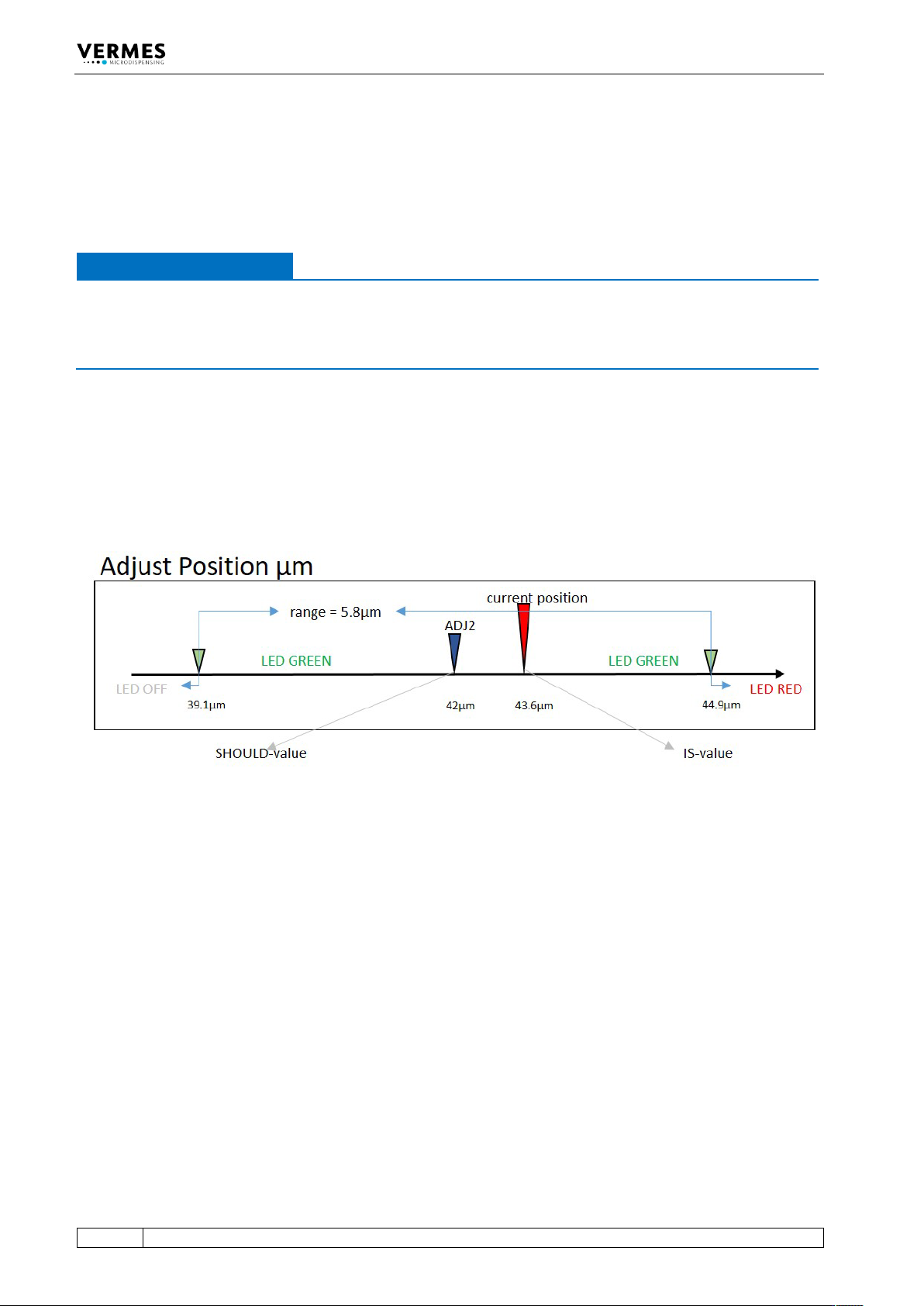
The adjust range has the setpoint ADJ2 (the “SHOULD-value”) in its center (see Fig. 50). When the
current position of the adjust (the “IS-value”) is within the adjust range, the green adjust-LED is
ON. Is the current position beyond the adjust range the red adjust-LED is ON. In case the value for
the current position is smaller than the value where the adjust range begins both adjust-LEDS are
OFF.
With the serial command ADJ:VALUES:?, the MDC shows you the setpoint ADJ2 as well as the
deviation of the current position from the setpoint (see paragraph 8.1.2.2, page 88).
Fig. 50: Adjust position with unchanged adjust range
To widen the adjust range, use the serial command ADJUST:TO:CHANGE:<adjust range>. As
parameter for the range, enter ten times the value in micrometer. E.g. to change the adjust range
to 8.4 µm, enter 84 as value for the parameter. The new adjust range is again centered around
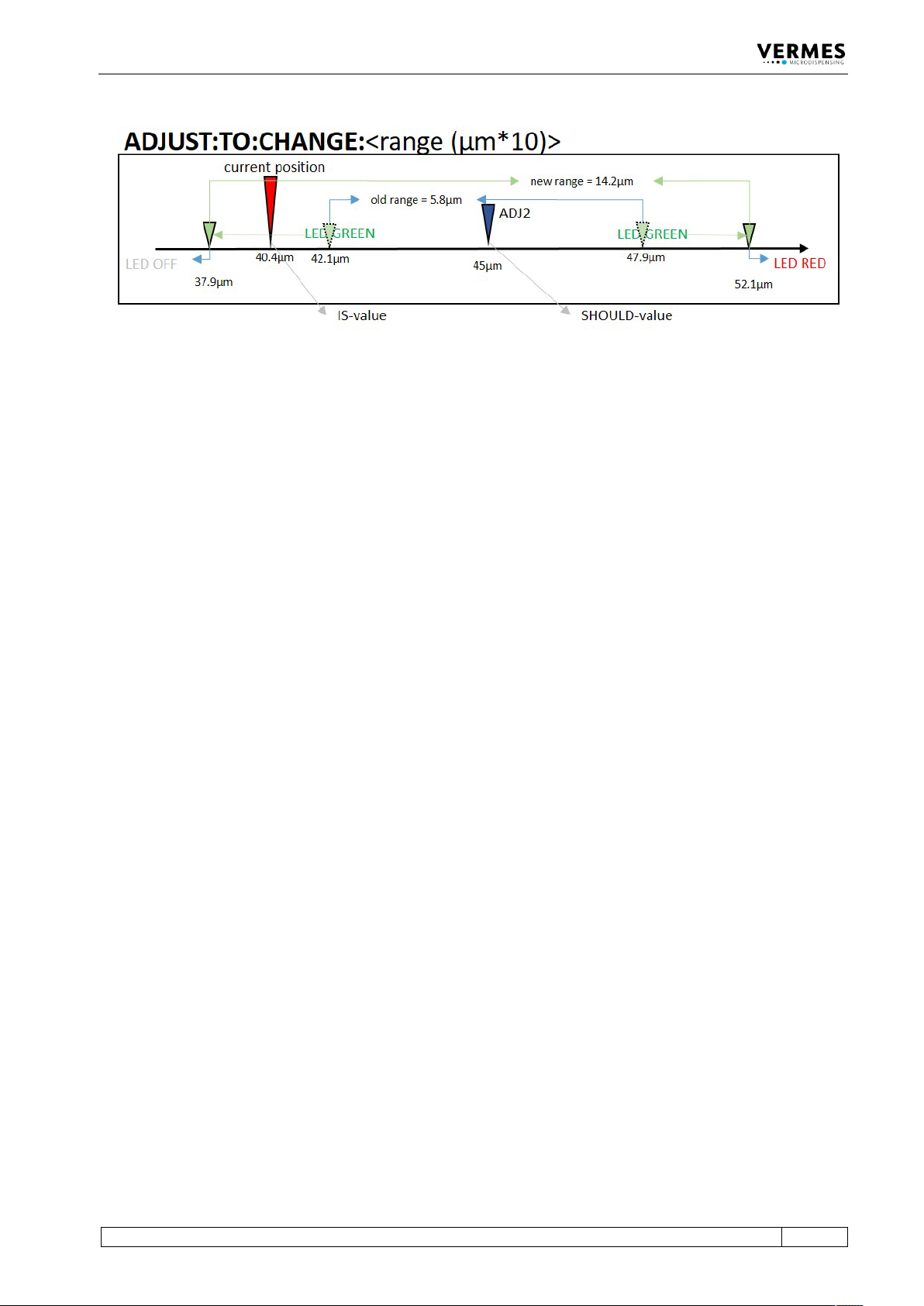
the setpoint ADJ2. The following figure shows an example, where the adjust range is set to
14.2 µm (see Fig. 51). The range is then at 45 µm +/- 7.1 µm. In this example, the command would
be ADJUST:TO:CHANGE:142.
You can only enter integer values between 58 and 300 as parameters (i.e. between 5.8 µm and
30.0 µm).
Attachments
VTK-TR-BA-171e-1 - User Manual MDS 3080-V
175
Fig. 51: Adjust position with adjust range changed with command ADJUST:TO:CHANGE
Attachments
176
VTK-TR-BA-171e-1 - User Manual MDS 3080-V
14.9 Declaration Concerning Decontamination of Shipped Equipment
Before returning Microdispensing Systems for purposes of inspection, maintenance and repair,
be sure that the equipment is in a completely decontaminated state. You have to fill out the
following form correctly; otherwise, the order will not be processed. Upon request, VERMES
Microdispensing performs the required decontamination after receipt of the corresponding
safety data sheet. This work will be calculated separately.
Only authorized and responsible personnel may fill out and sign this declaration!
1 Designation of the System
Serial No.:
MDV SN# _____________________________
MDV SN# _____________________________
2 Legally Binding Declaration
The signer declares that the microdispensing system is free of any substances harmful to health. The
decontaminated system is shipped according to legal prescriptions.
Company: _________________________________________________________________________
Address: __________________________________________________________________________
__________________________________________________________________________
Name: ____________________________________________________________________________
Phone: __________________________________
Fax:___________________________________
E-Mail: ____________________________________________________________________________
Date: ____________________________________
Signature: _____________________________
Company Stamp:
3 Note for Shipment
In order to prevent damage to the equipment, the manufacturer recommends using the original
packaging material for return. Instructions about transport have to be observed (see paragraph 12.1,
page 156). The manufacturer is not liable for any damage resulting from inadequate packaging or
transport.