a3369b.pdf - 第135页
Communication Interfaces 126 VTK - TR -BA- 171e - 1 - User Man u al MDS 3080 -V 8.2.4 Remote First Drop Perfor ming th e first drop a djust (see parag raph 7.11 , page 71 ) is also p ossib le remot ely v ia t he RS - 232…
Communication Interfaces
VTK-TR-BA-171e-1 - User Manual MDS 3080-V
125
Outside the adjust range, the adjust can only be interrupted by sending a long trigger signal
(110 ms – 200 ms) to the control unit via PLC- interface. The system returns the message “adjust
failed” to the PC.
Communication Interfaces
126
VTK-TR-BA-171e-1 - User Manual MDS 3080-V
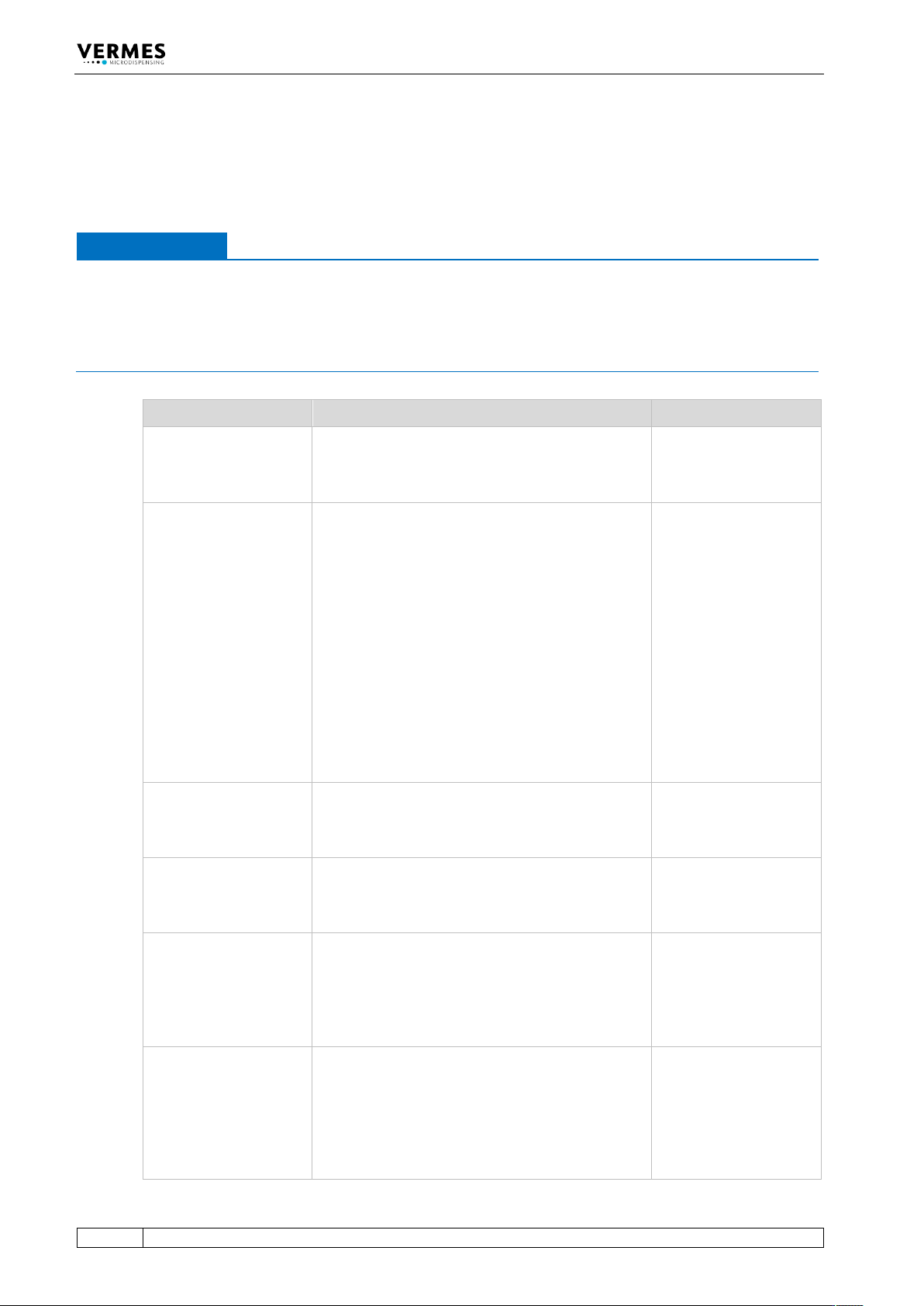
8.2.4 Remote First Drop
Performing the first drop adjust (see paragraph 7.11, page 71) is also possible remotely via the
RS-232C serial interface. In this chapter, the necessary steps are explained.
IMPORTANT NOTE
Display, cancelling the first drop adjust
• During the remote first drop adjust the message “Remote FirstDrop is running” is shown in
the display.
• You can cancel the remote first drop by sending the command “KEY:ESC”, unless the system
is working at that moment (e.g. during dispensing the 1000 shots).
Step Explanation Result
Send the command
“SYSTEM:FIRSTDROP:ON
”.
To perform the first drop adjust, you switch the
system into first drop mode.
Response of the system:
“OK”
The red first drop LED is
ON.
Send the command
“SYSTEM:FIRSTDROP:AD
JUST:<value>”. For
“value” use the starting
value, e.g. 15 %.
With this command you start the first drop adjust.
The starting value for the first drop has to be
between 2 % and 50 %. From this value, you will
slowly increase the needle lift to find the exact
position at which the first drop of the medium
appears.
For watery fluids, the value usually lies between
20 % and 35 %. You should not start with a too
high value, since if there is a drop visible right
away, then you will have to repeat the first drop
adjust from the beginning with a lower starting
value.
Make sure you have inserted a filled cartridge with
your dispensing medium. Set the dispensing
pressure at 0.5 – 1.0 bar (depending on medium).
Response of the system:
“Fill up with
Medium!!!!!!”
The display shows:
“Remote FirstDrop is
running!”
Confirm the message
with the command
“KEY:ENTER”.
Now 1000 shots have to be dispensed. This will
prepare the valve.
Place a container of sufficient size be-low the valve
to capture the dispended medium.
Response of the system:
“Press Enter for 1000
Shots”
Confirm the message
with the command
“KEY:ENTER”.
After the 1000 shots have been dispensed, you
have to clean the nozzle. Use a lintless rag. Make
sure the lower surface is dry and that no drop
appears after cleaning.
Response of the system:
“OK”
“Clean Nozzle”
Confirm the message
with the command
“KEY:ENTER”.
With this command, you confirm that you have
cleaned the nozzle.
Check, if there is a drop visible at the nozzle.
Yes: You have to repeat the first drop adjust with a
lower starting value.
No: Move on to the next step.
Response of the system:
“OK”
“Drop Visible”
“15 %”
Send the command
“KEY:ADJUST”.
With this command, you increase the needle lift by
1 %.
Check again, if there is now a drop visible at the
nozzle.
Yes: Move on to the next step.
No: Repeat this step and send the command
“KEY:ADJUST” again.
Response of the system:
“OK”
“Drop Visible?”
“16 %”
Communication Interfaces
VTK-TR-BA-171e-1 - User Manual MDS 3080-V
127
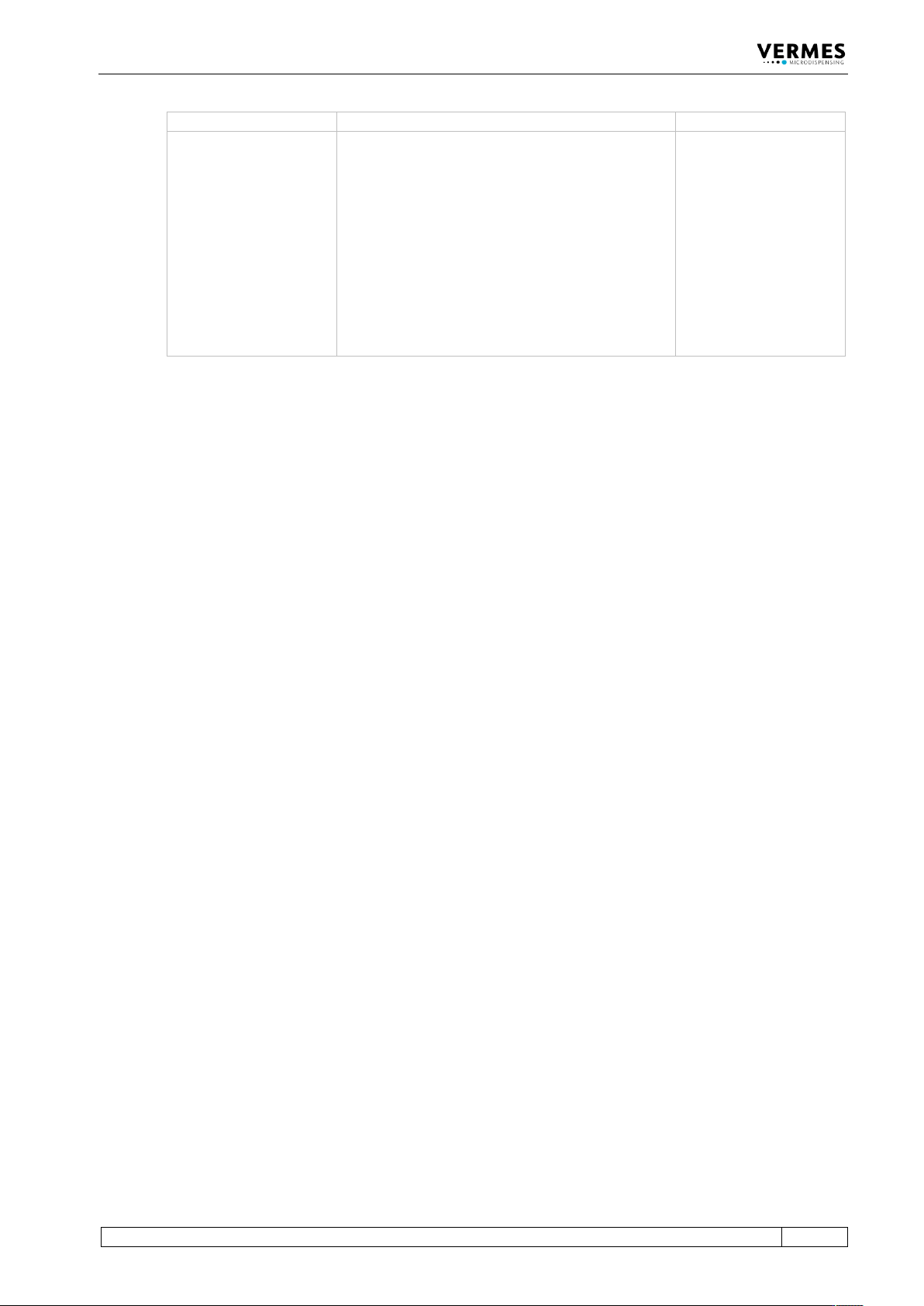
(You might have to repeat this step several times.)
Confirm your settings
with the command
“KEY:ENTER”.
With this command, you confirm the first drop
value. The first drop adjust is completed.
The display jumps back to the “3090+” message.
The shown max value of the True Needle Lift
(TNLmax) depends on your first drop value.
If the first drop value is smaller than 30 %, the
TNLmax is 70 %.
If the first drop value is bigger than 30 %, the
TNLmax is calculated as:
(100 % minus first drop value)
[Example: With a first drop value of 40 %, the
TNLmax is 60 %.]
Response of the system:
“OK”
“Ready”
The red first drop LED is
OFF.
The display shows:
“3090+ xx Hz
TNLmax = yy %”
Tab. 26: Remote First Drop