a3369b.pdf - 第38页
Control Unit MDC VTK - TR -BA- 171e - 1 - User Manua l MDS 3080 -V 29 4.5.2 Submenu “ Pul se Para meters ” In th e submen u “Pulse P arameters” , you can recall a nd modif y dispen sing p arameters for a particular p roc…
Control Unit MDC
28
VTK-TR-BA-171e-1 - User Manual MDS 3080-V
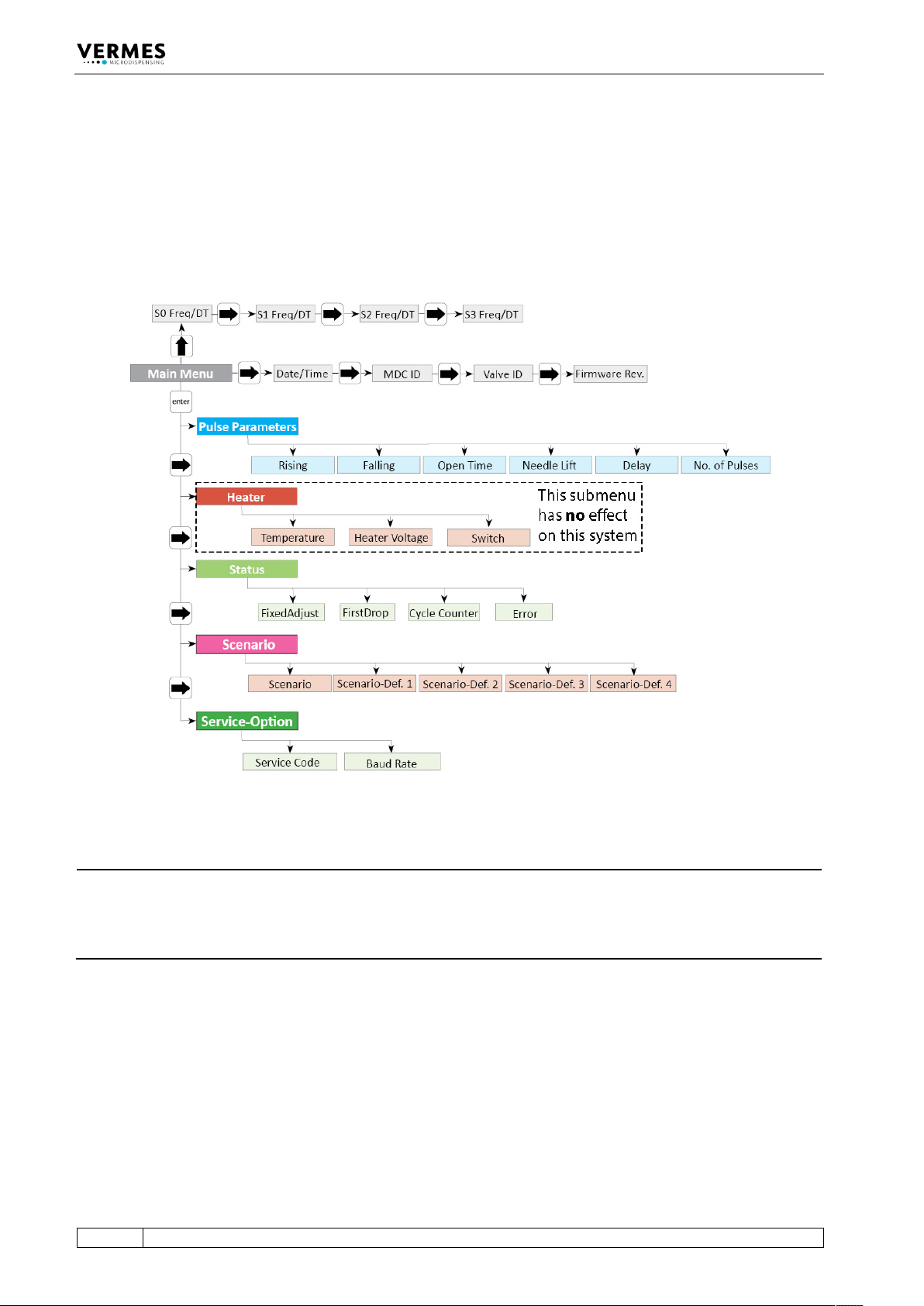
4.5.1 Main Menu
When you switch ON the MDC, you always start in the “Main Menu”. The display shows “3090+”
(upper left). With [enter] or [↓] you can reach the submenus. For the information on the main
level use [→] or [←]. With [↑] you can find information about the frequency and dispensing time
(DT) of your scenarios or setups (depending on if scenario is “ON” or “OFF”). All levels are “wrap-
around”, i.e. you can circle around between the items with both keys.
Fig. 4: Menu structure
INFORMATION
Automatic change back to the main menu
On this level, the display jumps automatically back to “3090+”, if you do not press any button for
longer than about 10 sec. From the submenus, the display will jump back as well, if no buttons
are pressed, but the wait is a bit longer.
In the upper right corner of the display a frequency is shown. This is the dispensing frequency
resulting from your current parameter settings. While “Scenario” is “ON”, the word “Scenario” is
shown instead (only while entering parameters in the submenu, the frequency is always shown).
If you are in one of the submenus, instead of the frequency one or two letters show the submenu
you are in (PP = Pulse Parameters, S = Status, Sc = Scenario, SO = Service-Option).
In case the system is in first drop mode (function “FirstDrop” in the submenu “Status” set to “ON”)
or fixed adjust mode (function “FixedAdjust” in the submenu “Status” set to “ON”) the second line
shows the current TNLmax.
Control Unit MDC
VTK-TR-BA-171e-1 - User Manual MDS 3080-V
29
4.5.2 Submenu “Pulse Parameters”
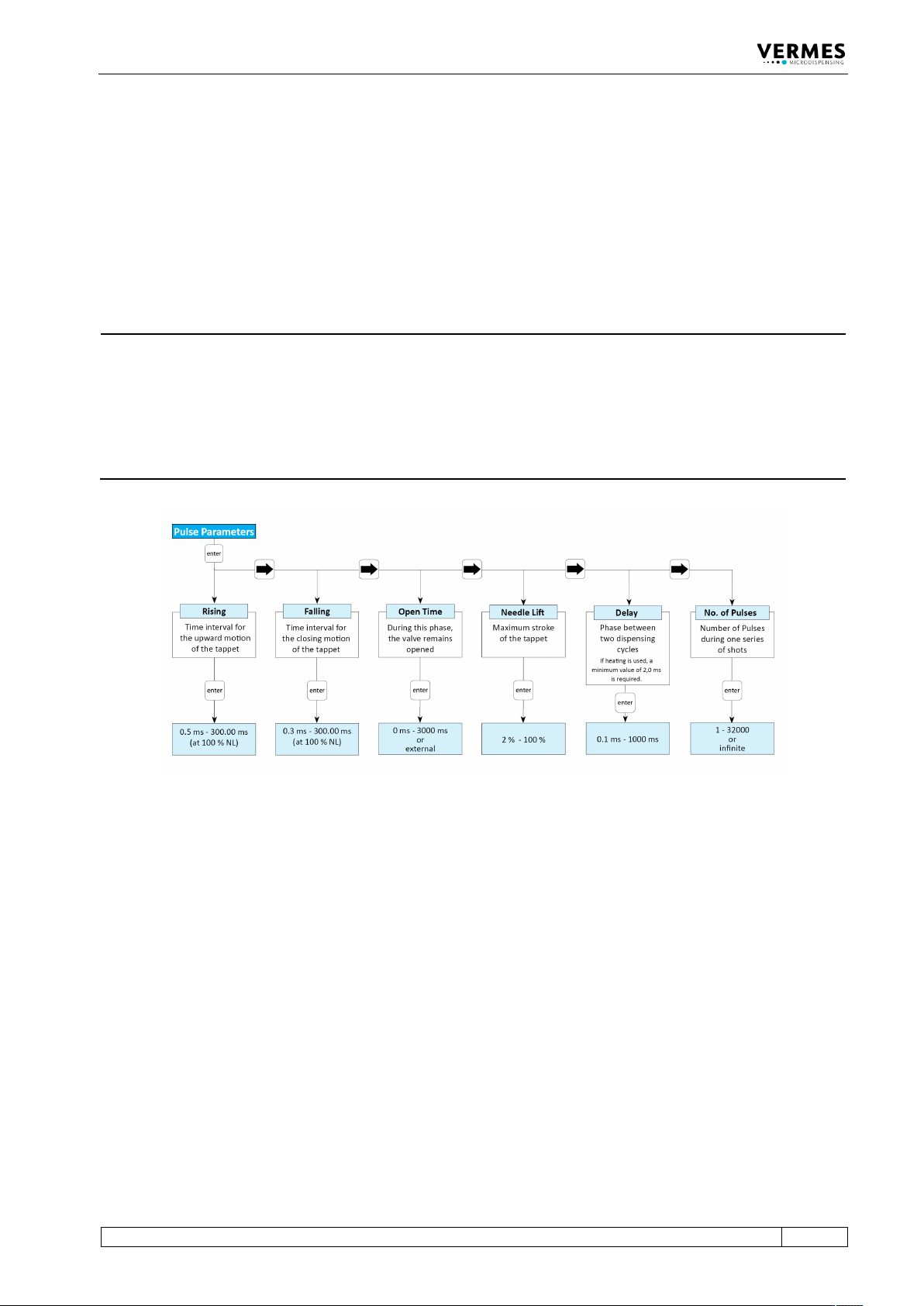
In the submenu “Pulse Parameters”, you can recall and modify dispensing parameters for a
particular process. The limits for these parameters you can find in the diagram. For falling and
rising, the lower limits depend on the needle lift. You cannot enter values outside these ranges.
The dispensing frequency based on the current parameters is shown in the upper right of the
display (as long as “Scenario” is switched “OFF” or always while entering parameters in the
respective submenu).
INFORMATION
Fixed adjust and first drop mode
If either fixed adjust mode or first drop mode (see paragraph 7.12, page 76and paragraph 7.11,
page 71) is “ON”, the parameter “True Needle Lift” is shown instead of “Needle Lift”. It can have a
highest value of 80 % for the fixed adjust mode and of 70 % for the first drop mode. If the needle
lift at the time of switching is higher than this limit, the value will be changed to this limit. You
should not set the TNL to a value larger than the TNLmax. If you do, the red first drop LED
(“function”) is “ON”.
Fig. 5: Submenu „Pulse Parameters“
4.5.3 Submenu “Heater”
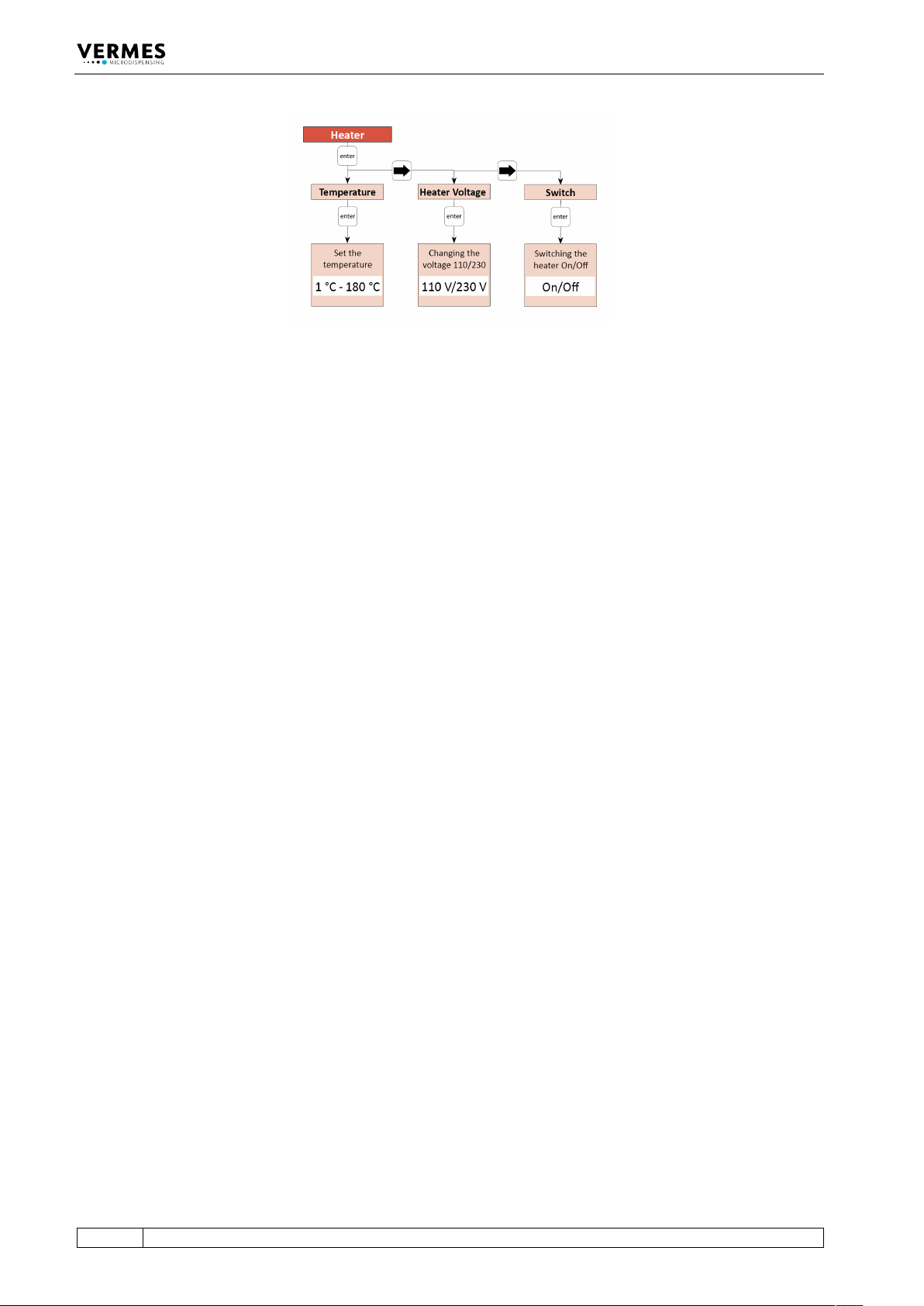
Completely ignore the submenu “Heater”! Since there is no 230 V heater from VERMES, which
would be compatible with the valve MDV 3080-V.
The Microdispensing System MDS 3080-V can only be equipped with a 48 V heater (e.g. the
heater MDH-48-BY, order no. 1014231). This heater cannot be controlled via the control unit MDC
3090-V. You will need an external heater controller (e.g. MFC 3000, order no. 1014981, or MHC
48-1, order no. 1014107). You can find more information in paragraph 7.14, page 77.
Control Unit MDC
30
VTK-TR-BA-171e-1 - User Manual MDS 3080-V
Fig. 6: Submenu “Heater” (inapplicable)