a3369b.pdf - 第84页
Operation VTK - TR -BA- 171e - 1 - User Manua l MDS 3080 -V 75 Min. Fal li ng = (Mi n. F alling at 100% NL) x (TNL + 30)/ 100 Min. Ris ing = (Min . R ising at 100% NL ) x (TNL + 30)/ 100 If th is form ula result s in a v…
Operation
74
VTK-TR-BA-171e-1 - User Manual MDS 3080-V
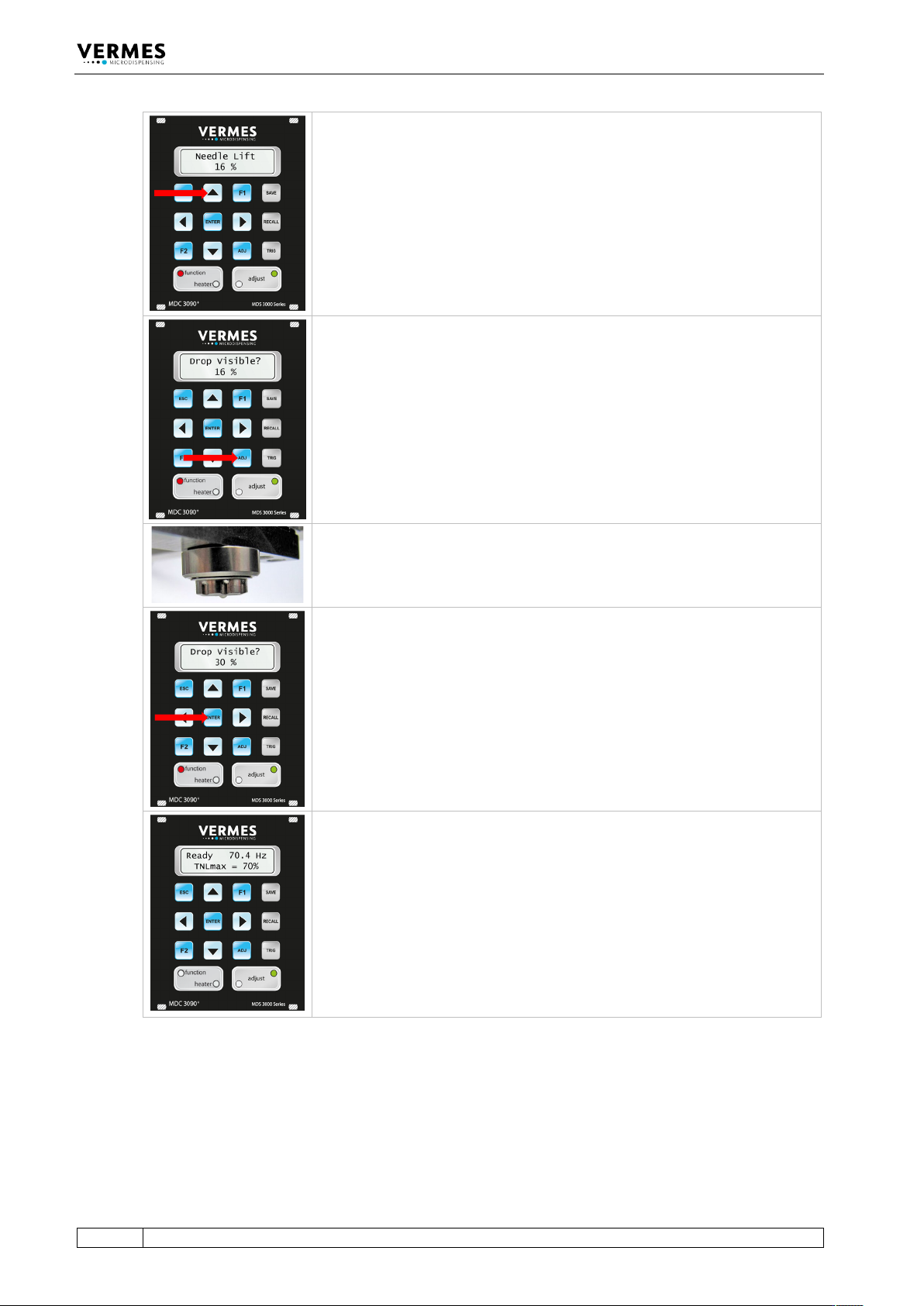
You can change the starting value with the help of the arrow keys. The
lowest possible value you could set is 2 %.
For watery media the value for the first drop is roughly between 20 % and
35 % Needle Lift. You have to be careful. If your starting value is too high and
the drop is already visible, you have to start again and select a lower starting
value.
You confirm the starting value by pressing [enter].
The display shows the message “Drop Visible?” and the starting value you
have selected.
Check if there is a drop visible at the lower surface of the nozzle.
If yes, you have to re-start the process with a lower starting value.
If not, press the [adj]-key. The value rises by 1 %. Check again, if there is a
drop.
Repeat these two actions (pressing [adj] and checking the nozzle) until there
actually is a drop visible at the nozzle (see picture).
This is the first drop position for your application.
Confirm by pressing the [enter]-key.
The display jumps back to the ready message (“3090+”). The second line now
shows the TNLmax, the max value of the True Needle Lift.
The value is calculated as (100 % - first drop value), but it is capped at 70 %.
E.g., a first drop value of 35 % leads to a TNLmax of 65 %, but a first drop
value of 25 % leads to a TNLmax of 70 %.
In case you perform the first drop adjust in fixed adjust mode (see
paragraph 7.12, page 76), the TNLmax will be set to 50 %.
The red LED “function” has now been switched off.
Tab. 25: First Drop Adjust
While the system is in first drop mode, the display will always show the TNLmax on the main
page. “Needle Lift” in the submenu “Pulse Parameters” will be exchanged for “True Needle Lift”.
The True Needle Lift is capped at 70 %. In case the value of the Needle Lift is higher than 70 %, it
will be lowered to a True Needle Lift of 70 % when switching to first drop mode.
In first drop mode, the minimum values for Falling and Rising are determined by the following
formulas:

Operation
VTK-TR-BA-171e-1 - User Manual MDS 3080-V
75
Min. Falling = (Min. Falling at 100% NL) x (TNL + 30)/100
Min. Rising = (Min. Rising at 100% NL) x (TNL + 30)/100
If this formula results in a value, which cannot be used, it is rounded up to the next possible value
(e.g. 0.201 ms would be rounded to 0.21 ms).

Operation
76
VTK-TR-BA-171e-1 - User Manual MDS 3080-V
7.12 Fixed Adjust
The fixed adjust is for special applications with media which react with air. A typical example
would be cyanoacrylate.
You can only use the fixed adjust mode, if “FixedAdjust” is set to “ON” in the MDC submenu
“Status” (see paragraph 4.5.4, page 31).
The fixed adjust is automatically coupled with the first drop mode. Therefore, you cannot select
the submenu “FirstDrop ON/OFF”, while “FixedAdjust” is switched “ON”. Since the fixed adjust
influences the normal adjust, you will be asked to perform an adjust every time the fixed adjust
mode is switched “ON” or “OFF”. It is important to do this, since a correctly performed adjust is a
requirement for good dispensing results.
In the fixed adjust mode some parameters for the adjust (see paragraph 6.5, page 52) and the
first drop adjust (see paragraph 7.11, page 71) are slightly different. The adjust in fixed adjust
mode can be confirmed in a range from 0 µm to 50 µm. For the first drop adjust in fixed adjust
mode, TNLmax is set to 50 %. Otherwise, you can follow both processes as usual.
In fixed adjust mode, the function “Needle Lift” in the submenu “Pulse Parameters” is replaced by
“True Needle Lift”, but normally keeps the same value. In fixed adjust mode the True Needle Lift is
capped at 80 %. In case the value for the Needle Lift is higher than this limit, it will be changed
into a True Needle Lift of 80 % when switching into fixed adjust mode.
IMPORTANT NOTE
Minimum values for Falling and Rising in fixed adjust mode
In fixed adjust mode, the minimum values for Falling (0.30 ms) and Rising (0.50 ms) are fixed and
do not depend on the needle lift.
7.13 Auxiliary Mode
In this mode, you cannot dispense, since there is no internal communication with the valve. The
valve might even be disconnected. But you can use all other functions of the MDC, e.g. check
your parameters or control a heater. While in auxiliary mode, the display shows the message
“Auxiliary Mode” in the bottom line. Auxiliary mode is automatically deactivated when you
switch off the MDC.
You can enter the auxiliary mode through the menu. You have to enter service code “1000” in the
submenu “Service Code” which is part of the menu “Service Option” (see paragraph 4.5.6,
page 33).
After the error messages 101 (Incorr. Valve) and 199 (Valve Error), you also get the chance to
switch to the auxiliary mode. This allows you to keep control of the information and most of the
functions of the MDC in such a situation (see chapter 11, page 149).
When an auxiliary mode is activated, it will automatically be deactivated during the start-up of
the MDC, if a compatible microdispensing valve is connected.