00198783-01_AI_Kit_TwinVHF_Gantry_SXV3_de_en.pdf - 第113页
3 Fitting the gantry 3.2 Gantry Preparations Assembly Instructions / Montageanleitung SIPLACE SX1/SX2 V3 Reconfiguration Kit Twin VHF mit Portal Reconfiguration Kit Twin VHF with Gantry 06/2020 113 Move the gantry lift i…
3 Fitting the gantry
3.2 Gantry Preparations
112 Assembly Instructions / Montageanleitung SIPLACE SX1/SX2 V3 Reconfiguration Kit Twin VHF mit Portal
Reconfiguration Kit Twin VHF with Gantry 06/2020
Assembly
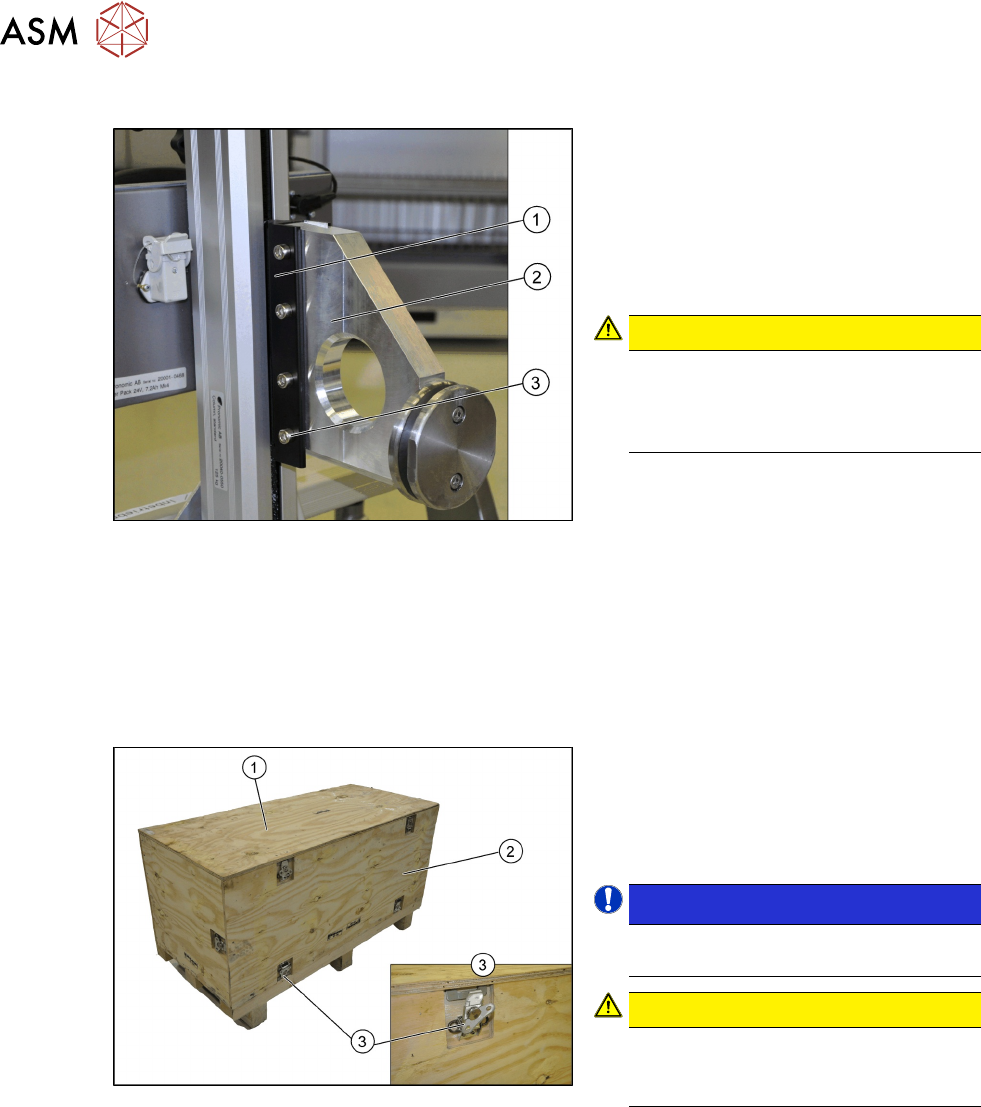
Fig.26: Gantry carrier plate fitted
Fitting the gantry carrier plate
To enable the gantry lift to accommodate the
gantry, the gantry carrier plate (2)
must be
fitted to the slide (1)
of the gantry lift.
► Use the four fastening screws (3) to fix
the gantry carrier plate(2)
to the slide (1)
of the gantry lift.
CAUTION!
Information on safety
Mount all eight screws with the associ-
ated washers and tighten them with
18Nm.
.
3.2.2 Unpacking the Gantry
Transportation crate
The gantry is packed in a transportation crate. Move the transportation crate near to the SIPLACE
SX machine on which the gantry is to be assembled. Do not move the gantry over long distances
with the gantry lift.
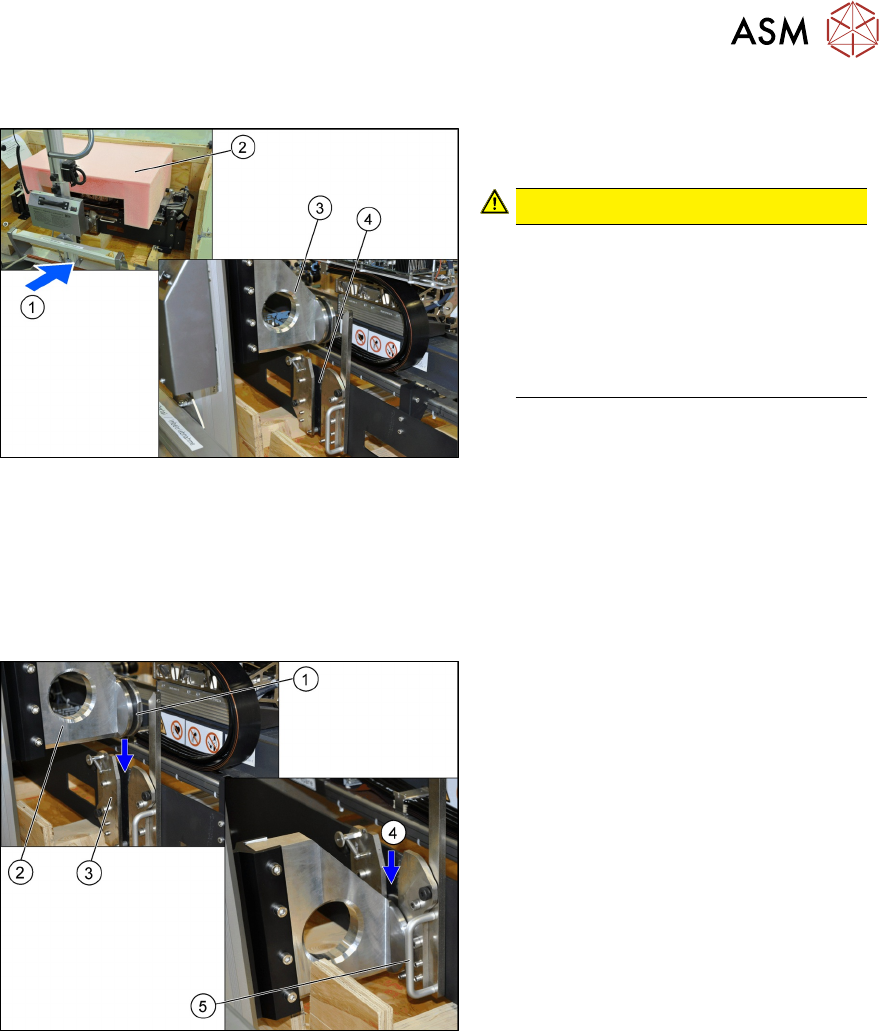
Fig.27: Transportation crate
► Open the turn-lock fasteners (3) on the
top (1)
and front (2) of the transporta-
tion crate.
► Remove the two wooden panels at (1)
and (2).
NOTICE!
The gantry is fixed with four screws in
the transportation crate.
.
CAUTION!
Carrier
When putting back the carrier it must
be screwed again.
.
3 Fitting the gantry
3.2 Gantry Preparations
Assembly Instructions / Montageanleitung SIPLACE SX1/SX2 V3 Reconfiguration Kit Twin VHF mit Portal
Reconfiguration Kit Twin VHF with Gantry 06/2020
113
Move the gantry lift into position
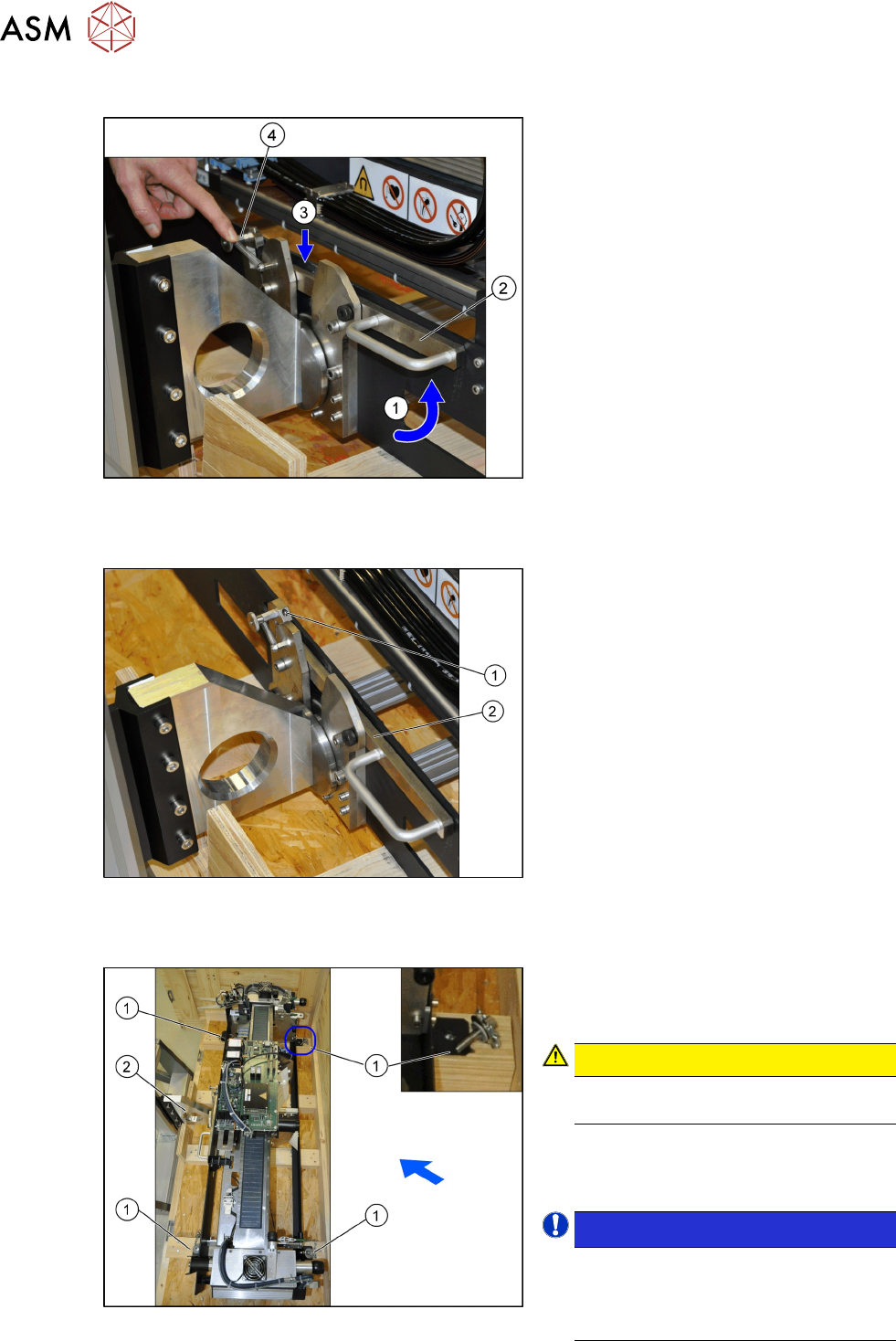
Fig.28: Gantry lift in position
► Carefully move the gantry lift (1) up to
the gantry.
CAUTION!
Take care not to damage the gantry
when moving it with the gantry lift.
Do not hit the gantry or locks with the
gantry carrier plate(3).
Make sure that the gantry carrier plate
(3) protrudes above the gantry carrier
locks(4).
.
► Remove the foam cover (2).
3.2.3 Locking and Transporting the Gantry Carrier
The "gantry 40 mm" may only be transported with the current gantry carriers [00519814-03]
(observe function state!).
Move the gantry lift to the gantry
Fig.29: Gantry lift on gantry
► Move the gantry carrier plate (2) for the
gantry lift over the gantry carrier locks
(3)
. The groove (1) must be able to en-
gage with the two locking plates (3)
.
► Lower the gantry lift so that the gantry
carrier plate can slide into the locks (4)
.
► Move the lift only so far down that the
locking lever (5)
can be closed.
3 Fitting the gantry
3.2 Gantry Preparations
114 Assembly Instructions / Montageanleitung SIPLACE SX1/SX2 V3 Reconfiguration Kit Twin VHF mit Portal
Reconfiguration Kit Twin VHF with Gantry 06/2020
Locking the gantry carrier
Fig.30: Locked gantry carrier
► Press the lock (4) back and pull (1) the
handle (2)
of the lock upwards.
ð The lever (3) will engage. The
spring on the lock (4)
secures the
locking mechanism.
Locking the gantry carrier correctly
Fig.31: Checking the lock
► Check that the lever (2) on the lock (1)
has engaged properly.
► To open, press the lock backwards and
then press the lever downwards. This
opens the lock.
Securing the gantry in the transportation crate
Fig.32: Fuse in the transportation crate
► The gantry is fixed with four screws (1)
in the transportation crate. Remove
these screws.
CAUTION!
Only transport the gantry with the
gantry lift when the arms are locked!
.
► Move the gantry lift upwards and care-
fully lift the gantry out of the transporta-
tion crate.
NOTICE!
The placement head must be in the
center of the gantry.
This ensures that the load is distrib-
uted evenly during transportation.
.