00198783-01_AI_Kit_TwinVHF_Gantry_SXV3_de_en.pdf - 第121页
3 Fitting the gantry 3.5 Installing the Gantry Assembly Instructions / Montageanleitung SIPLACE SX1/SX2 V3 Reconfiguration Kit Twin VHF mit Portal Reconfiguration Kit Twin VHF with Gantry 06/2020 121 Fig.46: Flat ribbon…
3 Fitting the gantry
3.5 Installing the Gantry
120 Assembly Instructions / Montageanleitung SIPLACE SX1/SX2 V3 Reconfiguration Kit Twin VHF mit Portal
Reconfiguration Kit Twin VHF with Gantry 06/2020
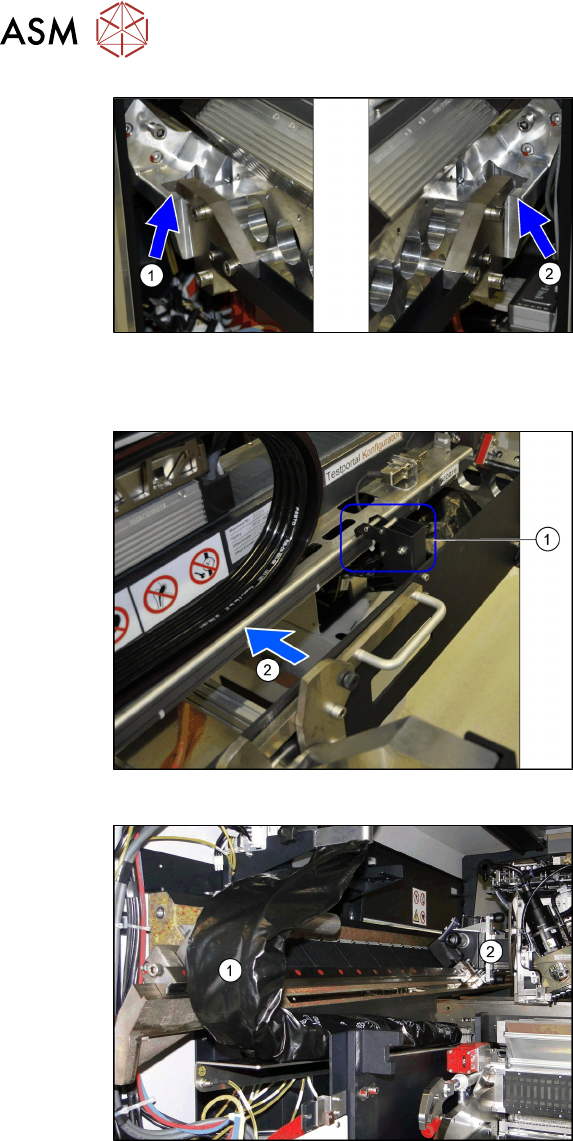
Fig.43: Docking hook hooked into place
The docking hooks are hooked into place on
the left (1)
and right (2) sides.
The gantry carrier with the gantry is now
fixed reliably onto the machine.
Remove the tilt guard and move in the gantry
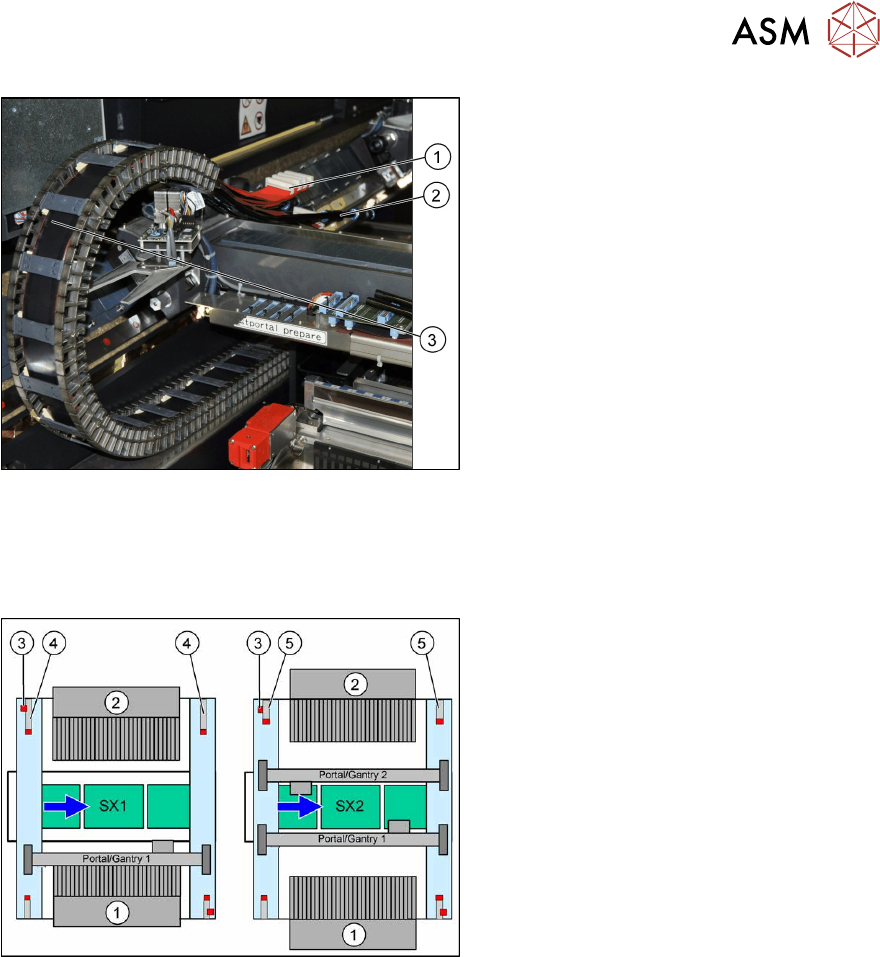
Fig.44: Opening the tilt guard
► Open the tilt guard (1).
► Push the gantry (2) into the machine so
that both sides of the gantry rest on the
two linear guides.
► Move the gantry lift with the gantry car-
rier out of the location.
Fig.45: Pulling the trailing cable
► Move the gantry (2) into the machine
so that the trailing cable (1)
can be
pulled underneath, through the gantry.
3 Fitting the gantry
3.5 Installing the Gantry
Assembly Instructions / Montageanleitung SIPLACE SX1/SX2 V3 Reconfiguration Kit Twin VHF mit Portal
Reconfiguration Kit Twin VHF with Gantry 06/2020
121
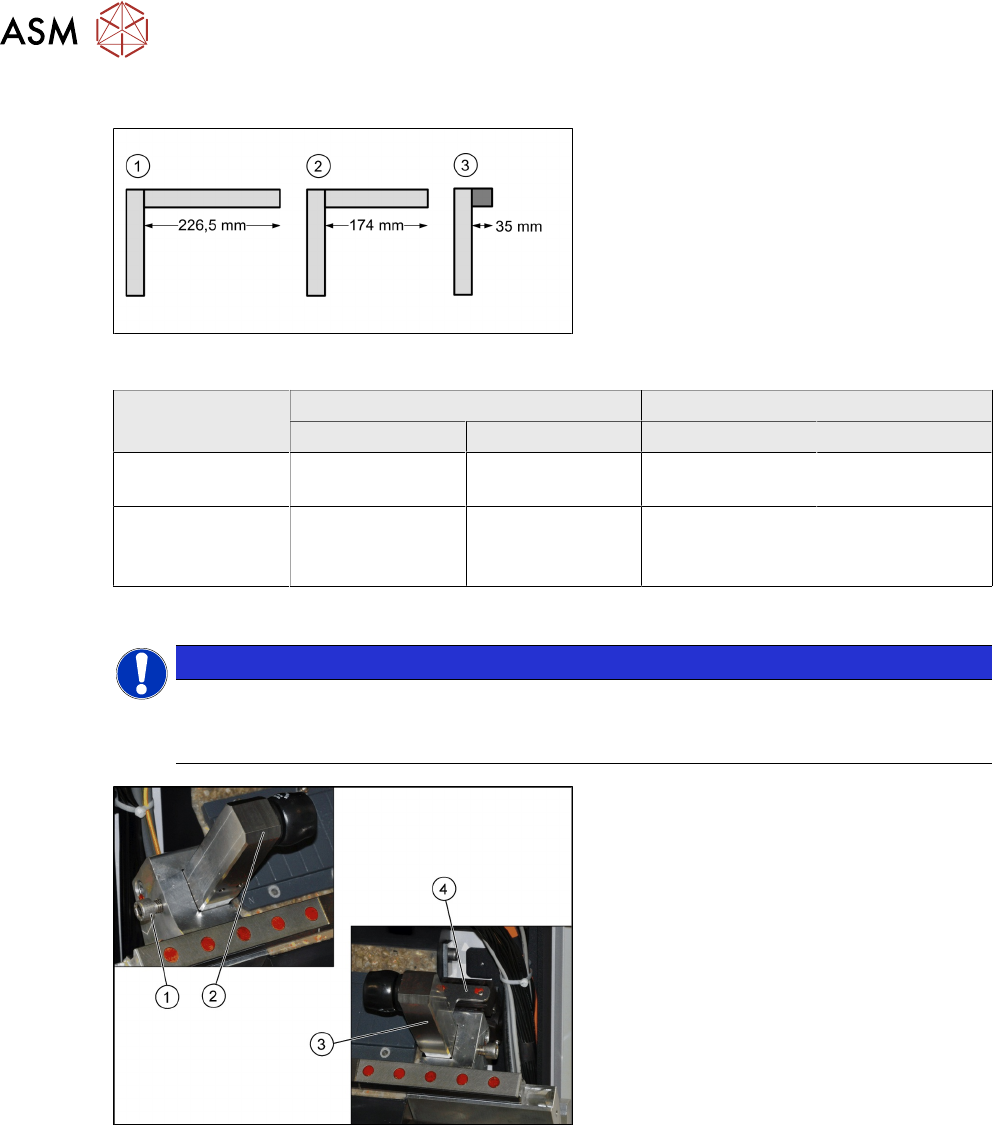
Fig.46: Flat ribbon cable and pneumatic connections
► Carefully place the flat ribbon cable (1)
and the pneumatic connections (2) over
the gantry.
► Remove the black plastic foil. A cable
tie fixes the black plastic foil to the trail-
ing cable(3)
.
3.5.1 Replacing/Fitting the End Position Buffers
Overview
Fig.47: Upgrade to SIPLACE SX2
1. Location 1
2. Location 2
3. Safety switch
4. Buffer with distance pipe at a SIPLACE
SX1
Standard: 226.5 mm
Twin VHF: 174 mm
5. Short buffer on an SX2 (standard and
Twin VHF)
When upgrading from a SIPLACE SX1 to a SIPLACE SX2, you need to fit the short end position
buffers at location 2.
When downgrading from a SIPLACE SX2 to a SIPLACE SX1, fit the buffer with distance pipe at
location 2.
When fitting a 40mm gantry, you need to fit the buffer with distance pipe at location 2 of the
SIPLACE SX1. (Buffer labeling: "LOC2,VHFSX1").
3 Fitting the gantry
3.5 Installing the Gantry
122 Assembly Instructions / Montageanleitung SIPLACE SX1/SX2 V3 Reconfiguration Kit Twin VHF mit Portal
Reconfiguration Kit Twin VHF with Gantry 06/2020
Buffer types
Fig.48: Buffer types
1. Standard: long buffer with distance pipe
for location 2 of an SX1 (226.5mm)
2. Twin VHF: buffer with shortened dis-
tance pipe [03105259-xx] for location 2
of an SX1 (174mm)
Buffer labeling: "LOC2, VHF SX1
"
3. Standard and Twin VHF: short buffer
with rubber damper for both locations
on an SX2 (35mm)
Machine SIPLACE SX1 SIPLACE SX2
Location 1 Location 2 Location 1 Location 2
Standard 35 mm rubber
dampers
226.5 mm
distance pipe
35 mm rubber
dampers
35 mm rubber
dampers
40 mm gantry for
Twin VHF
35 mm rubber
dampers
174 mm distance
pipe (shortened)
LOC2, VHF SX1
35 mm rubber
dampers
35 mm rubber
dampers
Installation
NOTICE
Holder and distance pipe
► You might need to fit the holder from one distance pipe onto the other distance pipe.
When doing so, hand-tighten
the distance pipe on the holder.
Fig.49: Fitting the end position buffer
► Fit the end position buffer (2) to the left
side.
► Fit the end position buffer (3) to the
right side. The safety switch (4)
for the
buffer monitoring function must engage
in the Schmersal switch.
► Tighten the fastening screws (1) for the
buffers with a torque of 14Nm
.