00198783-01_AI_Kit_TwinVHF_Gantry_SXV3_de_en.pdf - 第120页
3 Fitting the gantry 3.5 Installing the Gantry 120 Assembly Instructions / Montageanleitung SIPLACE SX1/SX2 V3 Reconfiguration Kit Twin VHF mit Portal Reconfiguration Kit Twin VHF with Gantry 06/2020 Fig.43: Docking hoo…
3 Fitting the gantry
3.5 Installing the Gantry
Assembly Instructions / Montageanleitung SIPLACE SX1/SX2 V3 Reconfiguration Kit Twin VHF mit Portal
Reconfiguration Kit Twin VHF with Gantry 06/2020
119
3.5 Installing the Gantry
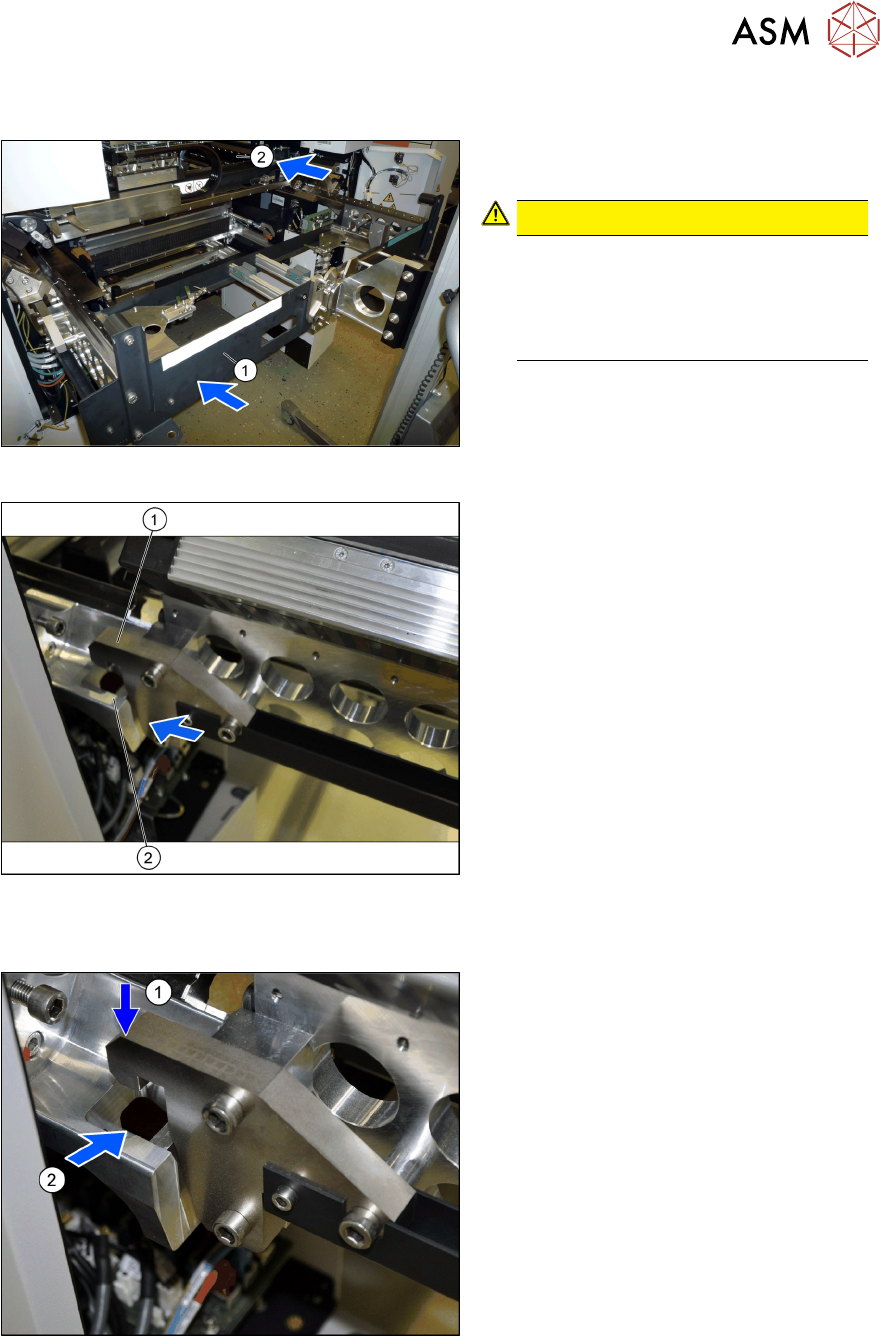
Fig.40: Moving the gantry in
► (1) Use the gantry lift to move the
gantry in front of the machine location.
CAUTION!
Move the gantry carefully
Make sure that you do not hit the
gantry anywhere and do not move it
too far into the machine (2)
. Always
check the right and left sides.
.
Fig.41: Docking in at the gantry carrier
1. Docking hook on the gantry carrier
2. Docking unit on the machine linear
guides
► Move the gantry forwards so that the
gantry carrier docking hooks (1)
are in
front of the machine docking unit (2)
.
► Always check the right and left sides.
Hooking the gantry carrier into place on the machine
Fig.42: Lifting the gantry
► Lift the gantry so that the gantry carrier
docking hooks (1)
are above the
machine docking unit (2)
.
► Carefully lower the gantry so that the
two docking hooks (1)
slide reliably into
the openings in the docking unit (2)
.
► Always check the right and left sides.
3 Fitting the gantry
3.5 Installing the Gantry
120 Assembly Instructions / Montageanleitung SIPLACE SX1/SX2 V3 Reconfiguration Kit Twin VHF mit Portal
Reconfiguration Kit Twin VHF with Gantry 06/2020
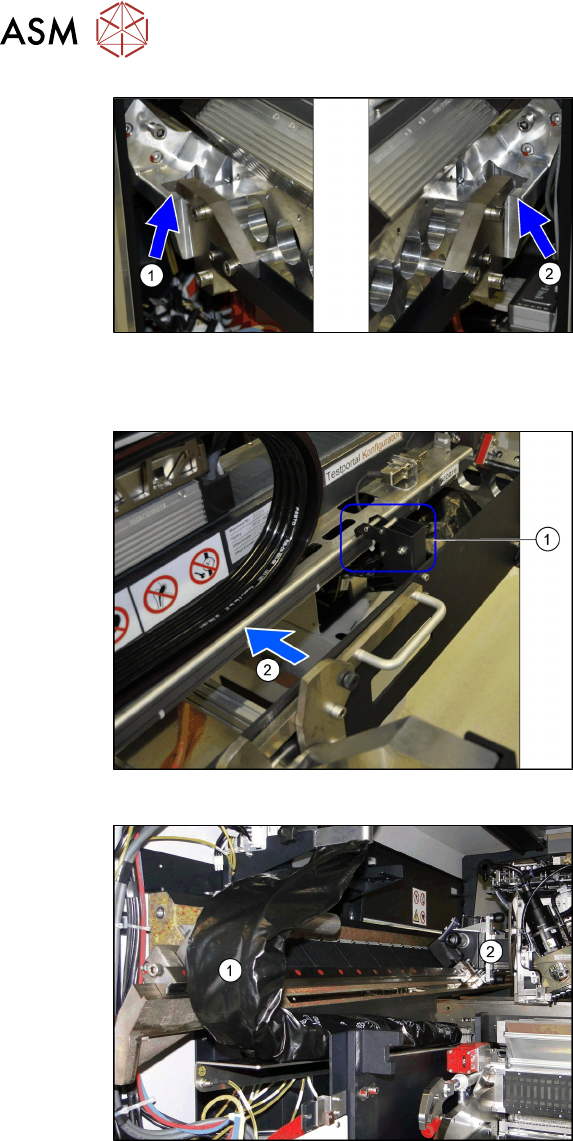
Fig.43: Docking hook hooked into place
The docking hooks are hooked into place on
the left (1)
and right (2) sides.
The gantry carrier with the gantry is now
fixed reliably onto the machine.
Remove the tilt guard and move in the gantry
Fig.44: Opening the tilt guard
► Open the tilt guard (1).
► Push the gantry (2) into the machine so
that both sides of the gantry rest on the
two linear guides.
► Move the gantry lift with the gantry car-
rier out of the location.
Fig.45: Pulling the trailing cable
► Move the gantry (2) into the machine
so that the trailing cable (1)
can be
pulled underneath, through the gantry.
3 Fitting the gantry
3.5 Installing the Gantry
Assembly Instructions / Montageanleitung SIPLACE SX1/SX2 V3 Reconfiguration Kit Twin VHF mit Portal
Reconfiguration Kit Twin VHF with Gantry 06/2020
121
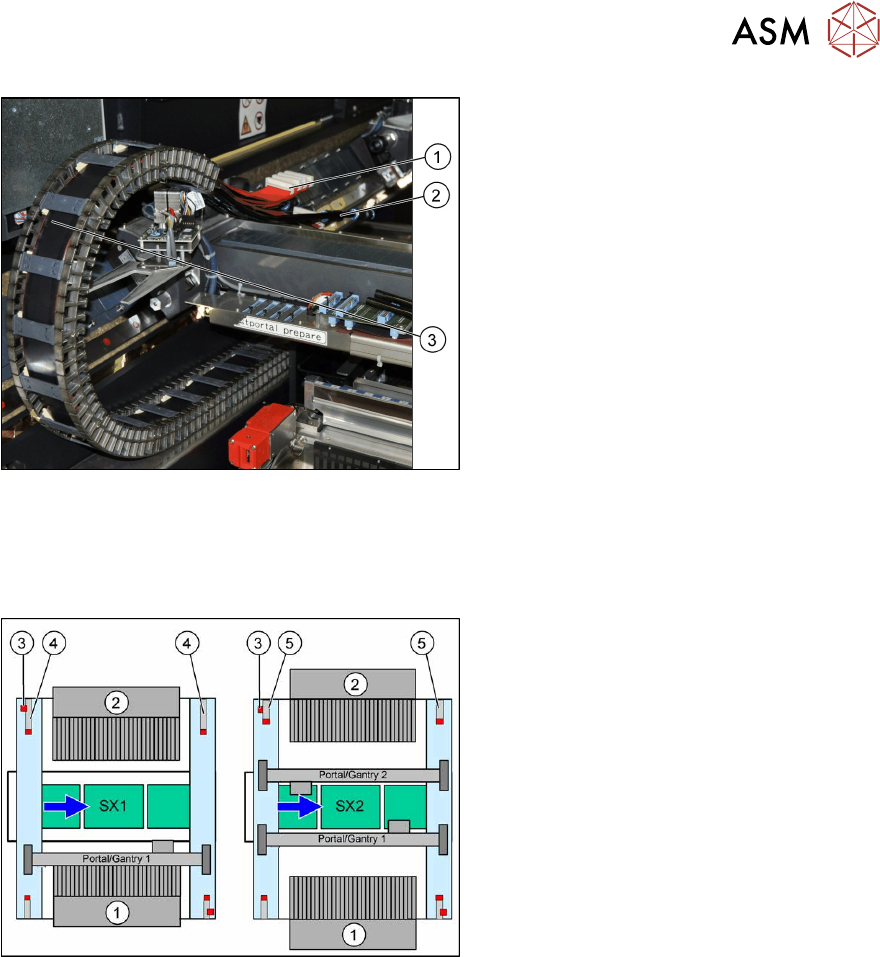
Fig.46: Flat ribbon cable and pneumatic connections
► Carefully place the flat ribbon cable (1)
and the pneumatic connections (2) over
the gantry.
► Remove the black plastic foil. A cable
tie fixes the black plastic foil to the trail-
ing cable(3)
.
3.5.1 Replacing/Fitting the End Position Buffers
Overview
Fig.47: Upgrade to SIPLACE SX2
1. Location 1
2. Location 2
3. Safety switch
4. Buffer with distance pipe at a SIPLACE
SX1
Standard: 226.5 mm
Twin VHF: 174 mm
5. Short buffer on an SX2 (standard and
Twin VHF)
When upgrading from a SIPLACE SX1 to a SIPLACE SX2, you need to fit the short end position
buffers at location 2.
When downgrading from a SIPLACE SX2 to a SIPLACE SX1, fit the buffer with distance pipe at
location 2.
When fitting a 40mm gantry, you need to fit the buffer with distance pipe at location 2 of the
SIPLACE SX1. (Buffer labeling: "LOC2,VHFSX1").