00198783-01_AI_Kit_TwinVHF_Gantry_SXV3_de_en.pdf - 第146页
5 Appendix 5.1 Excerpts from the Service Manual 146 Assembly Instructions / Montageanleitung SIPLACE SX1/SX2 V3 Reconfiguration Kit Twin VHF mit Portal Reconfiguration Kit Twin VHF with Gantry 06/2020 5.1.2 Replacing the…
5 Appendix
5.1 Excerpts from the Service Manual
Assembly Instructions / Montageanleitung SIPLACE SX1/SX2 V3 Reconfiguration Kit Twin VHF mit Portal
Reconfiguration Kit Twin VHF with Gantry 06/2020
145
5 Appendix
5.1 Excerpts from the Service Manual
The following chapters are excerpts from the service manual. For more information, refer to the full
service manual for your machine.
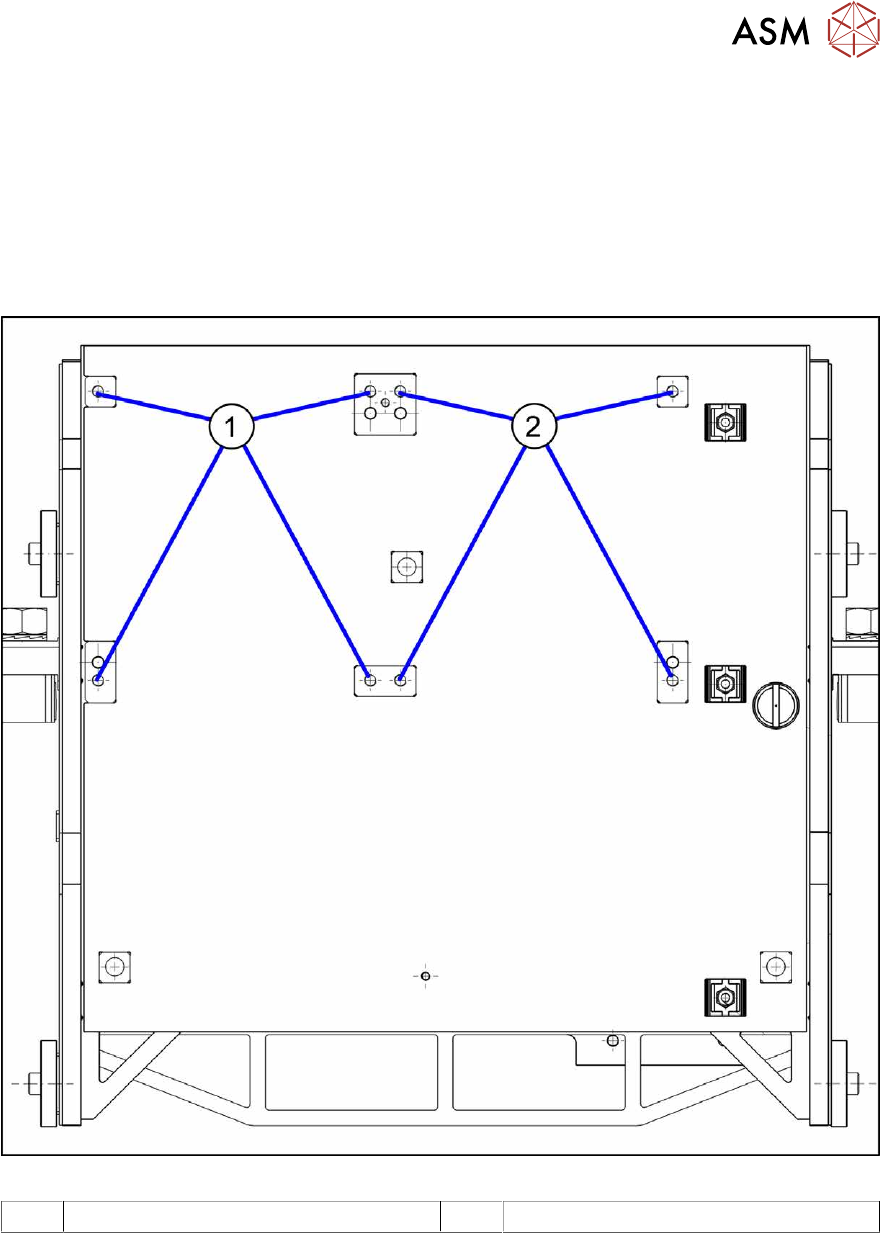
5.1.1 Installation Positions on the Twin VHF Head Plate
Fig.85: Installation positions on the Twin VHF head plate
1 Installation position Twin VHF segment 1 2 Installation position Twin VHF segment 2
5 Appendix
5.1 Excerpts from the Service Manual
146 Assembly Instructions / Montageanleitung SIPLACE SX1/SX2 V3 Reconfiguration Kit Twin VHF mit Portal
Reconfiguration Kit Twin VHF with Gantry 06/2020
5.1.2 Replacing the head adapter for the HCU and MHCU
NOTICE
SIPLACE C&P20P
The following additional conditions must be fulfilled for operating a SIPLACE C&P20P:
► The base adapter needs at least FS06.
► Make sure to use MHCU [03090990-xx].
► You find a complete list of the prerequisites in section Replacing the C&P20 P Head.
Parts, equipment and tools
The head adapter version needed depends on the head which is installed:
03065868-xx Head adapter HCU for SIPLACE CPP and SIPLACE C&P20A
(consists of: 1x PCB/B base adapter C&P [03055516-xx] and 1x MHCU
[03090990‑xx])
03065969-xx Head adapter HCU for SIPLACE Twin (VHF TwinHead)
(consists of: 1x PCB/B base adapter TWIN [03055517-xx] and 2x MHCU
[03090990‑xx])
03090990-xx MHCU assembly, compatible
Overview
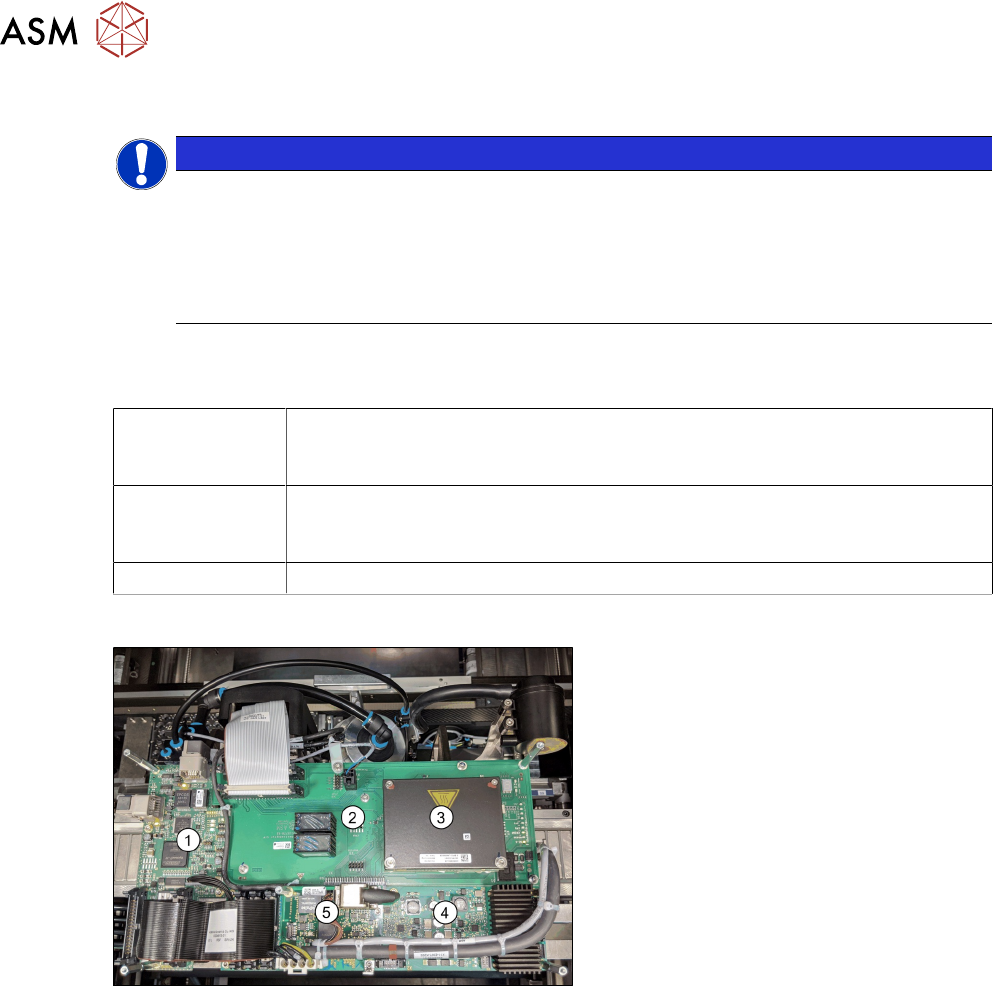
Fig.86: Boards on the gantry
1. Vision head interface
2. Head adapter (shows the CPx version
with a MHCU)
3. 1x MHCU (2x for Twin)
4. Head interface
5. Sensor module
Removal
► Switch off the machine, disconnect it from the power supply and secure it to prevent
unauthorized reactivation.
1.2 "Preparatory work..." [}85]
► If there is a cover above the boards, dismantle it.
► Unplug all electrical connections. You may want to mark the positions of these connections to
make clear assignment easier later on.
5 Appendix
5.1 Excerpts from the Service Manual
Assembly Instructions / Montageanleitung SIPLACE SX1/SX2 V3 Reconfiguration Kit Twin VHF mit Portal
Reconfiguration Kit Twin VHF with Gantry 06/2020
147
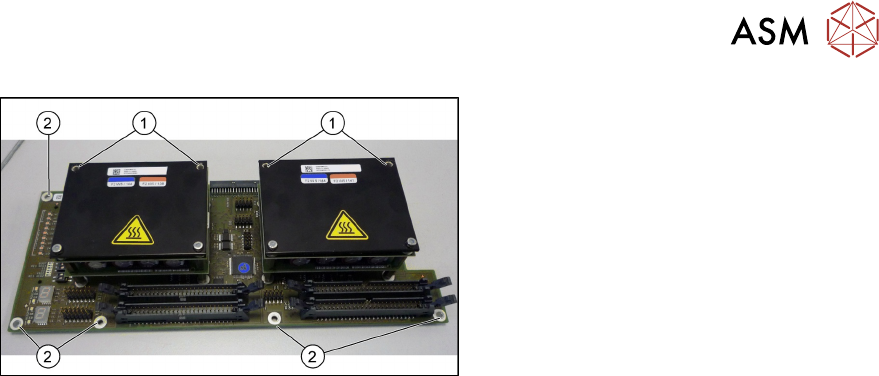
Fig.87: Head adapter MHCU (the TwinHead version shown here)
► Remove the two front screws (1)
fastening the MHCU in each case.
Make sure that you do not lose the
shims. Make a note of the number of
washers used for each screw, as this
may well differ.
► Remove all screws(2) fastening the
board and then remove the board.
► If you have ordered the base adapter without MHCU(s) you will have to convert the MHCU(s).
Remove the two screws fastening the MHCU on the underside of the board and carefully pull
the MHCU off the base adapter. Make sure not to damage the pins located below. Repeat this
procedure for the second MHCU, if necessary (for TwinHead only).
Installation
Follow the removal instructions in reverse order for installation. Also observe the following instruc-
tions:
► Checking the embedded software and performing a download if needed (see LINK).
4.2.1 "eSW Download (SW 70x)" [}142]