00198783-01_AI_Kit_TwinVHF_Gantry_SXV3_de_en.pdf - 第115页
3 Fitting the gantry 3.2 Gantry Preparations Assembly Instructions / Montageanleitung SIPLACE SX1/SX2 V3 Reconfiguration Kit Twin VHF mit Portal Reconfiguration Kit Twin VHF with Gantry 06/2020 115 3.2.4 Transportation L…
3 Fitting the gantry
3.2 Gantry Preparations
114 Assembly Instructions / Montageanleitung SIPLACE SX1/SX2 V3 Reconfiguration Kit Twin VHF mit Portal
Reconfiguration Kit Twin VHF with Gantry 06/2020
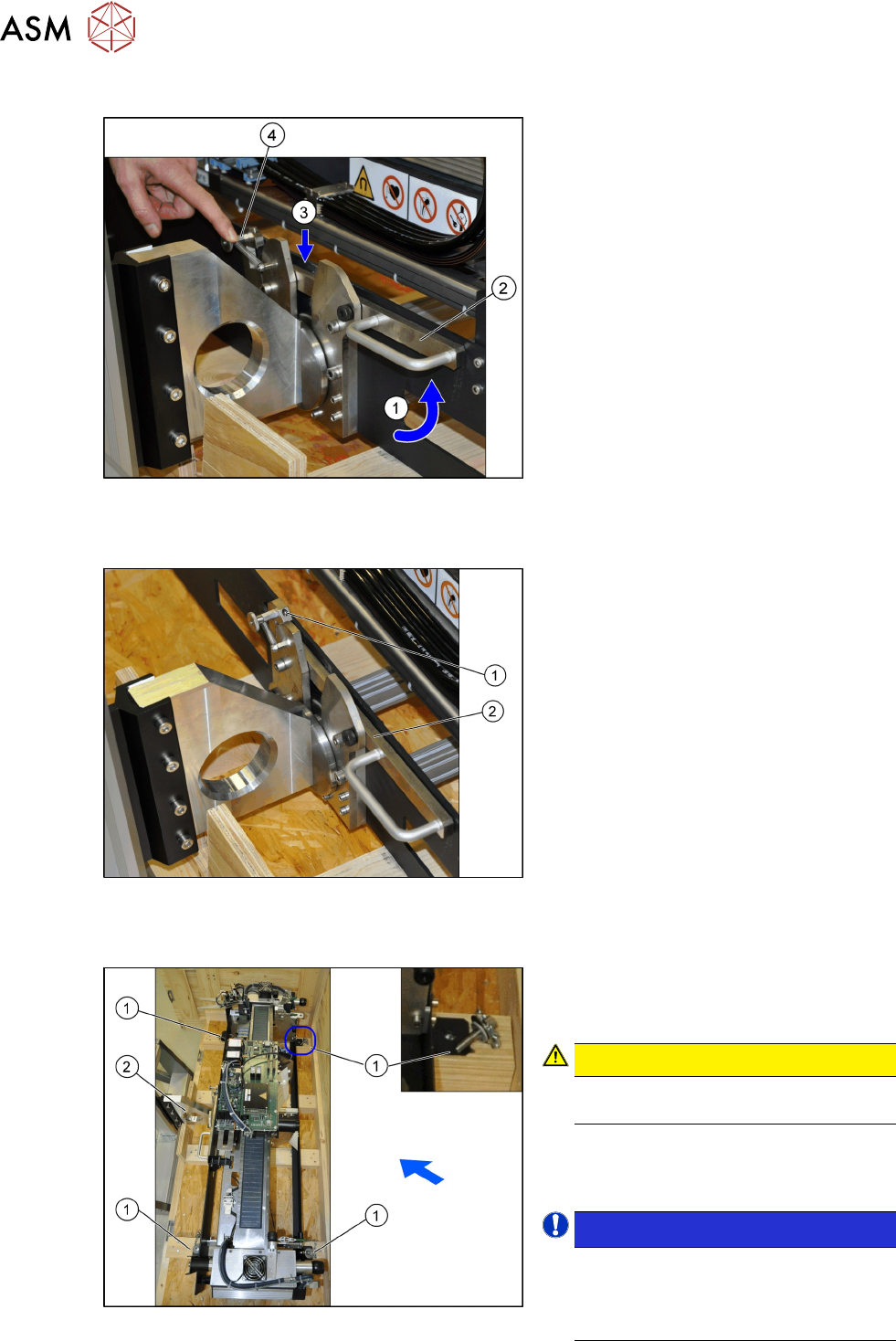
Locking the gantry carrier
Fig.30: Locked gantry carrier
► Press the lock (4) back and pull (1) the
handle (2)
of the lock upwards.
ð The lever (3) will engage. The
spring on the lock (4)
secures the
locking mechanism.
Locking the gantry carrier correctly
Fig.31: Checking the lock
► Check that the lever (2) on the lock (1)
has engaged properly.
► To open, press the lock backwards and
then press the lever downwards. This
opens the lock.
Securing the gantry in the transportation crate
Fig.32: Fuse in the transportation crate
► The gantry is fixed with four screws (1)
in the transportation crate. Remove
these screws.
CAUTION!
Only transport the gantry with the
gantry lift when the arms are locked!
.
► Move the gantry lift upwards and care-
fully lift the gantry out of the transporta-
tion crate.
NOTICE!
The placement head must be in the
center of the gantry.
This ensures that the load is distrib-
uted evenly during transportation.
.
3 Fitting the gantry
3.2 Gantry Preparations
Assembly Instructions / Montageanleitung SIPLACE SX1/SX2 V3 Reconfiguration Kit Twin VHF mit Portal
Reconfiguration Kit Twin VHF with Gantry 06/2020
115
3.2.4 Transportation Locks and Tilt Guard
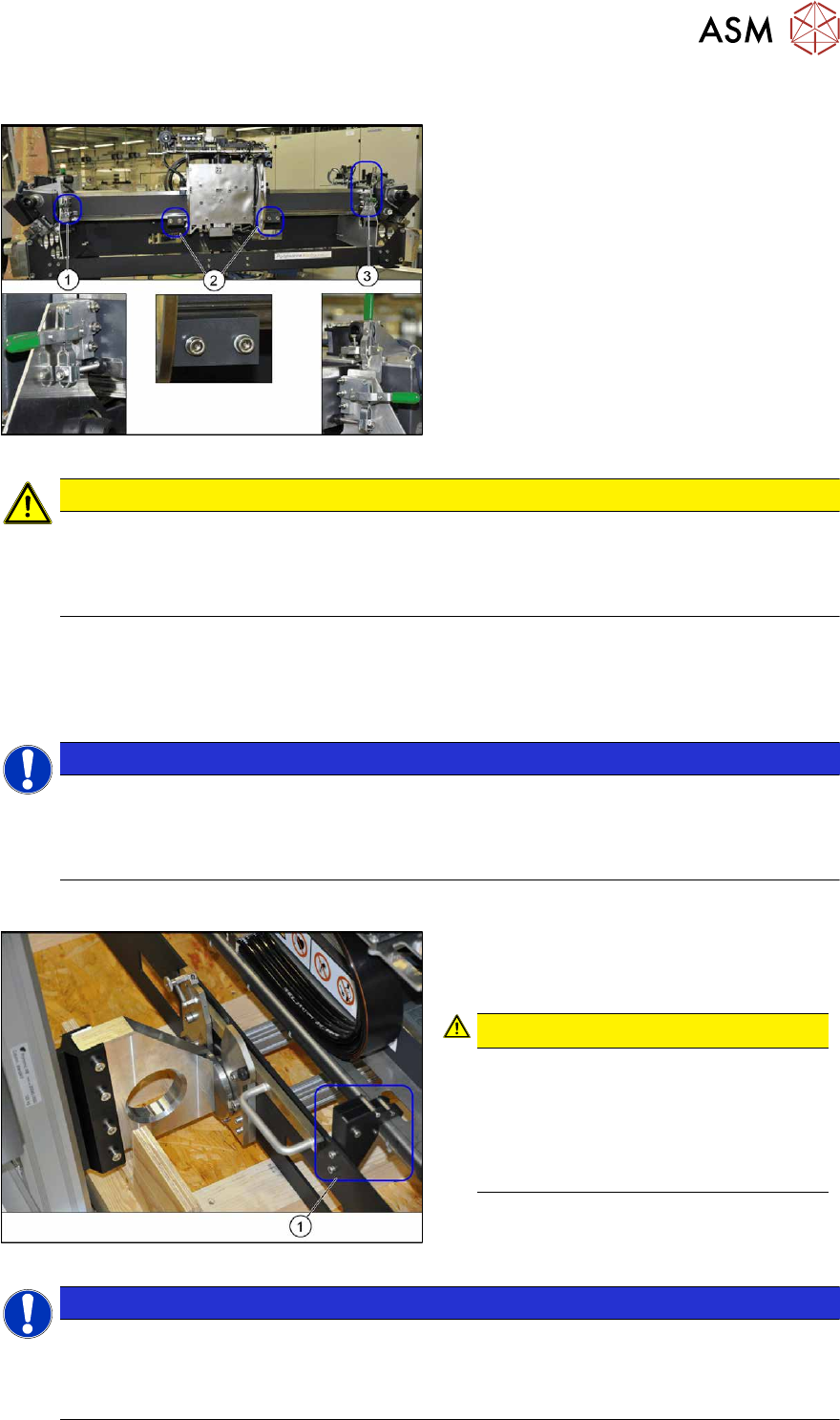
Fig.33: Transportation locks
The gantry is locked with three transportation
locks (1)
and (3) at the gantry carrier. In addi-
tion, the head plate has two transportation
locks (2)
for the placement head.
CAUTION
Docking
► Flap down the transportation lock plates right before the docking.
► Make sure that the gantry does not slide off the gantry carrier during rerailing respectively
derailing and that the tilt guard is suspended in order to hold the gantry in position.
► Move the green lever upwards and swivel the transportation lock to one side.
► There is another lever at (3). Move the green lever upwards and remove it.
► Loosen the two screws fastening the transportation locks (2) to the head plate in each case
and remove both locks.
NOTICE
Storing the transportation locks
If the gantry is transported or packed back into the transportation crate, you need to refit the
transportation locks.
► Place the transportation locks in the crate for later usage.
Tilt guard on the gantry carrier
Fig.34: Tilt guard on the gantry carrier
The gantry is also fitted with a tilt guard (1) on
the gantry carrier.
CAUTION!
Tilt guard on the gantry carrier
When the tilt guard is open, the gantry
could fall off the gantry carrier.
Only open the tilt guard once you have
hooked the gantry carrier onto the
machine docking unit.
.
NOTICE
Tilt guard on the gantry
The tilt guard may need to be adjusted to the gantry type "standard gantry" or "40mm VHF
Twin gantry". For more details see the technical information "Description of correct pack-
aging for an SX gantry" [DE:TI2013‑05D06] [EN:TI2013‑05E06].
3 Fitting the gantry
3.3 Assembling the SIPLACE Twin VHF
116 Assembly Instructions / Montageanleitung SIPLACE SX1/SX2 V3 Reconfiguration Kit Twin VHF mit Portal
Reconfiguration Kit Twin VHF with Gantry 06/2020
3.2.5 Fitting the MHCUs and base adapter for MHCU
► Fit the MHCUs onto the base adapter and then fit the base adapter onto the gantry.
Please read section 5.1.2
"Replacing the head adapter for the HCU and MHCU" [}146] and
the relevant chapter in the service manual for your machine.
3.3 Assembling the SIPLACE Twin VHF
The SIPLACE Twin VHF is fitted to the gantry before the gantry is installed. It consists of two
identical Twin segments, which are fitted at an angle of 180°.
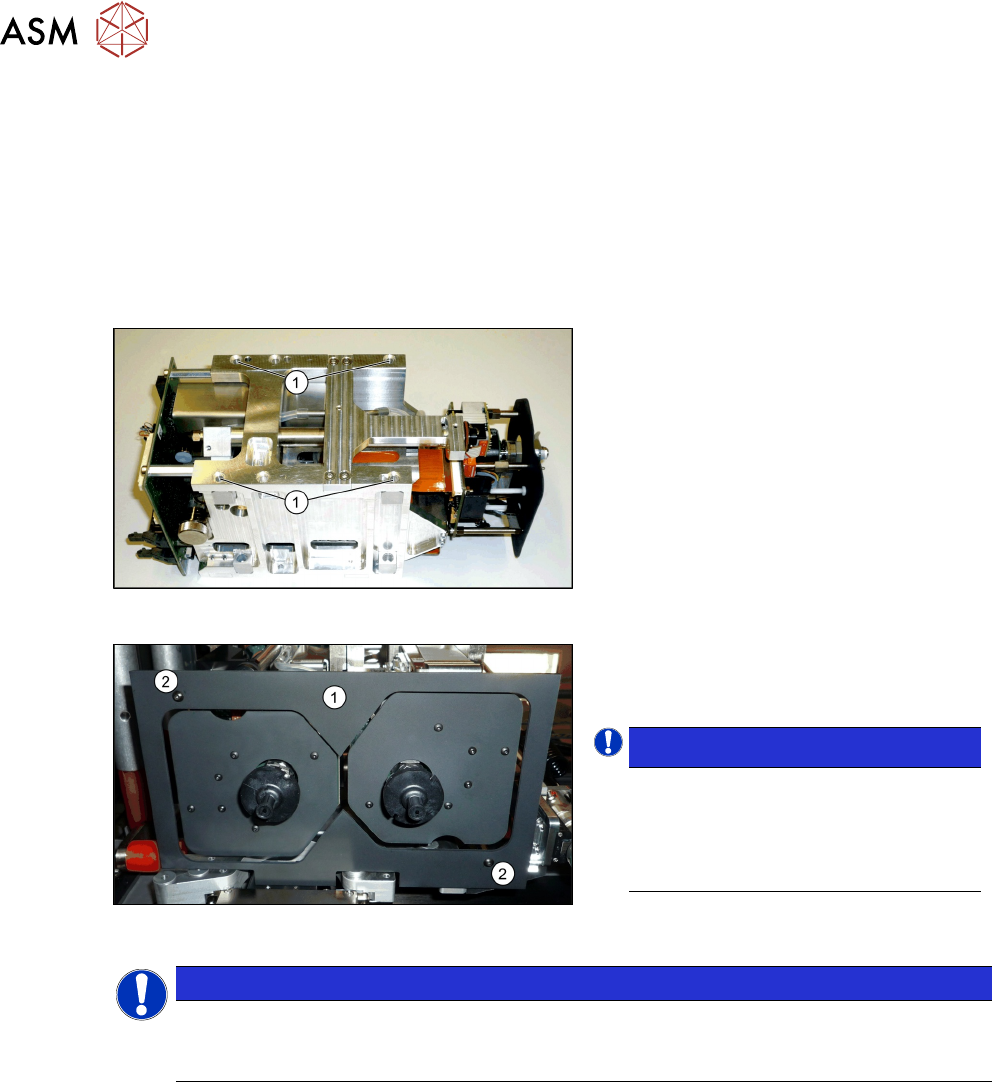
Fig.35: SIPLACE Twin VHF
Each module is fixed with four screws to the
head plate and is positioned with two pins.
► Lift the first module into position and
fasten this into place using a long Allen
key. Use the four M4x14screws(1)
.
► Repeat this step for the second mod-
ule.
Fig.36: Camera lens hood
► Fit the camera screen(1). This is
fastened into place using two black
screws(2)
.
NOTICE!
Black screws
Only use these screws to fix the cam-
era screen. This prevents reflection
when measuring components with the
stationary camera.
.
NOTICE
Hose and cable guidance
When performing the following steps, pay attention to the correct running of hoses and
cables. Refer to the diagrams for guidance.