00198783-01_AI_Kit_TwinVHF_Gantry_SXV3_de_en.pdf - 第123页
3 Fitting the gantry 3.6 Connecting the Trailing Cable Assembly Instructions / Montageanleitung SIPLACE SX1/SX2 V3 Reconfiguration Kit Twin VHF mit Portal Reconfiguration Kit Twin VHF with Gantry 06/2020 123 3.6 Connecti…
3 Fitting the gantry
3.5 Installing the Gantry
122 Assembly Instructions / Montageanleitung SIPLACE SX1/SX2 V3 Reconfiguration Kit Twin VHF mit Portal
Reconfiguration Kit Twin VHF with Gantry 06/2020
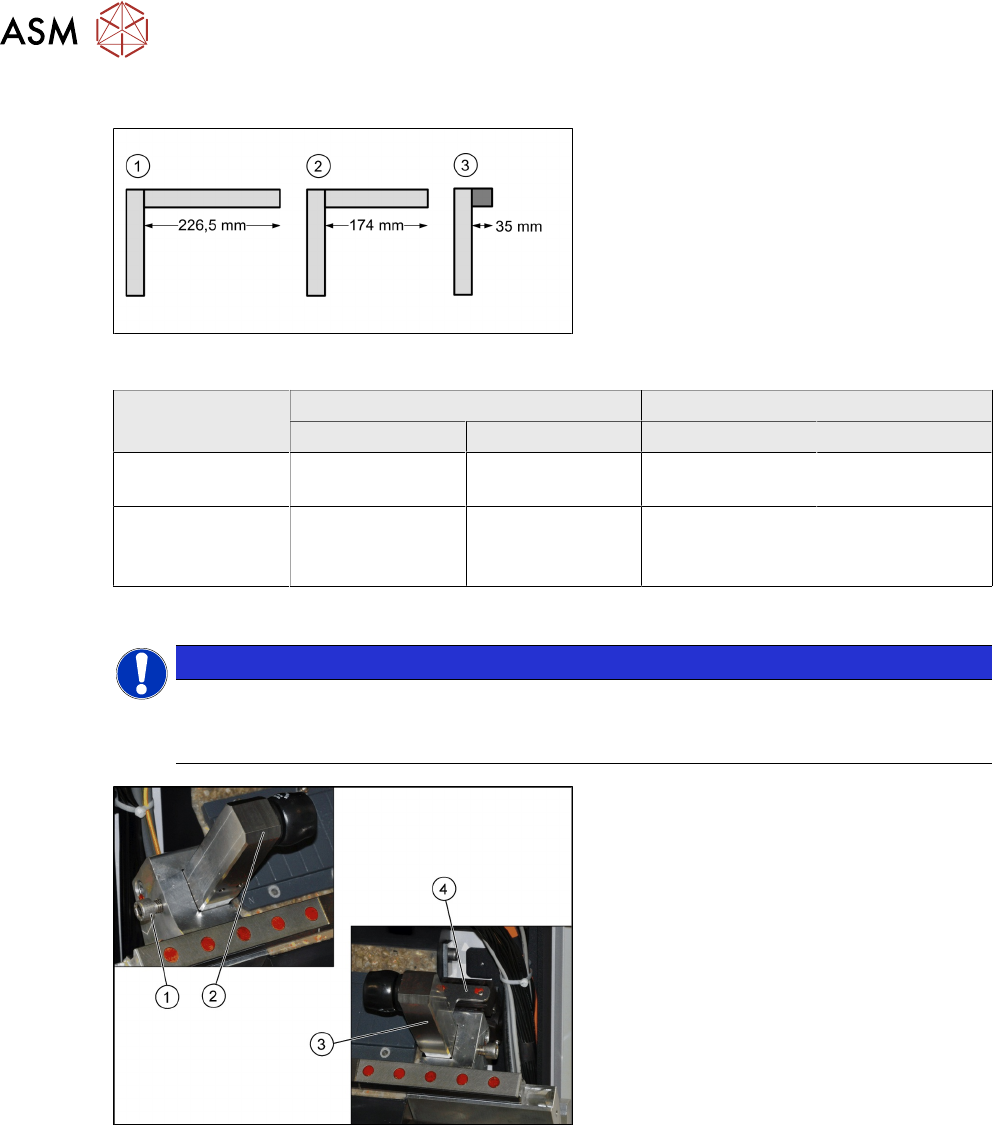
Buffer types
Fig.48: Buffer types
1. Standard: long buffer with distance pipe
for location 2 of an SX1 (226.5mm)
2. Twin VHF: buffer with shortened dis-
tance pipe [03105259-xx] for location 2
of an SX1 (174mm)
Buffer labeling: "LOC2, VHF SX1
"
3. Standard and Twin VHF: short buffer
with rubber damper for both locations
on an SX2 (35mm)
Machine SIPLACE SX1 SIPLACE SX2
Location 1 Location 2 Location 1 Location 2
Standard 35 mm rubber
dampers
226.5 mm
distance pipe
35 mm rubber
dampers
35 mm rubber
dampers
40 mm gantry for
Twin VHF
35 mm rubber
dampers
174 mm distance
pipe (shortened)
LOC2, VHF SX1
35 mm rubber
dampers
35 mm rubber
dampers
Installation
NOTICE
Holder and distance pipe
► You might need to fit the holder from one distance pipe onto the other distance pipe.
When doing so, hand-tighten
the distance pipe on the holder.
Fig.49: Fitting the end position buffer
► Fit the end position buffer (2) to the left
side.
► Fit the end position buffer (3) to the
right side. The safety switch (4)
for the
buffer monitoring function must engage
in the Schmersal switch.
► Tighten the fastening screws (1) for the
buffers with a torque of 14Nm
.
3 Fitting the gantry
3.6 Connecting the Trailing Cable
Assembly Instructions / Montageanleitung SIPLACE SX1/SX2 V3 Reconfiguration Kit Twin VHF mit Portal
Reconfiguration Kit Twin VHF with Gantry 06/2020
123
3.6 Connecting the Trailing Cable
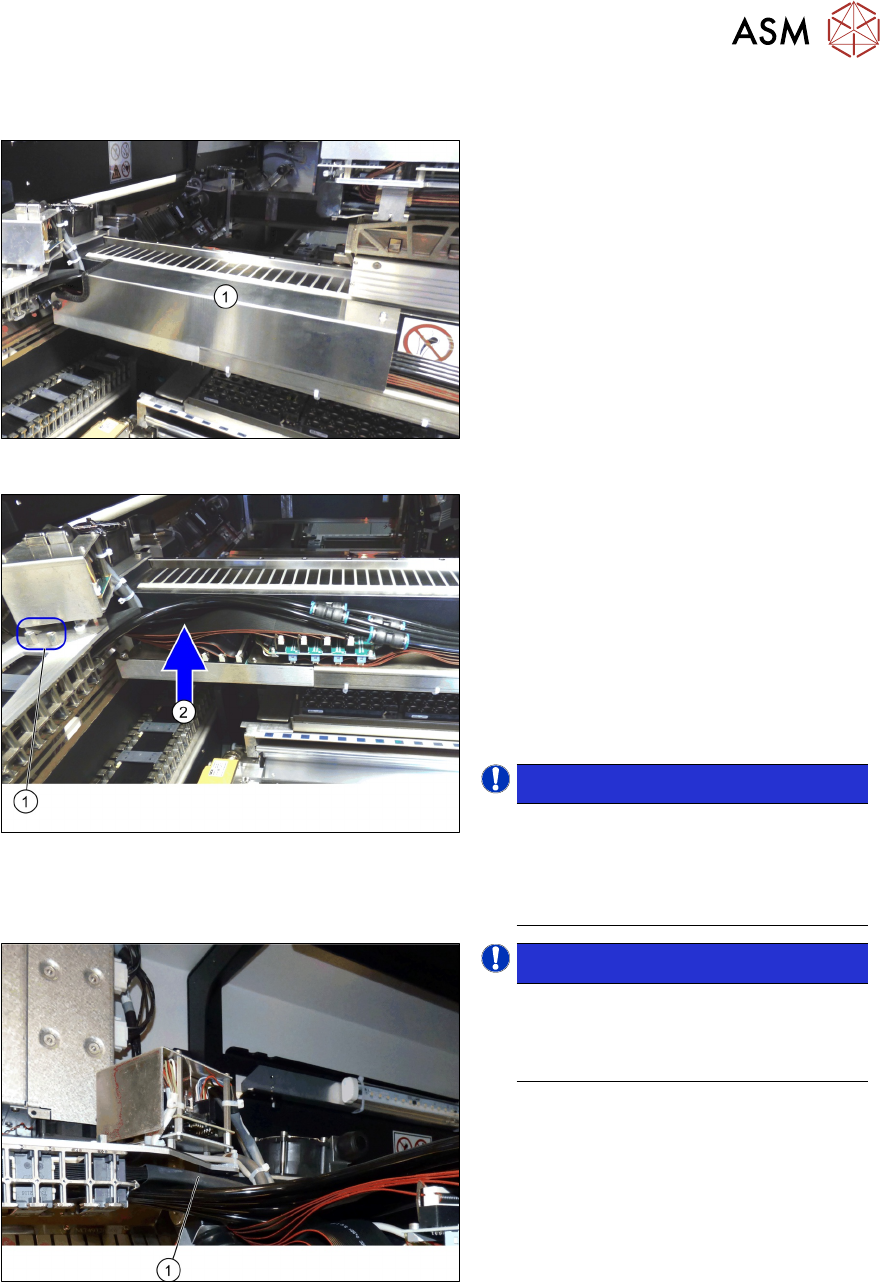
Fig.50: Cover
► Remove the cover (1) over the gantry
interface. To do this, remove the two
fastening screws on the right side and
carefully open the bottom left pushbut-
ton.
Fig.51: Fitting the trailing cable
► Fit the trailing cable holder (1) from
below, to the gantry distributor holder.
See the following section.
► Carefully place the flat ribbon cable and
the pneumatic hoses to one side (2)
.
► Make sure you do not damage the
cables and hoses.
► Take care that the alignment is correct
and that all cables and hoses are run
above one another and evenly.
NOTICE!
Use the correct gantry with Gig E trail-
ing cable, since only this can be con-
nected as described. It is not possible
to connect an older gantry with hotlink
trailing cable.
.
Fig.52: Heat-shrinkable hose
NOTICE!
When fitting the trailing cable, make
sure that the heat-shrinkable sleeve
(1) protects the flat ribbon cable under
the Y sensor module holder.
.
3 Fitting the gantry
3.6 Connecting the Trailing Cable
124 Assembly Instructions / Montageanleitung SIPLACE SX1/SX2 V3 Reconfiguration Kit Twin VHF mit Portal
Reconfiguration Kit Twin VHF with Gantry 06/2020
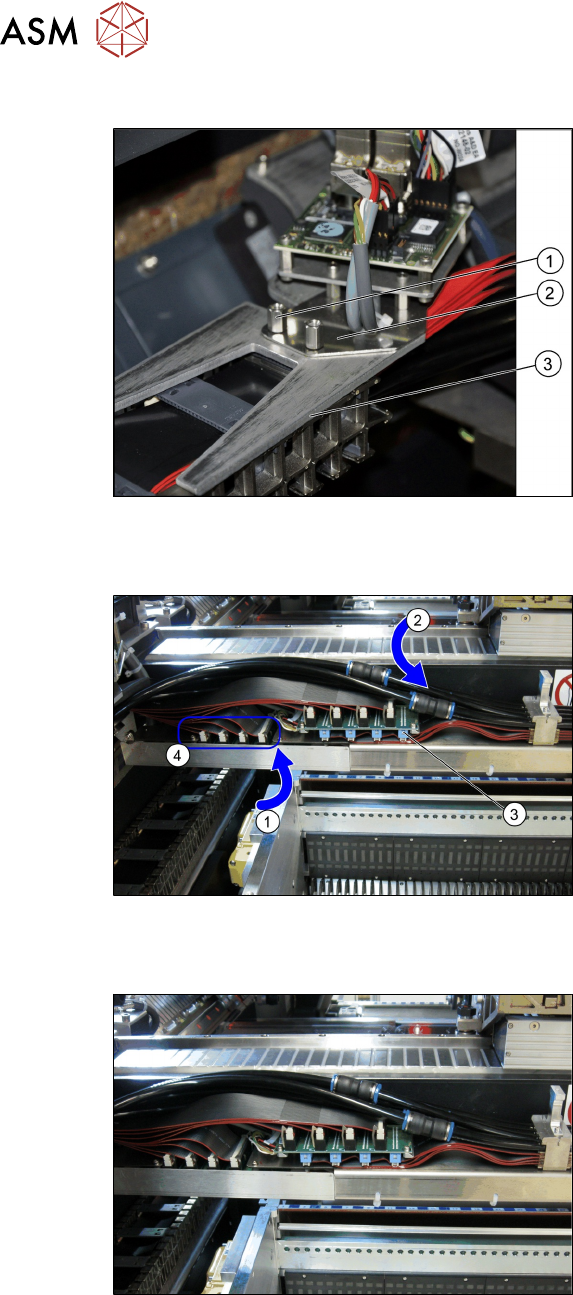
Trailing cable holder - overview
Fig.53: Trailing cable mount
1. Two hexagon spacer bolts M4 x 10
mm.
2. Gantry board holder
3. Trailing cable holder
► Remove the two hexagon spacer bolts
M4 x 10 mm on the trailing cable
holder.
► Hold the trailing cable holder from
below, on the gantry board holder.
► Screw the two hexagon spacer bolts
from above, into the trailing cable
holder.
► Secure the two hexagon spacer bolts
with Loctite 241
.
Restore the electrical and pneumatic connections
Fig.54: Electrical and pneumatic connections
► First connect the seven flat ribbon
cables (1)
to the boards for the gantry
interface of the X axis (3)
and the
gantry interface of the Y axis (4)
. The
sequence depends on the different
cable lengths. Work your way from
back to front.
► Remove the dummy plugs from the
pneumatic hose couplings.
► Connect the four pneumatic connec-
tions for the trailing cable to the gantry
connections (2)
. The sequence de-
pends on the different hose lengths.
Connections established
Fig.55: Arranging the connections
This diagram shows the precisely run and
correctly arranged connections.