00198783-01_AI_Kit_TwinVHF_Gantry_SXV3_de_en.pdf - 第128页
3 Fitting the gantry 3.7 Final Work 128 Assembly Instructions / Montageanleitung SIPLACE SX1/SX2 V3 Reconfiguration Kit Twin VHF mit Portal Reconfiguration Kit Twin VHF with Gantry 06/2020 3.7.6 Checking the Camera Cable…
3 Fitting the gantry
3.7 Final Work
Assembly Instructions / Montageanleitung SIPLACE SX1/SX2 V3 Reconfiguration Kit Twin VHF mit Portal
Reconfiguration Kit Twin VHF with Gantry 06/2020
127
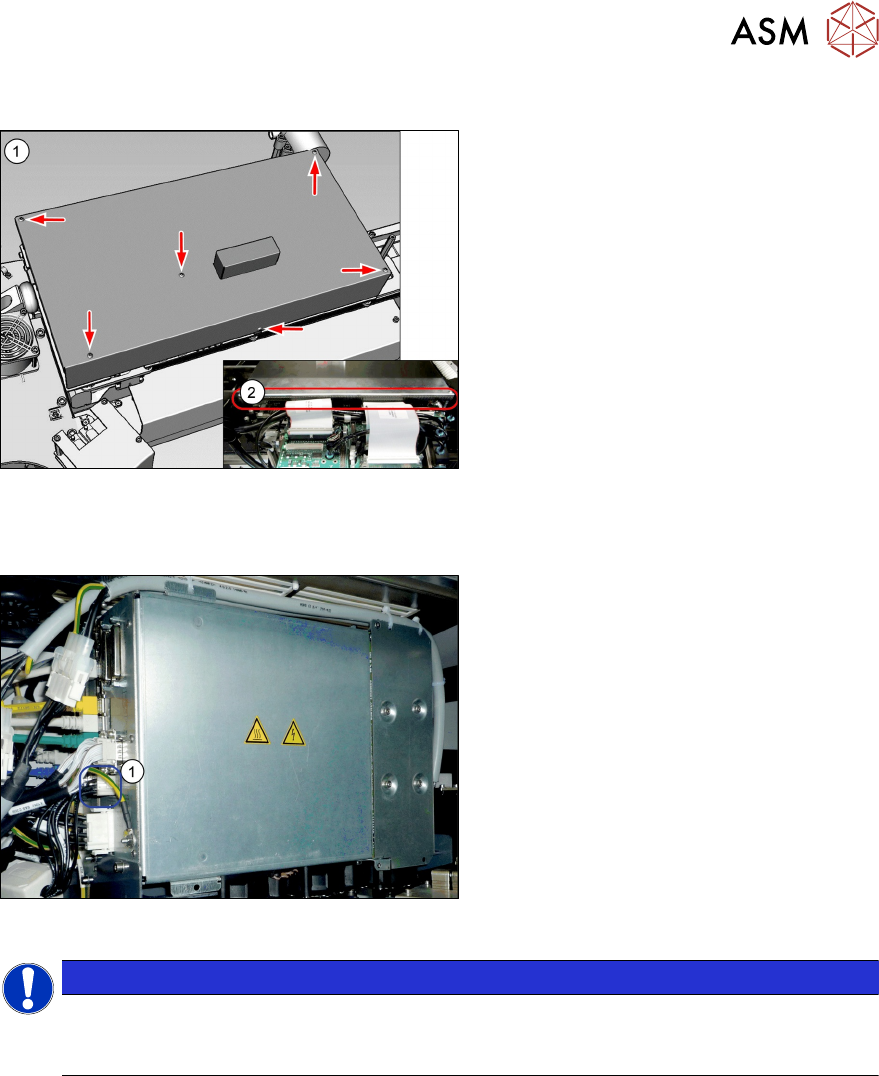
3.7.4 Fitting the cover
Fig.60: Cover
► Fit the cover(1) on the boards.
► VHF heads also need edge protec-
tion(2)
to be present.
3.7.5 Note MGCU
Fig.61: MGCU supply cable [03068134-xx]
► Please check the connection of the
MGCU power cable with the connector
X1up (1)
to ensure a correct start-up of
the machine.
NOTICE
Dismantling a gantry
The connector X1up has to be disconnected from the MGCU, if the gantry is dismantled
later on.
See also
2 5.1.3 "Overview of MGCU (Rxxxx)" [}149]
3 Fitting the gantry
3.7 Final Work
128 Assembly Instructions / Montageanleitung SIPLACE SX1/SX2 V3 Reconfiguration Kit Twin VHF mit Portal
Reconfiguration Kit Twin VHF with Gantry 06/2020
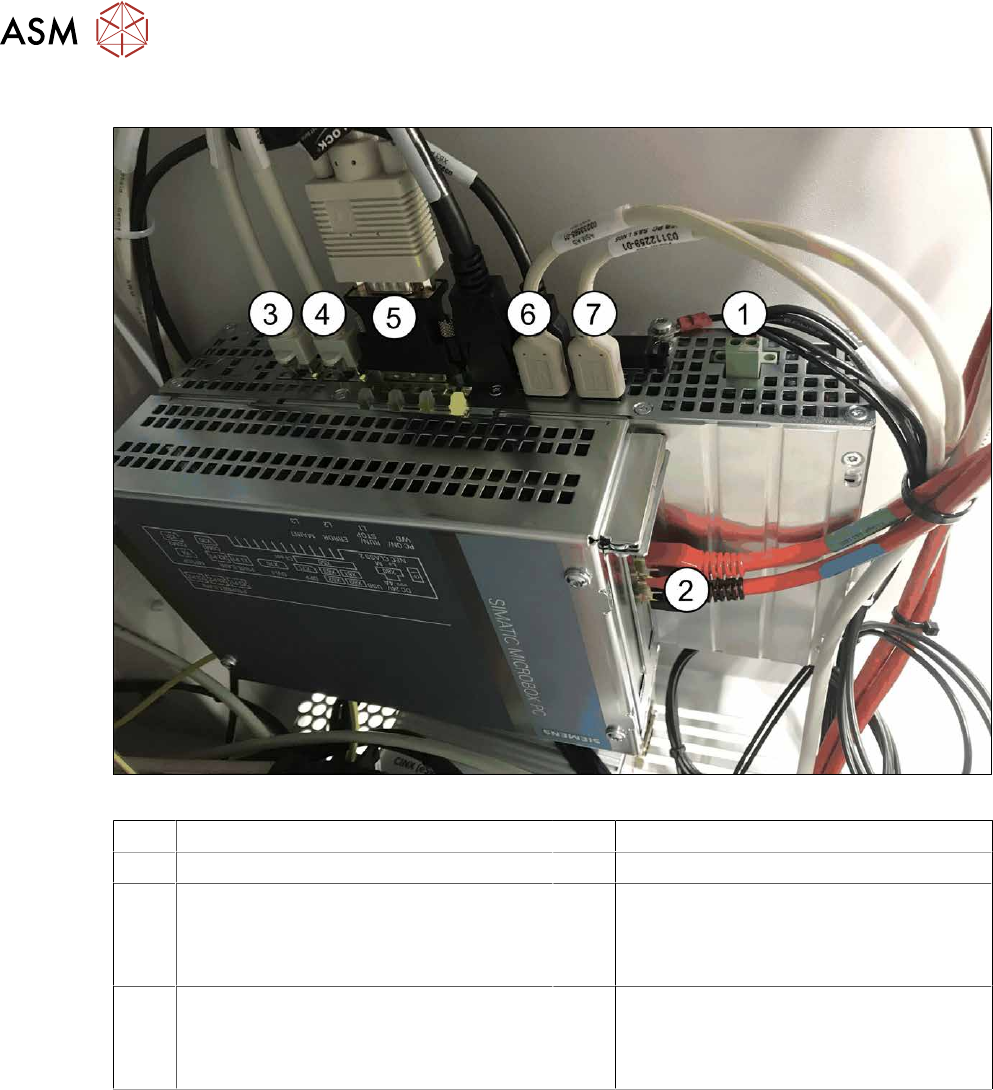
3.7.6 Checking the Camera Cable
Fig.62: Rear side BoxPC 427D
1 Power supply DC 24V 2 GigE ethernet adapter PCI-E
3 LAN 1: CIN Box 4 LAN 2: connection for line computer
5 DVI/VGA monitor connection
(connection monitor 1)
6 USB 2 – connection for an external DVD
drive
USB 4: X63 - connection for monitor 2
multitouch
7 USB 0: connection for keyboard/touch-
screen (connection to USB hub)
USB 1: X60 connection for monitor 1
multitouch
► Check whether the camera cable is connected to the GigE Ethernet adapter of the box PC.
Pay attention to the correct connections (see labeling on the GigE Ethernet adapter).
3 Fitting the gantry
3.7 Final Work
Assembly Instructions / Montageanleitung SIPLACE SX1/SX2 V3 Reconfiguration Kit Twin VHF mit Portal
Reconfiguration Kit Twin VHF with Gantry 06/2020
129
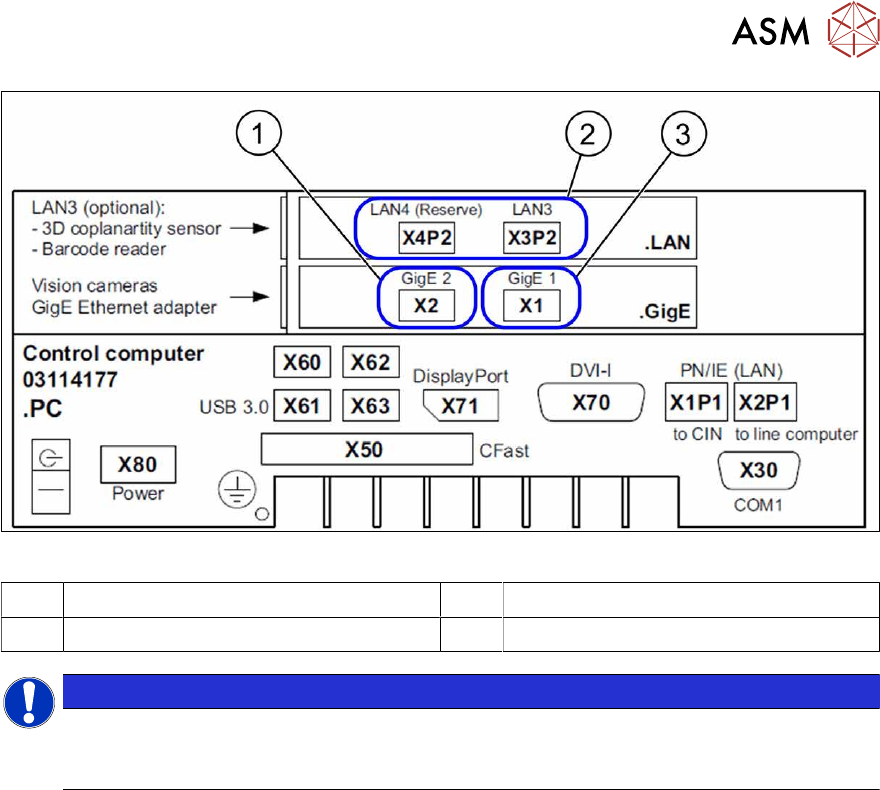
Fig.63: Label BoxPC
1 X1-Vision base interface gantry 1 2 Option: GigE ethernet adapter PCI-E
3 X2 Vision base interface gantry 2
NOTICE
Option
The LAN connections 3 and 4 on the LAN card PCI Express 2xGigabit LAN [03198999‑xx]
are available as an option.
3.7.7 Fitting the Nozzle Changer and Options
Installing the required nozzle changer (head-related)
► See also the assembly instructions "Nozzle Changer - SIPLACE SX-
Series" [DEEN:00196578‑xx].
Fitting the stationary cameras (optional)
► See also the assembly instructions "Stationary Camera SST 25 – SIPLACE X‑SeriesS and
SX V3" [DEEN:00197710‑xx].
Fitting the component reject bin query (optional)
► See also the assembly instructions "Reject Bin Query - for SIPLACE SX1/SX2" [DE
EN:00196615-xx].
Taking into account the component trolley docking unit inner/outer
► See also the service manual "SIPLACE SX1/SX2" [DE:00196496‑xx] [EN:00196497‑xx].