00197973-10_SM_MaterialTower.pdf - 第13页
0019797 3 - 10 / 02 , 2016 About th is Manual SIPLACE Mat. Towe r St ora ge Serv ice Manual © ASM xiii Tool Meaning of pictogra m: a tool is re quired to carry o ut a step in a pr ocedure. The pictogram is pl ac ed next …
About this Manual 00197973-10 / 02 , 2016
xii © ASM SIPLACE Mat. Tower Storage Service Manual
How to Use
In general, this Service Manual should be used in conjunction with all other relevant
documentation provided with the machine. To find specific information quickly, all user
information contain following features:
• Table of contents
• Cross-references within text
• Margin notes, pictograms, symbols etc.
• Glossary, giving a helpful list of the most frequently used terms of SMT technology
Manual used as Reference Book
This Service Manual can be used as reference book for working with the equipment. All equipment
users can follow the task description steps easy and fast. ASM suggests to acquire application
knowledge in training courses.
Manual used as Training Information
This Service Manual is structured according to the method of Performance Based Equipment
Training (PBET). Therefore it can be used as training information to pursue tasks step by step. It will
be used in ASM training courses.
Pictograms and their Meanings
Pictograms are used in this Manual in order to support the understanding of the text and to
increase the efficiency of the practical work. In line with text no pictograms are used.
Menu
Meaning of pictogram: "select the menu:…". The corresponding menu with sub-menu is written
next to the pictogram in a hierarchical form.
Example:
System
Calibration
XY gantry
Soft Key
Meaning of pictogram: "click the soft key ...". The corresponding soft key is written next to the
pictogram in bold italic font.
Example:
Calibrate all
00197973-10 / 02 , 2016 About this Manual
SIPLACE Mat. Tower Storage Service Manual © ASM xiii
Tool
Meaning of pictogram: a tool is required to carry out a step in a procedure. The pictogram is placed
next to the corresponding instruction.
Example:
Tighten the fixation screw.
Check
Meaning of pictogram: a selection has to be done (check boxes). The pictogram is placed next to
the corresponding instruction.
Example:
Setup check
Hint / Notification
Meaning of pictogram: a pop up window giving a hint or a warning. The text of the pop up window
is written next to the pictogram in a non proportional font.
Example:
Make sure that all boards are removed before continuing calibration
Text Box
Meaning of pictogram: a value (alphanumeric) has to be entered by means of the on-screen
keyboard, after clicking the text box (usually a parameter). The pictogram is placed next to the
corresponding parameter name.
Example:
Barcode, enter the barcode of the feeder.
Drop Down List
Meaning of pictogram: one of the presented items on the drop down list has to be selected, after
clicking the box (usually a parameter). The pictogram is placed next to the corresponding
parameter name.
Example:
No of pick retries, select the desired number of pick retries.
Text Conventions and their Meanings
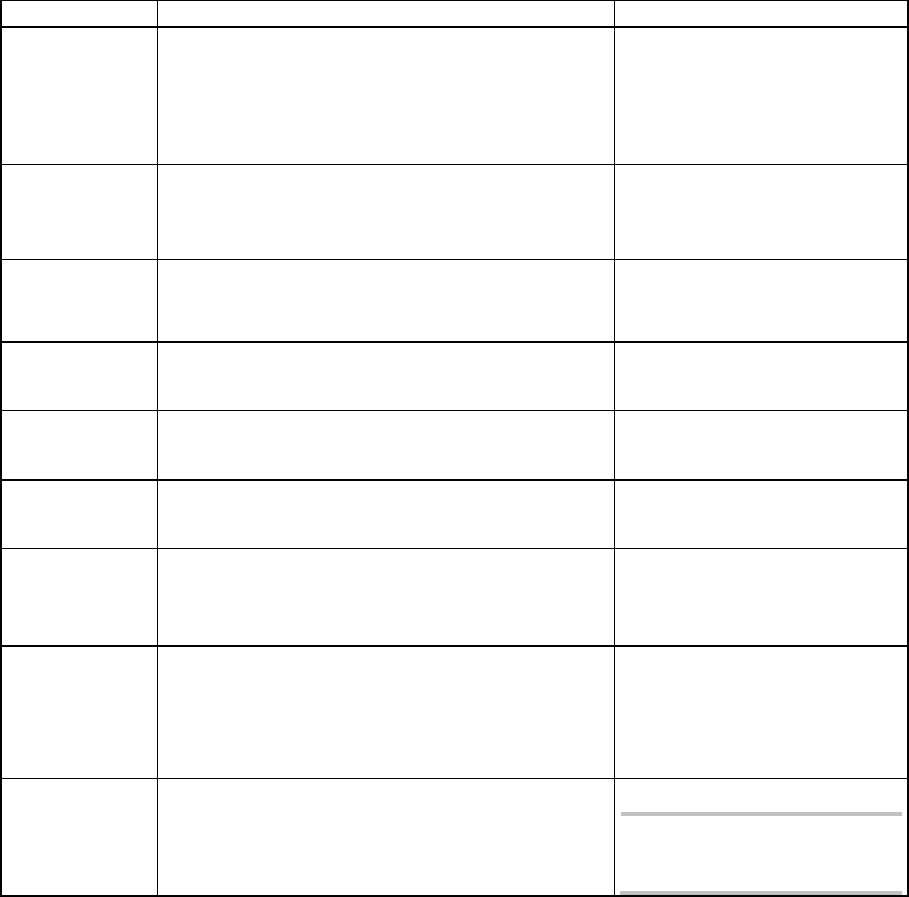
Various text styles are used in this Service Manual in order to support the readability of the text or
to emphasize the meaning of text segments.
About this Manual 00197973-10 / 02 , 2016
xiv © ASM SIPLACE Mat. Tower Storage Service Manual
Meaning
Description / Text Style
Example
Parameters and
actual Values
Machine parameters and actual values are
visualized by bold characters and in the same
spelling as in the menu. Also the state of the
parameter is written in the same way.
Set the parameter
Optimization mode to
Maximum performance
Pickup 5 [ms]
Soft Key Context sensitive function keys are written in
italic and bold. Normally they are shown
together with the respective pictogram.
Press New to create a new
light profile
Menu Key
(Screen)
Starts a submenu. Same style as the Soft Keys.
Production Settings
Check Boxes Are located anywhere on a screen. They have
same style as Soft Keys.
Select Setup check
Menu Tree In a text flow the hierarchy of a menu is visu-
alized by using hyphens and bold characters.
Setup - Optimization -
Recipe Splitting
Screen Screens are written in bold using capital and
small letters.
... on Produce screen
Cross
Reference
Written in blue italic.
see page Fehler! Es wurde
kein Textmarkenname
vergeben.
Notification
Error
Warning
Appearing in a pop up window providing tips,
instructions and messages. They are written in a
non proportional font.
The following warning
appears:
No components found
to be produced
Note If a certain subject must be emphasized it is
written as a note.
Note:
Adjust the guide pins
symmetrically