00197973-10_SM_MaterialTower.pdf - 第22页
在线预览 00197973-10_SM_MaterialTower.pdf PDF 文档。
00197973-10 / 02 , 2016 Safety
SIPLACE Mat. Tower Storage Service Manual © ASM 1-7
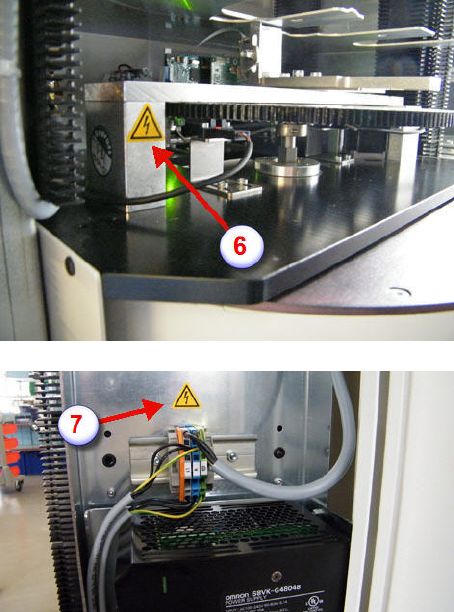
• (6) Portal seen from rear on left (if shelves
above the portal are mounted, the main
switch is not visible)
• (7) Power distributor, close to the power
supplies
00197973-10 / 02 , 2016
SIPLACE Mat. Tower Storage Service Manual © ASM 2-1
2 General
2.1 Check tension of all belts
2.1.1 Introduction
This instruction describes how to check and setup the tension of all belts on SIPLACE Material
Tower.
Before starting the maintenance, read the Safety instructions carefully.
If the tension of a belt has been modifies, all stacks must be recalibrated. Therefore, SIPLACE
Material Tower must be emptied in advance by means of the software.
However, as the unloading and recalibration is time
-consuming it is recommended first to
check all tensions without modifying them. Proceed with the unloading of the stacks only if a
new setup of a belt is required.
2.1.2 Tools, Material and Scheduling
For an effective and efficient maintenance, the following resources have to be provided:
Required Tools / Auxiliary Material / Spare parts
Tools: Allen key nr. 2, 2.5, 3 and 5
Torque key nr. 3 and 5 (torque range min-max: 1 N - 10 N)
Wrench Nr. 10
Belt tension meter (frequency range min-max: 20 Hz - 450 Hz), e.g. Sonic Tension
Meter / Gates Corporation Denver, Colorado
Measuring tape 5m
Auxiliary
Material:
Loctite Threadlocker Blue 242