00196504-02_UM_X-Serie_SR70X_EN.pdf - 第225页
User manual SIPLACE X-series Setting up and commissioning From software version SR.70x.xx 01/2011 EN edition Infrastructure at the installation location 225 PLEASE NOTE 4 The Japan ese supply network (3 x 200 V AC) and s…
Setting up and commissioning User manual SIPLACE X-series
Infrastructure at the installation location From software version SR.70x.xx 01/2011 EN edition
224
→ Crimp a ferrule onto each end of the wire.
→ Loosen the nuts on the angled cable gland (item 2 in Fig. 4.2 - 3
, page 222).
→ Fold up the angled cable gland.
→ Feed the power supply cable through the angled cable gland to the terminal panel X100 (see
X100 in Fig. 4.2 - 4
, page 223).
→ Connect the cable to the terminal and ensure that it has a sufficient bending radius. The wires
must not be kinked.
→ Fold up the angled cable gland (item 2 in Fig. 4.2 - 3
, page 222) and tighten the nuts hand-
tight.
4.2.3.5 Checking connections to the primary side of the three-phase transformer T1
The primary side of the three-phase transformer T1 must be configured for the respective supply
voltage.
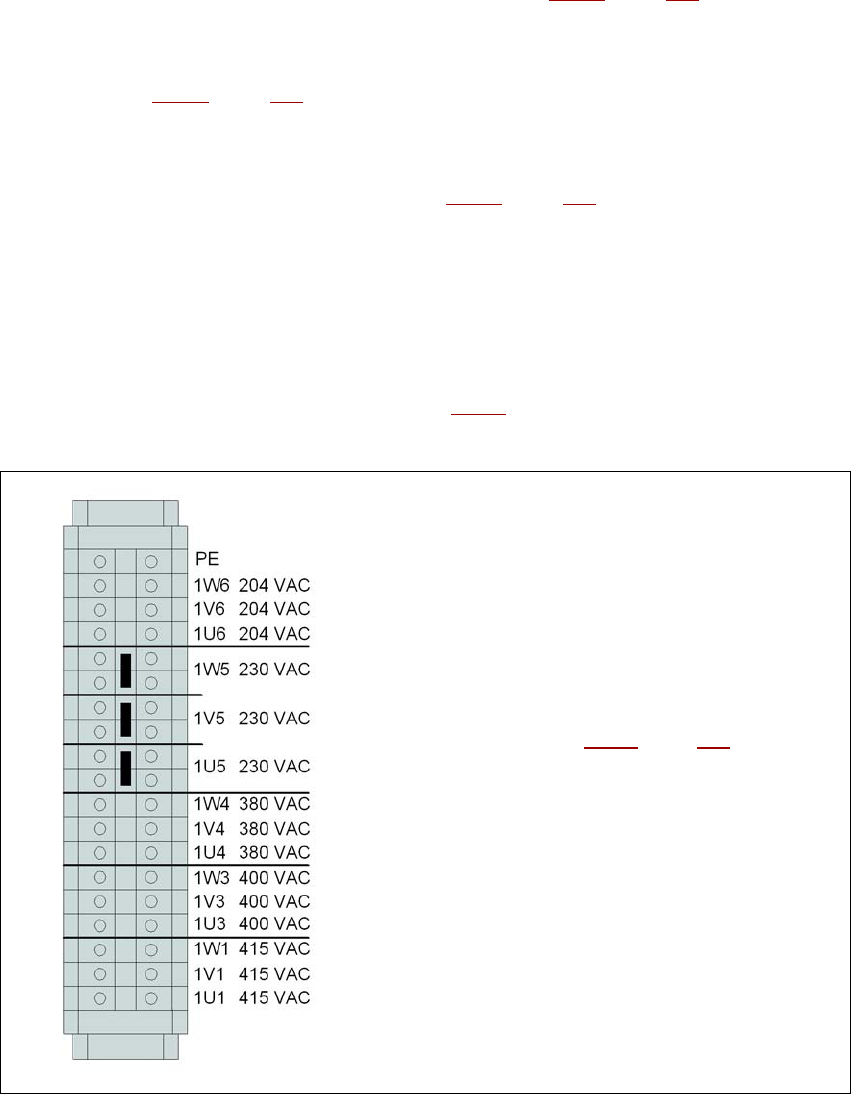
→ Therefore check at the terminal block (see Fig. 4.2 - 5
) to see whether the primary side of the
three-phase transformer T1 has been correctly connected for the respective supply voltage.
4
Fig. 4.2 - 5 Terminal block for the primary side of the three-phase transformer T1
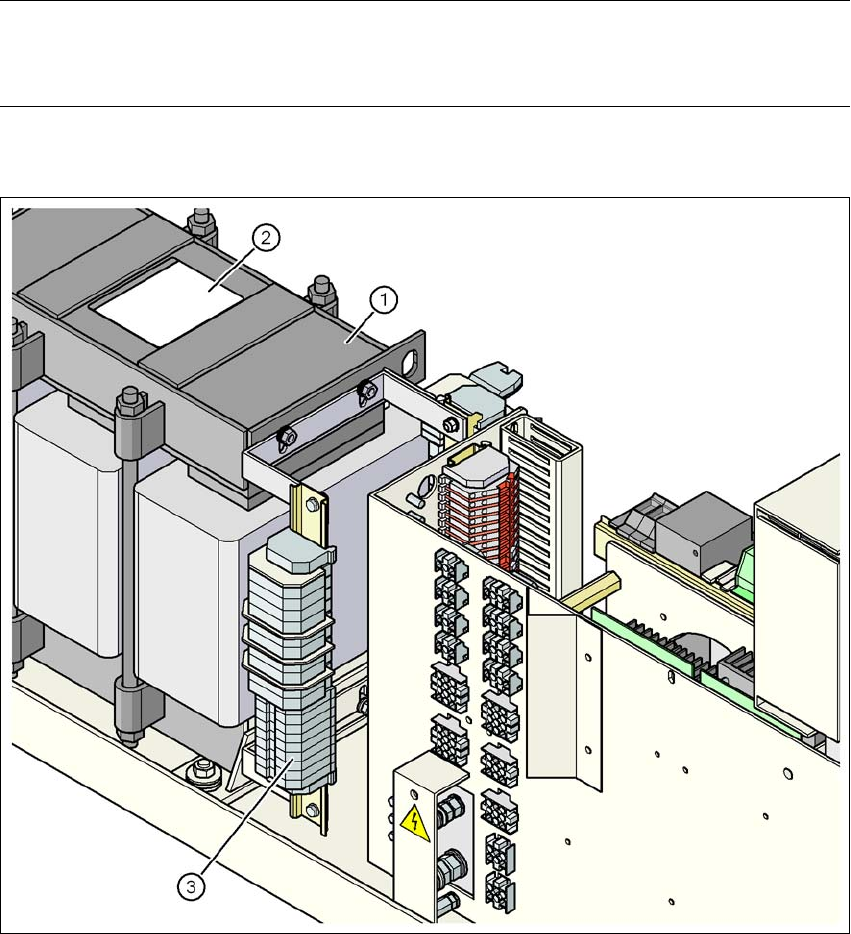
See item 3 in Fig. 4.2 - 6, page 225 for the
position of the terminal block
User manual SIPLACE X-series Setting up and commissioning
From software version SR.70x.xx 01/2011 EN edition Infrastructure at the installation location
225
PLEASE NOTE 4
The Japanese supply network (3 x 200 VAC) and supply networks in the USA (3 x 208 VAC) are
connected to terminals for 3 x 204 VAC.
4
4
4
4
Fig. 4.2 - 6 Position of the terminal block with primary connections for the three-phase transformer T1
(1) Three-phase transformer T1
(2) Sign with the connection wiring diagram for the primary side
(3) Terminal block with primary connections for the three-phase transformer T1
Setting up and commissioning User manual SIPLACE X-series
Infrastructure at the installation location From software version SR.70x.xx 01/2011 EN edition
226
4.2.3.6 Checking the inrush current limitation jumpers
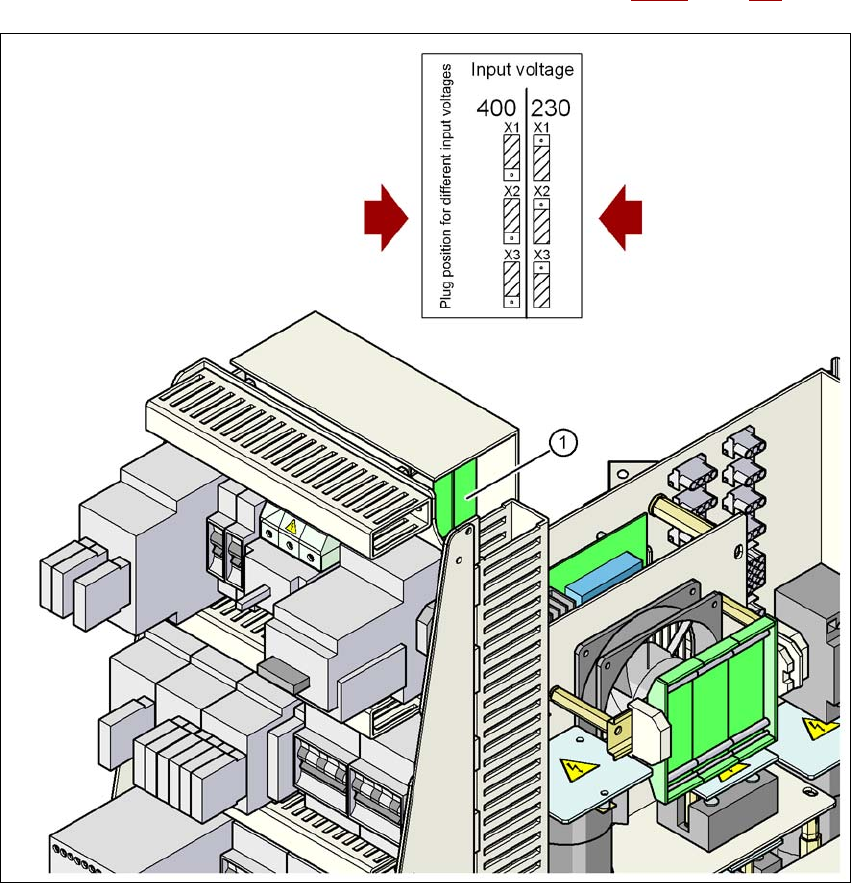
The inrush current limitation must be configured in relation to the supply voltage. This is done us-
ing plug-in jumpers on the inrush current limitation board (item 1 in Fig. 4.2 - 7
, page 226).
4
Fig. 4.2 - 7 Position of the board and connectors for the inrush current limitation
4
(1) Inrush current limitation board
X1, X2, X3 Connectors for configuring the inrush current limitation on the board
→ Check the jumper assignment and correct if necessary.
3 x 380 VAC
3 x 400 VAC
3 x 415 VAC
3 x 200 VAC
3 x 208 VAC
3 x 230 VAC