00196504-02_UM_X-Serie_SR70X_EN.pdf - 第231页
User manual SIPLACE X-series Setting up and commissioning From software version SR.70x.xx 01/2011 EN edition Setting up the machine 231 4 Fig. 4.3 - 3 Machine feet 4 (1) Outer machine foot, 4 x, 2 versions (see Fig. 4.3 …
Setting up and commissioning User manual SIPLACE X-series
Setting up the machine From software version SR.70x.xx 01/2011 EN edition
230
increase the distance between the forks so that the machine is lifted on the side parts of the
machine frame, since this would deform the machine frame.
→ Make sure that the forks are evenly loaded when you lift the machine. A firm support between
the forks and machine will prevent the machine tilting when it is raised. This will also prevent
a one-sided load on the machine feet, which would deform the fixing of the machine feet. We
recommend that a second person watch the machine as it is raised, and make sure that the
machine does not tip to one side when lifted with the fork-lift.
→ With the fork-lift, raise the machine approximately 30 mm. This will avoid any risk of injuring
your feet if you lower the machine feet accidentally.
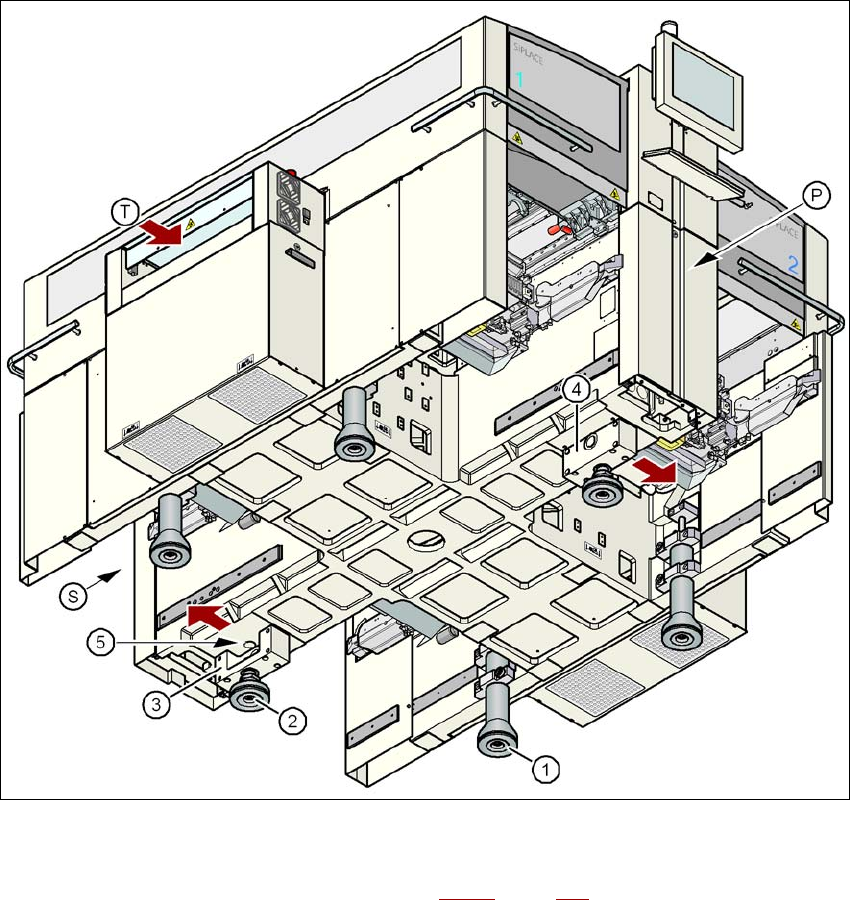
The machine stands on 6 feet.
– 4 outer machine feet (item 1 in Fig. 4.3 - 3
, page 231)
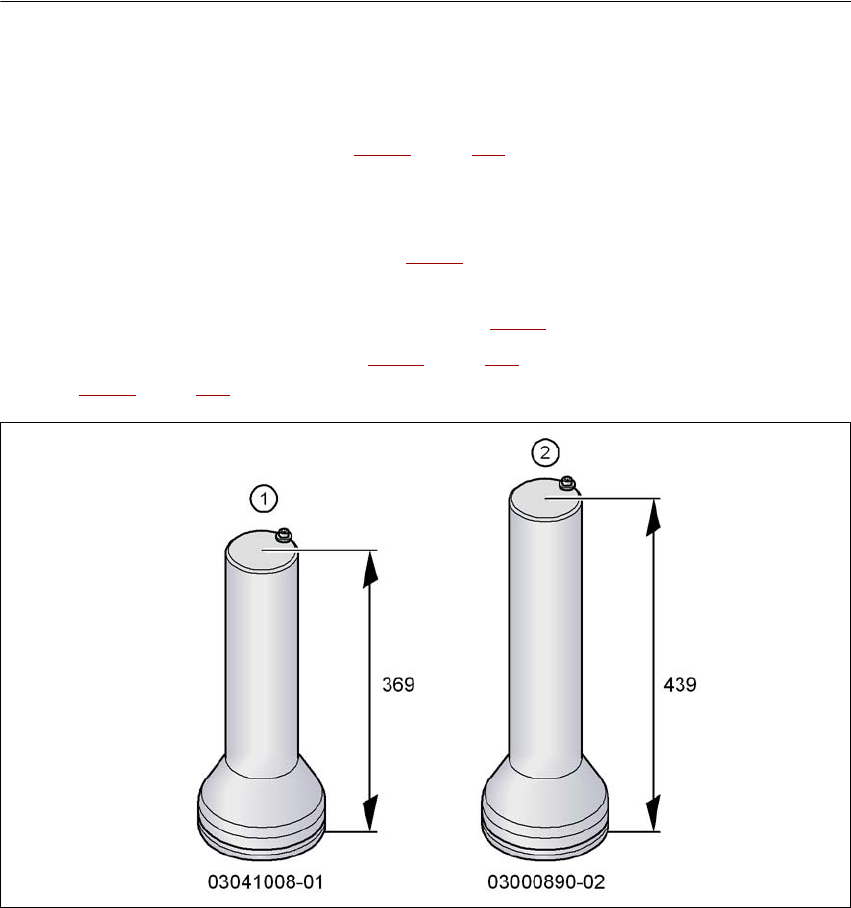
There are two versions of the outer machine feet: 4
– outer machine foot for the PCB conveyor height of 830 mm, length 369 mm,
item no. 03041008-01 (item 1 in Fig. 4.3 - 2
)
– outer machine foot for the PCB conveyor heights of 900, 930 and 950 mm, length
439 mm, item no. 03000890-02 (item 2 in Fig. 4.3 - 2
).
– 2 middle machine feet (item 2 in Fig. 4.3 - 3
, page 231) with 2 spacers (item 3 and item 4 in
Fig. 4.3 - 3
, page 231) for adjusting the height, if necessary.
4
Fig. 4.3 - 2 Outer machine feet - two versions (dimensions in millimeters)
User manual SIPLACE X-series Setting up and commissioning
From software version SR.70x.xx 01/2011 EN edition Setting up the machine
231
4
Fig. 4.3 - 3 Machine feet
4
(1) Outer machine foot, 4 x, 2 versions (see Fig. 4.3 - 2, page 230)
(2) Middle machine foot, 2 x
(3) Spacer on the side of the power supply unit
(4) Spacer on the side of the pneumatic unit
(5) threaded hole for the middle machine foot
(T) Direction of PCB transport
(P) Pneumatic unit
(S) Power supply unit
Setting up and commissioning User manual SIPLACE X-series
Setting up the machine From software version SR.70x.xx 01/2011 EN edition
232
4.3.4.1 Presetting the height of the middle machine feet
The middle machine feet are preset first. The spacer must be bolted to the underside in the correct
position for the machine height.
Setting the PCB conveyor height to 830 mm 4
You will not need a spacer for a PCB conveyor height of 830 mm.
→ Screw the middle machine foot as far as possible into the thread provided (see point 5 in Fig.
4.3 - 3
, page 231).
Setting the PCB conveyor height to 900 mm 4
You will need the spacer for a PCB conveyor height of 900 mm.
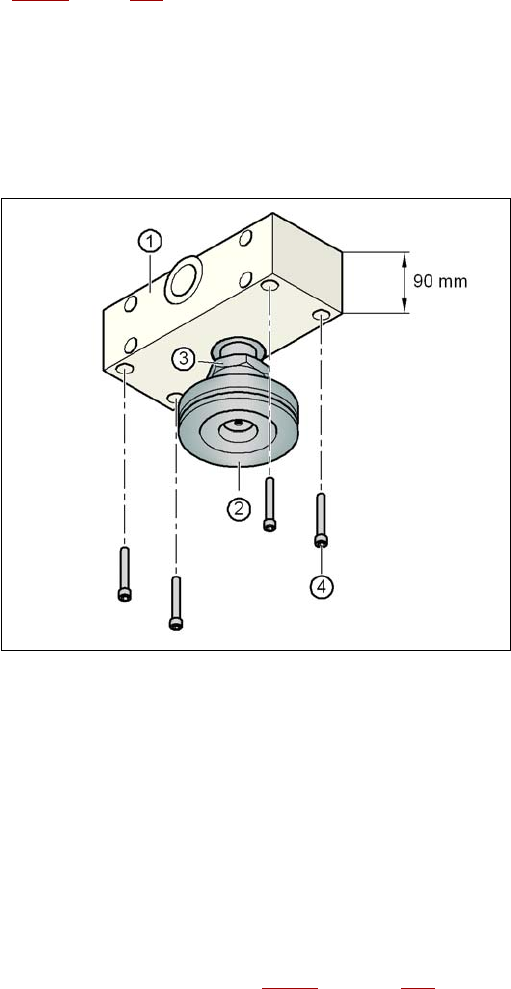
→ Align the spacer so that the 90 mm side is vertical and the hole for the middle machine foot
points downwards.
4
4
4
4
4
4
4
4
4
4
4
4
Fig. 4.3 - 4 Alignment of the spacer for a transport height of 900 mm
4
(1) Spacer height 90 mm
(2) Middle machine foot
(3) M24 lock nut
(4) Hexagon socket head screw M12x80, 4x
→ Screw the thread of the middle machine foot into the hole on the underside of the spacer.
→ Align the two spacers on the underside of the machine as follows:
– The opening in the spacer on the pneumatic unit side points in the direction of PCB trans-
port (see point 4 in Fig. 4.3 - 3
on page 231).