00196504-02_UM_X-Serie_SR70X_EN.pdf - 第349页
User manual SIPLACE X-series Tasks on the machine From software version SR.70x.xx 01/2011 EN edition Docking the component trolley in or out at the docking station 349 5.16 Docking the component trolley in or out at the …
Tasks on the machine User manual SIPLACE X-series
Docking the component trolley in or out From software version SR.70x.xx 01/2011 EN edition
348
5
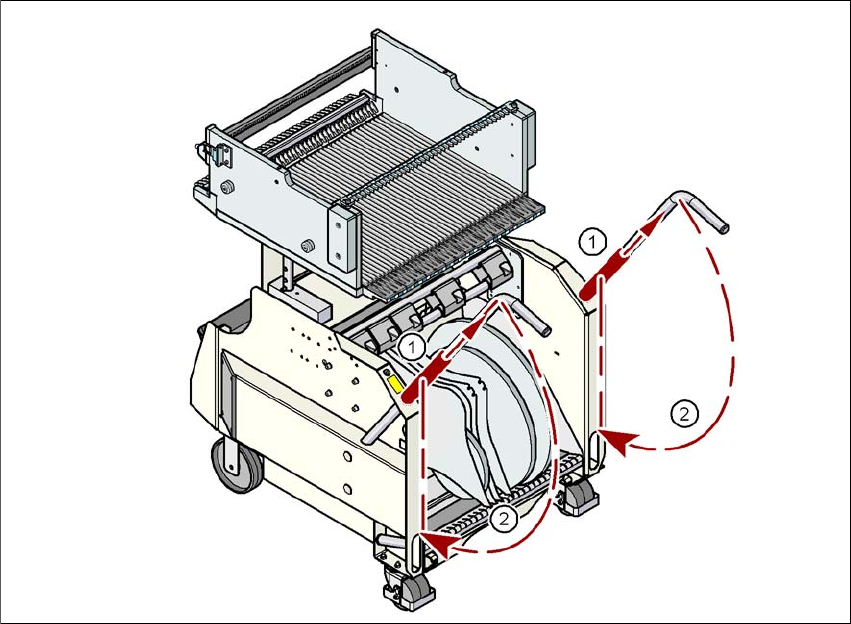
Fig. 5.15 - 4 Component trolley X-series - swivel handles down
(1) Push sleeve up
(2) Fold handle down
User manual SIPLACE X-series Tasks on the machine
From software version SR.70x.xx 01/2011 EN edition Docking the component trolley in or out at the docking station
349
5.16 Docking the component trolley in or out at the
docking station
5
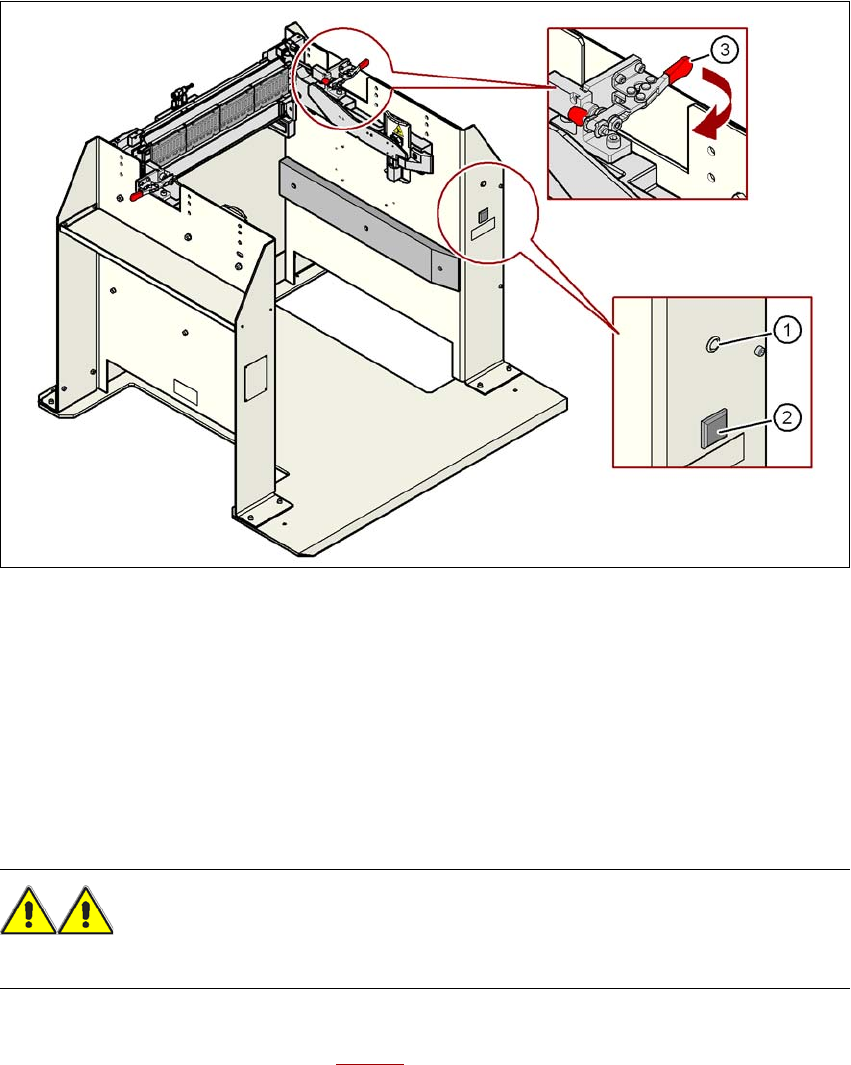
Fig. 5.16 - 1 Component trolley X-series - swivel handles down
(1) Main power supply indicator lamp
(2) Button for locking and releasing all the feeder modules on the component trolley
(3) Horizontal tensioner for fixing the component table lever in the "closed" position
5
5
5.16.1 Docking the SIPLACE X-series component trolley into the docking station
WARNING 5
→ While docking, do not reach into the areas between component trolley and docking station.
→ Release the two horizontal tensioners at the same time by moving them in the direction indi-
cated by the arrow (item 3 in Fig. 5.16 - 1
).
Tasks on the machine User manual SIPLACE X-series
Docking the component trolley in or out at the docking station From software version SR.70x.xx 01/2011 EN edition
350
→ Push the component trolley carefully into the docking station. This will raise the component
table.
→ Make sure that the component trolley is standing fully on the base plate of the docking station.
→ Apply the two horizontal tensioners at the same time (item 3 in Fig. 5.16 - 1
, page 349).
The component table is raised into its definitive position and locked.
→ Use the button (item 2 in Fig. 5.16 - 1
, page 349) to lock or release all the feeder modules on
the component table.
5.16.2 Docking out the SIPLACE X-series component trolley from the docking sta-
tion
WARNING 5
→ While undocking, do not reach into the areas between component trolley and docking station.
→ Release the two horizontal tensioners at the same time (item 3 in Fig. 5.16 - 1
, page 349).
The component table is lowered.
→ Now pull the component trolley out of the docking station.