00196504-02_UM_X-Serie_SR70X_EN.pdf - 第242页
Setting up and commissioning User manual SIPLACE X-series Setting up the machine From software version SR.70x.xx 01/2011 EN edition 242 4.3.7.5 Fitting the grounding cable for the doors → Fix the two grounding cab les fo…

User manual SIPLACE X-series Setting up and commissioning
From software version SR.70x.xx 01/2011 EN edition Setting up the machine
241
4.3.7.3 Fitting the guide for the hexagonal shaft
→ On the single conveyor, fix one guide for the hexagonal shaft (item 8 in Fig. 4.3 - 7, page 237)
to the extension kit using two fillister head screws M6x16 and washers.
→ On the double conveyor, fix two guides for the hexagonal shaft (item 8 in Fig. 4.3 - 7
, page
237
) to the extension kit using two fillister head screws M6x16 and washers.
4.3.7.4 Producing cable connections - extension kit on the PCB output side
4
4
4
4
4
Left-hand side of the extension kit
(viewed in the direction of travel)
Connector/cable To connector/cable
EMERGENCY STOP button
Start/stop button
X63/03020687 X63/03002526
Protective cover switch, location 3
X53/03020409 X53/03002528
Button for the component trolley docking unit,
location 3
X232/03021056 X232/03021053
Right-hand side of the extension kit
(viewed in the direction of travel)
Connector/cable To connector/cable
Start/stop button
Switch, PCB conveyor cover
X62/03020410 X62/03002525
Protective cover switch, location 2
X52/03006476 X52/03002527
Button for the component trolley docking unit,
location 2
X222/03021056 X222/03021052
Setting up and commissioning User manual SIPLACE X-series
Setting up the machine From software version SR.70x.xx 01/2011 EN edition
242
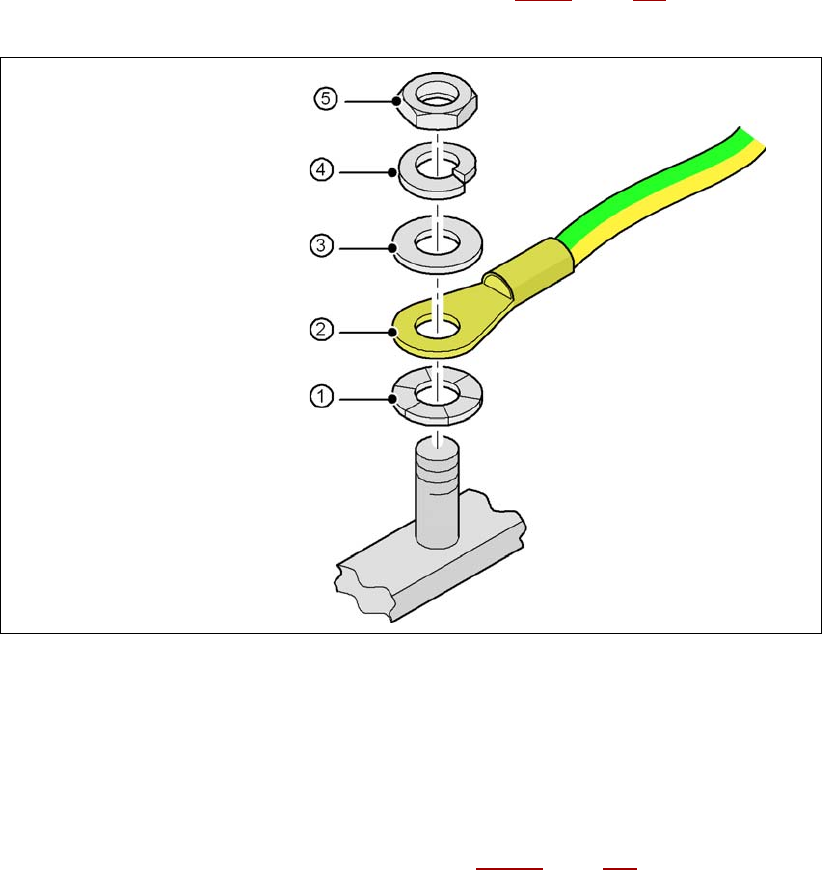
4.3.7.5 Fitting the grounding cable for the doors
→ Fix the two grounding cables for the doors (item 4 in Fig. 4.3 - 8, page 239) to the machine
frame as follows:
4
Fig. 4.3 - 9 Fitting the grounding cable
4
4
4
4
4
4.3.7.6 Checking and setting the protective cover switch
→ Check that the protective cover switch (item 2 in Fig. 4.3 - 17, page 258) is working correctly.
→ Adjust the protective cover switch if necessary (see service manual).
Hex nut M5
Spring washer M5, DIN 7980
Washer M5, DIN 125
Cable lug, annular
Contact washer
User manual SIPLACE X-series Setting up and commissioning
From software version SR.70x.xx 01/2011 EN edition Setting up the machine
243
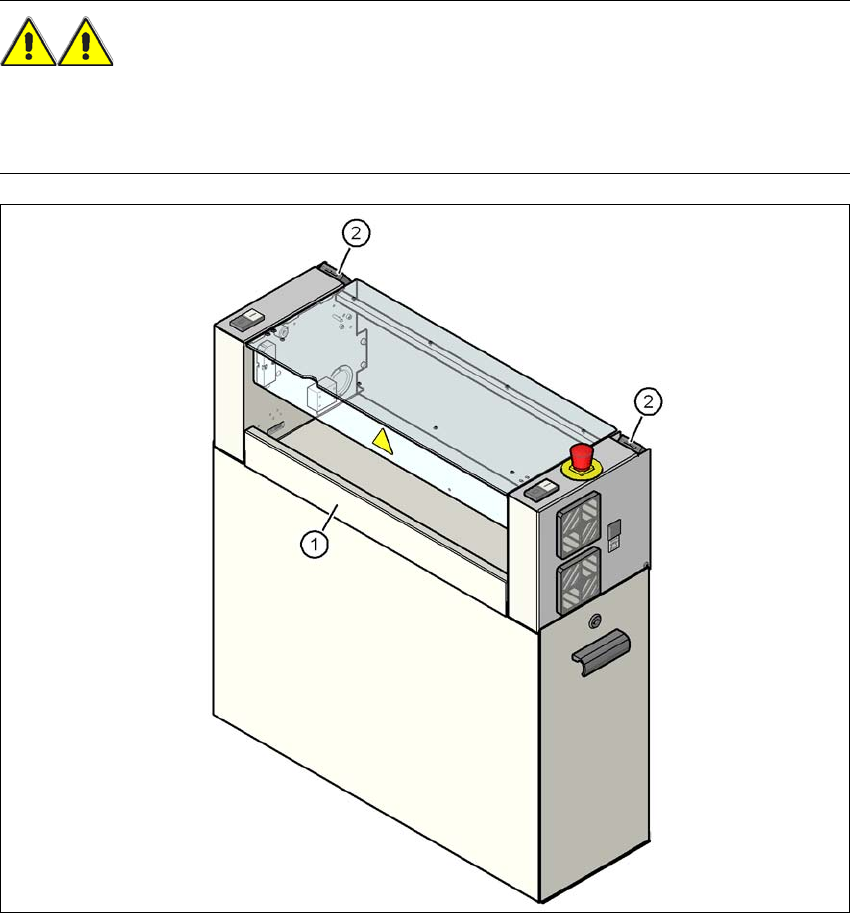
4.3.7.7 Fitting the "bottom" hand guard
The machines are supplied with just one "bottom" hand guard. If the machines are installed within
a line, then no hand guard is required between immediately adjacent output and input conveyors.
WARNING 4
Always fit the "bottom" hand guard (item no. 03045426-xx) on the input side of the first machine
and on the output side of the last machine of a line using 4 hexagon socket head screws M4x12.
This will prevent your personnel reaching into the machine without authorization.
4
Fig. 4.3 - 10 Fitting the "bottom" hand guard on the PCB output side
(1) "Bottom" hand guard, item no. 03045426-xx
(2) Protective cover switch