00196504-02_UM_X-Serie_SR70X_EN.pdf - 第254页
Setting up and commissioning User manual SIPLACE X-series Setting up the machine From software version SR.70x.xx 01/2011 EN edition 254 4.3.10 Fitting the extension kit on the PCB input side 4.3.10.1 T ools – Allen keys,…
User manual SIPLACE X-series Setting up and commissioning
From software version SR.70x.xx 01/2011 EN edition Setting up the machine
253
→ Remove the cable covers (items 3 and 5 in Fig. 4.3 - 14, page 252) from the input conveyor
(item 1 in Fig. 4.3 - 14
, page 252).
→ Carefully place the rail (item 1 in Fig. 4.3 - 14
, page 252) against the rail on the processing
conveyor (item 2 in Fig. 4.3 - 14
, page 252).
CAUTION 4
Be careful not to cut through any of the light barrier or drive motor cables.
→ Fix each rail using 4 fillister head screws M6x16 and the associated washers (item 7 in Fig.
4.3 - 14
, page 252).
→ Connect the power cable to the light barriers and drive motors.
→ Fix the cable covers in place (item 3 and 5 in Fig. 4.3 - 14
, page 252).
→ Introduce the hexagonal shaft (item 9 in Fig. 4.3 - 14
, page 252) into the drive unit (item 10 in
Fig. 4.3 - 14
, page 252).
→ Make sure that the hexagonal shaft guide (item 8 in Fig. 4.3 - 14
, page 252) always points
towards the conveyor side wall to which the drive unit (item 10 in Fig. 4.3 - 14
, page 252) is
fixed.
Setting up and commissioning User manual SIPLACE X-series
Setting up the machine From software version SR.70x.xx 01/2011 EN edition
254
4.3.10 Fitting the extension kit on the PCB input side
4.3.10.1 Tools
– Allen keys, DIN 911, set
– Machine key
4.3.10.2 Assembly
4
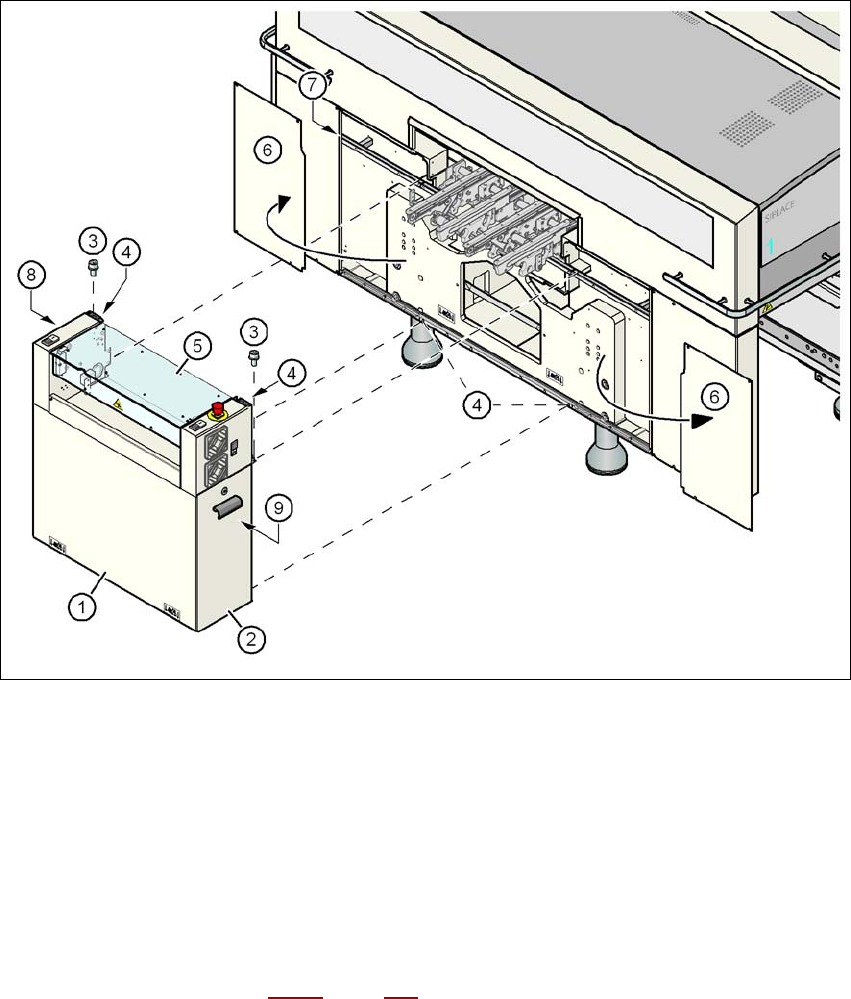
Fig. 4.3 - 15 Fitting the extension kit on the PCB input side
(1) Extension kit
(2) Door
(3) Fillister head screw DIN 912, M6x16 and washer
(4) Ground connection point
(5) Conveyor cover
(6) Side panel, detached
(7) Drawer unit rail
(8) Box PC unit (see Section 4.3.12
, page 263)
(9) Axis unit (X4I, X4, X3: gantries 1 and 4)
User manual SIPLACE X-series Setting up and commissioning
From software version SR.70x.xx 01/2011 EN edition Setting up the machine
255
→ Release the two horizontal tensioners (item 6 in Fig. 4.3 - 15, page 254).
CAUTION 4
Do not unscrew the three bottom screws straight away. Simply loosen them so that the side
plate does not fall off.
→ Detach the ground cable from the side plate.
→ Remove both doors (item 2 in Fig. 4.3 - 15
, page 254) from the extension kit (item 1).
PLEASE NOTE: 4
To avoid damage, we recommend that a second person helps to assemble the extension kit.
→ Set down the box PC unit
a
(item 8 in Fig. 4.3 - 15, page 254) and the axis unit (item 9 in Fig.
4.3 - 15
, page 254) at the side of the machine in order to make enough space to fit the exten-
sion kit (item 1 in Fig. 4.3 - 15
, page 254).
→ Make sure that the connecting cables to the box PC unit and axis unit are not too tight.
→ Lift the extension kit (item 1 in Fig. 4.3 - 15
, page 254) against the machine frame and position
it so that the assembly bracket lies on the drawer unit rail (item 7 in Fig. 4.3 - 15
, page 254).
CAUTION 4
Make sure that the extension kit does not collide with the hexagonal shaft of the PCB con-
veyor and thus become bent.
→ Fix the extension kit using 4 fillister head screws M6x16 and the associated washers (item 3
in Fig. 4.3 - 15
, page 254).
a) see Section 4.3.12, page 263