00196504-02_UM_X-Serie_SR70X_EN.pdf - 第67页
User manual SIPLACE X-series Operational safety From software version SR.70x.xx 01/2011 EN edition Safety instructions for operating the machine 67 2.5.4 Safety instructions for the T winSt ar co mponent cameras during a…
Operational safety User manual SIPLACE X-series
Safety instructions for operating the machine From software version SR.70x.xx 01/2011 EN edition
66
2.5.3 Safety instructions for manually moving the Z axis at the TwinStar
CAUTION
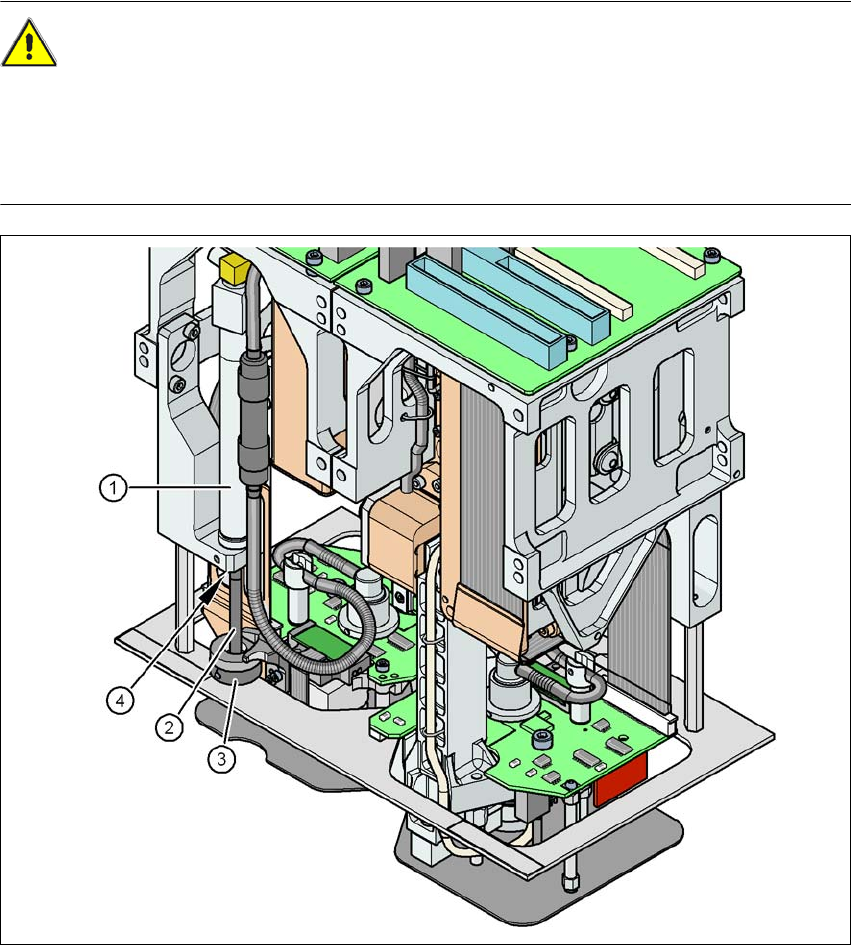
RISK OF CRUSHING AT THE TwinStar 2
NEVER move the Z axis down with your hand at the buffer of the return unit. The powerful spring
force of the cylinder creates a risk of injury to your fingers due to the buffer springing back. The
same applies inside the TwinStar when the piston rod springs back into its starting position.
2
Fig. 2.5 - 2 Risk of crushing from the return unit on the TwinStar
(1) Return unit, compressed air cylinder
(2) Piston rod
(3) Buffer of the return unit
(4) Risk of crushing to fingers
User manual SIPLACE X-series Operational safety
From software version SR.70x.xx 01/2011 EN edition Safety instructions for operating the machine
67
2.5.4 Safety instructions for the TwinStar component cameras during
a placement head change
WARNING 2
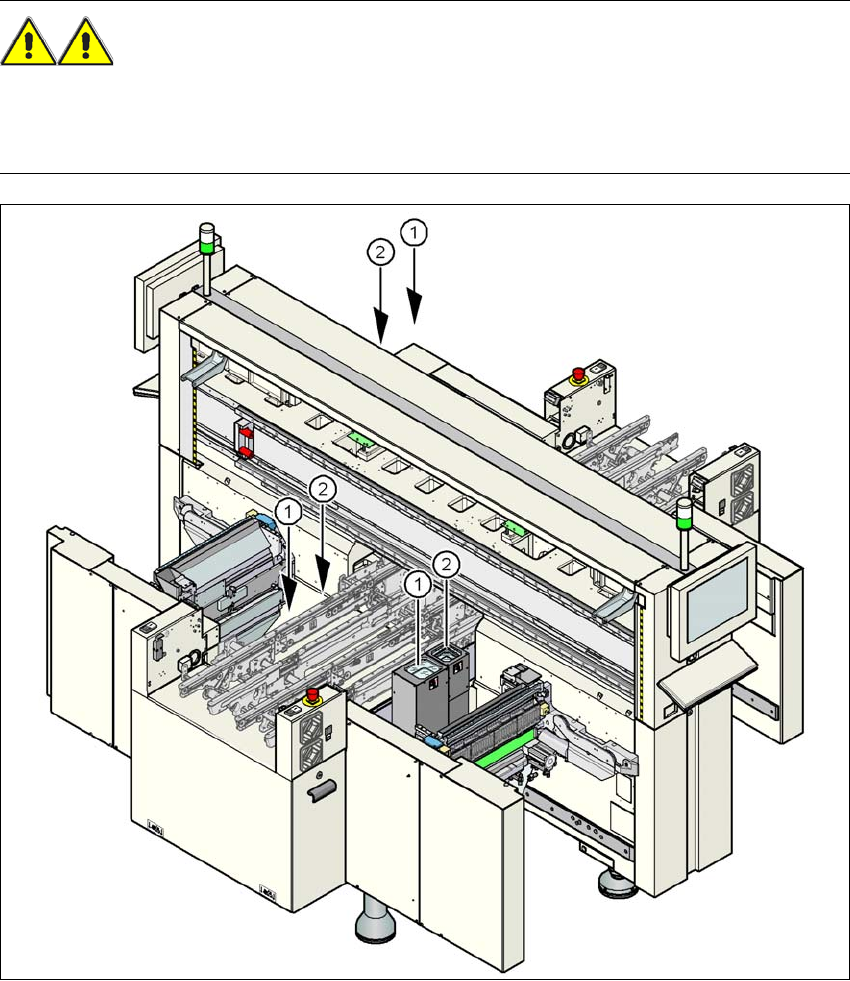
When the placement head is changed from the TwinStar to the SpeedStar, the TwinStar's com-
ponent cameras (stationary, P&P, type 33, 55 x 45, and type 25, 16 x 16) must be removed, oth-
erwise the SpeedStar will collide with the camera housings.
2
Fig. 2.5 - 3 Safety instructions for the TwinStar vision modules during a placement head change
(1) Assembly position for the component camera (stationary, P&P, type 33, 55 x 45) with refer-
ence to the X3
(2) Assembly position for the component camera (stationary, P&P, type 25, 16 x 16) with refer-
ence to the X3
Operational safety User manual SIPLACE X-series
Safety instructions for operating the machine From software version SR.70x.xx 01/2011 EN edition
68
The assembly positions for all placement machines from the SIPLACE X-series are shown in
Section 3.8.2
, from page 162. 2
2.5.5 Safety instructions for docking the component trolley in or out
WARNING
To prevent accidents (risk of crushing), the component trolley may only be docked in or out by
one person.
2
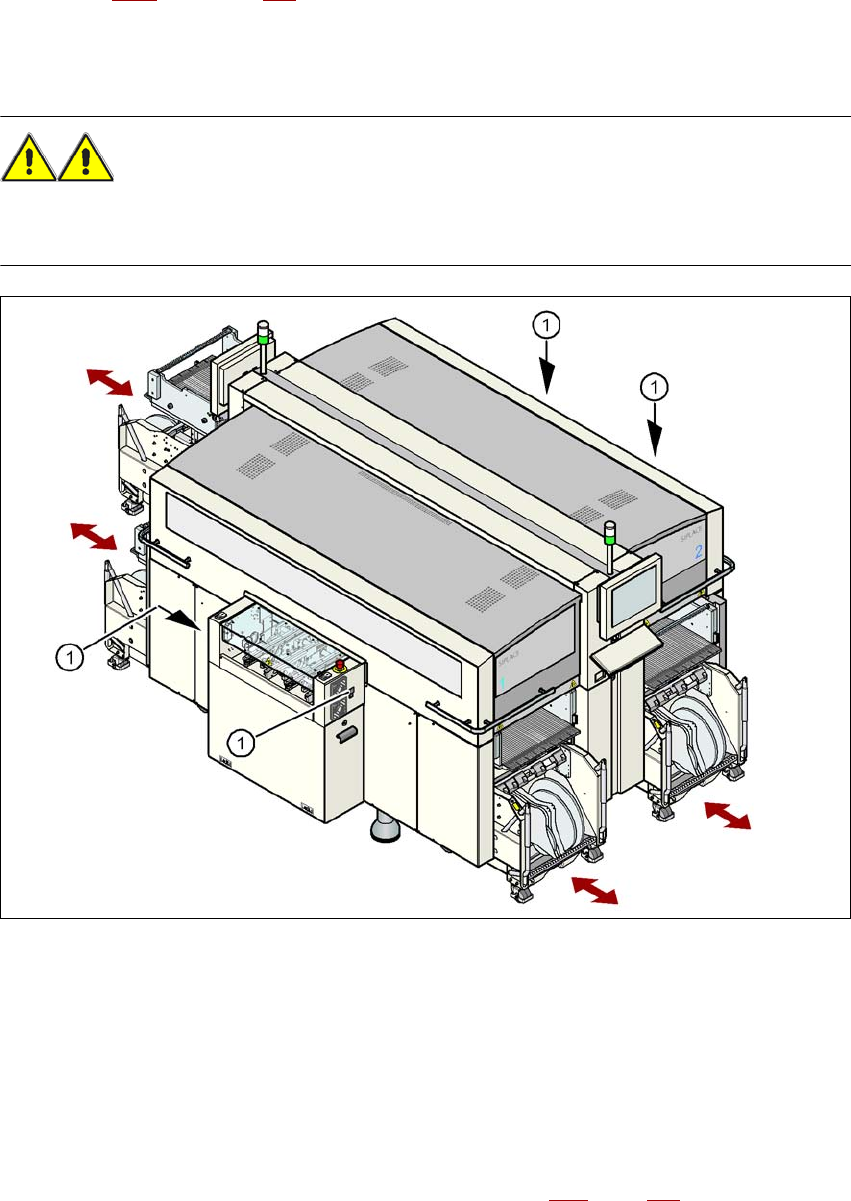
Fig. 2.5 - 4 Buttons on the input and output side for docking the component trolley in or out
2
(1) Buttons on the input and output side for docking the component trolley in or out
2
The safety concept for the component trolley change requires the operator to press a button (item
1) on the input or output side of the machine in order to dock the component trolley in or out. This
ensures that the operator is always standing to the side of the machine. In addition, the component
trolley can only be docked in if the protective covers are closed.
Docking the component trolley in or out is described in Section 5.15
, page 344. Follow the instruc-
tions exactly as described in this section.