00197446-02_UM_JTF_S_JTF-M_ X-Serie_S_de_en.pdf - 第123页
Setting up and Commissioning 4.3.4 Installation Position of the Spacer Plates for Reject Boxes, Stationary Camera and Q10 Magaz ine at Locations 2 and 3 Retr ofitting in the JEDEC Tray Feeder 123 4.3.4 4 . 3 . 4 I n s t …
Setting up and Commissioning
Retrofitting in the SIPLACE X-Series S 4.3.3 Removing the COT insert
122 JEDEC Tray Feeder
4.3.3
4.3.3 Removing the COT insert
Removing the COT insert
The COT insert must be removed before installing the manual table.
► Dismantle the nozzle changer.
► Disconnect the COT insert from all electrical and pneumatic connections. Mark the positions of these
connections, to make clear assignment easier later on. The connection cables and hoses are located
behind the COT insert – in the space leading to the machine base (under the nozzle changer).
CAUTION
Heavy machine part!
Risk of injuries die to heavy weight.
➢ The COT insert is heavy.
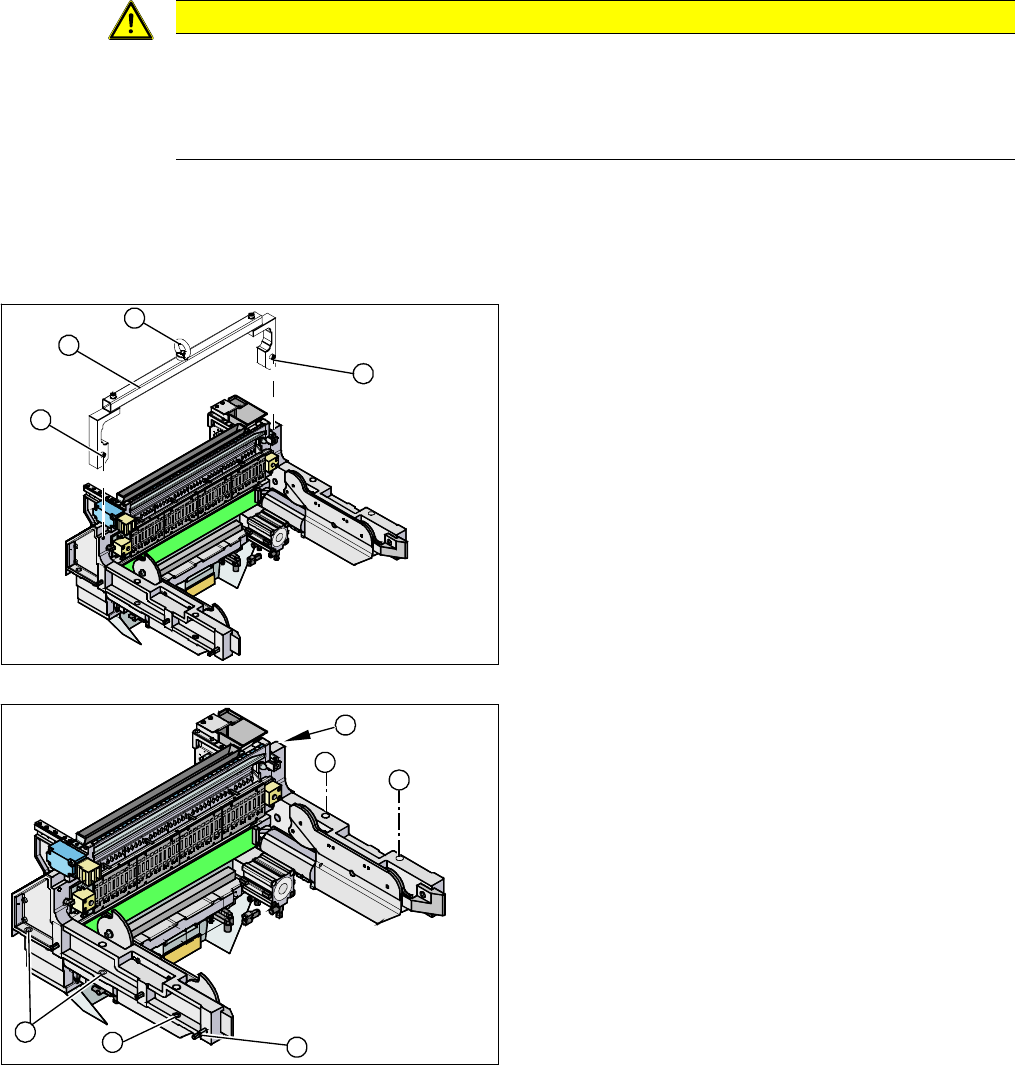
► To lift it out, use the fit-up aid and a suitable lifting device (hand-operated crane etc.).
1. Fixtures
2. Fit-up aid
3. Eyelet
► Attach the fit-up aid (2) to the fixtures provided (1) on
the COT insert.
► Fix the lifting device to the eyelet (3) of the fit-up aid
(2).
► Loosen the screws fastening the COT insert (1).
► Lift the complete COT insert out of the machine and
place it on a suitable surface (e.g. four wooden
blocks).
► Make sure that you do not damage any valves, con-
nection cables, hoses etc.
1
1
3
2
1
1
1
1
2
1
Setting up and Commissioning
4.3.4 Installation Position of the Spacer Plates for Reject Boxes, Stationary Camera and Q10 Magazine at Locations 2 and 3 Retrofitting in the
JEDEC Tray Feeder 123
4.3.4
4.3.4 Installation Position of the Spacer Plates for Reject Boxes, Stationary Camera and Q10 Magazine at Locations 2 and 3
Installation Position of the Spacer Plates for Reject Boxes, Stationary Camera and Q10
Magazine at Locations 2 and 3
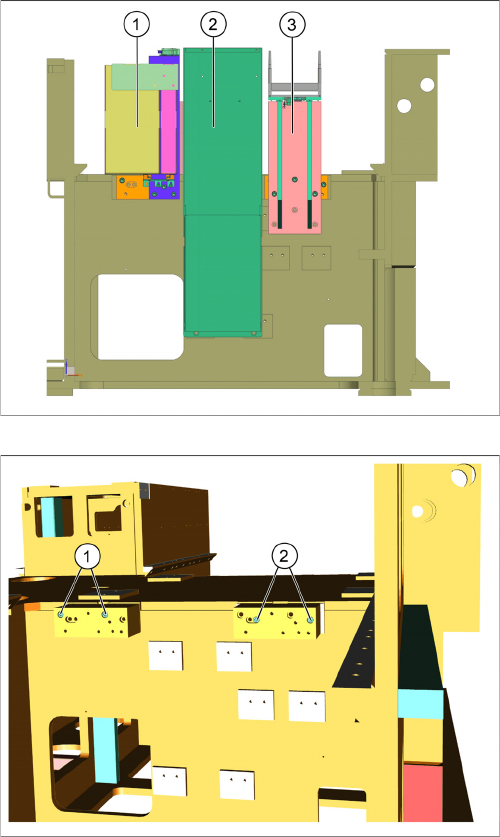
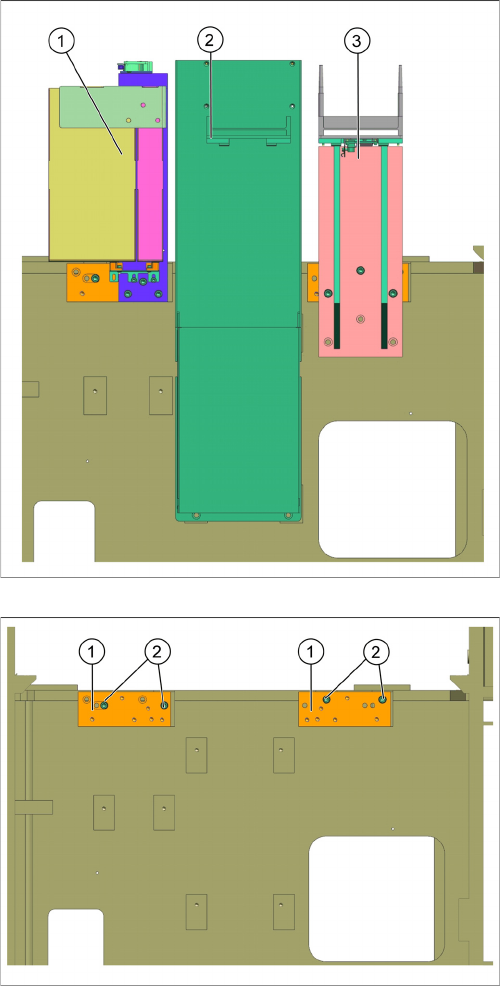
Observe the different installation positions of the spacer plates for the installation of the reject box, the
stationary camera and the Q10 magazine. These vary, depending on location and machine type.
Positions on the SIPLACE X2 S, X3 S and SIPLACE X4 S at location 2
1. Reject box
2. Stationary camera
3. Q10 magazine
1. Installation position for the reject box
2. Installation position for the Q10 magazine
Setting up and Commissioning
Retrofitting in the SIPLACE X-Series S 4.3.4 Installation Position of the Spacer Plates for Reject Boxes, Stationary Cam-
124 JEDEC Tray Feeder
Positions on the SIPLACE X2 S, X3 S and SIPLACE X4 S at location 3
Positions on the SIPLACE X4i S at location 2
On SIPLACE X4i S machines, the Q10 magazine must be installed in the middle position.
1. Reject box
2. Stationary camera
3. Q10 magazine
1. Installation position for the reject box
2. Installation position for the Q10 magazine