00197446-02_UM_JTF_S_JTF-M_ X-Serie_S_de_en.pdf - 第163页
Tasks for SIPLACE JTF-S, SIPLACE JTF-M 5.3.5 Configuration of the Setup – Setup Tree View Configuration of SIPLACE JTF-S, SIPLACE JTF-M in SIPLACE Pro JEDEC Tray Feeder 163 SIPLACE JTF-S, SIPLACE JTF-M Carrier Level If a…
Tasks for SIPLACE JTF-S, SIPLACE JTF-M
Configuration of SIPLACE JTF-S, SIPLACE JTF-M in SIPLACE Pro 5.3.5 Configuration of the Setup – Setup Tree View
162 JEDEC Tray Feeder
5.3.5.3
5.3.5.3 Configuring the SIPLACE JTF-S, SIPLACE JTF-M on the Table
Configuring the SIPLACE JTF-S, SIPLACE JTF-M on the Table
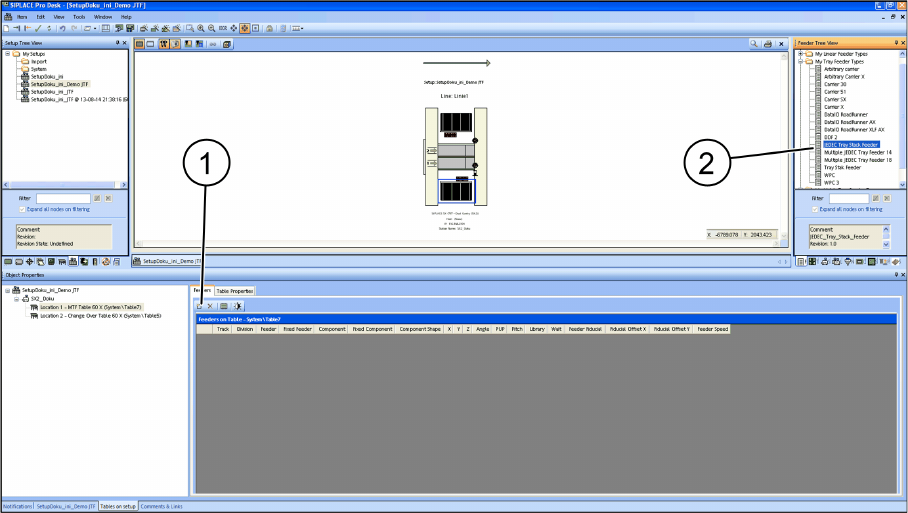
There are two ways for setting up the SIPLACE JTF-S, SIPLACE JTF-M on the table:
▪ Manually dragging the SIPLACE JTF-S, SIPLACE JTF-M onto the table (2).
▪ By selecting the Insert a new item into the collection menu option (1)
The SIPLACE JTF-S, SIPLACE JTF-M feeder is automatically configured on the track that is permitted
for the machine.
This track cannot be changed.
▪ SIPLACE SX1/2 tracks 11 - 26
▪ SIPLACE X-Series S track 1 – 15 at location 3
▪ SIPLACE X-Series S track 27 – 40 at location 2
Tasks for SIPLACE JTF-S, SIPLACE JTF-M
5.3.5 Configuration of the Setup – Setup Tree View Configuration of SIPLACE JTF-S, SIPLACE JTF-M in SIPLACE Pro
JEDEC Tray Feeder 163
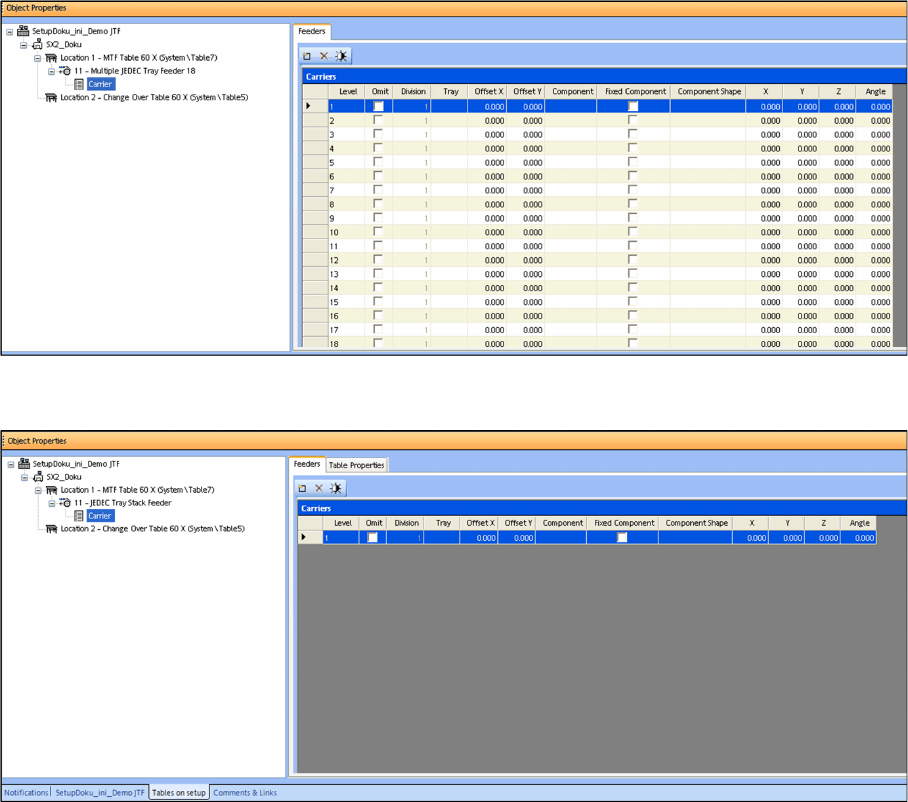
SIPLACE JTF-S, SIPLACE JTF-M Carrier Level
If a Multiple JEDEC tray feeder 18 (SIPLACE JTF-M for thin trays) was selected, "Carrier" lists the num-
ber of trays (18) as well as their settings and their component occupancy (per tray).
Only 14 trays are displayed for a Multiple JEDEC tray feeder 14 (SIPLACE JTF-M for thick trays).
For a JEDEC tray stack feeder (SIPLACE JTF-S), Carrier shows only one tray, as all trays that are set
up in the JEDEC tray stack feeder must have the same components.
Tasks for SIPLACE JTF-S, SIPLACE JTF-M
Configuration of SIPLACE JTF-S, SIPLACE JTF-M in SIPLACE Pro 5.3.5 Configuration of the Setup – Setup Tree View
164 JEDEC Tray Feeder