00197446-02_UM_JTF_S_JTF-M_ X-Serie_S_de_en.pdf - 第147页
Tasks for SIPLACE JTF-S, SIPLACE JTF-M 5.2.1 Structure Controls and Displays JEDEC Tray Feeder 147 LED indicators Green LED – READY (1) LED on Shows that a tray was succ essfully moved to the pick posi tion and is now re…
Tasks for SIPLACE JTF-S, SIPLACE JTF-M
Controls and Displays 5.2.1 Structure
146 JEDEC Tray Feeder
5.2
5.2 Controls and Displays
Controls and Displays
5.2.1
5.2.1 Structure
Structure
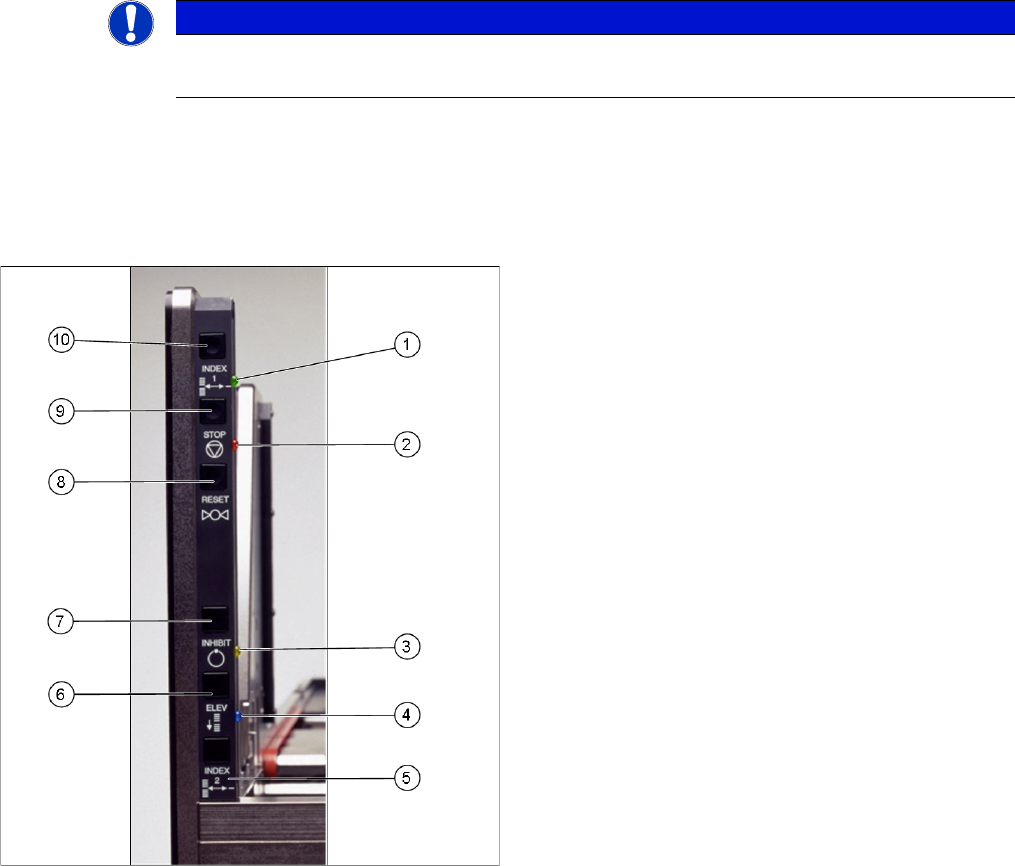
The diagram shows the control panel on the feeder.
The functions "Index, Inhibit and Elevator Down" are regulated by the controller.
The functions "Stop and Reset" are an electronic stopping function for the pneumatic system. If you
press the stop button, the pneumatic system immediately switches off and the motors will stop. The sta-
tus is read by the controller but not regulated by it.
NOTICE
SIPLACE JTF-S
This panel only applies to the SIPLACE JTF-S.
The precise functions are described below:
Index 1 (10) and index 2 (5)
Index 1 (10) and 2 (5) only trigger a tray changeover if
they are both pressed (series connection). The next tray
in the series is moved into the magazine. A connection to
the serial interface is needed for the various feeder com-
mands.
This function is disabled in production mode.
Stop (9)
If you press the stop button (9), the pneumatic system im-
mediately switches off and the motors will stop. The stop
button supports the stopping function of the pneumatics
system. A signal is sent to the host.
The "Stop and Reset" functions can not be switched off
by the production mode.
Reset (8)
The reset button (8) resets the feeder after a stop condi-
tion. A signal is sent to the host.
The "Stop and Reset" functions can not be switched off
by the production mode.
Inhibit (7)
The inhibit button (7) locks the remote control for the
SIPLACE JTF-S. The feeder does not receive any control
commands from the host. This lock is released when the
button is pressed again.
This function is disabled in production mode.
Elevator down (6)
This function allows you to change the trays in the maga-
zine without stopping production. The magazine moves
down and the current tray in the pick position remains
clamped and the ready LED (green) continues to shine.
► As soon as the lift stops at the bottom, the door can
be opened and the trays can be changed.
► Open the door once the lift has reached the bottom.
► Leave the empty slot (for the tray currently used in the
pick position) empty.
This function is disabled in production mode.
Tasks for SIPLACE JTF-S, SIPLACE JTF-M
5.2.1 Structure Controls and Displays
JEDEC Tray Feeder 147
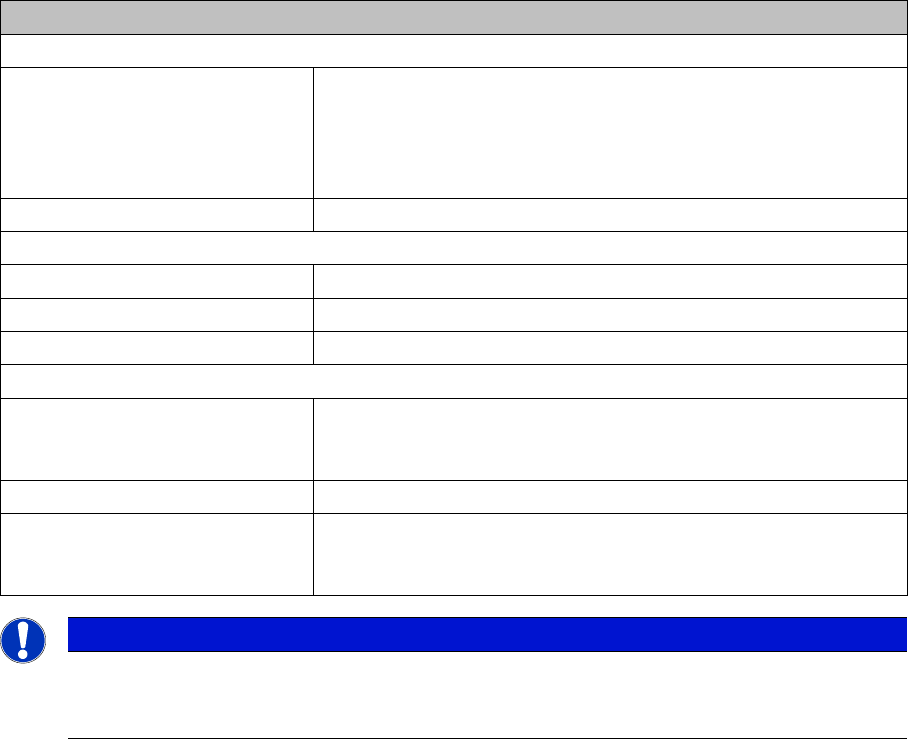
LED indicators
Green LED – READY (1)
LED on Shows that a tray was successfully moved to the pick position and
is now ready for components to be removed from the tray (or for it
to be loaded). The LED also shows that a ready signal has been
sent to the host. As soon as the tray leaves the pick position, the
LED will extinguish.
LED off Not ready for loading or unloading or tray changeover.
Orange LED – Stop/Error (2)
LED on Stop condition. For example, occurs after stop button was pressed.
LED flashes Error condition. An error occurred during the tray changeover.
LED off Normal mode
Yellow LED – Inhibit (3)
LED on The yellow LED shows a lock. The feeder will not receive any tray
changeover commands, neither via the remote control nor manual-
ly.
LED off Normal mode.
Blue LED – Full/Empty (4) If the next tray is manually queried after the last tray in the maga-
zine (slot with the highest number), the blue LED will show EMPTY.
This also occurs when there is no magazine inserted.
NOTICE
SIPLACE JTF-M
The SIPLACE JTF-M is only operated via the SC GUI. The only exception is the Reset button
on the operating panel, which can be used for the reset function.
Tasks for SIPLACE JTF-S, SIPLACE JTF-M
Controls and Displays 5.2.2 Operating the JEDEC Tray Feeder in the Station Software (SW707)
148 JEDEC Tray Feeder
5.2.2
5.2.2 Operating the JEDEC Tray Feeder in the Station Software (SW707)
Operating the JEDEC Tray Feeder in the Station Software (SW707)
SIPLACE JTF-S, SIPLACE JTF-M feeders are available from station software version 707.0. Previous
versions do not support this feeder family.
The SIPLACE JTF-S, SIPLACE JTF-M is not displayed at the station until a job has been defined.
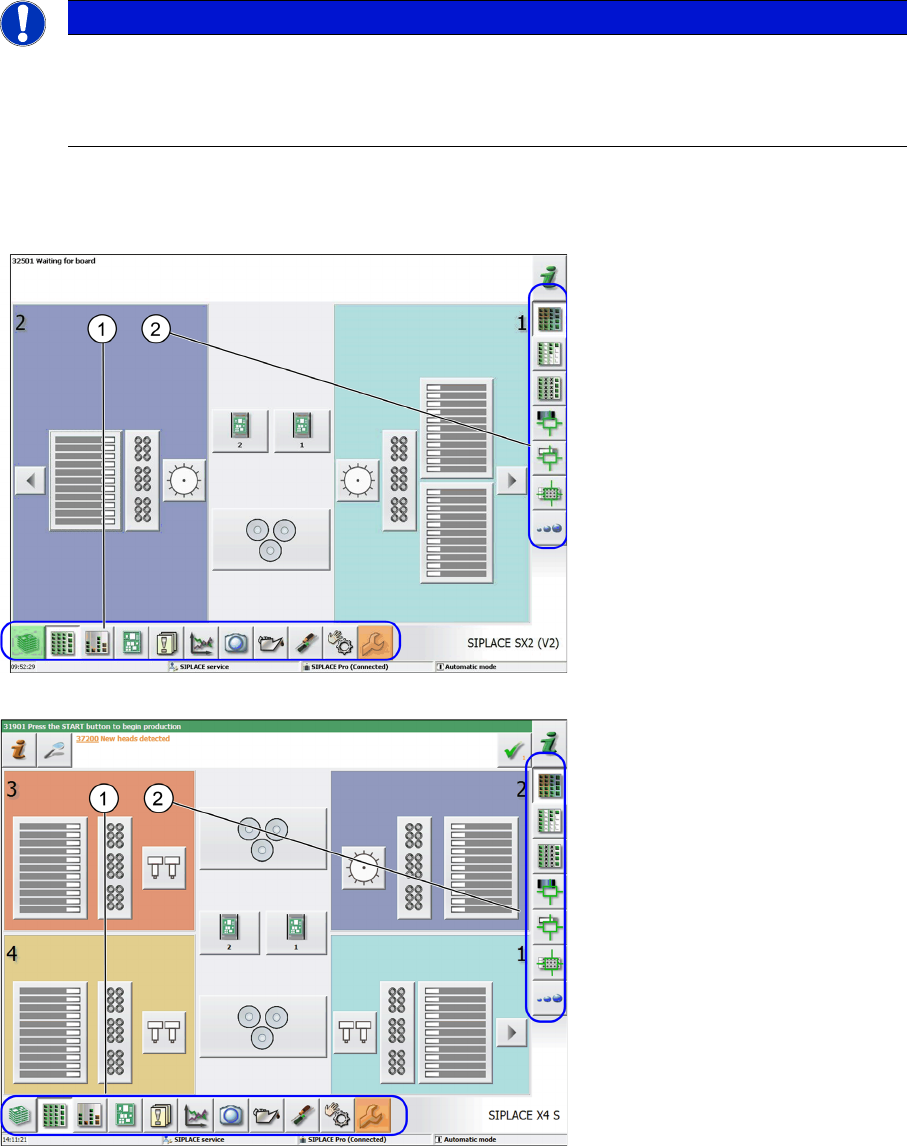
The following terms are used in the sections:
1. Menu
2. Submenu
Main view - SIPLACE SX2 (V2) as example
Main view - SIPLACE X4 S as example
NOTICE
Example
The following graphics show the station software 707.xx taking the SIPLACE SX2 V2 as exam-
ple. Proceed in the same way for SIPLACE SX1 V2 machines and SIPLACE X-Series S ma-
chines. Any differences will be explicitly indicated.