00197446-02_UM_JTF_S_JTF-M_ X-Serie_S_de_en.pdf - 第157页
Tasks for SIPLACE JTF-S, SIPLACE JTF-M 5.2.2 Operating the JEDEC Tray Feeder in the Station Software (SW707) Controls and Displays JEDEC Tray Feeder 157 2. Deactivate : Deactivates the complete t ray which is then marked…
Tasks for SIPLACE JTF-S, SIPLACE JTF-M
Controls and Displays 5.2.2 Operating the JEDEC Tray Feeder in the Station Software (SW707)
156 JEDEC Tray Feeder
Position Correction
If necessary, perform a pickup position correction for the selected tray.
▪ Teaching the pickup position for eccentric pickup.
▪ Teaching the component center
Switching to Level View
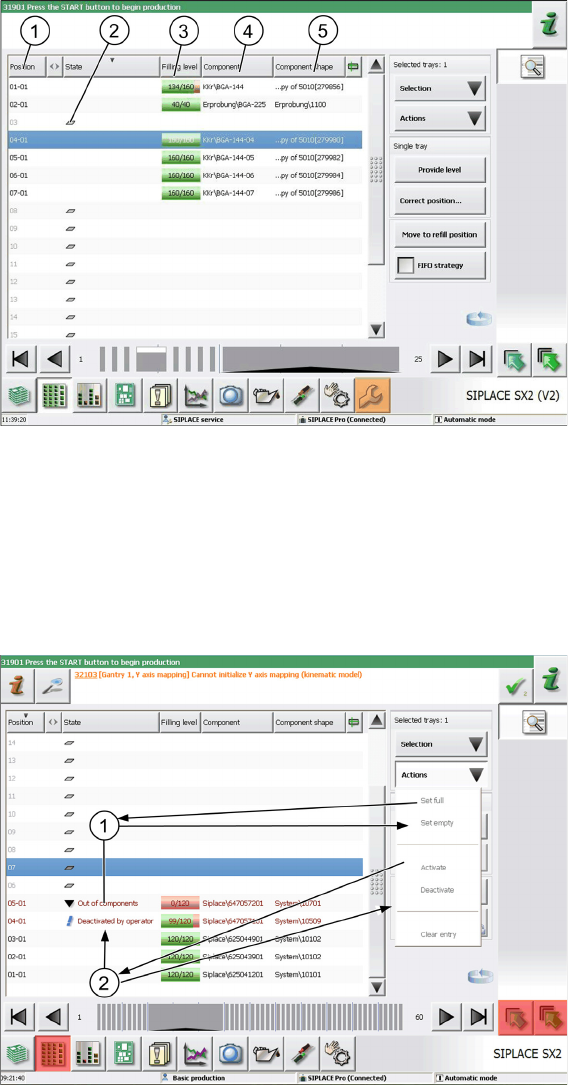
► Press the change button to display the level view of the SIPLACE JTF-S, SIPLACE JTF-M.
1. Position of the SIPLACE JTF-M tray (14 or 18 levels)
2. State (2) indicates that a tray is present on this level which is not used for this setup. The filling level
is not queried.
3. Filling level: Actual - target
4. Component: Component description
5. Component shape: Component shape name
Single Tray Selection
The line for a single selected tray is highlighted in blue color.
Use the cursor to select a single tray.
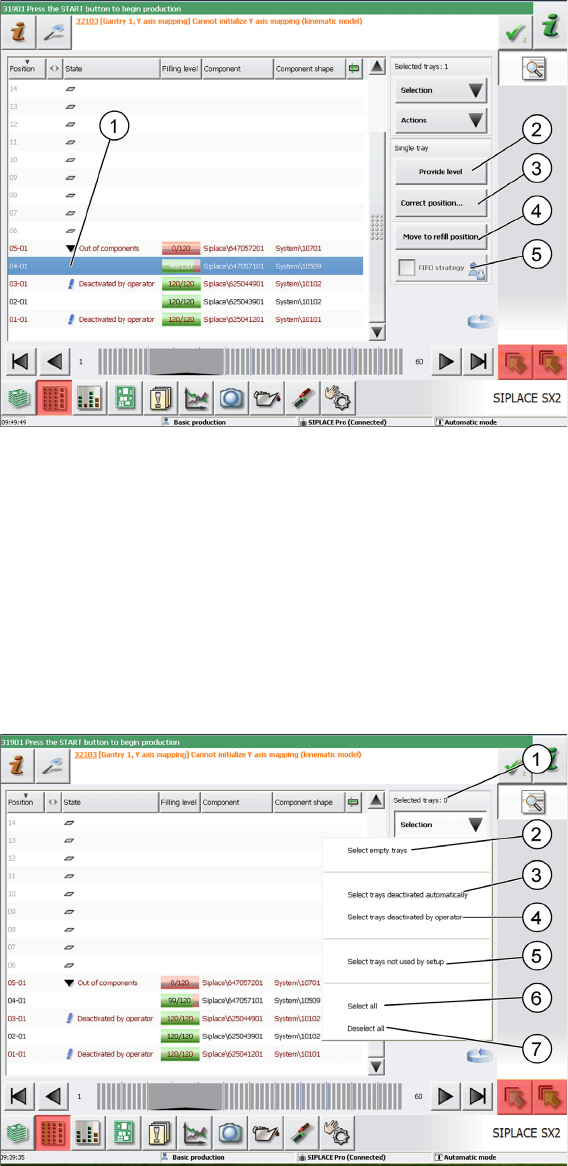
You can now make settings for the tray and assign different states.
Please note that the trays have been selected in advance in the example in the screenshot.
1. Set empty: Sets the tray to "Out of components". Use the Set full button to set it back to full.
Tasks for SIPLACE JTF-S, SIPLACE JTF-M
5.2.2 Operating the JEDEC Tray Feeder in the Station Software (SW707) Controls and Displays
JEDEC Tray Feeder 157
2. Deactivate: Deactivates the complete tray which is then marked as "Deactivated by operator". Use
the Activatebutton to set it back to active.
You can select the following functions and actions for the single selected tray:
1. Selected tray: highlighted in blue color
2. Provide level: Moves this level to the transfer position.
3. Correct position: Correction of the pickup position
4. Move to refill position: Moves the tray back into the tray carrier in order to remove it. In this state, no
components can be picked up from any tray.
5. FIFO strategy: This button is active when you are logged in with the necessary access privileges. As
soon as pickup has been performed once from a JEDEC tray on a replacement track, this will be
emptied completely before the actual track is used again.
Multiple Selection of Trays
Use the key combination Shift+Alt to select several trays. The selected trays are then highlighted in blue
color.
If trays have been deactivated manually or automatically before or if the state has been changed, you
can now easily select these trays with the Selection button.
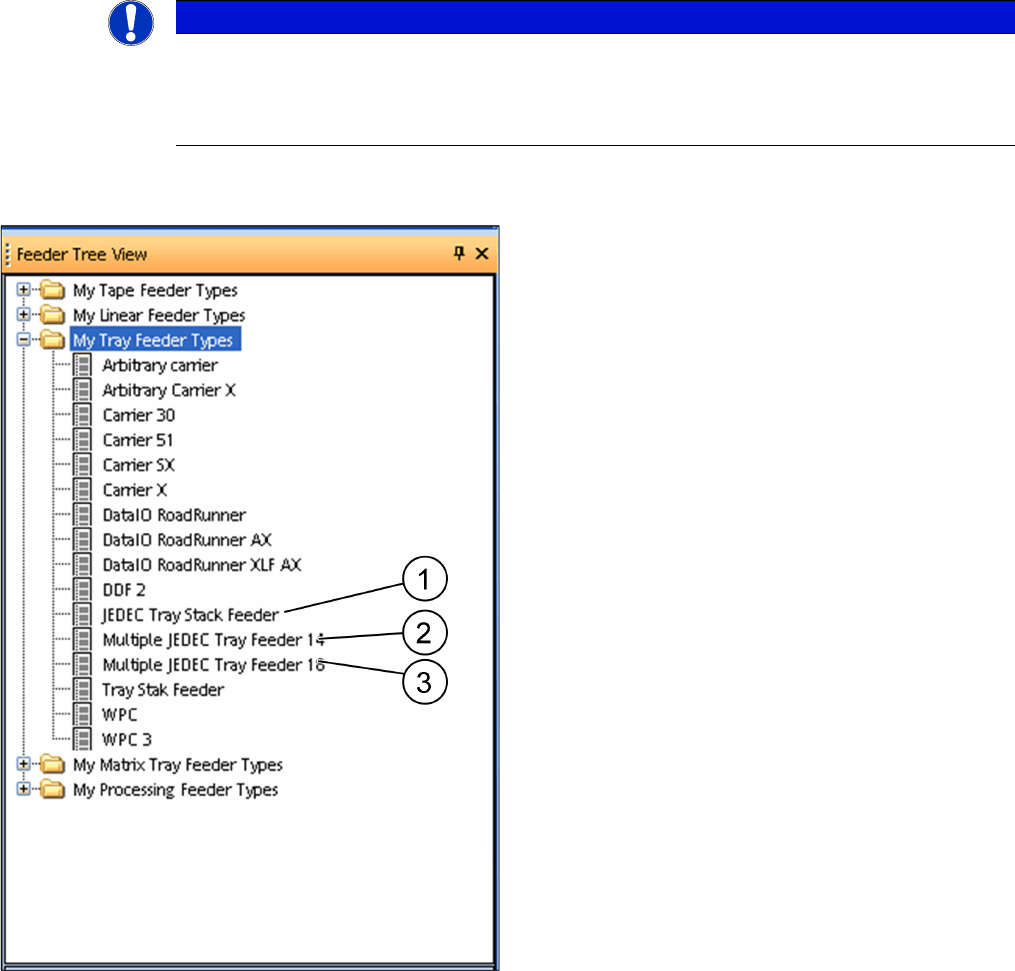
The selected trays are then displayed as Selected Trays: xx.
The Selection button provides the following quick selection types:
1. Selected Trays: xx: Indicates the number of selected trays.
Tasks for SIPLACE JTF-S, SIPLACE JTF-M
Configuration of SIPLACE JTF-S, SIPLACE JTF-M in SIPLACE Pro 5.3.1 SIPLACE JTF-S, SIPLACE JTF-M Versions in SIPLACE Pro – Feeder
158 JEDEC Tray Feeder
2. Select empty trays: All empty trays in the setup are selected.
3. Select trays deactivated automatically: All automatically deactivated trays are selected.
4. Select trays deactivated by operator: All trays that have been manually deactivated by the operator
are selected.
5. Select trays not used by setup: All trays that are not used in the current setup are selected.
6. Select all: All trays are selected regardless of their state.
7. Deselect all: Each previous selection is discarded.
5.3
5.3 Configuration of SIPLACE JTF-S, SIPLACE JTF-M in SIPLACE Pro
Configuration of SIPLACE JTF-S, SIPLACE JTF-M in SIPLACE
Pro
SIPLACE JTF-S, SIPLACE JTF-M feeders are available from SIPLACE Pro 11.1. SIPLACE Pro versions
up to 10.x do not support this feeder family.
5.3.1
5.3.1 SIPLACE JTF-S, SIPLACE JTF-M Versions in SIPLACE Pro – Feeder Tree View
SIPLACE JTF-S, SIPLACE JTF-M Versions in SIPLACE Pro – Feeder Tree View
NOTICE
Example
The following graphics show the SIPLACE Pro 11.1 software taking the SIPLACE SX2 V2 as
example. Proceed in the same way for SIPLACE SX1 V2 machines and SIPLACE X-Series S
machines. Any differences will be explicitly indicated.
Three SIPLACE JTF feeder types can be selected in the
feeder tree view:
1. JEDEC tray stack feeder
One component type only in the whole feeder
2. Multiple JEDEC tray feeder 14
Version for 14 thick JEDEC trays d = 12.19 mm / max.
14 different component types (one type per tray)
3. Multiple JEDEC tray feeder 18
Version for 18 thick JEDEC trays d = 7.62 mm / max.
18 different component types (one type per tray)