00197446-02_UM_JTF_S_JTF-M_ X-Serie_S_de_en.pdf - 第142页
Setting up and Commissioning Installation 4.4.4 Final Work: 142 JEDEC Tray Feeder

Setting up and Commissioning
4.4.4 Final Work: Installation
JEDEC Tray Feeder 141
4.4.4
4.4.4 Final Work:
Final Work:
► Switch on the machine and make the necessary settings in the software.
NOTICE
Dummyfeeder
In case you remove the JEDEC Tray Feeder, you have to replace it with a dummyfeeder X8
[03012733-xx].
Setting up and Commissioning
Installation 4.4.4 Final Work:
142 JEDEC Tray Feeder
Tasks for SIPLACE JTF-S, SIPLACE JTF-M
Task: Operating the Feeder
JEDEC Tray Feeder 143
5
5 Tasks for SIPLACE JTF-S, SIPLACE JTF-M
Tasks for SIPLACE JTF-S, SIPLACE JTF-M
This chapter contains a number of subjects that are intended to help you during your daily work on a
SIPLACE line. For example, you are provided with preventative measures that you can take to minimize
the down time on the machine, to obtain the highest possible level of efficiency for the SIPLACE line dur-
ing production.
5.1
5.1 Task: Operating the Feeder
Task: Operating the Feeder
Loading the trays
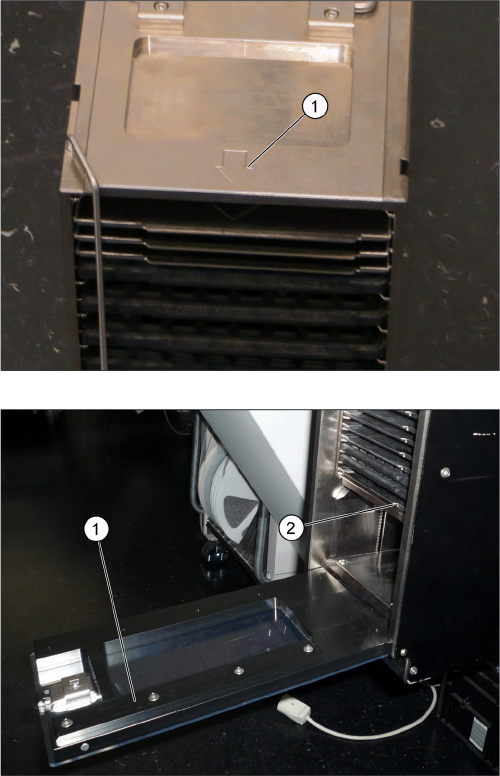
► Place the magazine down on a stabile surface.
► Observe the arrow (1) on the magazine, which shows
the direction of loading for the magazine (example of
a magazine for SIPLACE JTF-M shown here).
► Observe the direction of loading for the trays and the
orientation. The encoding (1) on the door must corre-
spond to the tray orientation(2). The door can only be
closed if both correspond to one another.