03217917-01-01E By DEK Technical Reference Manual Vol 1_enPDFA.pdf - 第155页
11 SQUEEGEE MODULE 11.2 ELECTRICAL SCHEMATIC TECHNICAL REFERENCE MANUAL Vol 1 E By DEK 04/2019 155 11.2 ELECTRICAL SCHEMATIC Squeegee Front Home (9S E 04) Squeegee Rear Home (9S E 05) Rear Squeegee Stepper Motor (9M4) Mo…
11 SQUEEGEE MODULE
11.1 OVERVIEW
154 TECHNICAL REFERENCE MANUAL Vol 1 E By DEK 04/2019
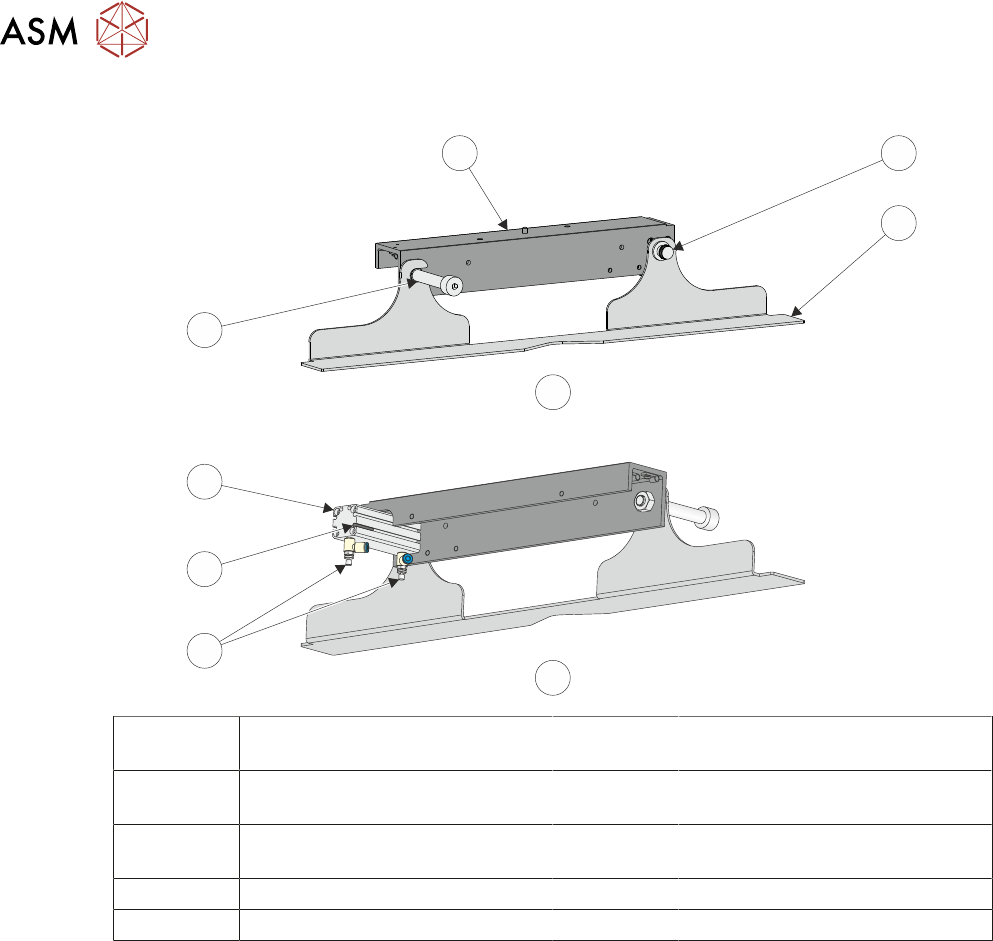
11.1.2 Squeegee Drip Tray
4
1
2
7
6
5
B
A
3
A View on Front of Squeegee Drip
Tray
4 Squeegee Drip Tray Mechanism
B View on Rear of Squeegee Drip
Tray
5 Speed Control Valves
1 Squeegee Drip Tray Securing
Screw
6 Drip Tray Retracted Sensor
2 Squeegee Drip Tray 7 Drip Tray Pneumatic Actuator
3 Drip Tray Guide Shaft
The squeegee drip tray mechanism secures to the underneath of the print carriage. The drip tray
pneumatic actuator extends the drip tray below the squeegees to prevent print medium from drip-
ping onto the stencil during print carriage initialisation or auto stencil loading.
The drip tray retracted sensor is used by software to check that the pneumatic actuator has retrac-
ted the drip tray before lowering the squeegees.
11 SQUEEGEE MODULE
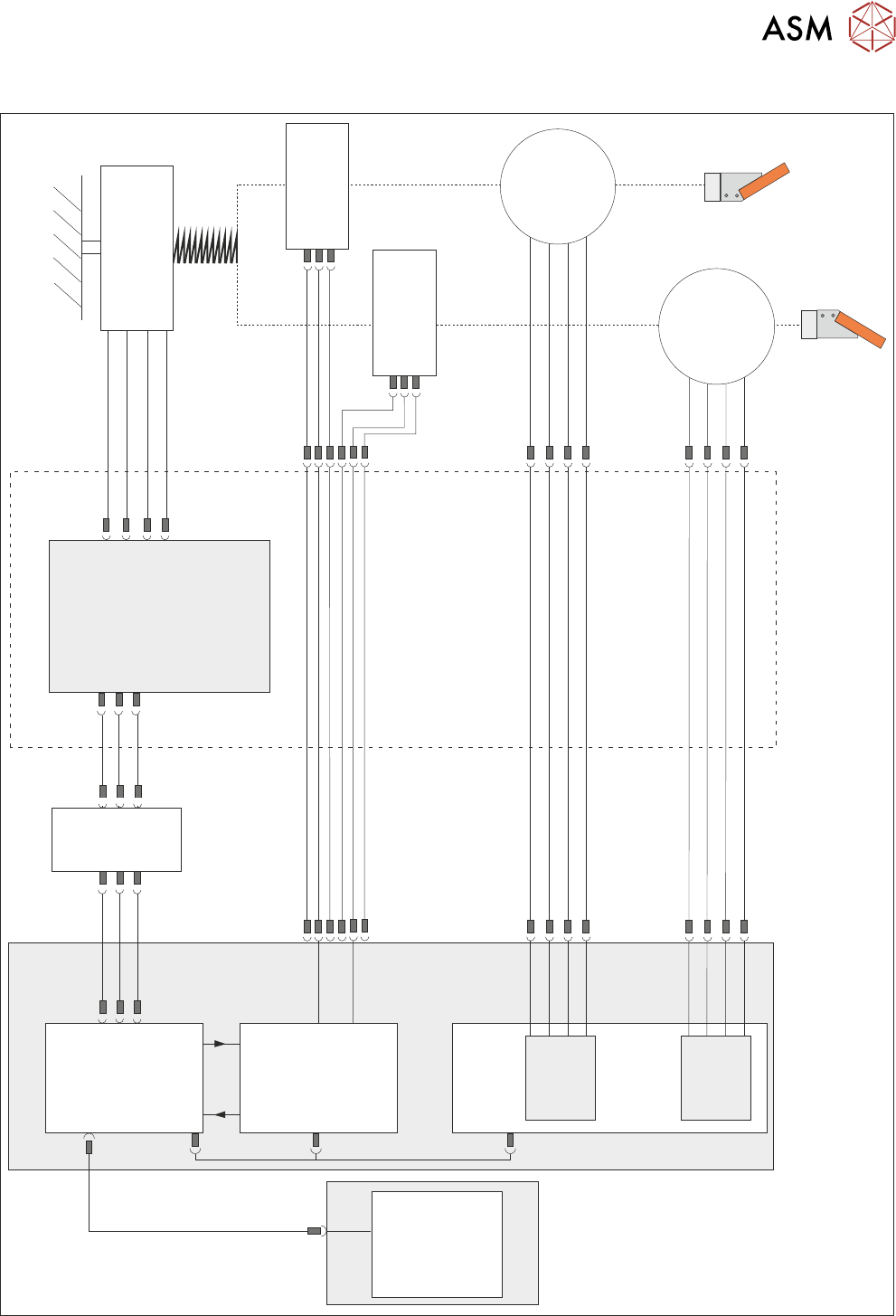
11.2 ELECTRICAL SCHEMATIC
TECHNICAL REFERENCE MANUAL Vol 1 E By DEK 04/2019 155
11.2 ELECTRICAL SCHEMATIC
Squeegee Front
Home
(9SE04)
Squeegee Rear
Home
(9SE05)
Rear
Squeegee
Stepper
Motor
(9M4)
Motor 1 B-
Motor 1 B+
Motor 1 A-
Motor 1 A+
Motor 2 B-
Motor 2 B+
Motor 2 A-
Motor 2 A+
Print Carriage
9PL16
9PL08
9PL17
0V
+V
-IN
+IN
Strain Gauge Bridge
(9SE6)
Spring Beam
9SK11
9SK12
Print Carriage I/O
Node 3
N3PL16
M36PL35
N3SK2
N6PL3
CAN BUS
PC
Motherboard
M36PL35
USB
M36Pl28
NextMove ES
(I/O Node 1)
NextMove
Interface
Dual Stepper
Card X2
M36 Machine Control
Step 3
Step 4
Front
Squeegee
Stepper
Motor
(9M3)
M36PL21
M36PL12
M36PL21
CAN
In
Rising
Table
Node 6
N6SK2
11 SQUEEGEE MODULE
11.3 REPLACEMENT PROCEDURES
156 TECHNICAL REFERENCE MANUAL Vol 1 E By DEK 04/2019
11.3 REPLACEMENT PROCEDURES
11.3.1 Drive Belt Replacement
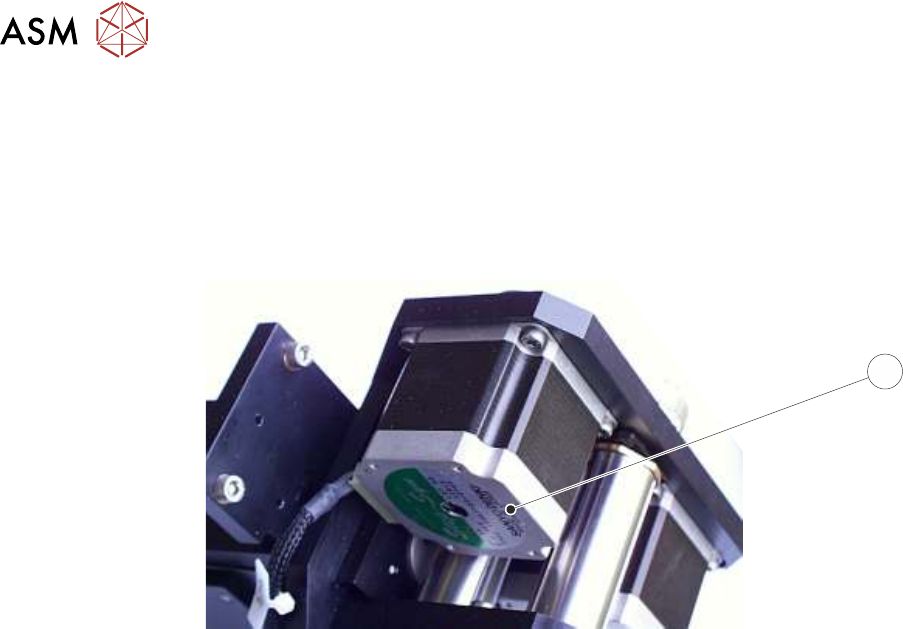
There are two different types of squeegee stepper motors that drive the drive belts, one type featur-
ing a green ident label (1) on the underside which requires tensioning of the belts, the other type
without the label which does not require tensioning.
1
Squeegee Stepper Motor (Green Ident Label Shown)
The belt replacement procedures for the two types are different, so care must be taken to ensure
the correct procedure is followed.
11.3.1.1 Rear Squeegee Drive Belt (Green Label)
The rear squeegee drive belt (right hand stepper motor) can be replaced without having to remove
the printhead mechanism from the print carriage.
► Select Open Cover Commands.
► Select Carriage To Front.
► Select Back.
► Select Shut Down.
► Select Continue.
► Switch the mains isolator to OFF; lockout the isolator switch.
► Open the printhead cover.
► Remove the squeegees, if fitted.