03217917-01-01E By DEK Technical Reference Manual Vol 1_enPDFA.pdf - 第267页
17 CAMERA SYSTEM MODULE 17.3 ADJUSTMENTS AND SETTINGS TECHNICAL REFERENCE MANUAL Vol 1 E By DEK 04/2019 267 ► There are two versions of the rail setting jig (Part No. 191156) and they are labelled: ● Standard Rails (roun…

17 CAMERA SYSTEM MODULE
17.3 ADJUSTMENTS AND SETTINGS
266 TECHNICAL REFERENCE MANUAL Vol 1 E By DEK 04/2019
17.3 ADJUSTMENTS AND SETTINGS
17.3.1 X Camera Home Positioning
The position of the sensor and vane is fixed, therefore no adjustment is possible.
17.3.2 Y Camera Home Positioning
The position of the sensor and vane is fixed, therefore no adjustment is possible.
17.3.3 X Axis Parallelism
WARNING
BOARD CLAMPS. EXTREME CARE MUST BE EXERCISED WHEN WORKING IN
THE TOOLING AREA OF THE MACHINE TO AVOID INJURY. THE FOILS ON THE
FRONT AND REAR BOARD CLAMPS ARE VERY SHARP.
NOTE
The X axis parallelism is factory set and shouldn’t normally need to be adjusted.
► Select Open Cover Commands.
► Select Carriage To Rear.
► Select Unload Screen.
► Open the printhead cover.
► Remove the stencil from the machine.
► Close the printhead cover.
► Press the System button.
► Select Back.
► Select Maintenance.
► Select Diagnostics.
► Using the Next or Previous button highlight Rail System.
► Select Select Module.
► Ensure that Home Rail Width is highlighted.
► Select Run Diagnost.
► Select Exit.
► Using the Next or Previous button highlight Rising Table.
► Select Select Module.
► Using the Next or Previous button highlight Raise Table to Vision Height.
► Select Run Diagnost.
► Select Exit.
► Using the Next or Previous button highlight Rail System.
► Select Select Module. The board clamps are released.
► Open the printhead cover.
► Remove any tooling from the manual tooling plate.
► Remove the board clamp from the front transport rail, see 16.5.1 "Board Clamp Replace-
ment" [}253].
17 CAMERA SYSTEM MODULE
17.3 ADJUSTMENTS AND SETTINGS
TECHNICAL REFERENCE MANUAL Vol 1 E By DEK 04/2019 267
► There are two versions of the rail setting jig (Part No. 191156) and they are labelled:
●
Standard Rails (round belts)
●
Heavy Board Rails (flat belts)
► Confirm which type of rails are fitted to the machine and select the appropriate rail setting jig.
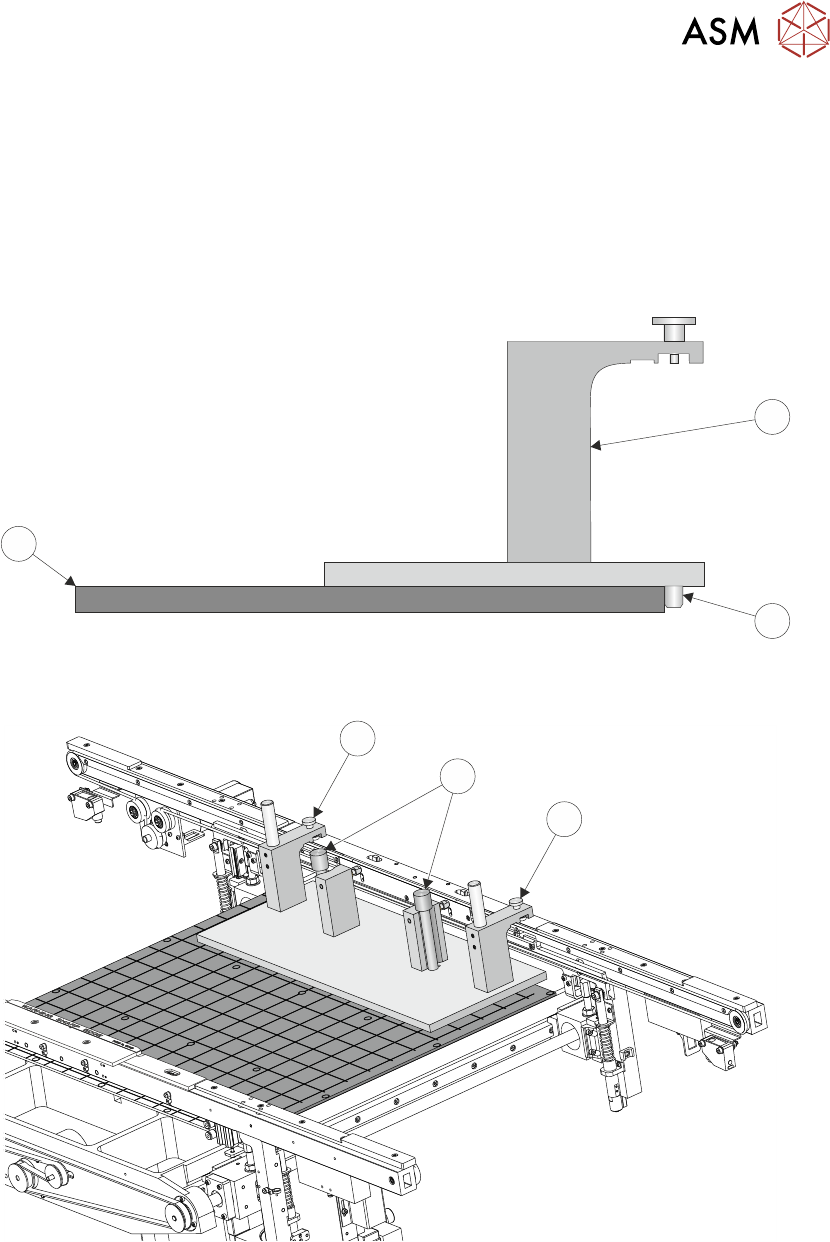
► Place the jig (1) on the manual tooling plate (3) ensuring that the location pins (2) on the un-
derside of the jig (1) are located in the holes on the manual tooling plate (3). Check there is no
gap using a 0.05mm feeler gauge.
3
1
2
► Secure the jig (1) to the front rail using the two jig to rail thumbscrews (4).
4
5
4
► Secure the jig (1) to the rising table using the two jig to table thumbscrews (5).
► Check that the location pins (2) are up against the front edge of the manual tooling plate (3)
using a 0.05mm feeler gauge.
17 CAMERA SYSTEM MODULE
17.3 ADJUSTMENTS AND SETTINGS
268 TECHNICAL REFERENCE MANUAL Vol 1 E By DEK 04/2019
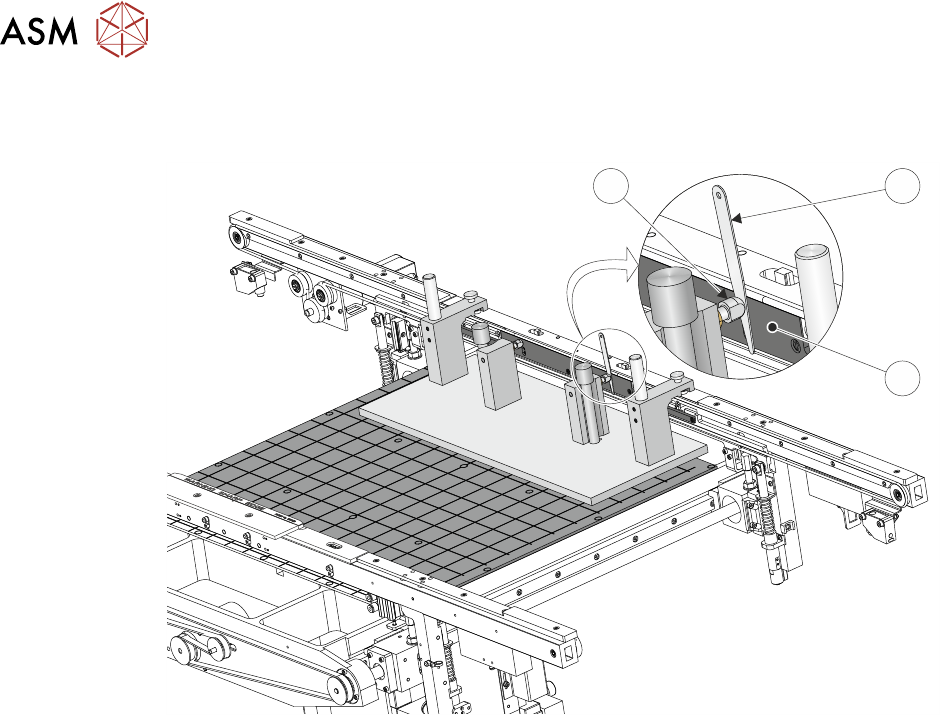
► Using feeler gauges (6) check that the gap between both alignment pads (8) and the belt sup-
port plate (7) of the front rail is 0.25mm ±0.05mm.
8 6
7
► If adjustment is necessary, refer to 16.4.5 "Front Rail Parallelism" [}243].
► Bring the camera carriage X axis support platform into contact with the camera alignment
pins.