03217917-01-01E By DEK Technical Reference Manual Vol 1_enPDFA.pdf - 第198页
15 BOARD STOP 15.6 ADJUSTMENTS AND SETTINGS 198 TECHNICAL REFERENCE MANUAL Vol 1 E By DEK 04/2019 ► Select Camera from the table. ► Select Camera to Board Stop . ► Open the front printhead cover. ► Select Board Clamps Of…
15 BOARD STOP
15.6 ADJUSTMENTS AND SETTINGS
TECHNICAL REFERENCE MANUAL Vol 1 E By DEK 04/2019 197
15.6 ADJUSTMENTS AND SETTINGS
15.6.1 Camera Board at Stop Sensor
WARNING
BOARD CLAMPS. EXTREME CARE MUST BE EXERCISED WHEN WORKING IN
THE TOOLING AREA OF THE MACHINE TO AVOID INJURY. THE FOILS ON THE
FRONT AND REAR BOARD CLAMPS ARE VERY SHARP.
The sensitivity should be adjusted to see a board on the rails at transport height. The distance
between the top of the board and the top of the tooling can change, due to different board thick-
ness, even if the same underside clearance parameter is used. The optimum adjustment is
achieved using the thinnest board, down to a minimum of 0.2mm thick. If the sensor is adjusted
and later a thinner board is used in the machine, it is possible that the decreased distance between
the sensor and the tooling may cause the sensor to be activated while no board is present, due to
tooling being positioned directly below the sensor. If a 0.2mm board is not available, extra care
should be taken to ensure that the sensor is detecting only the top of the board.
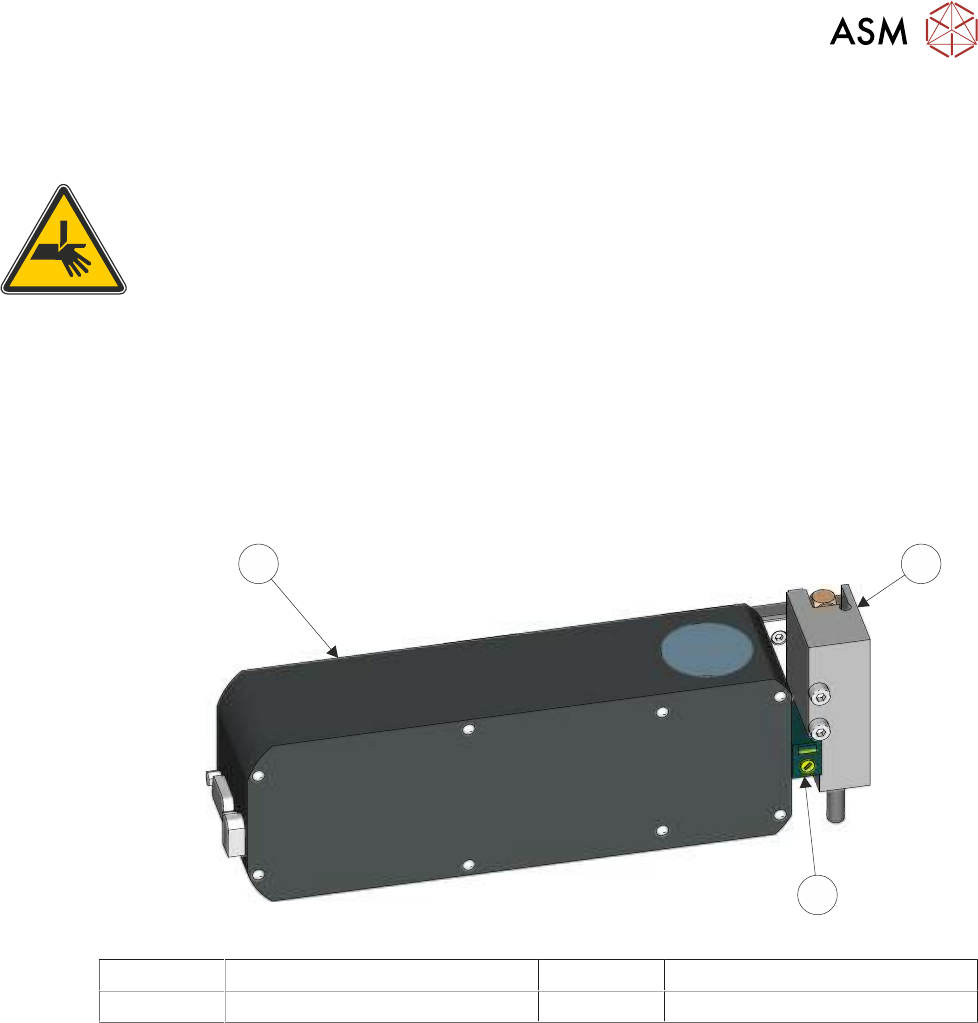
3
1
2
1 Camera Mounted Board Stop 3 Camera
2 Board at Stop Sensor
To check and adjust the sensitivity of the board at stop sensor, carry out the following procedure.
Ensure that the rail width is setup for the test board.
► Select Open Cover.
► Select Unload Screen.
► Open the front printhead cover.
► Remove the stencil.
► Close the front printhead cover.
► Press the System button.
► Select Exit.
► Select Maintenance.
► Select Diagnostics.
► Select Confirm.
► Select Print Carriage from the table.
► Select Carriage To Rear.
► Select Back.
15 BOARD STOP
15.6 ADJUSTMENTS AND SETTINGS
198 TECHNICAL REFERENCE MANUAL Vol 1 E By DEK 04/2019
► Select Camera from the table.
► Select Camera to Board Stop.
► Open the front printhead cover.
► Select Board Clamps Off.
► Position the test board (a 0.2mm board if available) on the rails below the sensor (3).
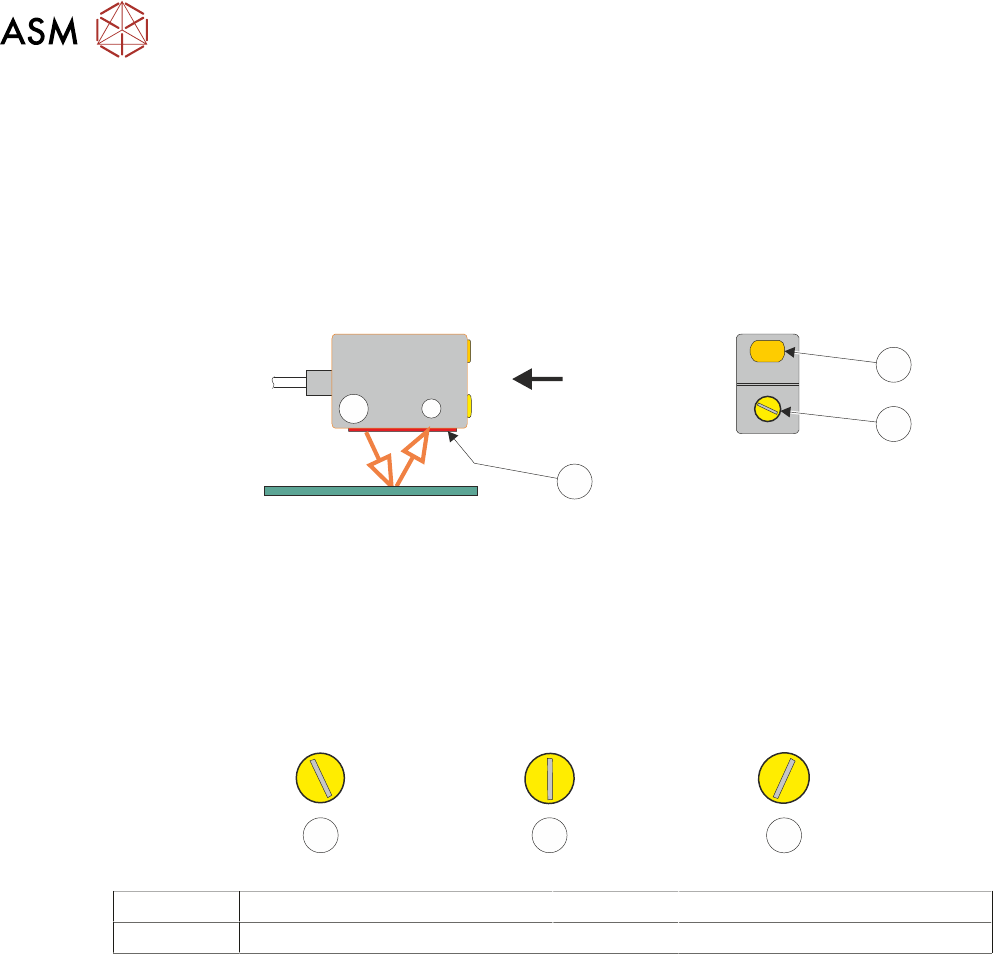
► If the amber LED (1) on the sensor is illuminated, turn the sensitivity/focal length adjustment
(2) anti-clockwise using a plastic trimmer tool until the LED is OFF (or the LED is flickering).
View on Arrow
3
1
2
► Turn the sensitivity/focal length adjustment (2) very slowly in a clockwise direction until the in-
stant the LED (1) is ON (the LED may flicker before fully illuminating).
► Turn the control (2) in a clockwise direction approximately 10 to 20 degrees beyond the point
at which the LED ON.
NOTE
Turning the control more than 10 to 20 degrees beyond the point at which the LED first illuminated
may cause the sensor to detect the tooling whilst printing using thin boards.
1 2 3
1 LED Not Illuminated 3 Final Set Position
2 LED Illuminated
NOTE
The final set position can be at any angle.
► Remove the test board from the machine.
► Refit the screen.
► Select Back.
► Select Exit.
► Select Confirm.
15 BOARD STOP
15.6 ADJUSTMENTS AND SETTINGS
TECHNICAL REFERENCE MANUAL Vol 1 E By DEK 04/2019 199
15.6.2 Configuring the Remote Board Stop
Configuring the remote board stop should only be carried out when called for in one of the following
procedures:
Procedure Reason for Change
Camera to Remote Board Stop -
LHS Configuration
Change from using the camera mounted board stop
to the remote board stop. The remote board stop is
mounted on the left side of the rising table.
Camera to Remote Board Stop -
RHS Configuration
Change from using the camera mounted board stop
to the remote board stop. The remote board stop is
mounted on the right side of the rising table.
Remote Board Stop -
LHS to RHS Configuration
Change the remote board stop location from the left
to the right side of the rising table.
Remote Board Stop -
RHS to LHS Configuration
Change the remote board stop location from the
right to the left side of the rising table.
Remote Board Stop -
Same Side Configuration
Change the remote board stop position when
switching between products with different board
widths.
15.6.2.1 LHS Configuration
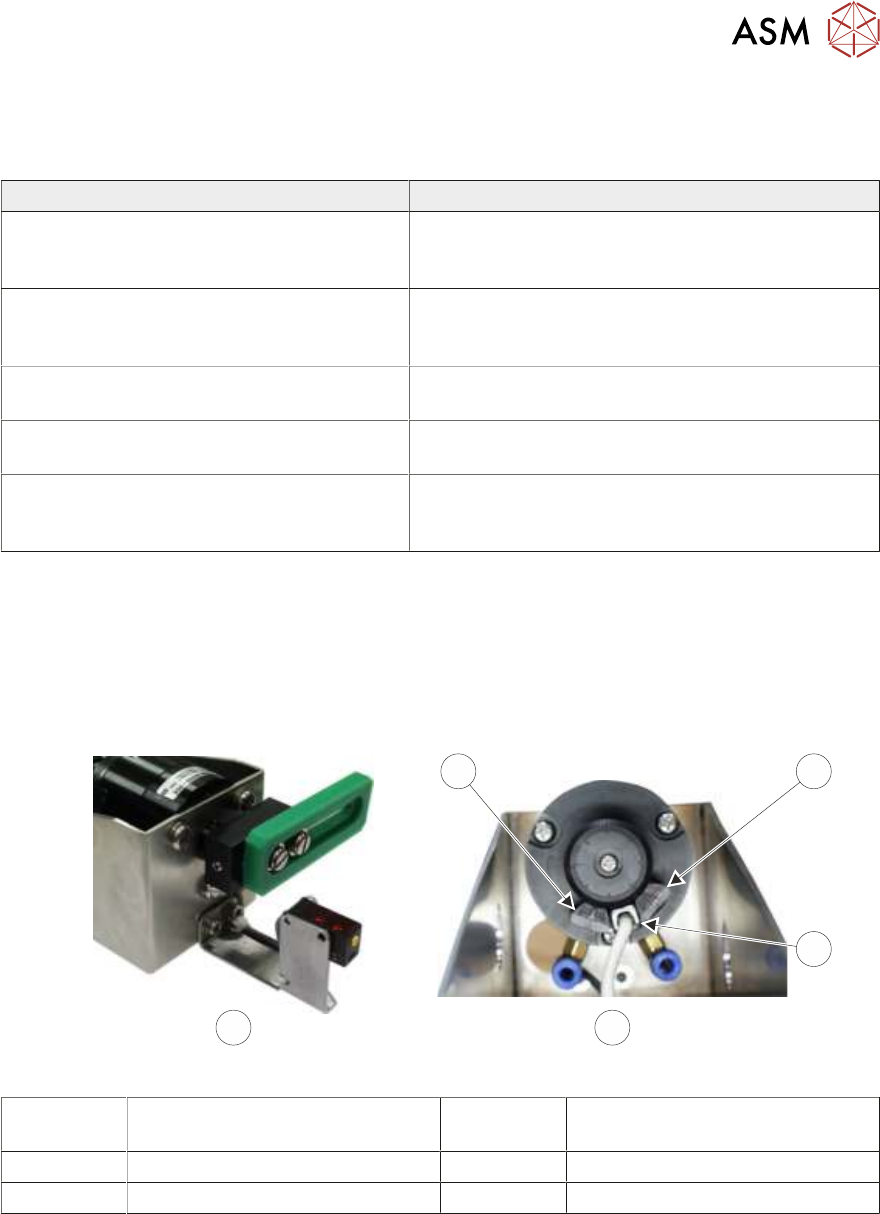
The remote board stop is configured for the LHS when:
●
The board stop rotates anti-clockwise to the raised position and faces the rear of the machine
when lowered, (as shown below).
●
The reed switch is positioned between the fixed stop and the adjustable stop.
4
1
2
BA
3
A Remote Board Stop
LHS Configured
2 Reed Switch
B View on Rear of Rotary Actuator 3 Fixed Stop
1 Adjustable Stop