Utah-94-721002-System-Manual.pdf - 第155页
System Manual = lñÑçêÇ=fåëíêìãÉåíë=mä~ëã~= qÉÅÜåçäçÖó= mä~ëã~ä~Ä (h) Troubleshootin g: Check the backs of wafers for excessive contamination, scratching or curvatur e/bowing. Vent chamber and check electrode for particle…

mä~ëã~ä~Ä= lñÑçêÇ=fåëíêìãÉåíë=mä~ëã~=qÉÅÜåçäçÖó= System Manual
PKOKU= rëÉ=çÑ=ÜÉäáìã=Ä~ÅâáåÖ=Ñçê=ÉÑÑÉÅíáîÉ=éêçÅÉëë=íÉãéÉê~íìêÉ=Åçåíêçä=
PKOKUKN= pÅçéÉ=
For all systems with wafer clamping and helium backing for wafer temperature control. i.e. Plasmalab
System 100 with ICP 65, 180 and 380 sources. Also, occasionally RIE 133 systems and RIE 80 Plus.
PKOKUKO= mìêéçëÉ=
It is important to ensure that the helium is sealed adequately behind the wafer. If the helium is leaking
out past the wafer with a poor seal against the table, the thermal contact to the temperature-controlled
table will be degraded. The wafer will then heat up more than expected and the process results may
suffer. For example, in SiO
2
etching the profile may become partially isotropic and/or any photoresist
masking used may burn too easily.
PKOKUKP= páãéäÉ=jÉíÜçÇ=íç=ÅÜÉÅâ=eÉäáìã=Ä~ÅâáåÖ=
(a) If the wafer is sealing the helium effectively, the measured He flow will be less than that when no
wafer is present.
(b) Set a range of He pressures and note the measured helium flows with no wafer loaded. (Set all
process gases, RF and pressure to zero and work in ‘manual’ mode.)
(c) Load a blank Si wafer of the correct size (if the system is a standard single wafer type) and note
the He flows for the same range of set He pressures.
(d) Load a typical customer wafer (e.g. with a thick SiO
2
layer) and note the He flows for the same
range of set He pressures. If a carrier is appropriate for the system, use that.
(e) Fill results in the following table. (If you do not have the capability to measure Helium flow then
measure CM gauge chamber pressure with APC fully open, no other gases flowing).
Set He/Torr He flow/sccm
No wafer
He flow/sccm
Si wafer
He flow/sccm
Customer wafer
7
10
15
20
(f) The larger the difference between ‘No wafer’ and ‘With wafer’ flows, the better the seal. ‘With
wafer’ values should be less. Pass criteria are still being evaluated but a recent example with
acceptable results is as follows.
(g) Recent acceptable example:
Set He pressure No wafer He flow With wafer He flow*
7Torr 4.2sccm <3.9sccm
10Torr 7.2sccm <6.5sccm
*These were the maximum values observed (usually occurring for wafers with thick SiO
2
layers)
and cooling was thought to be adequate because profiles were acceptable.
If there is little or no difference between the ‘No wafer’ and ‘with wafer’ flows, then the seal is
ineffective.
Process Information (Information contained in this document is confidential)
Issue 1: December 03 Page 12 of 30 Printed: 08 January 2006 09:37

System Manual= lñÑçêÇ=fåëíêìãÉåíë=mä~ëã~=qÉÅÜåçäçÖó= mä~ëã~ä~Ä
(h) Troubleshooting:
Check the backs of wafers for excessive contamination, scratching or curvature/bowing. Vent
chamber and check electrode for particles, scratches, or erosion. Check wafer clamp integrity and
wafer clamping force i.e. can you move the wafer by finger pressure when clamped?
Compare results with blank Si if possible. If blank Si is OK, there is a problem with the customer
wafers, i.e. they are warped or too flexible or too thin (thin wafers may require reduced He
pressure to avoid flexing of wafers), or the clamp ring does not have sufficient clamping points to
maintain wafer flatness.
Also check that the measured He pressure is correct – if the Helium pressure gauge is faulty, the
actual pressure could be far too high. Typical CM gauge pressure when wafer is clamped and
helium pressure applied (APC fully open and no other gases flowing) is in the range 0.3-2mT for
the range of Helium pressures given above.
For the range of helium pressures given previously: Typical CM gauge pressure when the wafer is
clamped and the helium pressure applied (with the APC fully open and no other gases flowing) is
in the range 0.3mTorr to 2mTorr.
Checks with the system vented:
(1) Ensure that the electrode is very flat and clean (no bumps or grooves eroded into it) and that the
back of the wafer is clean and smooth (no resist or glue or anything else adhering to the back),
and is mechanically strong so that it does not buckle or bow.
(2) Check that the wafer lift star (or pins) retracts fully below the surface of the electrode. This can be
checked with a flat edge placed on top of the star - if it wobbles then the star is too high. If the
star sticks up above the electrode, the helium will escape and the cooling efficiency will be
severely reduced (also, because of the increased gap between wafer and electrode surface, which
needs to be a few tens of microns for best cooling).
(3) Check that the clamping ring is actually clamping the wafer to give maximum clamp force. Often,
there can be a discrepancy between the wafer clamp recess height and the wafer thickness,
meaning that the wafer is not clamped and 'rattles' about inside the clamp ring. The clamping
force should therefore be adjusted as described in Section 6. of the system manual.
You should try to move the wafer with your finger, if you can move it then it is not clamped
properly and you may need to temporarily modify the ring by adding strips of PTFE or aluminium
foil to make it press down on the wafer.
(4) The wafer should be placed centrally in the clamp ring.
(5) Press down on the wafer in various places and see if it moves. This will indicate that the wafer is
not sitting down flat on the electrode. Try polishing away any bumps.
Checks with the system under vacuum:
(1) A good test of whether the wafer is being clamped properly is to measure the helium pressure in
the chamber (measured on CM gauge) both with and without a wafer in place for a variety of
helium pressure setpoints.
There should be a clear difference between helium pressure with and without wafer. If there is no
difference then it indicates that there is a helium leak caused by incorrect clamping.
Process Information (Information contained in this document is confidential)
Printed: 08 January 2006 09:37 Page 13 of 30 Issue 1: December 03
mä~ëã~ä~Ä= lñÑçêÇ=fåëíêìãÉåíë=mä~ëã~=qÉÅÜåçäçÖó= System Manual
(2) The helium setpoint should be set so that there is 1-2 mTorr chamber pressure with a wafer in
place. This ensures that there is sufficient cooling. It is probably best to work at as high a level as
you can tolerate if there is any doubt over cooling efficiency.
PKOKV= d~ëÉë=ïáíÜ=äçï=î~éçìê=éêÉëëìêÉ=
Gases with a low vapour pressure (e.g. SiCl4, BCl3) present unique problems for the gas supply system, e.g.
temperature dependence of gas pressure, condensation in the gas lines, and low line pressure.
To avoid the loss of line pressure during cold weather, it is recommended that gases with a low vapour
pressure are sited indoors, inside an extracted gas cabinet. However, it is NOT recommended to
deliberately heat the gas cylinder (e.g. by using a heated jacket) as this will result in the re-condensation
of the gas in the gas line and/or MFC, since these areas are likely to be cooler than the cylinder. The
presence of condensed gas in the gas line or MFC will cause loss of flow or severe pulsing of measured gas
flow.
Note that condensation problems can sometimes be observed even without direct cylinder heating. This is
usually due to a slight temperature difference between cylinder and MFC. In such cases, it is
recommended that heating tape is placed around the MFC, filter and valve assembly of the gas line to
ensure that the MFC and other components are kept at a higher temperature than the gas cylinder. An
alternative solution would be to use a heated MFC.
PKOKNM= båÇéçáåí=ÇÉíÉÅíáçå=íÉÅÜåáèìÉë=
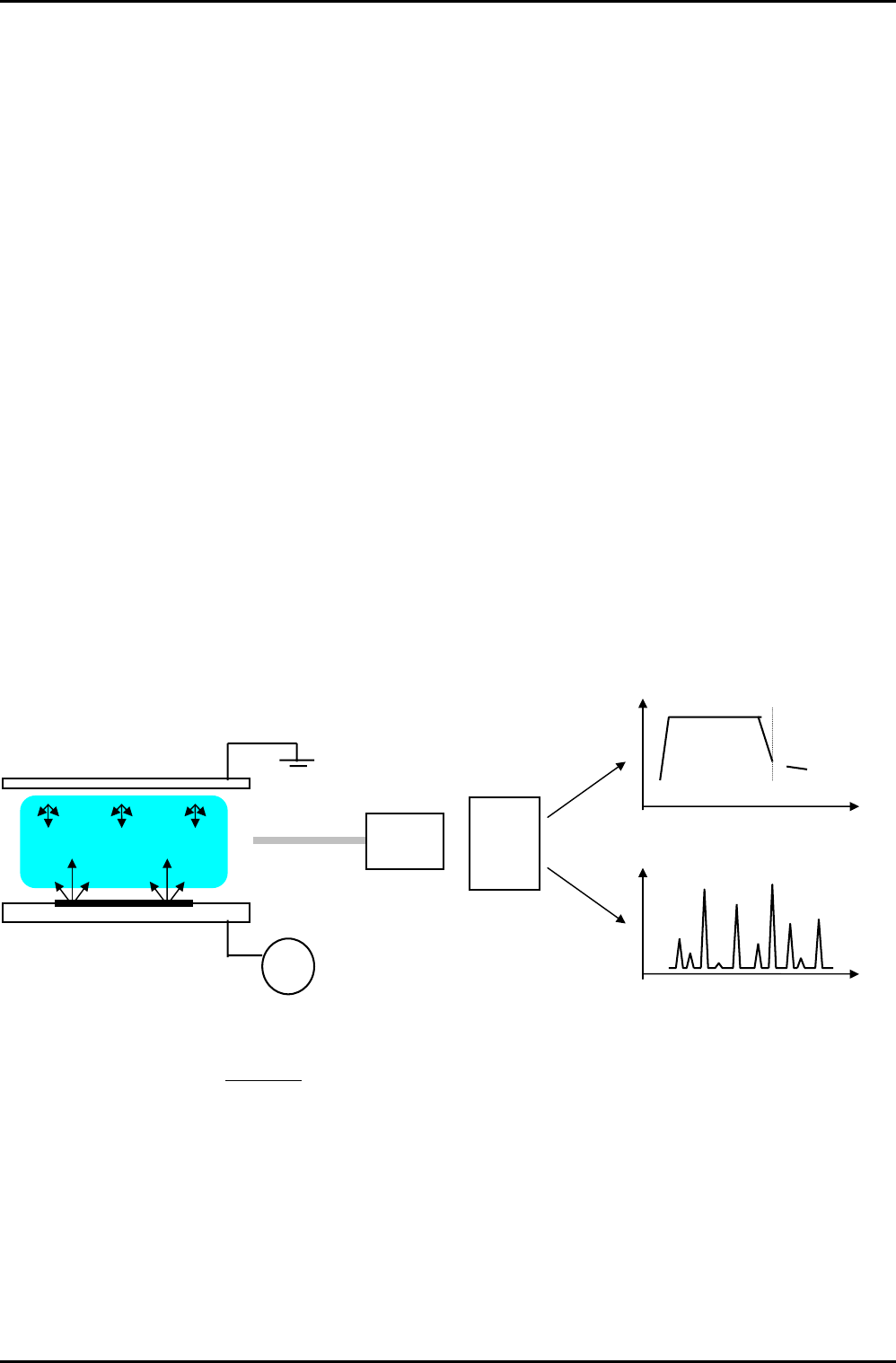
PKOKNMKN= léíáÅ~ä=Éãáëëáçå=ëéÉÅíêçëÅçéó=
Endpoint
Light
o/p
Monochromator
Light
o/p
RF
Reactive
s
p
ecies
Etch by-
products
PC
Etch time
Process chamber
Wavelength
• Monitoring of reactive species or etch by-products provides endpoint signal.
• Endpoint relies on etch stop layer.
• Scanned monochromator allows full spectrum analysis.
Process Information (Information contained in this document is confidential)
Issue 1: December 03 Page 14 of 30 Printed: 08 January 2006 09:37