Utah-94-721002-System-Manual.pdf - 第98页
mä~ëã~ä~Ä póëíÉãNMM lñÑçêÇ =fåëíêìã Éåíë= mä~ëã~ =qÉÅÜåçäçÖó == System Manual RKTKP= oçí~êóLÇêó=éìãé=k O =éìêÖÉ=Ñäçï=ê~íÉ=~ÇàìëíãÉåí= CAUTION If the rotary/dry pump’s N 2 purge flow rate is inadequate, damage to the pump…
System Manual lñÑçêÇ=fåëíêìãÉåíë=mä~ëã~=qÉÅÜåçäçÖó== mä~ëã~ä~ÄpóëíÉãNMM
RKTKO= ^ÇàìëíáåÖ=íÜÉ=åáíêçÖÉå=êÉÖìä~íçê=çìíäÉí=éêÉëëìêÉ=
NOTE: Refer to Section 2 for a description of the Nitrogen vent distribution circuit.
The regulator outlet pressure should not usually require adjustment from its factory setting.
However, if adjustment is necessary, proceed as follows.
WARNING
THIS PROCEDURE INVOLVES WORKING ON THE SYSTEM WITH COVERS REMOVED
AND WITH THE ELECTRICAL POWER ON. THEREFORE IT MUST ONLY BE CARRIED OUT
BY TRAINED AND COMPETENT PERSONNEL WHO ARE AWARE OF THE RISKS
INVOLVED.
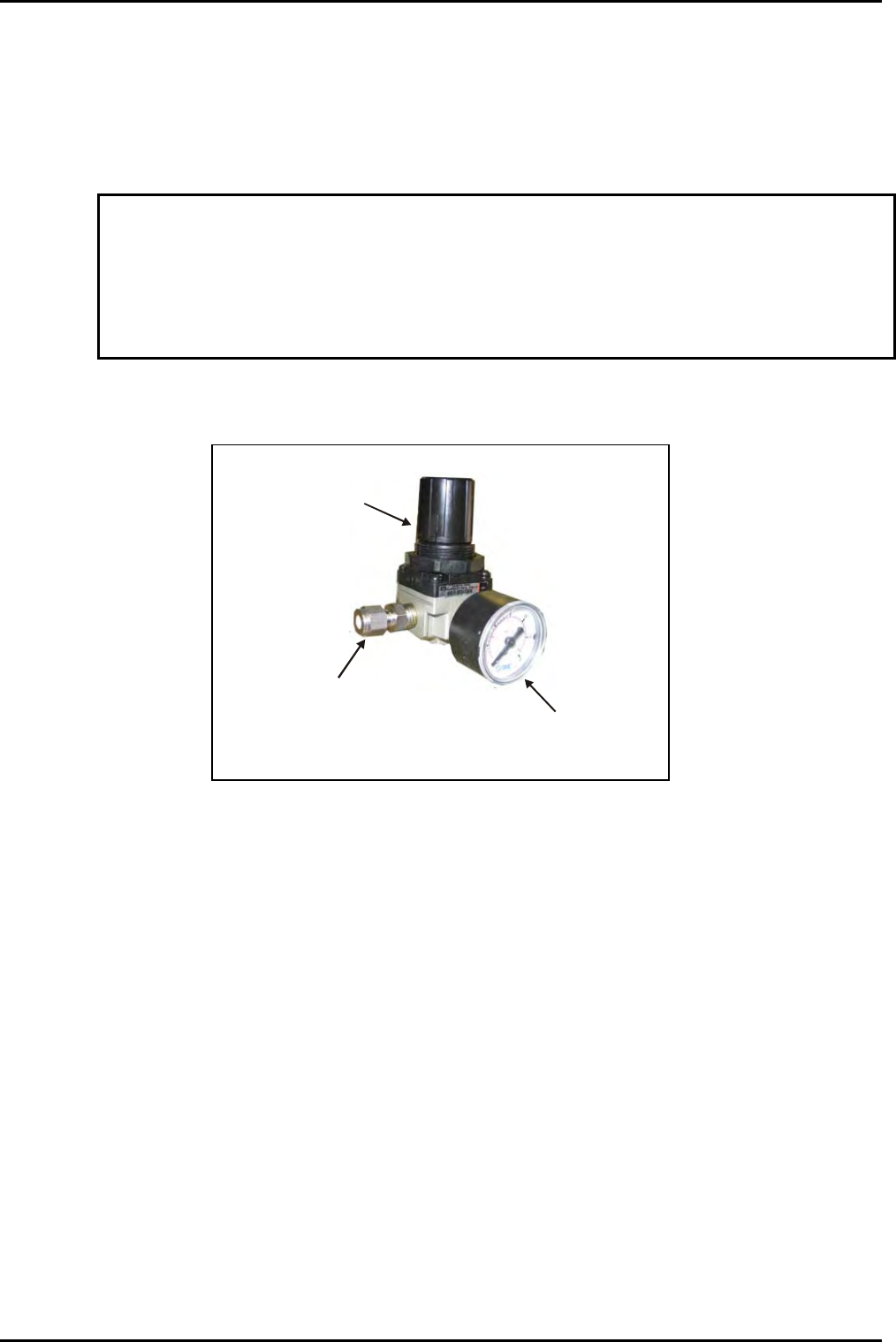
1) Remove system panels as necessary to gain access to the regulator.
Outlet connector
Outlet pressure
control knob
Outlet pressure
gauge
Fig 5.9: N
2
Pressure regulator/gauge
2) Adjust the regulator outlet pressure control knob to set the outlet pressure to the
maximum which will not open the check valve; normally 0.5 to 0.7 bar gauge as
indicated on the regulator gauge.
NOTE: Setting the outlet pressure too low will extend system venting times
excessively, and may compromise the purge gas flow to the turbo pump if
fitted. Setting the outlet pressure too high will open the check valve and
waste gas, but will not reduce venting times.
3) Refit all system covers.
4) Carry out a simple process to check that the vent sequence operates correctly.
Operating Instructions
Printed: 22-Mar-06, 10:42 Page 5-31 of 52 UC Davis 94-721001 Issue 1: March 06

mä~ëã~ä~ÄpóëíÉãNMM lñÑçêÇ=fåëíêìãÉåíë=mä~ëã~=qÉÅÜåçäçÖó== System Manual
RKTKP= oçí~êóLÇêó=éìãé=k
O
=éìêÖÉ=Ñäçï=ê~íÉ=~ÇàìëíãÉåí=
CAUTION
If the rotary/dry pump’s N
2
purge flow rate is inadequate, damage to the pump
could occur.
Ensure that the flow rate is set to the value recommended by the pump
manufacturer.
The rotary/dry pump’s N
2
purge flow rate is set at the factory before system shipment and
should not need adjustment. However, the pump purge rate will need to be confirmed on
installation and at any time the purge gas supply pressure changes significantly. If adjustment
is necessary, refer to Appendix R in this manual.
Operating Instructions
UC Davis 94-721001 Issue 1: March 06 Page 5-32 of 52 Printed: 22-Mar-06, 10:42
System Manual lñÑçêÇ=fåëíêìãÉåíë=mä~ëã~=qÉÅÜåçäçÖó== mä~ëã~ä~ÄpóëíÉãNMM
RKU= m`=OMMM=ëÅêÉÉåë=
RKUKN= mìãé=Åçåíêçä=é~ÖÉ=
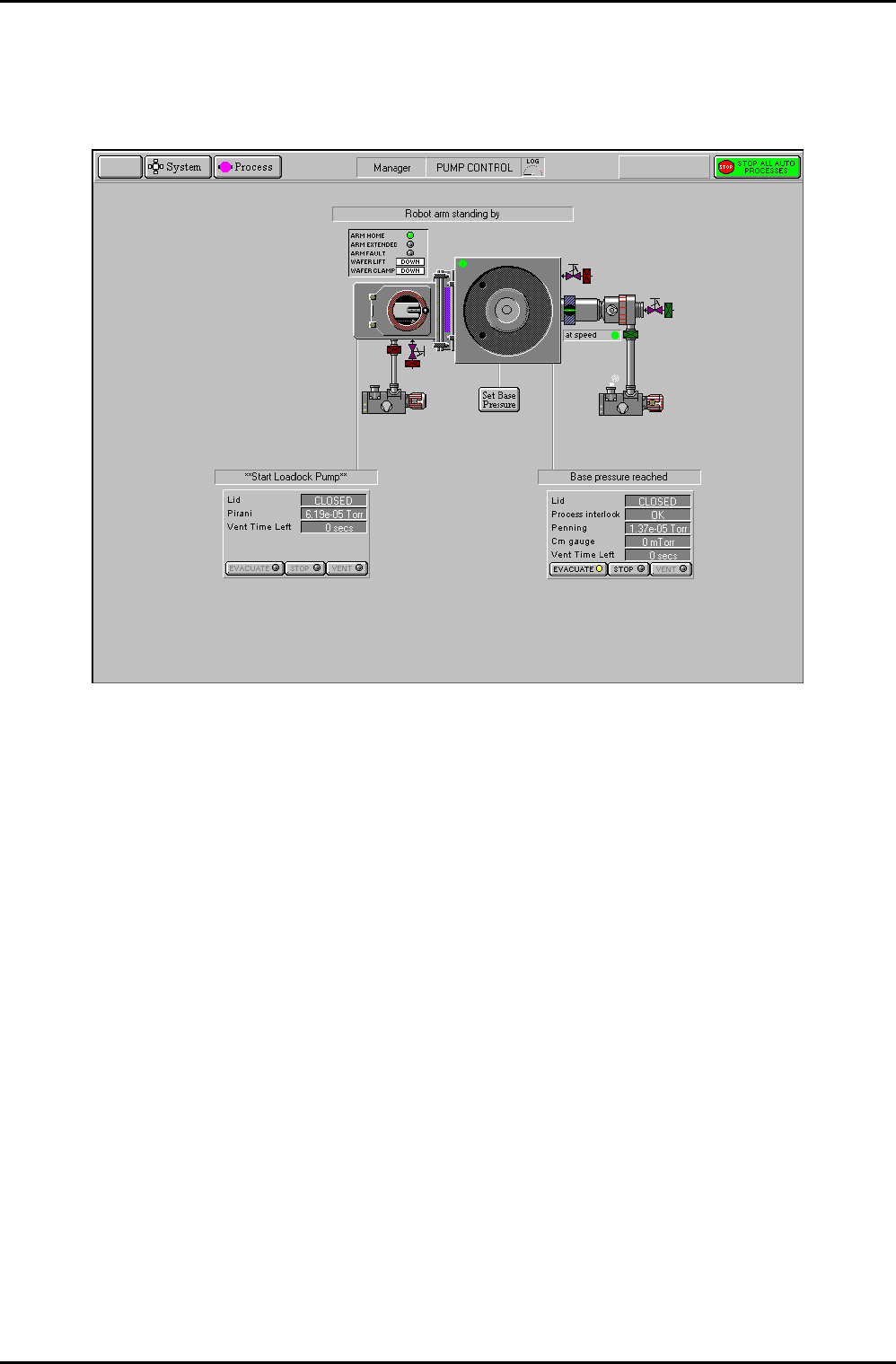
Fig 5.10: Pump control page
The pump control page provides control and monitoring of the vacuum system. The page has
the following features:
s~Åììã=ëóëíÉã=ãáãáÅ=
The vacuum system mimic is shown in Fig 5.11. Each chamber contains a wafer indicator
which when coloured green indicates that a wafer is present in the chamber. Clicking on a
green wafer indicator will display the Robot Control page showing the possible wafer
destination.
Note that the Automatic Pressure Controller (APC) mimic displays the current status of the
valve, i.e. open, closed, mid position or fault (indicated by a red dot).
Operating Instructions
Printed: 22-Mar-06, 10:42 Page 5-33 of 52 UC Davis 94-721001 Issue 1: March 06