Utah-94-721002-System-Manual.pdf - 第86页
mä~ëã~ä~Ä póëíÉãNMM lñÑçêÇ =fåëíêìã Éåíë= mä~ëã~ =qÉÅÜåçäçÖó == System Manual 11) When the ‘Process Complete’ message is displayed, select the Pump Control page and move the wafer from the process chamber to the Automati…

System Manual lñÑçêÇ=fåëíêìãÉåíë=mä~ëã~=qÉÅÜåçäçÖó== mä~ëã~ä~ÄpóëíÉãNMM
RKQKU= j~åì~ä=éêçÅÉëë=êìå=
1) Insert the wafer into the Automatic load lock. (If necessary, vent the Automatic load
lock by selecting the STOP button then the VENT button).
2) Close the Automatic load lock lid.
3) Select the Automatic load lock’s EVACUATE button. A dialogue box will be
displayed allowing entry of a Wafer Name, if any.
4) Check that the system has pumped down to base pressure. (The process chamber
message panel should display ‘Base Pressure reached’).
5) Select the Process menu, then the Chamber 1 option. Set the parameters as required,
e.g. Step Time, RF generator power, chiller temperature, chamber pressure, and gas
demands.
6) Ensure that the Automatic load lock is at the required pressure. (Check the relevant
panels on the Pump Control page). Green ‘ready for transfer’ indicators (WX) are
displayed on each chamber mimic when it is available for vacuum transfer.
7) On the Pump Control page, click on the Automatic load lock wafer mimic. The Robot
Control page is displayed (see Fig 5.13, page 5-36).
8) Click on the Process Chamber wafer mimic. The wafer is transferred from the
Automatic load lock into the Process Chamber.
9) On the Chamber 1 process page, check that the set parameters are correct for your
required process.
10) Click the START button. (Note that if this button is not active, the chamber has not
reached base pressure.) The process will commence.
NOTES:
a) You can pause the process at any time by selecting the PAUSE button. This
will cause the Step Time and the plasma power to stop with the current step
time indicated. Re-starting the process will cause the process to continue from
the time it was paused. If, during the pause period, you change any of the
process parameters, e.g. gas demand, pressure etc., you must press the START
button for the changes made to come into effect, this will cause the step timer
to continue from the time it was paused.
b) You can stop the process at any time; the message ‘Process Complete’ will be
displayed, if required, you can then run the same or another process.
WARNING
CONTACT WITH TOXIC GASES CAN CAUSE DEATH OR SERIOUS INJURY.
WHERE ANY PROCESS GAS IS TOXIC, DO NOT TRANSFER A WAFER FROM THE
PROCESS CHAMBER TO THE LOAD LOCK UNTIL ALL PROCESS GAS HAS BEEN
PUMPED OUT.
ENSURE THAT THE AUTOMATIC VENT SEQUENCE IS ALLOWED TO COMPLETE.
IF THESE PRECAUTIONS ARE NOT CARRIED OUT, THERE COULD BE A HAZARD IN THE
LOAD LOCK.
Operating Instructions
Printed: 22-Mar-06, 10:42 Page 5-19 of 52 UC Davis 94-721001 Issue 1: March 06

mä~ëã~ä~ÄpóëíÉãNMM lñÑçêÇ=fåëíêìãÉåíë=mä~ëã~=qÉÅÜåçäçÖó== System Manual
11) When the ‘Process Complete’ message is displayed, select the Pump Control page
and move the wafer from the process chamber to the Automatic load lock using the
same method as the transfer in.
12) Open the Automatic load lock’s lid and remove the wafer.
13) If required, the system can now be vented, see sub-section 5.4.9 page 5-20.
RKQKV= sÉåíáåÖ=íÜÉ=ëóëíÉã=
WARNING
CONTACT WITH TOXIC GASES CAN CAUSE DEATH OR SERIOUS INJURY.
BEFORE VENTING THE PROCESS CHAMBER, ALWAYS ENSURE THAT THE SYSTEM IS
ADEQUATELY PURGED AND PUMPED.
Do not vent a system which has used toxic gases unless the system has been adequately
pumped first.
For example: Gases having Threshold Limit Values (TLVs) of 1ppm or below, e.g.
Chlorine, require at least 20 minutes pumping before venting.
After venting, there may still be residual gases in the process chamber. Consider wearing
suitable personal protection, e.g. a respirator.
To vent the system, use the following steps.
1) From the System menu, select the Pumping option.
2) On the Pump Control page, select the STOP button then the VENT button for each
chamber. Note that the vent sequence is controlled by a timer to allow time for the
turbo pumps to ‘spin’ down.
3) When all of the ‘Vent Time Left’ timers have decremented to zero, all of the pumps
have been switched off automatically, and the complete system has been vented.
Do not attempt to open the process chamber lid until the vacuum switch has changed status,
i.e. to its high-pressure status (In this condition, on the Pump Control page the vacuum status
field will display ‘FAULT’).
Operating Instructions
UC Davis 94-721001 Issue 1: March 06 Page 5-20 of 52 Printed: 22-Mar-06, 10:42
System Manual lñÑçêÇ=fåëíêìãÉåíë=mä~ëã~=qÉÅÜåçäçÖó== mä~ëã~ä~ÄpóëíÉãNMM
RKR= `êÉ~íáåÖ=~åÇ=ÉÇáíáåÖ=êÉÅáéÉë=
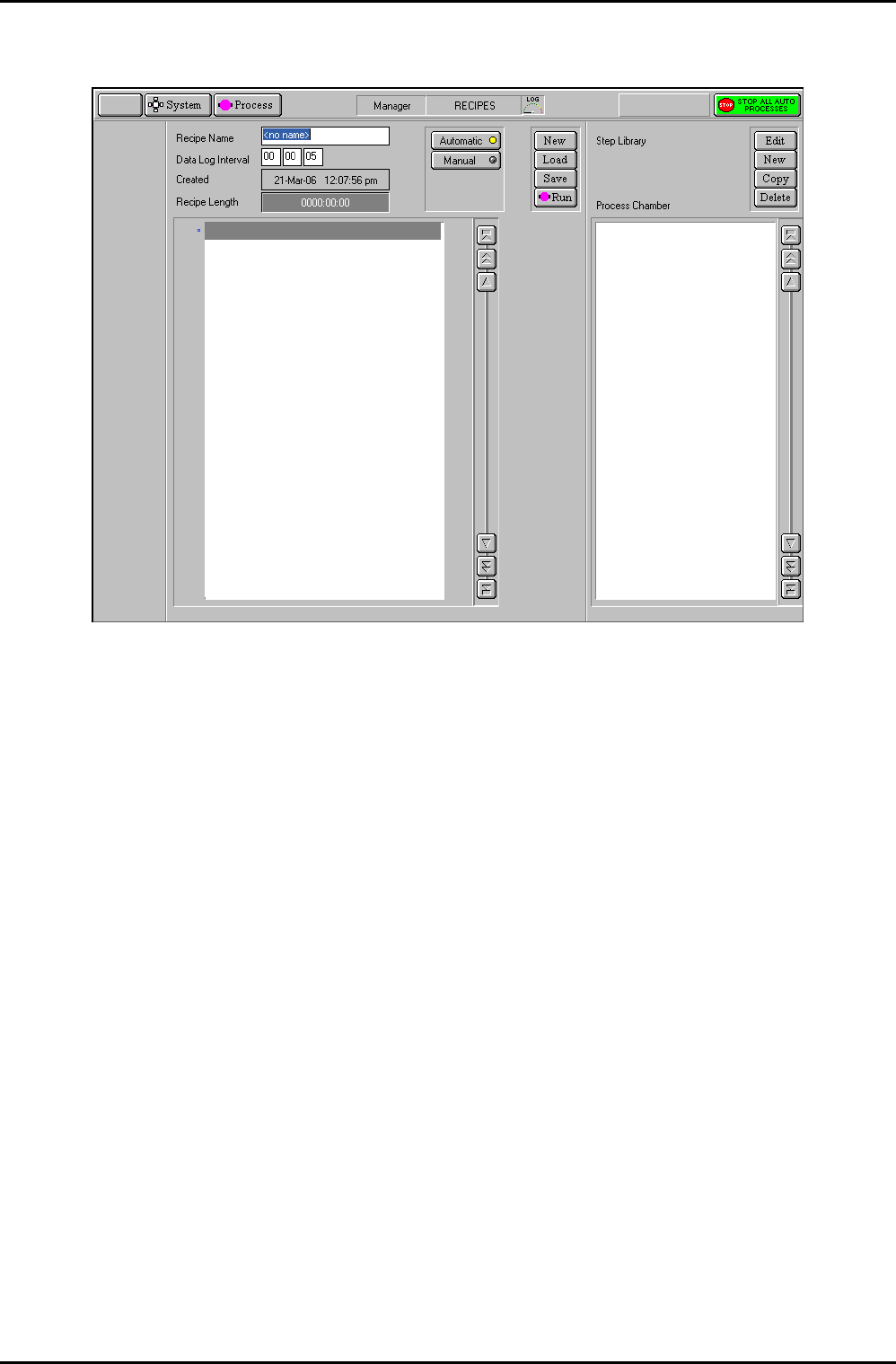
Fig 5.3: Recipe screen
This page is used to assemble and store in memory all the set points and instructions which
make up a Recipe for an Automatic Mode run. These recipes consist of a sequence of process
Steps. ‘Drag and Drop’ facilities are provided to copy library steps into a recipe.
NOTE: For a description of the facilities on this page, refer to sub-section 5.8.3, page 5-37.
The Recipe option (accessed from the PROCESS button) displays the recipe page for the
process chamber. This page allows you to create / edit recipes and the recipe steps that they
contain.
NOTE: Before creating / editing recipes, make sure that you understand the operation of
key components of the system to ensure that recipes proceed as expected.
A recipe is created by adding steps from the Step Library to the Recipe Step Name fields. The
recipe is then allocated a Data Log Interval and saved.
RKRKN= tçêâáåÖ=ïáíÜ=êÉÅáéÉ=ëíÉéë=
Recipe steps are stored in the Step Library list. The list can contain any number of steps,
depending on available hard disk space. When the displayed list is full, it becomes scrollable
to allow you to view all of the list contents.
`ob^qb=^=kbt=ob`fmb=pqbm=
To create a new recipe step, use the following procedure:
1) In the Step Library panel, select the NEW button. The Step Edit page is displayed.
2) Enter the step parameters as required, then click on OK. The step is automatically
saved.
Operating Instructions
Printed: 22-Mar-06, 10:42 Page 5-21 of 52 UC Davis 94-721001 Issue 1: March 06