Utah-94-721002-System-Manual.pdf - 第281页
System Manual lñÑçêÇ=fåëí êìãÉåíë=mä~ëã~=qÉÅÜåçäçÖó== ^ää=lfmq=póëíÉãë SK= qêçìÄäÉëÜççíáåÖ= WARNING HAZARDOUS RF VOLT AGE - CONTACT CAN CAUSE DE ATH, SEVERE INJ URY OR BURNS. ANY WORK REQUIRING THE REMOVAL OF COVERS OR P…

^ää=lfmq=póëíÉãë lñÑçêÇ=fåëíêìãÉåíë=mä~ëã~=qÉÅÜåçäçÖó== System Manual
Auto/manual switch: In the ‘Auto’ position, the unit will attempt to tune for minimum
reflected RF power. In the ‘Manual’ position, the capacitors
positions are controlled manually.
C1 max/min switch: In manual mode, this switch can be used to drive capacitor C1
towards maximum or minimum.
C2 max/min switch: In manual mode, this switch can be used to drive capacitor C2
towards maximum or minimum.
Note that capacitor positions are displayed as a three-digit number
from 000 (minimum) to 999 (maximum).
Display Selector
Switch:
The RF monitoring positions display the analogue voltages on the
remote control lines to the RF generators, as a service aid. The Hi/Lo
position reads a high (>9V) value when the wafer bias RF supply is at
full scale, and a low (<1V) value when this supply is scaled back to one-
tenth full power. This feature improves resolution of RF low power.
C1 park.
Potentiometer:
This control can be fitted either to the control panel or on the AMU
control board. The automatch will drive C1 to this pre-set position
when the RF is turned off, if the unit is set to ‘auto’
C2 park.
Potentiometer:
This control can be fitted either to the control panel or on the AMU
control board. The automatch will drive C2 to this pre-set position
when the RF is turned off, if the unit is set to ‘auto’
OIPT Automatch Unit
Issue 6: February 05 Page 14 of 20 Printed: 5-Jan-06, 8:03
System Manual lñÑçêÇ=fåëíêìãÉåíë=mä~ëã~=qÉÅÜåçäçÖó== ^ää=lfmq=póëíÉãë
SK= qêçìÄäÉëÜççíáåÖ=
WARNING
HAZARDOUS RF VOLTAGE - CONTACT CAN CAUSE DEATH, SEVERE INJURY
OR BURNS.
ANY WORK REQUIRING THE REMOVAL OF COVERS OR PANELS MUST
ONLY BE PERFORMED BY AUTHORISED PERSONNEL WHO ARE AWARE OF
THE HAZARDS INVOLVED.
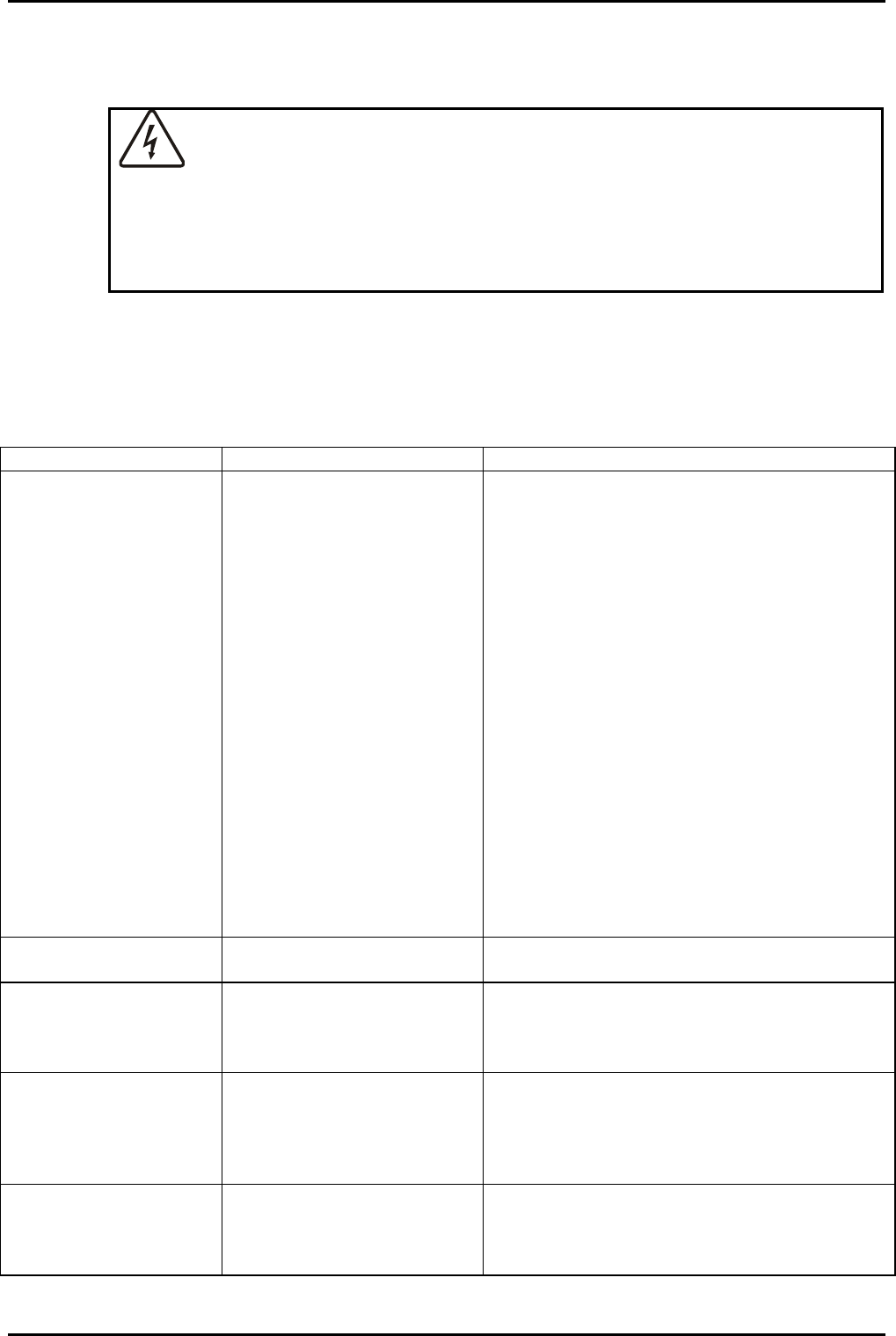
SKN= c~ìäí=Çá~Öåçëáë=ÅÜ~êí=
Use the following chart to locate and identify faults. Note that the chart lists typical fault
symptoms and is not exhaustive.
SYMPTOM POSSIBLE CAUSES ACTION
(A) Drive motors do
not respond to
automatic or
manual control
Fuse FS2 blown
Fuse FS1 or FS101 tripped.
Investigate and repair fault, which caused the
fuse to blow. Then renew the fuse.
Investigate and repair the fault, which caused
the fuse to trip. (The fuses will automatically
reset once the fault is repaired.)
Note that these components are semiconductor
fuses which respond to an increase in current
above their rating (approximately 200 mA) by
increasing their internal resistance significantly.
The voltage drop across each of these
components under non-fault conditions is
approximately 0.5V
When tripped by high current, the voltage drop
is almost the full supply voltage i.e. 24V.
After power is removed, the devices require 20
seconds to cool down and reset.
(B) C1 or C2 drive to
min or max
1. C1 or C2 starting too far
from final match position
Adjust park potentiometers (Refer to sub-
section 6.4 (page 20).
2. Match position is out of
accessible range
1. Change process conditions
2. Change component fit in AMU (skilled
personnel only). Refer to sub-section 6.3 (page
19).
(C) C1 or C2 drive to
min or max and do
not return
manually
Capacitor has travelled past
an electrical limit
1. All vane capacitors only: Continue manual
travel in the same direction (to max if capacitor
is at max). The capacitor will turn fully until it
passes the opposite limit.
2. Readjust limit settings
(D) Plasma does not
strike even though
the reflected power
is low
Gas pressure is too low or
too high
Caution: do not run for > 2 minutes in this
condition. Change gas pressure to 20 - 200
mTorr range (RIE), or 0.5 - 1.5 Torr range
(PECVD)
OIPT Automatch Unit
Printed: 5-Jan-06, 8:03 Page 15 of 20 Issue 6: February 05
^ää=lfmq=póëíÉãë lñÑçêÇ=fåëíêìãÉåíë=mä~ëã~=qÉÅÜåçäçÖó== System Manual
SYMPTOM POSSIBLE CAUSES ACTION
(E) C1 or C2 oscillate
close to match
1. Amplifier gain too high
2. C1 or C2 spindle thread
dirty.
See sub-section 6.1.1 (page 16).
Remove capacitor, clean and re-lubricate
capacitor’s spindle thread and bearing. Re-
align; see sub-section 6.1.2 (page 17).
(F) Drive motor shafts
rotate but capacitor
spindles do not.
Coupling between the motor
shafts and capacitor spindles
has become disengaged or
loose.
See sub-section 6.1.2 (page 17).
(G) End stops don’t
work, motor drives
through.
Park potentiometers have
broken
Check park potentiometers behind AMU
control panel and replace if necessary.
(H) Error signal pots
don’t adjust the
error signal or both
adjust one signal
only.
Links placed incorrectly Check links LK6, 7, 10 & 107 to ensure they are
in the correct position. If link is open end type,
ensure that metal insert is still present.
Hints and Tips
• Do not remove anything from the Motor Control board without removing the
power (JP2) first.
• When in ‘Auto’ mode RV1 and RV2 found on the side of the AMU casing can be used
to make fine adjustments to the match position.
SKNKN= ^ãéäáÑáÉê=Ö~áå=~ÇàìëíãÉåí=
Refer to Symptom (E) in the Fault diagnosis chart (see sub-section 6.1, page 15).
When adjusting the amplifier gain, initially adjust the associated variable resistor (RV101 for
C1 or RV1 for C2; see for locations). These variable resistors provide a ‘fine’ adjustment. If
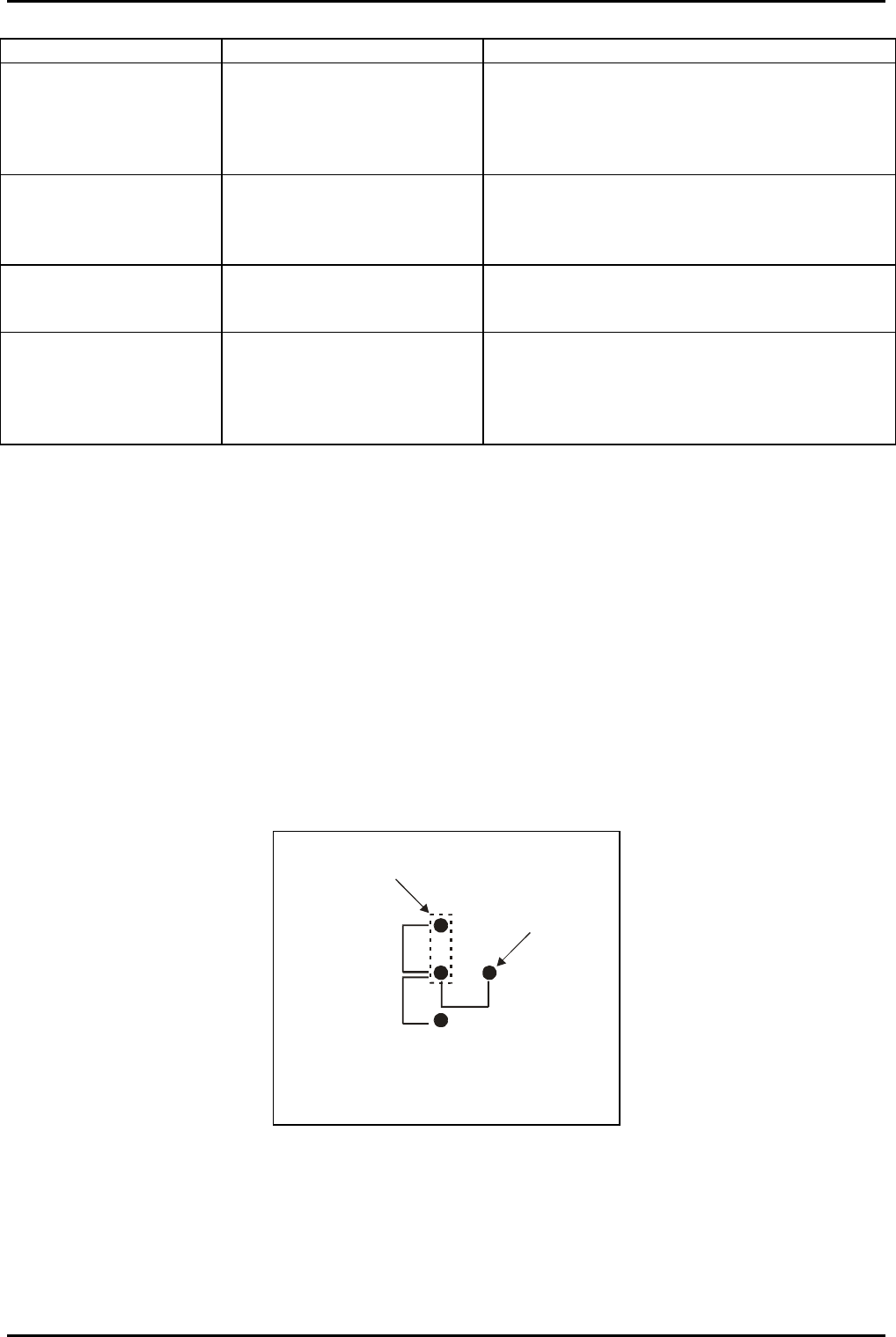
required, a coarse adjustment is available by using links LK102 and LK2 as shown in Fig 7.
A
B
C
Pin on
PCB
Link shown in
position A
Position A = Lowest amplifier gain
Position B = Medium amplifier gain
Position C = Highest amplifier gain
Fig 7: LK102 and LK2 settings
OIPT Automatch Unit
Issue 6: February 05 Page 16 of 20 Printed: 5-Jan-06, 8:03