CP643E.pdf - 第105页
FK-9F98-05 CP-643E Training Text for Service Engineers Edition 5.0 Chapter 6. Servo Pack Zero Setting and Gain/ Motion Check [ 14 / 14] Fuji Machine Mfg. Co., Ltd. Okazaki SMT Equipment Quality As surance Dept. Technical…
FK-9F98-05 CP-643E Training Text for Service Engineers
Edition 5.0 Chapter 6. Servo Pack Zero Setting and Gain/ Motion Check [13/14]
Fuji Machine Mfg. Co., Ltd. Okazaki
SMT Equipment Quality Assurance Dept.
Technical Support Div. Section No.2
6
-
13
D-axis
st_pos 0 speed 78125 kps 150
en_pos 1950 reach 15 kis 2
time 35 rough 20 kpm 110
pitch 0 accel 40 kim 0
z_high 150 Reduce 40 kff 30
z_creep 10 s_par 10 kaa 0
z_reduce 1000 lim_pe 0 kpi 110
cam_sp1 0 limit 0 kii/128 128
cam_sp2 0 h_speed 100 cam_pos1 0
cycle 0 deflect 10000 cam_pos2 0
da_sign 0 t_out 100 sign 0
pulse 0

FK-9F98-05 CP-643E Training Text for Service Engineers
Edition 5.0 Chapter 6. Servo Pack Zero Setting and Gain/ Motion Check [14/14]
Fuji Machine Mfg. Co., Ltd. Okazaki
SMT Equipment Quality Assurance Dept.
Technical Support Div. Section No.2
6
-
14
Notes:
FK-9F98-05 CP-643E Training Text for Service Engineers
Edition 5.0 Chapter 7. Camera Adjustment [1/10]
Fuji Machine Mfg. Co., Ltd. Okazaki
SMT Equipment Quality Assurance Dept.
Technical Support Div. Section No.2
7-1
Chapter 7 Camera Adjustment
Parts Cameras
Two CCD cameras are mounted on the machine for inspection of the parts picked at the first station.
The raw image is captured by the cameras and compared with part data to ensure that the part’s
dimensions are within specified tolerances.
Problems that arise from an incorrectly adjusted camera include displaced parts, high error rates, and
skewed parts. Some other examples of possible reasons for re-calibration are:
• Lens replacement
• Camera replacement
7.1 Parts Camera removal
1. With the machine power OFF, remove the video cables from the cameras.
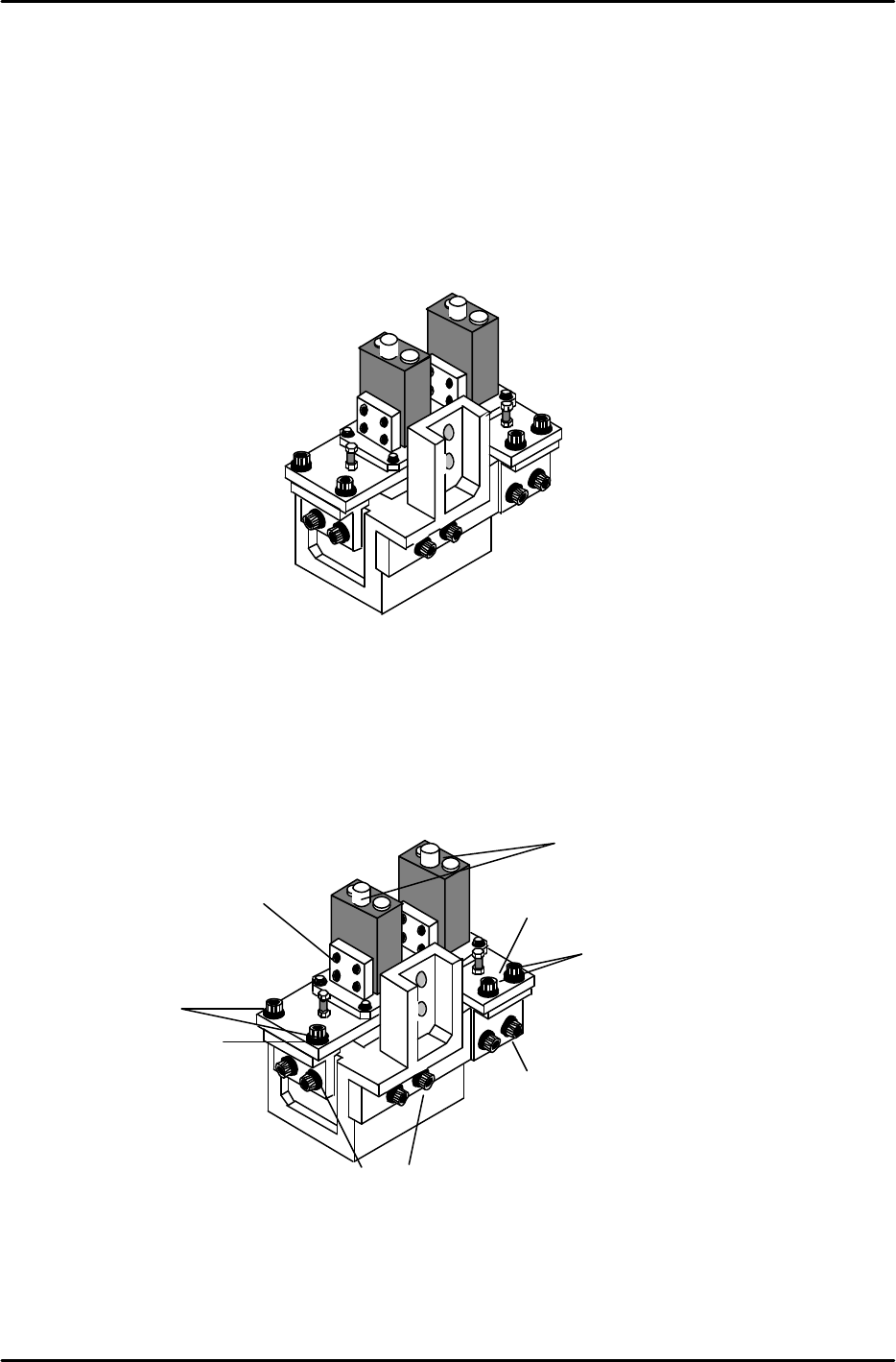
2. Remove the mounting bolts indicated in Fig. 2 and carefully remove the cameras.
Rear View
Camera3
Camera 2
Narrow Camera
Wide Camera
Figure 1
Rear View
Video Cables
Loosen these two
bolts to remove the
Narrow camera
Loosen these two
bolts to remove the
Wide camera
Figure 2
13N.m
13N.m
8N.m
1.5N.m
8N.m