CP643E.pdf - 第70页
FK-9F98-05 CP- 643E Training Text for Service Engineers Edition 5.0 Chapter 5. Loader and Conveyor Adjustment [ 7 / 28 ] Fuji Machine Mfg. Co., Ltd. Okazaki SMT Equipment Quality Assurance Dept. Technical Support Div. Se…
FK-9F98-05 CP-643E Training Text for Service Engineers
Edition 5.0 Chapter 5. Loader and Conveyor Adjustment [6/28]
Fuji Machine Mfg. Co., Ltd. Okazaki
SMT Equipment Quality Assurance Dept.
Technical Support Div. Section No.2
5-
6
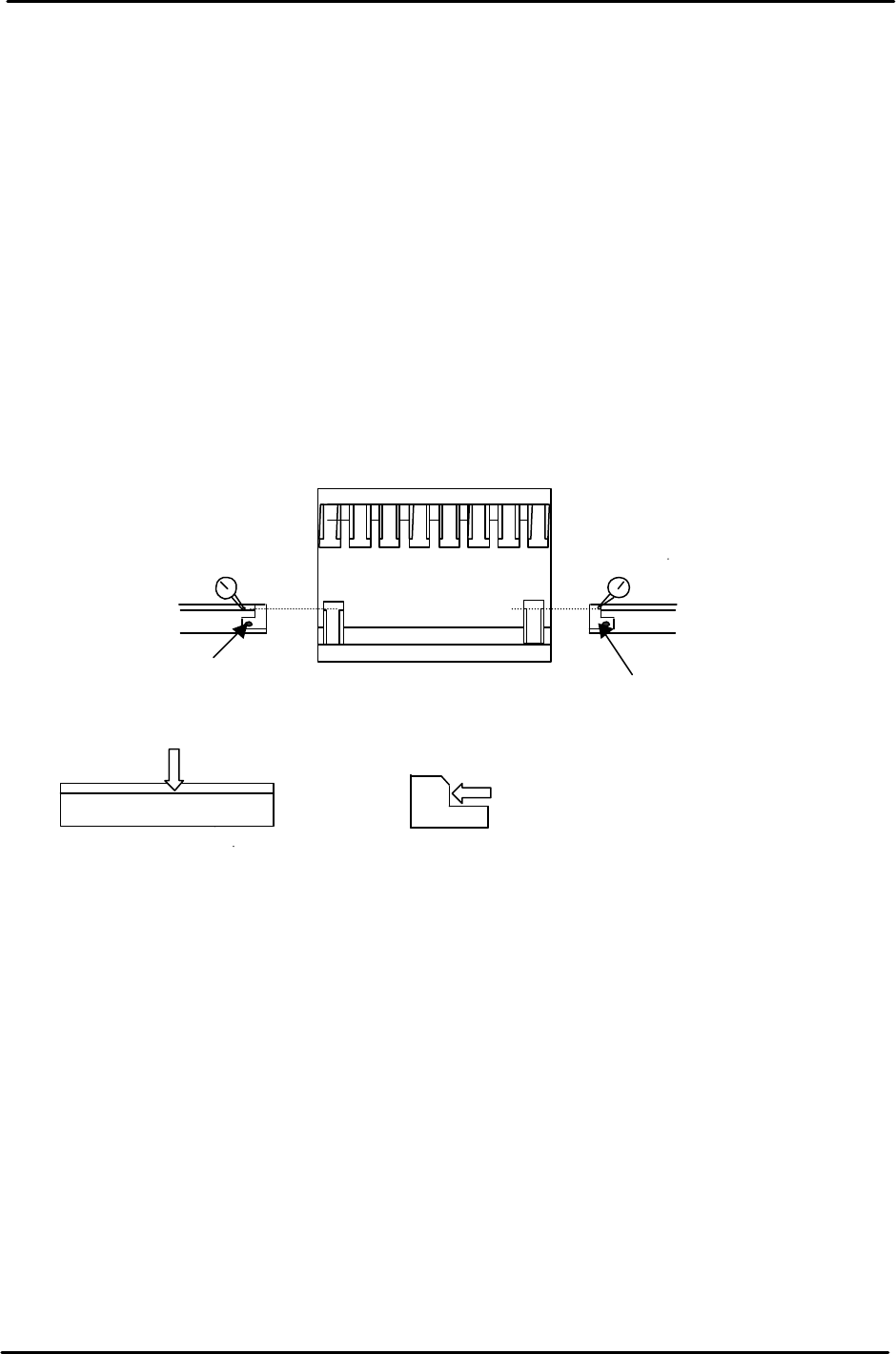
5.9 In / Out Loading Position (Y– Axis)
1. Move the X-Axis to – 6000 pulses for the Out Loading position. (– 57960 In Loading pos.)
2. Move the IN&OUT Carrier to the forward end positions manually. Remove the PCB stoppers
from the IN/OUT conveyors and the clamping claws on the left and right sides of the fixed rail
on the Main Table.
3. Manually raise the Z-axis until the claw and conveyor heights are the same. Slowly move the
Y-Axis to a position where the IN/Out conveyor reference side surface aligns with the main
table carrier claw reference surface. (Use a dial gauge for alignment) Place the dial gauge
stand under the carrier bracket. Fig. 14.
4. Take the lower value of the IN/Out readings minus 5 to 10 pulses. The servo counter value at
this position becomes YL IN/Out. (Note: Both YL-IN & YL-Out, are input to proper as the same
value.)
5. Enter the measured values to the proper at the host PC.
In/out conveyor reference
surface (fixed side)
Main table claw
reference surface
Main Table
Remove stopper
Remove stopper
In conveyor
Out conveyor
Figure 12
FK-9F98-05 CP-643E Training Text for Service Engineers
Edition 5.0 Chapter 5. Loader and Conveyor Adjustment [7/28]
Fuji Machine Mfg. Co., Ltd. Okazaki
SMT Equipment Quality Assurance Dept.
Technical Support Div. Section No.2
5-
7
5.10 In/Out Loading Position (X– Axis)
1. Close the carrier claw and advance the OUT carrier to the forward end.
2. Move the X-axis to where the servo counter indicates – 6000 pulses, and the
Y-axis to the loading position, YL_OUT.
3. Press the emergency stop switch. Move the Z-axis to around 15000 pulse
position while moving the X-axis and the secondary side rail.
Note 1: The carrier claw should not interfere with the guide rail.
Note 2: The secondary side rail engaging brackets should be aligned in the groove of
the adjustable rail on the main table.
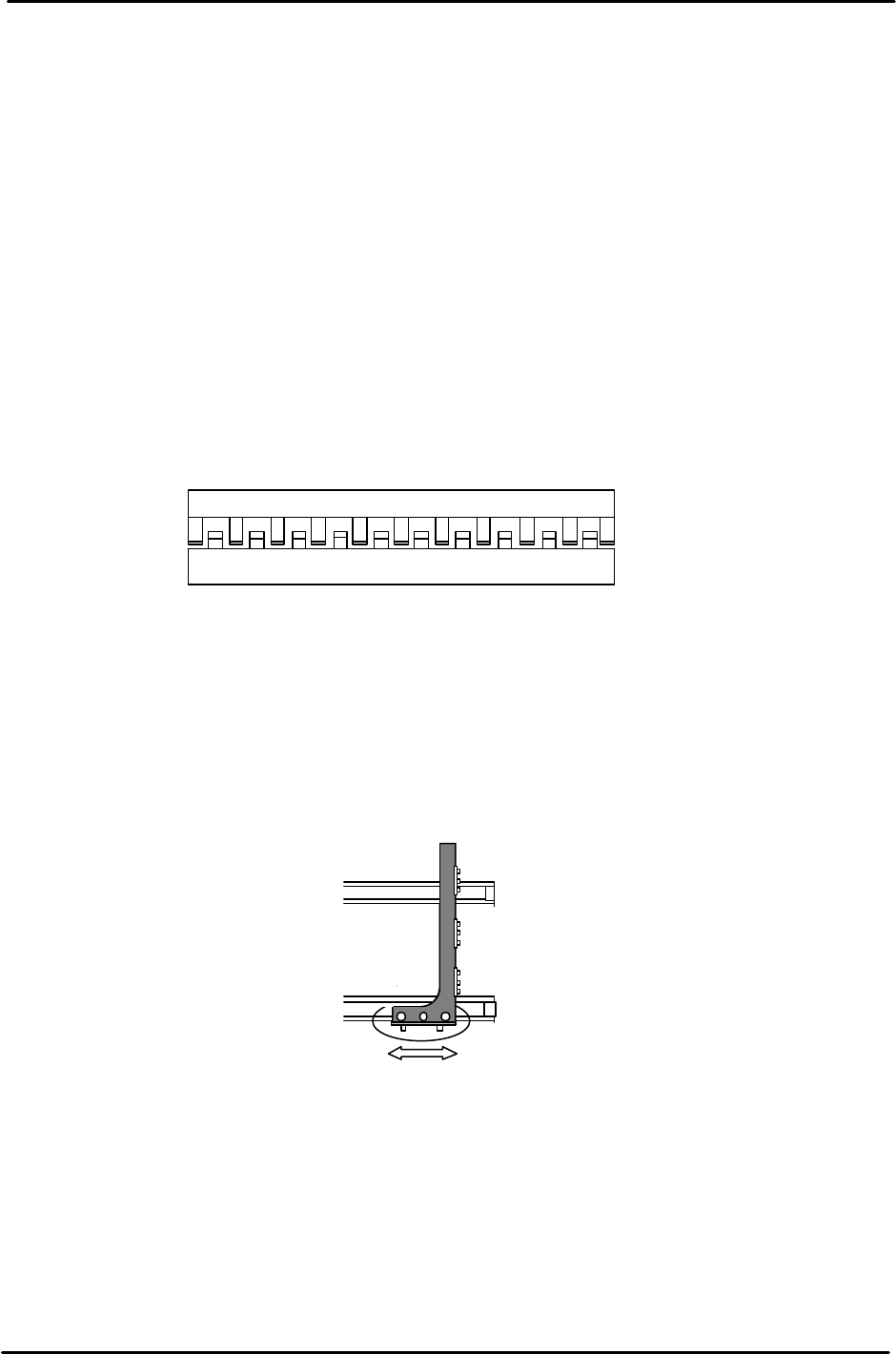
4. Move the X-axis cautiously so that the right and left clearance
between the carrier claw and the guide rail becomes uniform.
(Fig. 13)
5. The servo counter for the X-axis at this time is “XL_OUT”.
6. Once positioned, enter the measured pulse count in to the proper at the host PC.
7. If the moveable rail alignment is not balanced, loosen the screws on the linear
guide rail bracket, (used to change the carrier width) and align the adjustable
side to the reference side. (Fig. 14)
8. Calibrate “XL_IN” in the same manner. (Around – 57960 pulses)
In/Out Carrier
Main Table
The Main
table and carrier claws should be
balanced throughout the length of the rail.
Figure 13
Loosen
these five
screws
in order to move the
secondary rail back
and forth for alignment.
Figure 14
FK-9F98-05 CP-643E Training Text for Service Engineers
Edition 5.0 Chapter 5. Loader and Conveyor Adjustment [8/28]
Fuji Machine Mfg. Co., Ltd. Okazaki
SMT Equipment Quality Assurance Dept.
Technical Support Div. Section No.2
5-
8
5.11 In / Out Loading Position (Z– Axis)
1. Clamp a board on the main conveyor and move the table to the OUT loading position.
2. Manually, advance the OUT carrier to the forward end and open the carrier claws.
3. Raise the Z-axis manually to a position where the PCB can be clamped by the carrier
claws. (If the claw interferes with the PCB, open the carrier claws and raise the Z-axis a
little more.)
4. Open the main conveyor clamp by I/O.
<I/O → Standard → IN>
Y043 X Y - Table Panel CLAMP
Y044 X Y - Table Panel UNCLAMP
5. Lower the Z-axis just until it is clear from the PCB held by the carrier.
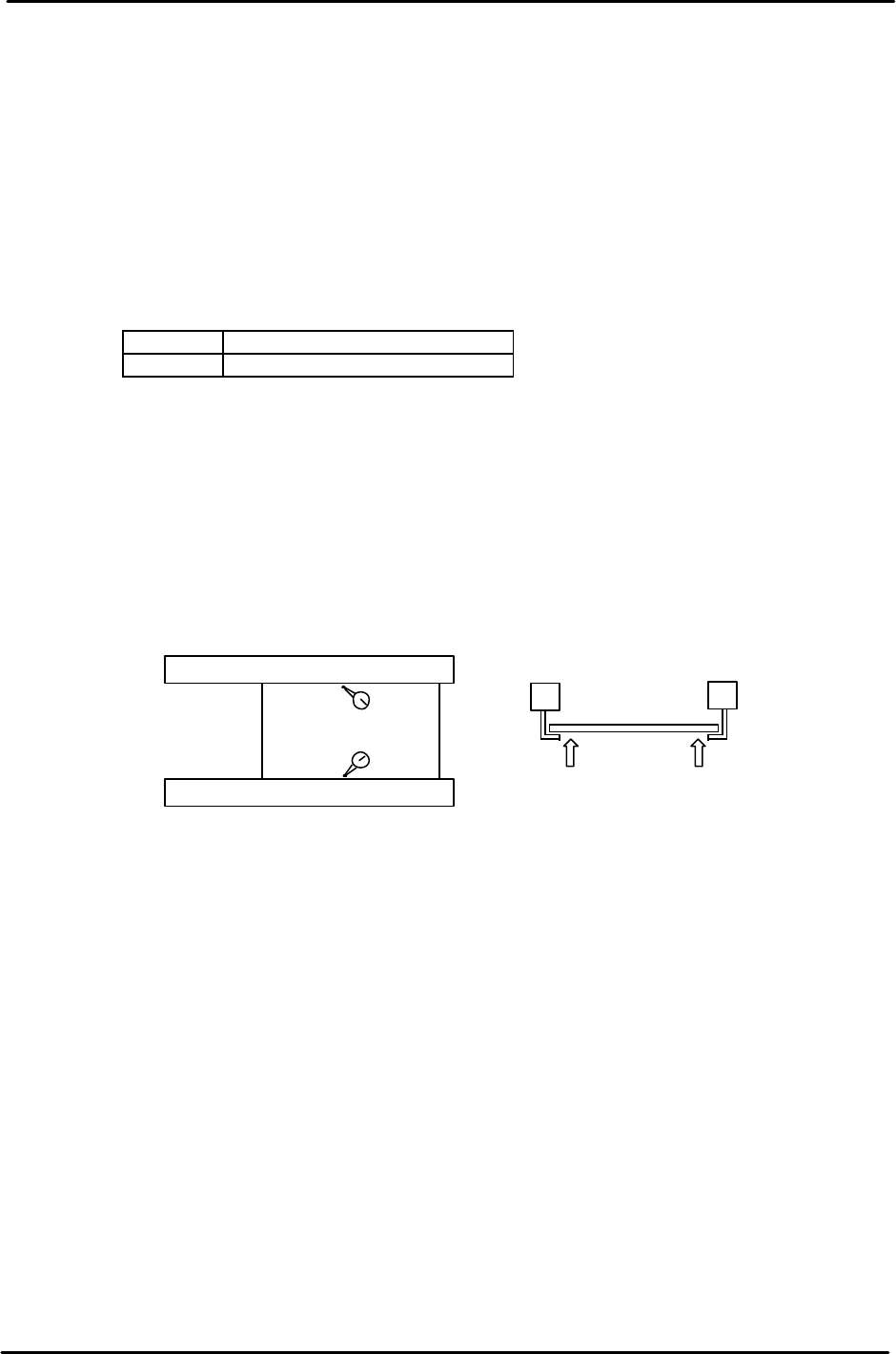
6. Set a dial indicator on the PCB close to the carrier claw on the reference side. Manually
raise the Z-axis again until the PCB lifts 0.5mm. Note the servo counter of the Z-axis.
7. Check the servo counter at a position close to the carrier claw on the secondary side.
Compare the two counter values. The higher value is called ZL_OUT. As for ZL-IN,
calibrate the IN loading position in the same manner.
8. When the Z load position has been determined, set the Z axis at the servo count position
and enter it into proper at the host PC.
Note:
The highest value for both the IN and Out Z loading positions is referred to as ZL upper.
The lowest value for both the IN and Out Z loading positions is referred to as ZL lower.
ZL upper and lower pulse counts are used as references for setting sensor positions in the
next section.
Carrier (Moveable Rail)
Carrier (Fixed Rail)
Z pushes the Pcb up 0.5mm
from the carrier claws
Figure 15